Show IH: Keila - Open Source Mailchimp Alternative
Hey Indiehackers,
today I want to share with you a project that I’ve been working on for about a year: Keila - an Open Source newsletter tool and alternative to proprietary services like Mailchimp or Sendinblue.
What is Keila?
Keila is an application for sending email newsletters, managing contact lists, and building signup forms.
I’m building Keila as a hybrid Open Source business: The plan is to generate income both from people who want to run their own self-hosted instances (via sponsorships and support contracts) and from those who become SaaS customers.
What’s special about Keila?
Keila is built with simplicity in mind. Other newsletter tools often have confusing interfaces while Keila tries to provide a much more streamlined experience.
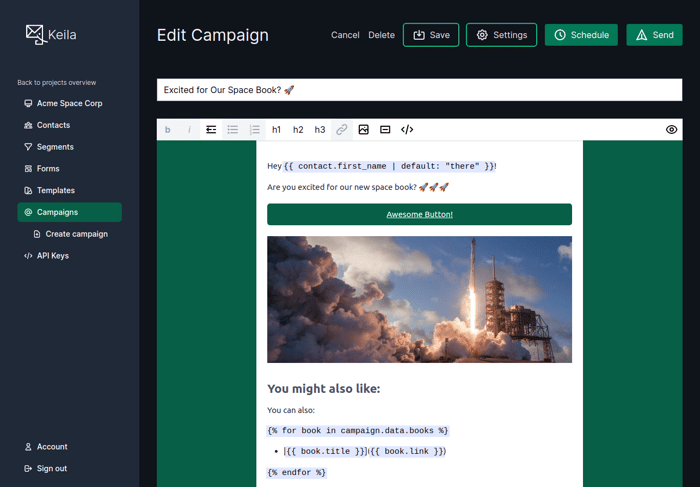
Another big thing that sets Keila apart from the competition is how it allows you to create fully data-driven campaigns:
- Keila has a full API (see docs)
- Keila supports Shopify’s Liquid template language
- You can add JSON data to every contact
- You can also add JSON data to every campaign, allowing you to easily populate a newsletter with data from external sources (see here for an example)
One thing that Keila currently doesn’t have is a Drag & Drop HTML editor. Instead I’m focusing on providing excellent Markdown support. But eventually a block editor will also make its way to Keila.
And finally, Keila is fully Free/Libre Open Source software. This means you can simply install it on your own server and stay 100% in control of your own data. You also don’t need to worry about the actual email infrastructure because Keila supports sending emails via SMTP, AWS SES, Mailgun, and Sendgrid.
Is Keila ready for production?
Yes! Keila has already helped send millions of emails.
How did I build Keila?
Keila is built on the PETAL stack, i.e. it’s using Phoenix/Elixir, Tailwind, AlpineJS and LiveView. This is a great stack for solo founders because I personally find working with it very pleasant and productive. You can check out the full source code on GitHub.
Can I give it a try?
Yes, you can install it yourself or try out the managed version at keila.io for free. And if you like it and decide to subscribe to a paid plan, you can use code INDIEHACKERS for a 20% lifetime discount until March 31.
What do you think?
I’m looking forward to your feedback - let me know what you think of the project, the app, and the landing page!

Excellent project, congratulations. Site looks great. Maybe I missed it, but I didn't see anything on list segmentation or tags? Though the one thing I think you may have missed the mark on is focusing on Markup instead of a WYSIWYG editor, that will cut down the appeal of this tool to some extent.
Thanks for your comment! Keila does have pretty advanced segmentation and tagging/data features! There is both a visual editor for segments and a query language for more complex segments: https://www.keila.io/docs/segments
You can also add any JSON data you like to your contacts, so tagging is really flexible and easy with Keila. You can see how it works here: https://www.keila.io/docs/contacts
I understand that many people don’t want to use plain Markdown - so Keila does have a WYSIWYG editor, just not a block-based editor yet :-)
Very interesting, you really have my attention now. Of course I'm commenting on only my own perspective, which may or may not line up with your focus but I'll throw out some things in case you find them useful.
In my industry (managed IT services), the go-to mailing services are MailJet and SMTP2GO. If you were add some pre-configured senders I'd be looking at those as they have generous free tiers and affordable paid tiers. For us, it is always about deliverability.
On your self-hosting Requirements page, that's easy enough for developers to set up but everyone in my industry is specialized. This type of knowledge for a self-hosted installation will turn a lot of people off, even technical people, even though you're providing a Docker image. May I suggest further hand holding with examples in a subsection, for instance can they set it up on a NAS that has Docker installed (ie Synology has it), or on amazon or digital ocean, etc? How would they accomplish that? Remember, the people who need this are ones who are interested in delivering newsletters, and the vast majority of those people don't even know who or what Docker is. Speak to your lowest level of customer, not the highest. In the IT support industry if we don't do this, we don't succeed.
Related to the above note, you might include for those subsections a short mention of backing up data in those environments. It's one thing to set it up and get Keila running, it's totally another thing that people won't think about in a self-hosted environment for backups and disaster recovery.
Your pricing is well segregated for various levels and affordable.
Do you have any eventual plans for your managed hosting on regional data centers? For instance, although we're in Canada, we typically do not keep our customer data in American data centers and prefer self-hosted in Canadian ones.
Although we deal with APIs all the time, if you go back to my lowest common denominator, customers may wonder how to make use of connecting Keila to their own services, for instance their customer lists in Excel, google sheets, shopify and so on. Giving them just a published API list leaves them scratching their heads. Might I suggest having an Integrations page where they can see how your software can work for them with the stuff they're already using.
Finally, how do you pronounce Keila? Kay-la, or Key-la? :)
cheers
Thanks for your input. I really appreciate you taking the time to write such a detailed comment!
The most important thing first, the official pronunciation is [kaɪla] 🙂