Show IH: Serendipity - New VS code theme.
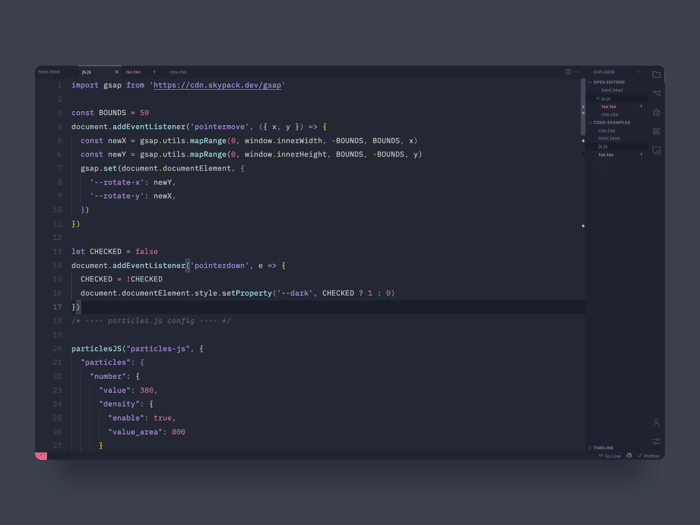
WVSC Serendipity Theme for VS Code
https://marketplace.visualstudio.com/items?itemName=wicked-labs.wvsc-serendipity
Installation
- Open Extensions sidebar panel in VS Code.
View → Extensions - Search for
wvsc-serendipity - Click Install to install it.
- Code > Preferences > Color Theme > wvsc-serendipity
- Optional: Use the recommended settings below for best experience
Recommended Settings
{
  // This is are my personal prefferences
  // Personally I use monospace, and it feels lovely.
  "workbench.colorTheme": "wvsc-serendipity",
  "editor.fontFamily": "'Jet Brains Mono' , Consolas, 'Courier New', monospace",
  "editor.fontSize": 18,
  "editor.lineHeight": 38,
  "editor.letterSpacing": 0.5,
  "files.trimTrailingWhitespace": true,
  "editor.fontWeight": "400",
  "prettier.eslintIntegration": true,
  "editor.cursorStyle": "line",
  "editor.cursorWidth": 5,
  "editor.cursorBlinking": "phase",
  "editor.renderWhitespace": "all",
}
Colours
DarkGray: #232834
Peppermint: #9EF0F0
Cherry: #F06897
Violeta: #BE95FF
Feedback
Anything you wonder just contact wickedlabs.dev on twitter. @wickedlabsHQ or me, Mike on twitter @mike_andreuzza

It is always great to have one more colour theme. Purple is my favourite colour, I'll give it a try. Thanks for sharing Michael!
Hey Alex! Thank you.
Oh, is it? I liked purple too, great color.
Super glad you like it, and if you have any feedback would love to know about it :-)
Neat!
Thanks Bray!