SketchBubble AI: Turn Any Topic into a Clear Presentation in Minutes
Introduction: The “Blank Slide” Problem Everyone Knows
You sit down to create a presentation. You know the topic. You may even have a rough idea of what you want to say. But once you open a blank slide, things slow down.
What should the first slide be?
How do you structure the flow?
What deserves its own slide - and what doesn’t?
This is where most of the time goes. Not in thinking, but in organizing.
For many professionals, students, and educators, presentation-making is less about ideas and more about translating those ideas into something clear and structured. That gap is exactly what tools like SketchBubble AI are trying to address - by helping users go from a simple topic to a usable presentation in minutes.
Why Creating Presentations Still Takes So Much Time
Even with modern tools like PowerPoint or Google Slides, the process hasn’t changed much. You still need to:
Break your topic into sections
Decide the order of ideas
Write concise slide content
Choose layouts and visuals
The challenge isn’t the software - it’s the thinking and structuring behind it.
A common issue is the “overthinking loop.” You start editing before you’ve finalized your structure. Then you go back, rearrange slides, rewrite headings, and adjust design… again and again.
For someone under time pressure - like preparing for a meeting or class - this becomes frustrating quickly.
What Is SketchBubble AI?
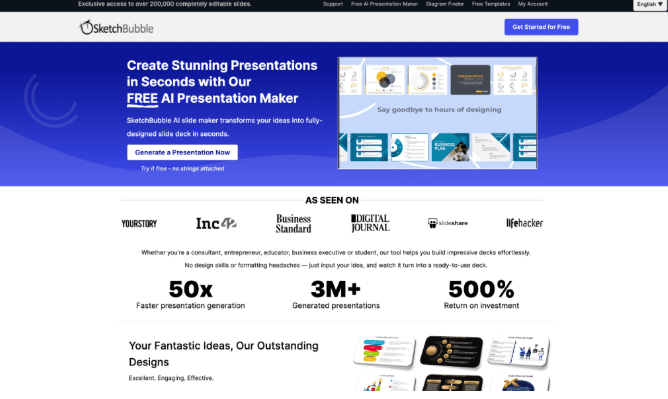
SketchBubble AI is an AI-powered tool designed to simplify presentation creation. Instead of starting from scratch, users begin with a topic or prompt. The system then generates a structured set of slides with headings, key points, and a logical flow.
At its core, it works like a thinking assistant. It doesn’t just create slides - it helps shape the narrative behind them.
It’s typically used by:
Professionals creating reports or pitch decks
Teachers preparing lessons
Students working on assignments
Content creators outlining talks or videos
The idea is simple: reduce the time spent figuring out structure so you can focus on refining the message.
How It Works in Practice
The workflow is straightforward, which is part of its appeal.
1. Start with a Topic
You enter a subject - anything from “Digital Marketing Basics” to “Water Conservation in India.”
2. AI Generates Structure
The tool breaks your topic into sections. Think introduction, key points, subtopics, and conclusion.
3. Slides Are Created Automatically
Each section becomes a slide (or multiple slides), with concise bullet points and headings.
4. Customize as Needed
You can edit text, adjust layouts, and tweak the design. The AI gives you a starting point, not a finished product.
In most cases, what would take an hour to draft manually can be outlined in a few minutes. Of course, refinement still matters - but the heavy lifting is reduced.
Features That Make It Practical
AI presentation tools aren’t new, but a few features make them genuinely useful rather than just interesting.
Structured Content Generation
Instead of random bullet points, the output usually follows a logical flow. This is important because structure is often the hardest part.
Clean, Readable Layouts
The focus is typically on clarity rather than heavy design. Slides are easier to read and present, which matters more than flashy visuals in most settings.
Editable Output
You’re not locked into the AI’s suggestions. Everything can be adjusted, expanded, or simplified.
Speed
This is probably the biggest advantage. When you’re short on time, even a rough but structured draft is valuable.
Real-World Use Cases
The usefulness of a tool like this depends on how it fits into everyday tasks. Here are a few common scenarios.
Business Presentations
Imagine preparing a quick internal update or a client pitch. Instead of building slides from scratch, you generate a draft, then refine it based on your data.
Teaching and Lectures
Teachers often need to convert textbook topics into structured lessons. AI-generated slides can serve as a starting framework.
Student Projects
Students sometimes struggle more with organizing content than understanding it. A structured draft can help them focus on learning instead of formatting.
Content Planning
If you’re creating a webinar or YouTube video, a presentation outline can double as a script or storyboard.
Where AI Presentation Tools Fit In
It’s worth noting that AI doesn’t replace the need for thinking - it changes where the effort goes.
Earlier, most of the time was spent:
Deciding structure
Formatting slides
Rearranging content
Now, the focus shifts to:
Refining the message
Adding examples or data
Adjusting tone for the audience
In a way, the role of the user becomes more editorial than mechanical.
That said, the quality of output still depends on input. A vague prompt will likely produce a generic presentation. A clear, specific topic usually gives better results.
Benefits (and a Few Trade-offs)
What Works Well
Time-saving
This is the most obvious advantage. Starting with a draft reduces friction.
Clarity
AI tends to favor structured, simplified content. That’s often helpful for presentations.
Accessibility
You don’t need design experience to create something presentable.
What to Watch Out For
Generic Output
If the input lacks detail, the result might feel basic or predictable.
Need for Editing
AI-generated slides aren’t final versions. They’re starting points.
Limited Context Awareness
The tool doesn’t fully understand your audience, goals, or specific requirements unless you guide it.
Tips for Getting Better Results
A few small adjustments can improve the output significantly.
Be Specific with Your Topic
Instead of “Marketing,” try “Digital marketing strategies for small businesses in India.”
Think in Sections
If possible, include hints about what you want covered - like “include examples” or “focus on beginners.”
Edit with Purpose
Don’t just accept the output. Refine it. Add your own insights, data, or examples.
Match It to Your Audience
A presentation for students should look different from one for senior executives. Adjust tone and detail accordingly.
Conclusion: From Blank Slides to Structured Ideas
Creating presentations has always been less about slides and more about clarity - what to say, how to say it, and in what order.
Tools like SketchBubble AI don’t eliminate the thinking process, but they do remove some of the friction around starting and structuring. That alone can make a noticeable difference, especially when time is limited.
In practice, the best use of AI here isn’t to generate a final presentation. It’s to get a solid first draft quickly - and then build on it.
For anyone who has stared at a blank slide for too long, that shift can feel surprisingly helpful.

