Smoke Testing: Definition, Types, Examples & Best Practices

Imagine running a Python project without a requirements.txt file. You might start execution, but the chances of runtime failure are extremely high.
In software development, smoke testing plays a similar role. Before investing time in detailed testing, teams use smoke tests to validate that the application is fundamentally stable and worth testing further.
In this guide, we’ll explore what smoke testing is, why it’s essential, how it works, when to use it, who performs it, real-world examples, automation strategies, comparisons with other testing types, and best practices—all aligned with modern Agile and CI/CD workflows.
What Is Smoke Testing?
Smoke testing is an early software test done to make sure that an application's essential or main functions operate correctly following the creation of the new version of the product.
The goal of smoke testing isn't to check all of the app but rather, to be sure that the new version of it didn't introduce any major defects.
Smoke testing originated as a terminology in the area of manufacturing electronic devices, where if at the first powering up of the item that produced smoke, it meant that the item had a serious manufacturing fault.
With regard to testing software products, performing smoke testing can help answer the following questions:
-
Does the application start?
-
Can users access core features?
-
Are critical workflows reachable?
-
Is the system stable enough for further testing?
Examples of scenarios that usually include performing smoke testing are:
-
Application launch
-
User authentication
-
Dashboard or homepage loading
-
Core API availability
-
Database connectivity
In conclusion, conducting smoke tests at the start of the testing process for newly built software programs, is a very fast and easy way to determine their overall quality.
Why Do We Need Smoke Testing?
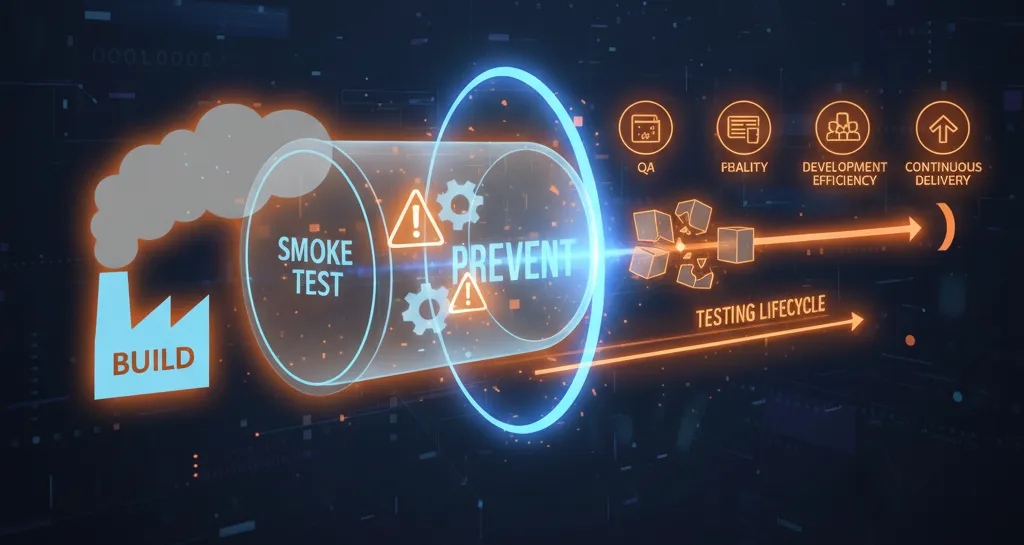
Smoke Tests Are the First Test in the Testing Lifecycle, Preventing Broken Builds from Advancing Any Further into the Testing Lifecycle.
1\. Smoke Tests Identify Major Issues Early
Smoke Tests Identify Major Issues Early in the Testing Lifecycle (e.g., application crashes, failed deployment, broken authentication, or misconfigured environments) Before Quality Assurance (QA) Begins Testing the Application in Greater Depth.
2\. Smoke Tests Improve Development Efficiency
Without Smoke Testing, Development Teams Risk Wasting Time Testing Builds that Are So Broken that They Will Likely Fail. Smoke Tests Provide a Filter That Prevents Development Teams from Testing Bad Builds.
3\. Smoke Tests Improve Quality Assurance
Smoke Tests Add a Quality Assurance Checkpoint to Ensure That the Basic Functionality of the Application Is Working Under Normal Conditions Before QA Begins to Perform In-Depth Testing.
4\. Smoke Tests Provide a Rapid Feedback Cycle
In an Agile and DevOps Environment, Providing Quick Feedback Is Critical. By Performing Smoke Tests on a Build Immediately, Development Teams Can Quickly Correct Any Defects They Find, Therefore Reducing the Time Needed for Each Testing Cycle.
5\. Smoke Tests Create Stability for Continuous Delivery
Continuous Delivery Requires Frequent Deployments, Therefore, Smoke Tests Are Critical to Create a Process to Prevent Bad or Broken Builds from Continuing Ahead in the Continuous Integration and Continuous Delivery (CI/CD) Process.
Objectives of Smoke Testing
The primary goal of Smoke Testing is the validation of a build, not an exhaustive verification.
Smoke Testing has key objectives:
-
Immediate Identification of Critical Issues
Verifies critical user paths (such as login, retrieve/archive flows, and key API calls) immediately after a new build is deployed to identify issues caused by recent code changes, configuration updates, or infrastructure problems. -
Confirmation of High-Priority Features
Ensures that essential, business-critical functionalities are working as expected (for example, in eCommerce applications: browsing products, adding items to the cart, and proceeding to checkout). -
Minimizing QA Waste
Prevents QA teams from spending time on lengthy or in-depth testing when the software is unstable by quickly invalidating broken or non-testable builds. -
Acts as a Quality Gate
A successful smoke test signals that the build is stable and ready for detailed testing, such as regression testing, system testing, or acceptance testing.
When and by Whom Is Smoke Testing Done?
When Is Smoke Testing Performed?
We usually perform smoke testing at some key times:
-
Immediately after a new build is deployed
-
Before regression or system testing begins
-
Automatically during CI/CD pipeline execution
-
After environment or configuration changes
Who Performs Smoke Testing?
Quality Assurance (QA) Engineers
QA personnel conduct manual or automated methods of performing smoke testing of a particular release or build prior to deeper testing ensuring its stability
Developers
Developers typically execute lightweight smoke test(s) on their local development environment(s) before submitting their release/build to QA for further testing.
Automation Engineers
Automation engineers create and run automated smoke tests for every CI/CD deployment by configuring it during deployment and pull request.
Real-World Scenario: Mobile Banking Application
Imagine that there is a mobile banking app that processes financial information about consumers.
In order for an app to go out for full testing, it must receive 'smoke testing' to confirm that all core activities associated with performing financial transactions are being executed properly. ‘
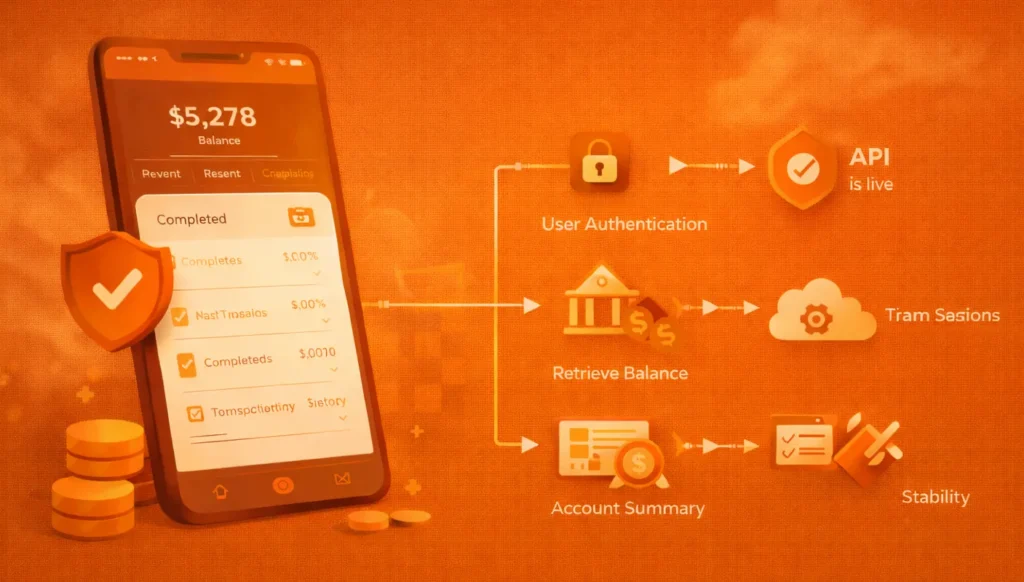
Steps in Conducting Smoke Test:
Validating Core Functionalities
-
User authentication
-
Retrieve balance
-
Start transactions
Verifying Navigation
-
Access to Account Summary page
-
Access to Transaction History page
-
Access to Settings and Profile pages
Verifying Stability
-
App crashes don't occur
-
API is live
-
Data passed through secure session
If you're unable to pass any of the tests indicated above, the build will not be processed further; it will be rejected.
The Different Types of Smoke Testing
1\. Build Verification Testing (BVT)
Build verification testing (BVT) enables the stable deployment of a freshly built product right after completion. In most cases, BVT is automated as part of the continuous integration CI pipeline.
2\. Sanity Smoke Testing
Sanity testing concentrates on certain features following minor bug corrections or improvements, to assure that they do not affect existing functionality.
3\. Acceptance Smoke Testing
Acceptance testing evaluates whether a build satisfies the minimum acceptance criteria specified by stakeholders prior to user acceptance testing (UAT).
4\. Manual Smoke Testing
The manual execution of smoke tests is often necessary in early development stages or when user interface (UI) validation requires human judgment.
5\. Automated Smoke Testing
Automated smoke tests speed up, repeat easily, and function well for continuous integration and continuous delivery (CI/CD) environments; hence they are typically the most utilized for large-scale projects.
How Can the Smoke Testing Procedure Be Automated?
Automating smoke tests improves speed, consistency, and reliability.
Step-by-Step Automation Approach:
-
Identify Critical Test Cases
Focus on login, APIs, dashboards, and essential workflows. -
Choose the Right Tools
UI tools for frontend validation, API tools for backend services, and framework-level tools for system checks. -
Integrate with CI/CD Pipelines
Automatically trigger smoke tests after deployments. -
Analyze and Report Results
Use dashboards and reports to quickly assess build health.
Smoke Testing vs Sanity Testing vs Regression Testing
While smoke testing, sanity testing, and regression testing are often confused, each serves a distinct purpose at different stages of the software testing lifecycle.
At a high level:
-
Smoke testing checks whether a new build is stable enough to test.
-
Sanity testing verifies that specific fixes or changes work correctly.
-
Regression testing ensures that existing functionality has not broken due to new changes.
Key Differences Explained
| Criteria | Smoke Testing | Sanity Testing | Regression Testing |
| --- | --- | --- | --- |
| Purpose | Verify overall build stability | Validate specific bug fixes or changes | Ensure existing features still work |
| Scope | Broad and shallow | Narrow and deep | Wide and deep |
| Performed After | A new build or deployment | Minor bug fixes or enhancements | Code changes, enhancements, or fixes |
| Test Coverage | Core and critical functionalities | Specific affected modules | Entire application or major parts |
| Automation | Common (especially in CI/CD) | Optional (often manual) | Highly recommended |
| Execution Time | Very fast | Fast | Time-consuming |
| Outcome | Accept or reject the build | Confirm fix correctness | Maintain application reliability |
Execution Order in Practice
In a typical testing workflow:
-
Smoke testing runs first to validate build stability.
-
Sanity testing runs next when specific fixes need validation.
-
Regression testing follows to ensure new changes haven’t broken existing functionality.
This layered approach helps teams save time, reduce risk, and maintain consistent software quality.
Benefits of Using Smoke Testing
Early Detection of Critical Defects
Smoke Testing allows for the immediate identification of critical defects within a software application after a new build has been created. Critical defects that may impede future development include, but are not limited to, application crashes, errors in assembly, loss of access to APIs, and broken authentication procedures. Early discovery and resolution of these critical defects will prevent development teams from working with unstable builds much later in the development process, thus saving both time and effort.
Reduced QA Cycle Time
The use of smoke testing enables QA teams to filter out early, unstable builds of software applications, eliminating the time wasted executing extensive test suites on fundamentally modified or broken builds. This will significantly shorten the overall duration of the QA Cycle for the software application, improving the speed with which the application can be delivered.
Improved CI/CD Reliability
The use of automated smoke tests serves as an early quality gate within CI/CD Pipelines, ensuring that only stable builds of the software application are pushed forward into later stages such as Regression and/or System Testing.
Faster Developer Feedback
The ability to run smoke tests gives immediate feedback to developers, which will allow for faster response times and less context switching for developers during the development process.
Increased Confidence in Releases
Developing smoke tests that consistently pass offer more confidence that the application being tested meets the minimum quality criteria prior to it eventually being deployed as a Release.
Disadvantages of Smoke Testing
Limited Coverage
The smoke test's area of focus is only the software's key elements and does not assess most software errors that occur as a result of UI failures and edge cases or for complicated workflows.
May Miss Edge Cases
A limited set of boundaries means that the smoke tests do not account for certain data, test conditions, users, and results that would not otherwise produce a successful outcome.
Not a Substitute for Deeper Testing
Smoke tests will never replace the need for a multitude of tests. Do not use only smoke tests to gauge whether your application is stable or not.
Requires Careful Test Selection
Choose smoke testing test cases with caution. If a smoke test case is poorly selected or too broadly targeted, the smoke test case may miss some of the most important failures or simply not result in accurate or reliable responses, causing the test's negative effects.
Best Practices for Performing Effective Smoke Tests
Automate Wherever Possible
Automated smoke tests can be executed much faster than manual smoke tests and are also reusable in Continuous Integration (CI) and Continuous Delivery (CD) environments because automated smoke tests can be run as soon as a build is built and created. in order for Smoke Testers to execute them.
Keep Tests Simple and Focused
Smoke tests should always test business critical paths or ways to login, core (main) APIs and ways to complete necessary activities (workflows). Keep smoke test items simple and do not add any unnecessary complications to them.
Run Smoke Tests on Every Build
Smoke tests should always be executed at the end of every successful build to verify that new code changes or configuration changes have not affected the way any of the smoke test workflows (business paths) function.
Prioritize Business-Critical Workflows
Smoke tests should focus on workflows that are directly related to the company's viability, specifically workflows that will have either a direct positive or negative impact on the company's earnings.
Avoid Flaky or Unstable Tests
Unstable or flaky automated smoke tests cause a lack of confidence in the results of all smoke tests. All automated tests should either depend on stable dependencies or controlled (e.g. known) test data.
Integrate Tightly with CI/CD Pipelines
Automated smoke tests should automatically block all future deployments of a product if any automated smoke tests fail. Automated smoke tests are the main quality control gate for the software development process.
Tools to Automate Smoke Testing
Keploy
Keploy automatically generates smoke tests from real API traffic, ensuring tests reflect real production behaviour. It integrates smoothly with CI/CD pipelines and is particularly effective for API-first and microservice architectures.
Selenium
Selenium is widely used for browser-based smoke testing. It helps validate critical UI workflows like login, navigation, and form submission across multiple browsers.
Jenkins
Jenkins automates the execution of smoke tests after builds or deployments, preventing unstable builds from progressing further in the pipeline.
PyTest
PyTest is a lightweight and scalable framework commonly used to automate smoke tests in Python applications due to its simplicity and fast execution.
Conclusion
Smoke Testing is one of the most effective, low-effort types of testing which is essential in the programming process today. By conducting a smoke test, you validate the build stability of a program very early. This way, you prevent unstable builds from being released into production, thereby decreasing amount of wasted time in Quality Assurance (QA) testing, and also allowing for quicker feedback to developers. Once the smoke test is automated and used in conjunction with Continuous Integration/Continuous Delivery (CI/CD) pipelines, it will lead to improved reliability of builds and increased speed in the development cycle, and overall greater confidence in the release of builds from developers.
Frequently Asked Questions (FAQ)
What is smoke testing?
A Smoke Test is considered to be an initial evaluation of the core functionality of the software build prior to performing further testing on that build.
Is smoke testing automated?
The smoke testing process can be conducted as either a manual process or an automation process. However, it is strongly recommended to use automation, particularly in a CI/CD pipeline environment, to improve the speed of providing the developer with feedback and also the reliability of the feedback received.
When should smoke testing be performed?
A smoke test should always be completed after each build/deployment has completed, to ensure the application can continue to be tested further while it is in a stable condition.
