State Transition Testing: Diagrams, Tables & Examples
Ever seen a workflow pass QA, then fail when users retry, refresh, or hit a timeout? These issues often happen because the system is in a different state when the same input arrives. This is exactly what state transition testing is designed to catch.
State transition testing ensures that applications behave correctly as they move between states based on user actions, system events, or external triggers. Let’s explore how this works in more detail.
What is State Transition Testing?
State transition testing is a black box testing technique that checks how an application behaves when it moves from one state to another based on events or inputs.
Instead of testing one action in isolation, teams validate the workflow rules:
-
Does the app move to the correct next state?
-
Does it return the correct output/action for that move?
-
Does it block invalid transitions cleanly?
That’s the core idea behind the state transition testing technique and why it’s widely used for workflows that depend on sequence and status.
State Transition in Software Testing: Core Concepts
To keep discussions clear across product, QA, and developers, teams usually align on four building blocks of software testing fundamentals: State, Event/Input, Transition, Action/Output.:
-
State: where the system is right now (
LoggedOut,Processing,Locked) -
Event/Input: what happens (
SubmitOTP,Cancel,Timeout) -
Transition: the move from one state to another after an event
-
Action/Output: what the system does/returns (UI message, API response, DB update)
Once these are named clearly, writing test cases becomes much less opinion-based.
A simple rule helps: if the same event behaves differently depending on “where we are,” it’s a strong candidate for transition testing.
These concepts form the foundation of state transition testing in software testing.
Coverage Levels in Transition Testing
In state transition testing, coverage defines how thoroughly states and transitions are validated.
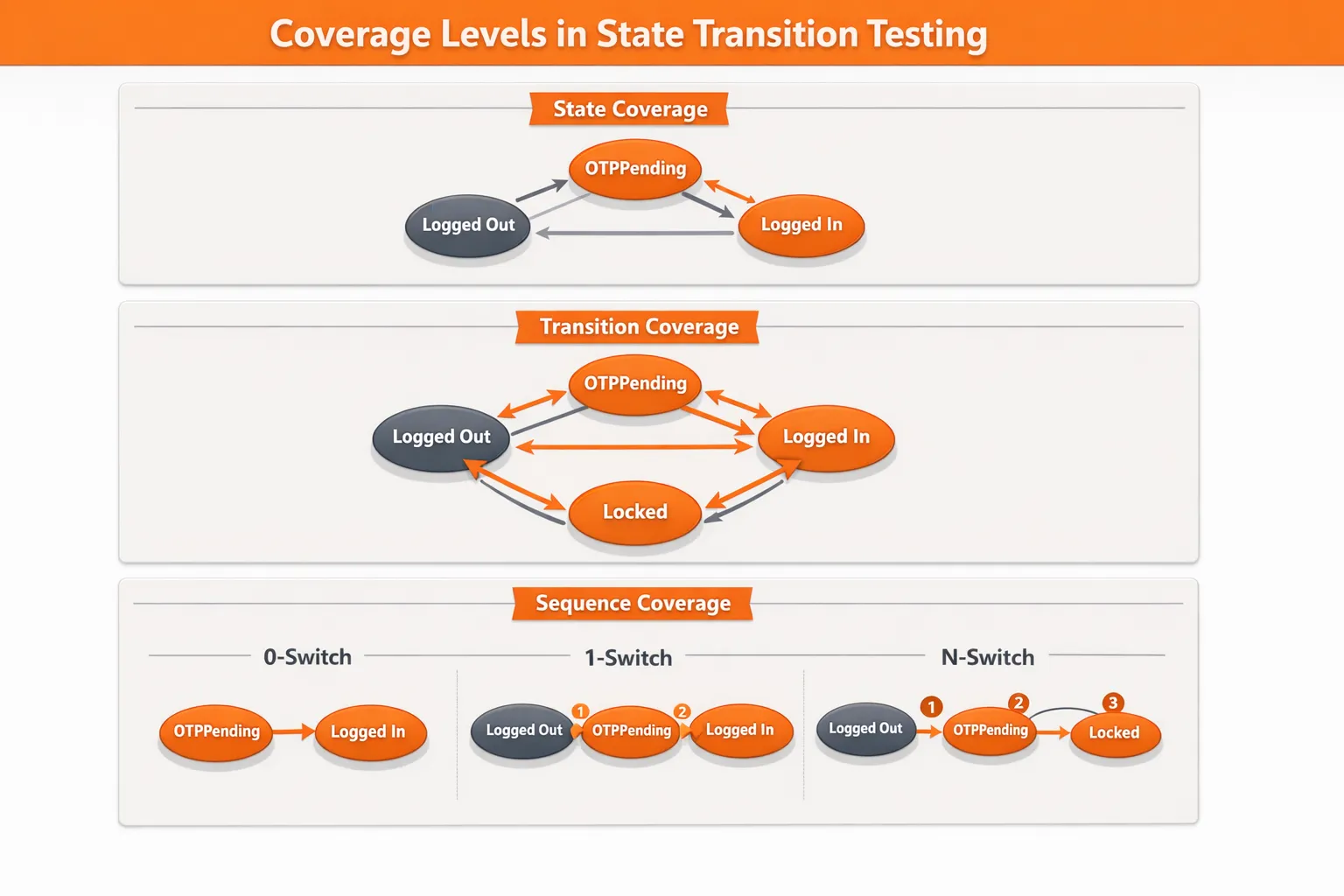
State coverage and transition coverage
-
State coverage: reach each important state at least once
-
Transition coverage: execute each important transition at least once
Most teams start with transition coverage because it directly validates movement through the workflow.
Sequence coverage (0-switch, 1-switch, n-switch)
For higher-risk flows, teams test sequences:
- 0-switch: single transition checks
Example:
plaintext
LoggedOut → (CorrectPassword) → OTPPending → (CorrectOTP) → LoggedIn
This validates that one event causes the correct immediate state change.
- 1-switch: two transitions back-to-back
Example:
plaintext
LoggedOut → (CorrectPassword) → OTPPending → (CorrectOTP) → LoggedIn
This confirms that consecutive transitions behave correctly when chained.
-
n-switch: longer sequences (used selectively because it grows fast)
Example:
plaintext
LoggedOut → (CorrectPassword) → OTPPending
→ (WrongOTP) → OTPPending
→ (WrongOTP) → OTPPending
→ (WrongOTP) → Locked
This matters in messy paths like: retry → timeout → retry → cancel, where real users often land.
When to Use State Transition Testing?
State transition testing works best when behavior depends on status and sequence, not just input value.
Below are the most common use cases of state transition testing in real-world systems:
- Auth and security flows: login, OTP, lockout, session expiry
Examples seen in real products:
plaintext
GitHub-style login:
LoggedOut --(ValidCredentials)--> OTPPending --(ValidOTP)--> LoggedIn

Google-style OTP retry:
OTPPending --(WrongOTP xN)--> AccountLocked

AWS-style session expiry:
LoggedIn --(SessionTimeout)--> LoggedOut
-
Payments (Stripe-style workflows): initiated, requires action, succeeded, failed, refunded
-
Orders (Shopify-like lifecycles): created, paid, fulfilled, delivered, canceled
-
Subscriptions: trial, active, past due, canceled
-
Workflow engines (AWS Step Functions-like patterns): orchestrated steps with clear state movement
For mostly stateless CRUD, or when risk is mainly numeric limits, other techniques (like boundary testing) often give better ROI.
How to Perform State Transition Testing? (Step-by-Step Guide)
Designing effective state transition test cases requires a structured approach. Here’s a step-by-step process teams follow, to get the most value when the process stays structured, small, and reviewable.
1) Identify states that matter
Start with states visible in:
-
requirement docs and acceptance criteria
-
API status fields
-
UI labels like “Processing,” “Failed,” “Locked”
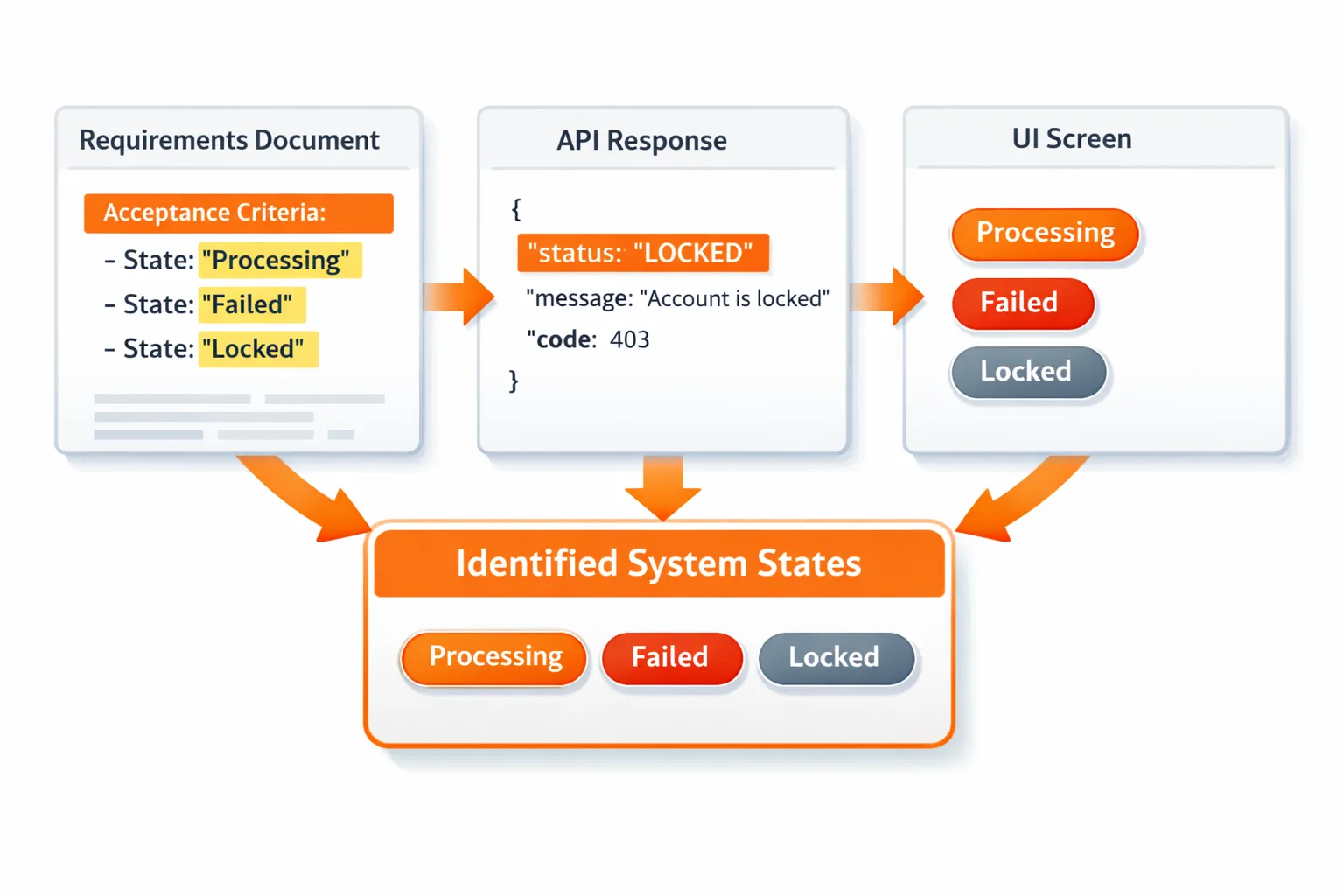
Keep it tight. A model that no one can review won’t help.
2) List events for each state
Capture what can happen in each state, and who or what triggers it:
-
User actions (submit, retry, cancel)
These are triggered directly by end users through the UI or API clients.
When they occur: during active interaction, often repeatedly (retries, edits, cancellations).
These events usually drive the most visible state changes and must be validated for both valid and invalid states. -
System events (timeout, scheduled job)
These are triggered by the application itself, without user involvement.
When they occur: after a time threshold (session expiry, payment timeout) or on a schedule (cleanup jobs, reconciliation tasks).
These transitions are common sources of “unexpected” state changes if not tested explicitly. -
External events (webhook received, payment confirmation)
These are triggered by third-party systems such as payment gateways, identity providers, or messaging services.
When they occur: asynchronously and often out of order, depending on network delays or retries.
These events are critical in distributed systems because they can arrive late, duplicate, or arrive after a user has already moved on.
3) Define valid and invalid transitions
This is where workflow bugs actually get caught.
For every transition, define:
-
expected next state
-
expected output/action
-
expected side effect (or no side effect for invalid transitions)
Invalid transitions are common “production surprises,” like:
-
Cancel after success
-
Retry after
Locked -
Pay twice for the same order
-
Submit
SubmitOTPwhen OTP was never requested
4) Convert transitions into test cases
Turn each transition (and key sequences) into state transition test cases with clear assertions:
-
response/output
-
next state
-
side effects (DB status, session, emitted event)
-
no side effects on invalid moves
For API-heavy workflows, teams often reduce effort by replaying real traffic. This is where Keploy can fit naturally: capturing real request/response flows once and replaying them helps validate stateful behavior without bloating test setup.
State Transition Diagram vs State Transition Table
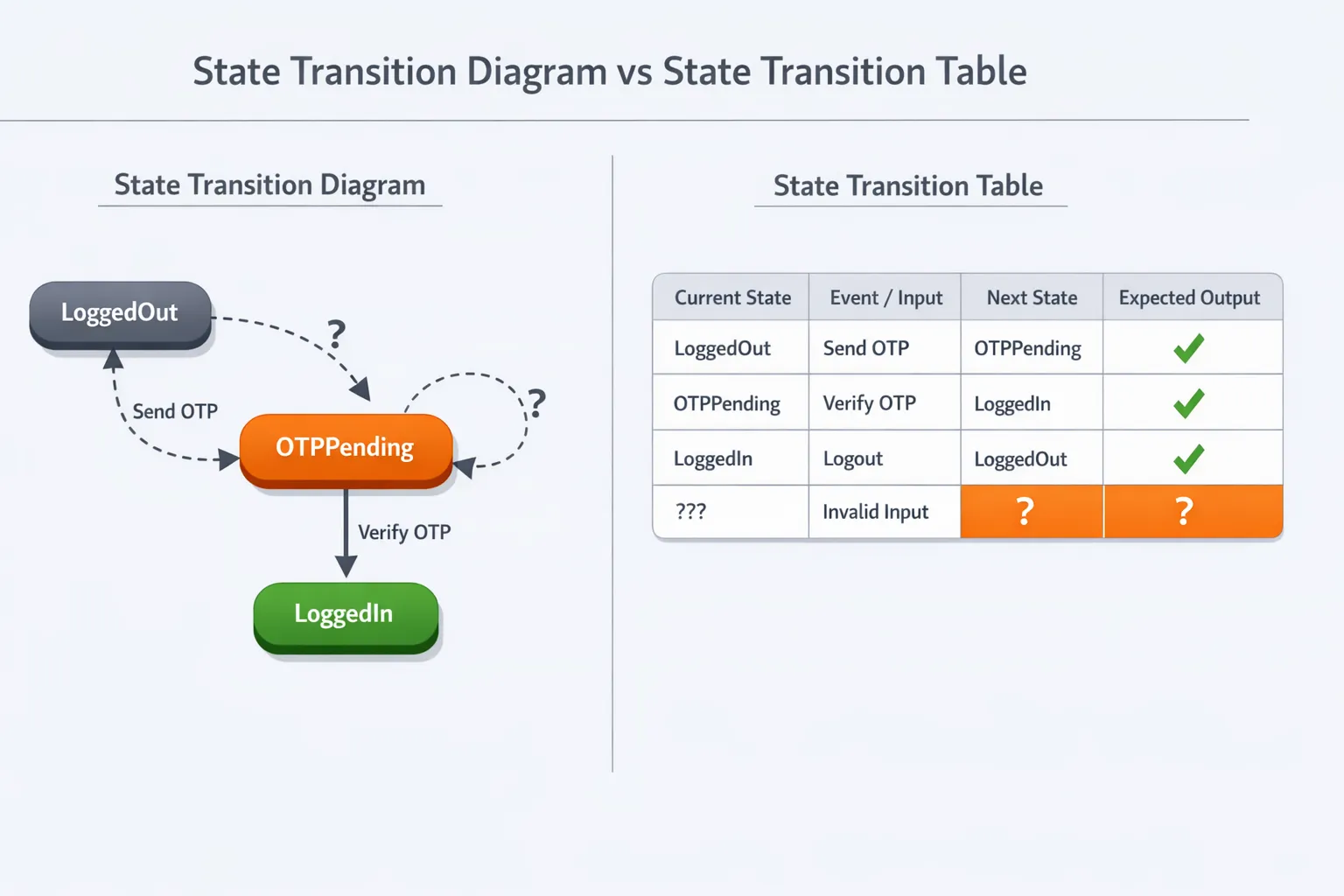
Both are useful, just for different moments in the workflow.
A state transition diagram is great for:
-
quick alignment across teams
-
spotting missing states and unclear rules
A state transition table is great for:
-
generating test cases systematically
-
tracking which transitions are already covered
In practice, teams often review the diagram together first, then use the table as the execution plan.
LoggedOut
Event:
Login
Next State:
OTPPending
Valid:
Yes
OTPPending
Event:
WrongOTP
Next State:
OTPPending
Valid:
Yes
OTPPending
Event:
WrongOTP x3
Next State:
Locked
Valid:
Yes
Locked
Event:
Login
Next State:
Locked
Valid:
No
Example of State Transition Testing
A clean example of state transition testing is a login + OTP + lockout flow, because state changes control what’s allowed.
State transition diagram
stateDiagram-v2
    Idle --> LoggedIn
    LoggedIn --> LoggedOut
Test Cases Teams Usually Automate First
To reach solid transition coverage:
-
Happy path: correct password → correct OTP → logged in
-
Lockout path: correct password → wrong OTP 3 times → locked
-
Invalid action: attempt login while locked → still locked (no session created)
This is the real value: the bug stops looking “random” and starts looking like a broken transition rule.
State Transition Test Cases: Key Takeaways
These are the points teams refer back to when planning coverage:
-
Transition coverage is the best baseline for most products
-
Invalid transitions need explicit assertions and no side effects
-
Diagrams align people; tables ship test cases
-
Start with high-risk workflows (auth, payments, orders)
-
Keep models small to avoid state explosion
Advantages and Disadvantages of State Transition Testing
This technique is powerful, but only when teams keep it scoped and clear.
Advantages
-
Strong for workflow-heavy features (auth, payments, orders, subscriptions)
-
Makes negative testing natural (invalid transitions become explicit)
-
Easier debugging (“wrong state after event”)
-
A solid fit for black box testing because it focuses on behavior, not internal code
Disadvantages
-
State explosion if everything gets modeled at once
-
Harder with async processing (timing affects transitions)
-
Requires agreement on a “source of truth” state (UI vs API vs DB)
Benefits and Challenges for Modern Teams
As products become more event-driven and async, state issues show up more often - especially across services. That’s why teams treat transition testing as a workflow safety net, not just another test type.
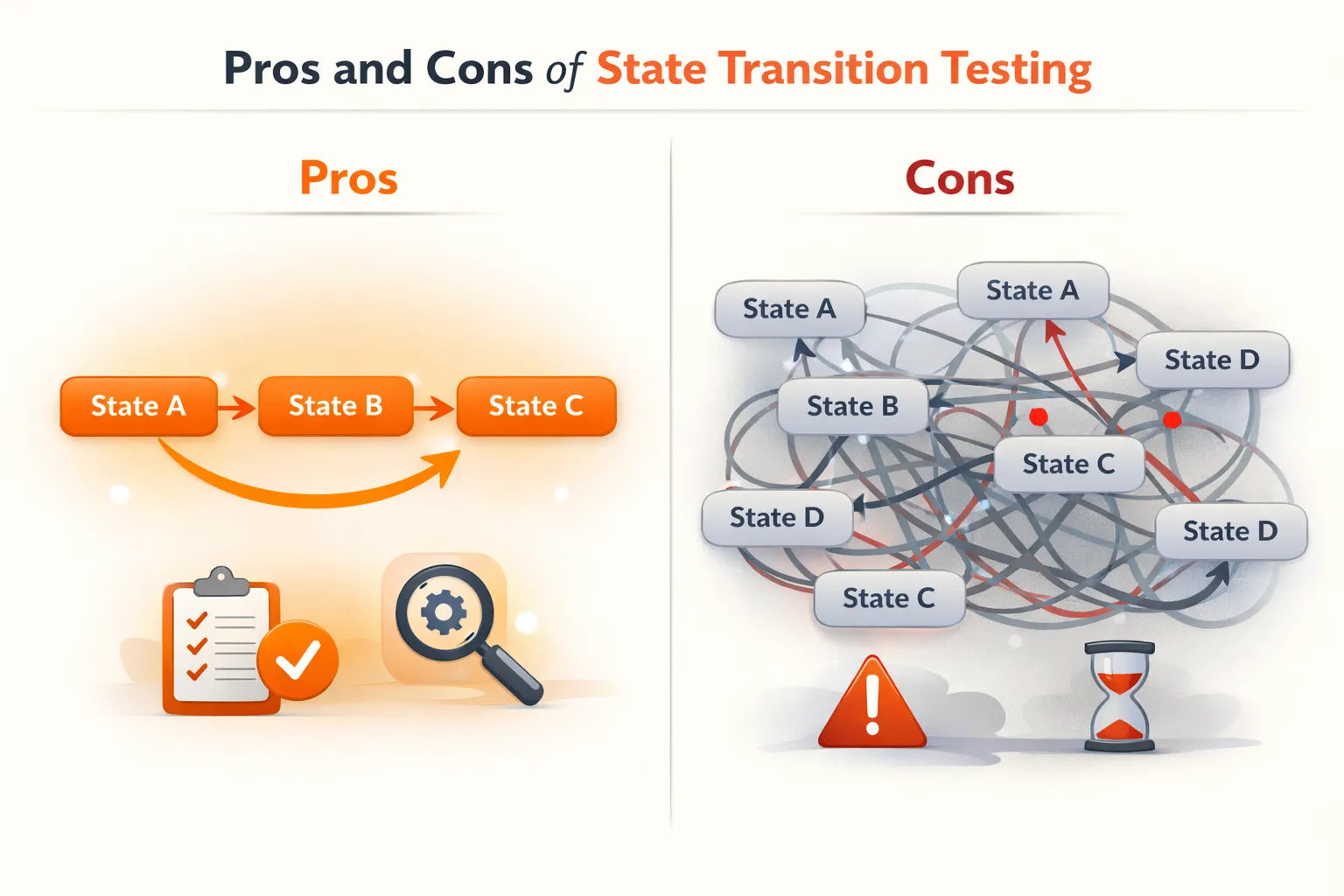
Common benefits teams notice:
-
fewer workflow regressions that appear only after retries or timeouts
-
clearer release confidence for stateful features
-
better collaboration, because state rules become visible and reviewable
Common challenges to plan for:
-
State explosion: too many states/transitions to maintain
-
Async behavior: background jobs and webhooks can shift state unexpectedly
-
Conflicting states: UI shows one thing while the backend still processes
-
Concurrency edges: events arriving close together create rare transitions
A practical approach is to focus first on transitions tied to real user pain: charge failures, lockouts, stuck orders, and “can’t cancel” scenarios.
Best Practices for Transition Testing
A state model only helps if it stays usable. The goal isn’t a perfect diagram. The goal is a model that produces reliable state transition test coverage and prevents regressions.
Best practices that consistently work:
-
Start with the highest-risk workflows (money, access, irreversible actions)
-
Keep state names clear and defined (avoid vague “InProgress” states)
-
Document invalid transitions explicitly (error + no side effect)
-
Split big models into smaller ones by feature boundary
-
Prefer transition coverage first, then add sequences only where risk is high
-
Align across QA + developers + product before scaling the model
-
Use deterministic replay where it helps (Keploy-style record/replay is useful for stateful APIs and reduces flakiness)
This keeps the state transition testing technique practical instead of turning into a diagram that nobody updates.
State Transition Diagram Tools (Text to Diagram)
Diagrams get outdated fast when they live only in slide decks. Many teams prefer “diagram-as-text” because it stays close to documentation, is easy to review in PRs, and updates naturally as workflows evolve. These tools take text input and generate a state transition diagram without manual dragging and aligning.
-
Mermaid: A great option for Markdown-first documentation. Teams can embed state diagrams directly into docs and keep explanations and visuals in one place.
-
PlantUML: Fits well with diagram-as-code workflows. The source text can live in version control, and diagrams can be regenerated consistently across environments.
-
Graphviz (DOT): Useful when teams want more control over layout and rendering. It works well for generating clean SVG/PNG outputs for documentation.
-
State-machine-cat: A lightweight option for generating readable state charts from a simple text definition. It’s handy when teams prefer a CLI-first workflow.
Conclusion
State transition testing is one of the most practical ways to validate how products behave in real life - not just on the happy path, but under retries, timeouts, cancellations, and “wrong action at the wrong time” moments. When teams model states, events, and transitions clearly, black box testing becomes sharper, test cases become more systematic, and workflow regressions become easier to predict and prevent. Looking ahead, as systems become more event-driven and interconnected, state will only get harder to manage - and more important to validate. The question worth carrying into the next release cycle is simple: are workflows being tested as isolated steps, or as reliable state journeys that still hold up when real users don’t behave ideally?
FAQs
1) Can state transition testing be used for API-only products?
Yes, state transition testing assesses not only APIs but also the overall new state of the system (status fields, sessions, emitted events) as a result of an API call, regardless of whether a UI is present.
2) How do teams test transitions triggered by webhooks or background jobs?
Both webhooks and completed jobs are considered events. They can be validated against their expected next state and side effects (including in the case of timeouts or retries) with targeted tests.
3) What’s a clean naming convention for states and events?
All states and associated events should use stable, business-related identifiers. For example, states should be named PaymentCompleted, Account is Locked, and events should be named Confirm Payment, Timeout, and Submit OTP. This way, everyone can verify the state transition table effectively.
4) How do teams prioritize transitions when time is limited?
Prioritize transitions that affect money, security, or irreversible actions before selecting the most common methods of failure per ticket: Retry, Cancel, Expire, Lockout.
5) How does the state transition testing technique help regression testing?
The state transition testing approach establishes rules for behaviour as a result of given states and events, therefore allowing teams to look for regressions in behaviours - this makes regression testing easier to detect and communicate among teams.
