Stop Overspending on Cloud: The $50/Month AWS Setup for Scaling SaaS
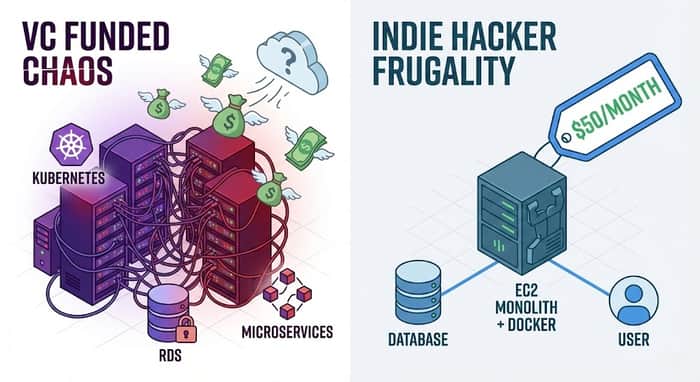
We’ve all read the horror stories on Twitter or Hacker News. A solo founder wakes up, checks their email, and sees a billing alert from AWS for $4,500 because a recursive function went rogue or they left a massive RDS instance running over the weekend.
These stories terrify indie hackers. They push many towards Heroku, Render, or DigitalOcean. While those platforms are fantastic for starting, they get expensive very fast once you gain traction.
As a Senior Software Engineer who has architected systems for high-growth companies and bootstrapped my own projects, I’m here to tell you a secret: AWS is only expensive if you use it like a VC-backed unicorn when you are still trying to find product-market fit.
You don't need Kubernetes. You don't need multi-region redundancy. You don't need serverless everything.
If you want to scale a SaaS to your first few thousand dollars in MRR without your infrastructure costs eating your profits, you need to embrace "boring" tech.
Here is the blueprint for a robust, scalable AWS setup that costs around $50 a month.
The "VC Trap": Why Your Bill is High
The primary reason indie hackers overspend on AWS is premature optimization via managed services.
AWS makes it incredibly easy to spin up managed databases (RDS), managed Redis (ElastiCache), and managed container orchestration (ECS/Fargate). These services are amazing because they handle backups, patching, and scaling for you.
They also carry a massive premium.
Running a t3.medium RDS Postgres instance will cost you significantly more than running Postgres yourself on a raw t3.medium EC2 instance. When you have zero customers, that premium is wasted money.
The $50 setup requires you to take back some control in exchange for massive savings.
The $50 Blueprint: The "Boring Monolith"
Our goal is to consolidate. We are going to run our application API, our frontend serving, our background workers, and yes, even our database, on a single, well-optimized EC2 instance using Docker.
This is blasphemy in enterprise DevOps. It’s survival for bootstrappers.
- The Compute: Graviton over Intel (Save ~20%)
Forget the standard t3 (Intel) instances. We are using AWS Graviton2 processors (the t4g family). They are ARM-based, generally perform better for web workloads, and are about 20% cheaper.
The Pick: t4g.small (2 vCPUs, 2 GiB Memory).
The Cost: Approx. $12/month (on-demand, us-east-1).
This instance is surprisingly powerful. It can easily handle hundreds of concurrent users for a typical CRUD SaaS application if your code isn't terribly inefficient.
- The Database: Self-Hosted Docker (The Big Saver)
This is where we save the most money. Instead of RDS, we run Postgres (or MySQL) in a Docker container right alongside our app on that t4g.small instance.
The Cost: $0 (It uses the compute you already paid for).
The Caveat: You are now responsible for data safety. You must set up a cron job on the host machine to pg_dump your database every 6 hours and push that dump file to an S3 bucket. Do not skip this step.
- Storage & Networking
We need storage for the EC2 root volume and a little extra for those database backups. We also need a way to serve static assets cheaply.
EBS Storage (gp3): 50GB is plenty to start. Cost: ~$4/mo.
S3 + CloudFront: Serve your frontend React/Vue app and static images via S3 fronted by CloudFront (CDN). This offloads traffic from your EC2 server and makes your site faster globally. The AWS free tier is generous here, but let's budget for traffic. Cost: ~$10/mo buffer.
- The "Luxury" Item: Application Load Balancer (ALB)
Could you just run Nginx on the EC2 box and expose ports 80/443 directly? Yes. It would save you money.
But I recommend splurging on an AWS Application Load Balancer (ALB). It sits in front of your EC2 instance.
Why? Free, auto-renewing SSL certificates via AWS Certificate Manager (ACM). Managing Let's Encrypt certs manually on a box is a pain I’m willing to pay to avoid.
The Cost: ~$18/mo (The single most expensive item on this list).
The Final Cost Breakdown
Let's tally it up:
Compute (t4g.small EC2): $12.00
Storage (50GB gp3 EBS): $4.00
Networking (ALB): $18.00
CDN/S3/Data Transfer Buffer: $15.00
Database (Self-hosted): $0.00
Total Estimated Monthly Cost: $49.00
You now have a setup that is reasonably performant, has SSL handling, globally cached assets, and a database that you control.
When Does This Break?
This setup is not forever. It will break when:
Your database exceeds memory: If your dataset grows too large for the 2GB RAM, things will crawl.
CPU gets pegged: If you have CPU-intensive tasks (image processing, heavy calculations), the API will slow down.
The Path to Scaling:
When you hit these limits, you don't throw the architecture away. You scale vertically first.
Change that t4g.small ($12/mo) to a t4g.medium ($24/mo) or t4g.large ($48/mo). It takes a 5-minute reboot.
Only when you have the revenue to justify it should you peel the database off into RDS, or split the workers onto their own servers.
Stop optimizing for problems you don't have yet. Save your money, embrace the "boring monolith," and focus on shipping features.

Solid breakdown, the boring monolith approach makes a lot more sense for solo projects than the usual managed service sprawl. One thing worth adding to the bill shock list: a security group left too open or an EC2 role with more access than it needs can turn into a different kind of expensive surprise, one that doesn't show up on the billing dashboard until it's too late. Curious if that side of things was something you checked once the stack was live, or if cost was the main thing you were optimizing for at the time. I've been building an open source scanner for exactly that gap if it's useful to compare notes.