Stop Treating Prompts Like Throwaway Text
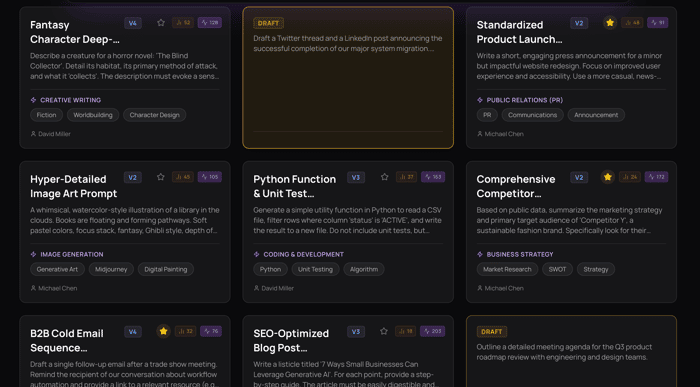
If you're building with AI daily, you’ve probably felt this already: your real work isn’t just code — it’s prompts.
They evolve. They break. They get duplicated across tabs, notes, Slack threads, and random .txt files. And at some point, you realize you’re not iterating — you’re recreating.
That’s where things start slowing down.
The Hidden Bottleneck in AI Workflows
Most indie builders optimize:
- model choice
- latency
- API costs
But ignore the actual interface between them and the model: prompt management.
Without structure:
- You reuse outdated prompts without knowing
- You lose high-performing variations
- You burn tokens testing the same ideas again
- You can’t scale beyond “trial and error”
AI feels powerful… but inconsistent.
What Changes When Prompts Are Structured
When prompts become first-class assets instead of scattered text, a few things happen:
- You iterate instead of rewrite
- You compare versions instead of guessing
- You build systems instead of one-off outputs
This is the difference between using AI and building with AI.
A More Practical Setup
This is where tools like Lumra come in — not as another AI layer, but as a workflow layer.
Instead of switching contexts, you keep everything where you already work:
Inside VS Code
- Access your prompts like you access code
- Reuse structured templates across projects
- Keep your AI logic versioned alongside your repo
Inside Chrome
- Pull the exact prompt you need without digging through notes
- Stay in flow while working with ChatGPT, APIs, or dashboards
Versioning Isn’t Just for Code
If you’re not versioning prompts, you’re losing information.
With Lumra:
- Every iteration is tracked
- You can roll back to what actually worked
- You can test variations intentionally
This alone cuts down a surprising amount of wasted API usage.
Prompt Chains = Real Efficiency
One of the biggest unlocks is chaining.
Instead of:
one giant prompt trying to do everything
You break it into:
- input structuring
- transformation
- formatting/output
With Lumra, you can:
- reuse each step independently
- optimize weak links in isolation
- reduce token usage across the chain
Result:
- cleaner outputs
- lower costs
- more predictable behavior
Why This Matters More Over Time
Early on, messy workflows are fine.
But once you:
- ship features
- handle real users
- rely on consistent outputs
…prompt chaos becomes technical debt.
Organizing them isn’t “nice to have” — it’s infrastructure.
The Quiet Advantage
Most people are still:
- copy-pasting prompts
- tweaking blindly
- wasting tokens
If you structure your workflow now, you get:
- faster iteration loops
- lower API costs
- more reliable outputs
Not because your model is better —
but because your system is.
Final Thought
AI doesn’t reward randomness — it rewards iteration.
And iteration only works when you can:
- track
- reuse
- refine
If your prompts aren’t organized, you’re not really iterating yet.
That’s the gap Lumra is trying to close.

I agree — I’ve definitely wasted a lot of tokens by repeatedly giving AI context it already had access to.
I’ve started adjusting my workflow so the model pulls context directly from code/files instead of me re-supplying it every time.
One thing I still wish existed is a proper 'conversation summariser' that compresses an entire thread into a clean, transferable context for switching between models or continuing elsewhere.
That is a killer idea, agree with you!
Thanks Taha! Fingers crossed someone builds it soon.
You are welcome and thank you too Billy!
This is interesting, the real issue isn’t just prompts, it’s losing context and iterations over time. Once things get scattered, it slows everything down.
Absolutely
This hits hard — I used to keep prompts in random notes and kept rewriting the same thing. Once I started saving and reusing them properly, my outputs got way more consistent and faster.
Definetely. Using ai agents in an organized way is more more productive than all other things. This is the secret ingredient for the success
Strong point. Prompt management starts looking a lot like source control once AI becomes part of real work. The missing piece for me is context, not just storing the prompt text, but storing what files, assumptions, and workflow stage make that prompt work. Without that, you are not really iterating, you are just hoping you can recreate the same result later.
Interesting point. I would like to lean on that too!
The 'recreating instead of iterating' problem is the right diagnosis. Anyone building seriously with AI for more than a few weeks has a graveyard of prompts that worked once, got tweaked, fragmented across tools, and can never quite be reconstructed.
The part that's underemphasized is context dependency — a prompt that works brilliantly in one project context breaks completely in another because the implied setup was never captured. Treating prompts as first-class assets means capturing not just the text but the conditions under which it works.
The 'Slack threads and random .txt files' pattern also mirrors what happens with documentation and internal knowledge in general. The tooling is usually the last thing teams invest in — until the cost of not having it becomes obvious. For AI-heavy workflows that threshold is arriving earlier than expected.
This is such a sharp observation — ‘prompt chaos as technical debt’ really hits.
I’ve definitely felt that shift from experimenting to realizing you’re just recreating the same prompts over and over without actually improving them. Treating prompts like versioned assets instead of throwaway text feels like the missing layer in most AI workflows.
The chaining part also stands out — breaking prompts into smaller reusable steps feels much closer to how good systems are actually built.
Also sharing something I’m building in parallel — You have an idea. $19 puts it in a real competition. Winner gets a Tokyo trip (flights + hotel booked, minimum $500 guaranteed). Round just opened, so best odds right now: tokyolore.com
Prompt versioning is a genuinely underserved space. Would be helpful to see a short demo or screenshot of what the VS Code extension looks like in action. Hard to evaluate without seeing the actual UX. Good luck with the launch.
Thanks for the feedback. https://lumra.orionthcomp.tech/explore you can check it out here how the VS Code extension looks like.