Text-only AI agents are a dead end. Here’s what worked better.
Our AI chatbot was accurate.
Users still ignored it.
They’d ask a question, get a clean answer, then open the dashboard anyway. I kept seeing the same pattern. The bot did the thinking. The user still did the work.
At first I assumed it was a trust issue. Maybe the answers weren’t convincing enough. Then I started checking logs more closely. The responses were correct most of the time. That wasn’t the problem.
The problem was what happened next. Or more accurately, what didn’t.
Text answers don’t close the loop
When someone asks “what’s driving support tickets this week” and gets a paragraph back, they’ve learned something. But they haven’t done anything with it.
They still need to:
- Open a dashboard
- Filter the data
- Recreate the view
That gap shows up every time. The AI gives insight. The user has to turn it into something usable.
I started thinking of it as an output problem. Not a model problem.
Text is a dead end for anything that requires action.
This isn’t just a chatbot issue
Once I noticed it, I saw it everywhere.
Internal tools. Analytics dashboards. SEO service reports. Even simple knowledge bases. The AI layer sits on top, answers questions, and stops right there.
The user reads. Then switches context.
If your product expects users to act on information, text responses add friction. They don’t remove it.
I went looking for a different approach
That’s what led me to Thesys
What stood out wasn’t the usual “build an AI agent” angle. It was how the agent responds.
Instead of returning text, it returns UI.
Charts. Cards. Tables. Structured views that feel closer to product surfaces than chatbot replies.
No workflow builder. No node graph. You describe what the agent should do, connect a data source, and it figures out the path.
That was enough to test it.
What I actually built
I started simple. A support knowledge agent.
Fed it a product documentation URL. Wrote a few instructions around tone and scope. Published it.
When I asked “what’s the refund policy”, it didn’t return a paragraph. It showed a structured card. Policy name, conditions, timeline. Easy to scan. No need to re-read.
Then I pushed it further.
I connected a Google Sheet with dummy ticket data. Asked for weekly trends.
It returned a bar chart inside the response.
Not a description of a chart. An actual chart. Labels, values, everything visible without leaving the conversation.
That was the first time the output felt complete. No second step required.
Setup time was under 15 minutes.
What felt different
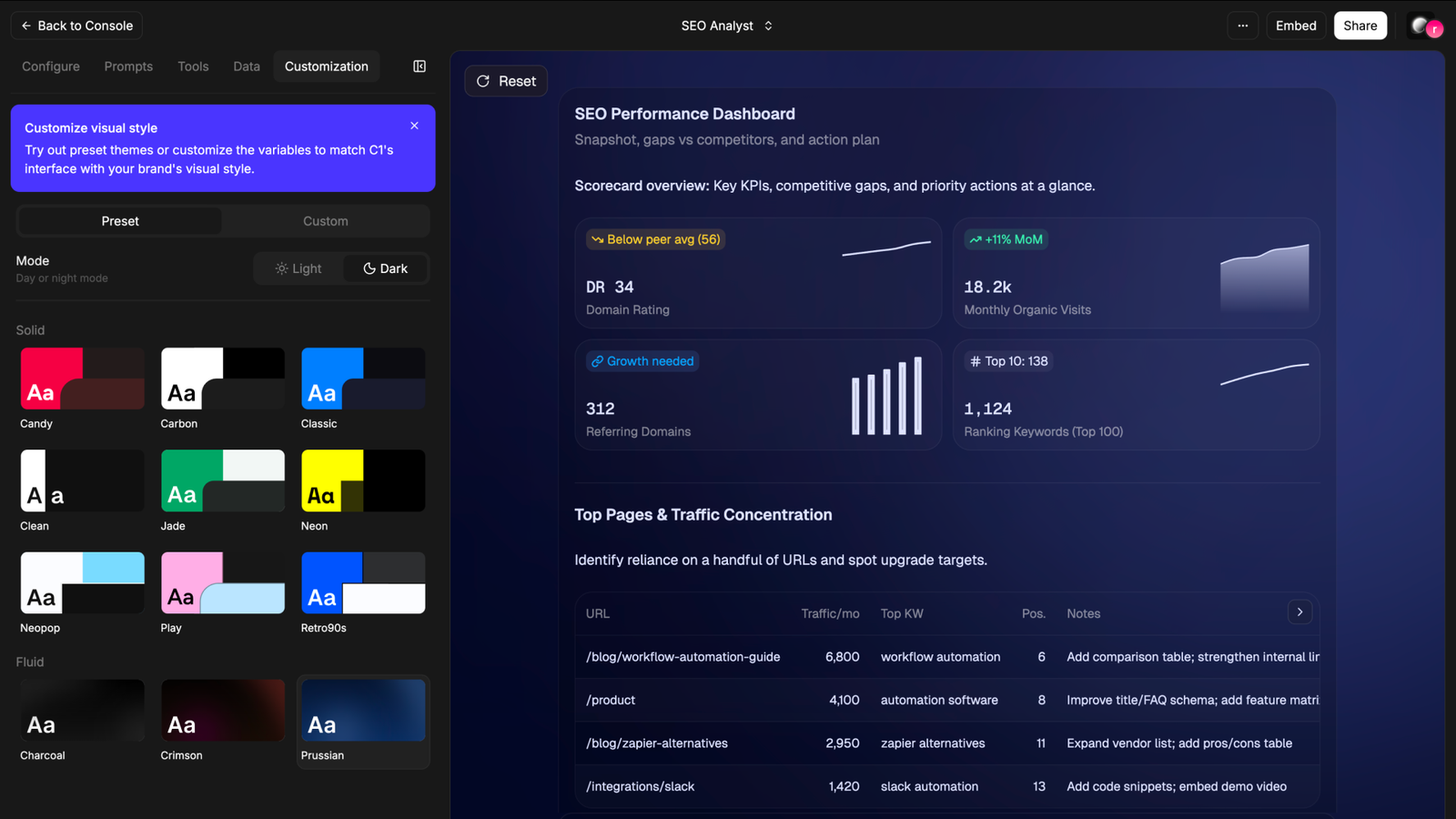
The biggest shift wasn’t visual. It was behavioral.
With text answers, I’d read and move on to another tool. With UI responses, I stopped there. The answer already looked like the thing I was going to open anyway.
That changes how the interaction feels.
It’s closer to using a feature than talking to a bot.
Where it breaks down
It’s not perfect.
When the generated chart isn’t quite right, debugging is unclear. You don’t have visibility into why the agent chose that structure. For simple data, it works well. For messy inputs, you start guessing.
The UI layer is mostly display-focused right now. If you want users to take action inside that interface, like triggering something on the backend, you’re pushing the limits.
There’s also a learning curve in how you describe behavior. You’re not writing code, but vague instructions lead to vague outputs.
Who this actually works for
This makes the most sense if you’re building something where users need to act on information quickly.
Support copilots. Internal analytics tools. Lightweight dashboards. Anything where the “next step” usually involves opening another screen.
If your use case is mostly conversational or exploratory, text still holds up fine.
The shift I didn’t expect
This changed how I think about AI features in general.
The question isn’t “can the model answer correctly”. That part is improving fast anyway.
The real question is whether the response removes the need for a second step.
If it doesn’t, you’ve just moved the friction, not reduced it.
Most AI features I see today still rely on text as the final layer. That works for explanations. It breaks for decisions.
One thing I’m still figuring out
If you’re building AI into your product right now, what format are you returning responses in?
And more importantly, are users actually doing something with them, or just reading and moving on?
Because that gap shows up faster than you expect.

I know a few founders or product builders integrating AI features into products who are grappling with how to format AI responses, and they'd probably be happy to answer some questions for free if you want me to pass them along.
It is an interesting viewpoint.. it seems like many tools reach their limits as they go from concept to partial use. It appears that execution is more difficult than expected also what worked best for you?
The shift from "can the model answer" to "does the response remove the second step" is the one most teams miss. Accuracy is table stakes. The real friction isn't wrong answers — it's answers that require action in another tool. Text closes the conversation. UI closes the loop. Most AI features stop at the first because it's easier to demo. But users don't need better explanations. They need fewer context switches.
Yeah, UIs are not going away any time soon. The chat based paradigm we've stagnated in is hopefully only a transient state and project like yours could really push LLM interactions forward. We're working on a less flashy but more approachable solution : user asks "how to X", our widget simply shows them in the UI where to click step by step. I'll follow your project closely anyhow !
This is a sharp observation — most people are still stuck at “AI gives answers” instead of “AI completes the job.”
The part that stands out is this:
“the user still did the work”
That’s the real leak.
What you’re describing is basically:
Text = insight
UI = execution
And most products stop at insight.
I’ve seen something similar where even when the output is technically correct, if it doesn’t feel like a finished state, users don’t trust it enough to act — they go back to the dashboard just to “confirm”.
So it’s not just friction, it’s also a confidence gap.
Curious — did you notice any difference in how users trusted the UI outputs vs text?
Like:
Did they actually skip the dashboard more once it looked like a “final surface”?