The 5 Easiest Ways To Accept Bitcoin Donations On Any Website
Alright, you’ve built a useful and beautiful website, tool or app. However, monetization isn’t a priority and you’d rather keep the project free, ads-free and accessible?
Accepting donations would be an option, but how? A PayPal button? Stripe? Buymeacoffe? Patreon?

All of these legacy services require a bank account and KYC verification for both sender and receiver — not very convenient.
If we only could send value over the internet, with just one click and without the need of a bank account…
Oh, hold on, that’s bitcoin! The decentralized protocol to send value across the globe. Money over TCP/IP.
So let’s take a look on how anyone can easily add a payment button or donation widget on a website or app.
Let’s get into it.
Introduction
Bitcoin is digital money that you can send and receive without the need for banks. While bitcoin is extremely secure, it’s not very fast. The maximum transactions per second (TPS) the network can handle is about 7. Obviously that’s not useful for daily payments or microtransactions.
If you’d like to dig deeper into how bitcoin works, a great read is “Mastering Bitcoin” by Andreas Antonopoulos.
Bitcoin vs Lightning
If you’d like to receive bitcoin donations “on-chain” all you need is a bitcoin wallet. You simply display your bitcoin address on your site and that’s it. You can receive donations.
It would look something like this; 1A1zP1eP5QGefi2DMPTfTL5SLmv7DivfNa
Instead of showing the actual bitcoin address, you can also turn it into a QR code.
However, this is not a recommended solution. Using static on-chain addresses has two major downsides. It lowers privacy for you and your donnors and it’s a UTXO disaster because many small incoming transactions could beocme hard to consolidate in the future.
For donations and small transactions, the Lightning Network is the better option. Lightning allows for instant settlement with fees only a fraction of a cent.
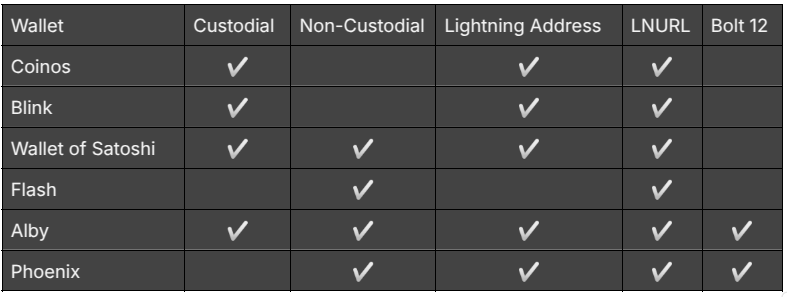
Similar to bitcoin, you have the choice between non-custodial and custodial wallets. This means, either you have full control over your money or the wallet provider has.
Option 1: Lightning Address
With the lightning address feature, you an easily receive donations to an email like address.
It looks like this: yourname@wallet.com
Many wallets support lightning addresses and make it easy to create one. Then, you simple add the address to your donation page and you’re ready to receive tips.
You can also add a link link as in lightning:yourname@wallet.com and compatible lightning wallets and browser wallets will detect the address.
Option 2: Lightning Donation Widgets
If you like to take it a step further, you can also create a more enhanced donation checkout flow.
Surely, you could program something yourself, there are many open source libraries you can build upon. If you want a simple plug-and-play solution, here are 5 options that only cost you a few minutes and you’re ready to accept bitcoin donations.
Pay With Flash
Easiest for indie hackers. Add a donation widget with minimal code and no KYC. Payments go directly to your wallet for a 1.5% fee.
Setup Steps:
-
Sign up at PayWithFlash.com
-
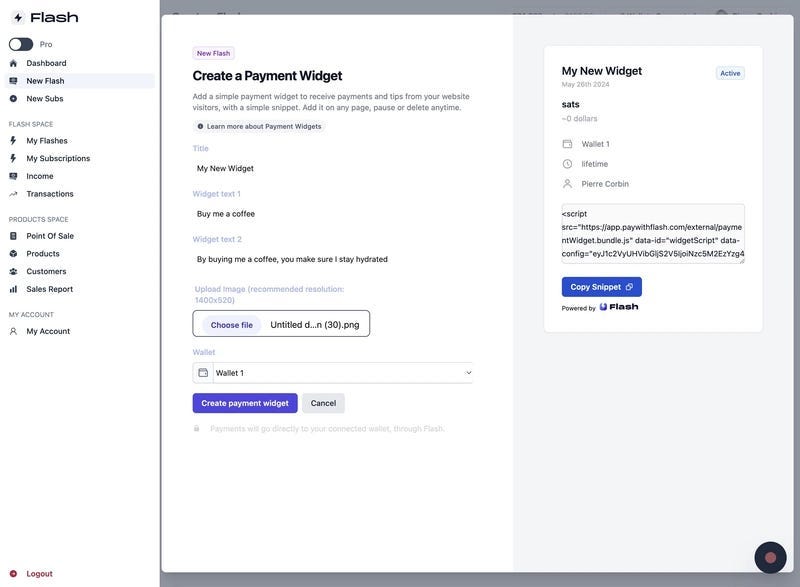
Customize your widget in the dashboard
-
Embed the code:
- Test to confirm functionality
Benefits:
-
Minimal technical skills required
-
Supports one-time or recurring donations
-
Direct fund transfer, no intermediaries
SatSale (GitHub)
Lightweight, self-hosted Bitcoin/Lightning payment processor. No KYC.
Ideal for developers comfortable with server management. Simple to deploy, supports both on-chain and Lightning, and integrates with WooCommerce.
BTCPay Server
Powerful, open-source, self-hosted processor for Bitcoin and Lightning. No KYC.
Supports multiple currencies, advanced features, and full privacy. Requires technical setup and maintenance. Funds go directly to your wallet; great for those seeking full control.
Explainer video below:
https://youtu.be/MIWGvl6_WzI?feature=shared
Geyser Fund
Crowdfunding platform. Widget-based, connects to your wallet, email registration.Focused on Bitcoin crowdfunding, memberships and donations.
OpenNode
Hosted, KYC required. Accept Bitcoin payments and donations; supports conversion to fiat, suitable for businesses and nonprofits.
Summary
-
Fast, low-code setup: Use Pay With Flash or Geyser Fund.
-
Privacy and control: Choose SatSale or BTCPay Server (requires technical skills).
-
Managed, compliant solutions: The Giving Block or OpenNode.
Choose based on your technical comfort, privacy needs, and project scale.
I hope this article helped you. If you added bitcoin donations, share your link in the comments and perhaps you’ll receive your first Lightning tip soon.

Accepting Bitcoin donations is becoming much easier thanks to improvements in wallets, payment gateways, and developer tooling. The real challenge is creating a seamless, secure, and reliable payment experience that lowers the barrier for contributors while maintaining operational simplicity.