The Indie Developer's Guide to Free 3D Models: Get What You Need Without Overspending (2026
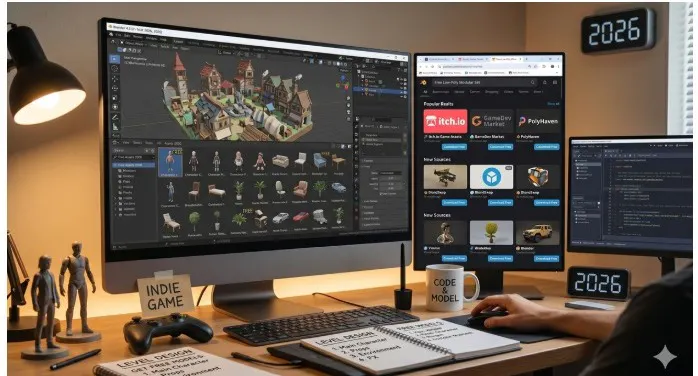
Building a game on a small budget is a series of hard choices about where to spend money and where to find something good enough for free. Art assets are usually where that tension is sharpest.
A solo developer or a small indie team shipping a 3D game in 2026 is looking at development budgets that typically range from $10,000 for a simple mobile title to $100,000 or more for a polished PC or console release. According to the GDC 2025 State of the Game Industry report, 60% of developers self-fund their projects. That means every dollar spent on a 3D model pack is a dollar not spent on marketing, sound design, or the tools you actually need to ship.
Here is the thing most asset guides do not tell you: you can build a complete 3D game using free 3D models and free 3D model sites without the result looking like a free game. What matters is knowing which sources are worth using, which formats work in your engine, what polygon budgets to stay within for each platform, and how to combine free assets with a consistent visual style. This guide covers all of that.
Why 3D Assets Eat So Much of the Indie Budget
Art is the most expensive part of most indie games. Programming, level design, and audio can all be handled by a solo developer with enough time. High-quality 3D art typically cannot. A professional character model costs $300 to $2,000 from a freelancer. A full environment set can run $1,000 to $5,000. A complete game might need dozens of unique assets across characters, props, environments, and vehicles.
This is why the asset sourcing decision matters so much. Studios that figure out how to use free 3D models smartly can redirect that budget to the things that actually move the needle: playtesting, marketing, platform certification, and post-launch support.
The good news is that the free 3D model landscape in 2026 is better than it has ever been. Several 3D model sites now offer libraries deep enough to support a full commercial release without paying for a single asset, as long as you know what to look for and how to use what you find.
Know Your Polygon Budget Before You Download Anything
The single most common mistake new game developers make when sourcing free 3D models is downloading assets without checking the polygon count. A realistic human character that looks beautiful in a product render can have 500,000 polygons. Put that in a mobile game and you will hit your draw call budget before the first enemy spawns.
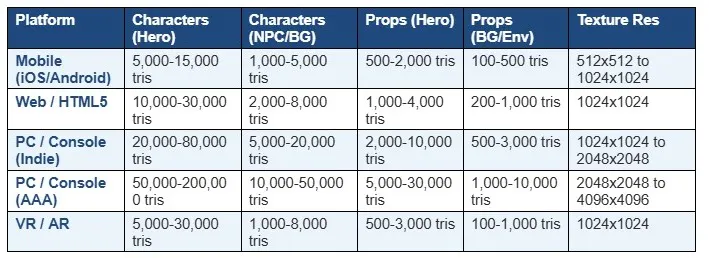
Here is the practical polygon reference by platform. These are not hard rules, but they are the industry-standard starting points before you start optimizing:
When you are browsing a free 3D model site, look for the polygon count listed on the model page before downloading. On CGTrader it is listed prominently. On Sketchfab it appears in the model details panel. On Tripo AI Gallery it is available per model. Any asset you plan to use in a shipped game should be checked against these targets before you build your scene around it
Which Format to Download for Your Game Engine
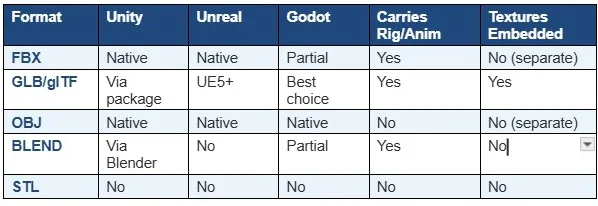
Format choice is the other thing that separates a smooth asset pipeline from hours of troubleshooting. Here is what works in each major engine:
Unity
FBX is the primary import format for Unity and handles rigs, animations, and materials. Unity also natively imports BLEND files if Blender is installed on the same machine, which can save a conversion step. GLB and glTF are supported from Unity 2020 onward via the official glTF package. For static environment props, OBJ imports cleanly. For anything animated or rigged, use FBX and check that the rig hierarchy matches Unity's expected bone naming if you plan to use Mecanim.
Unreal Engine
FBX is the standard for Unreal as well, and Unreal's FBX import dialogue is more detailed than Unity's, with options for LOD generation, collision mesh assignment, and material slot mapping on import. Unreal supports glTF import from version 5.0 onward. One important Unreal-specific note: Unreal's default unit scale is centimetres. FBX files exported from Blender use metres. Always set the scale to 100 in Unreal's FBX import settings for Blender-originated assets, or the model will import at one percent of its intended size.
Godot
Godot 4.x has excellent glTF 2.0 support and it is the recommended format for the engine. GLB files drop into Godot with materials, textures, and animations intact. FBX support exists but has historically been less reliable in Godot than in Unity or Unreal. If you are building in Godot, look for GLB format specifically when browsing free 3D model sites, and your import workflow will be significantly smoother.
Quick Format Reference for Game Engines
The Best Free 3D Model Sites for Game Developers in 2026
Here are the sources I recommend, in the order I check them. Each one serves a different part of the pipeline.
1. Kenney.nl: Best for Consistent Style Across a Full Game
Kenney is the most underrated free resource in game development. The site offers over 40,000 completely free assets under CC0 licence, meaning you can use them in any commercial project with no attribution required and no strings attached. The key advantage over most free 3D model sites is visual consistency: every Kenney asset pack is designed in the same low-poly art style, so assets from different packs work together in the same scene without style clashes.
The library covers characters, vehicles, environments, weapons, UI elements, and props. Everything is optimised for real-time use and comes in FBX, OBJ, and BLEND formats. For an indie developer building a full game on zero art budget, starting with Kenney's packs and customising the colours and textures gives you a complete, cohesive visual identity without hiring an artist.
Where it falls short
The CC0 low-poly aesthetic is identifiable. Players who spend a lot of time with indie games will recognise Kenney assets. This is not necessarily a problem, but if originality of visual style is a priority, you will need to either customise heavily or supplement with other sources.
Pricing: 100% free. CC0 licence. No account required.
Best for: Indie developers and game jam participants who need a full set of visually consistent, immediately usable game assets without spending anything.
2. Tripo AI Gallery: Best for Variety and Style Range
URL: studio.tripo3d.ai/3d-model-gallery/
When I need a specific type of model that Kenney does not cover, or when I need a different art style from Kenney's signature low-poly aesthetic, the Tripo AI Gallery is the next stop. It covers a breadth of categories and styles that no community-upload library can match: realistic characters, anime heroes, cyberpunk environments, fantasy creatures, stylized props, vehicles, animals, and weapons across dozens of art directions.
The practical value for game developers is variety without cost. You are not limited to one visual style or one polygon range. The gallery has low-poly cartoon models for mobile games, mid-poly stylized characters for PC games, and detailed props for high-fidelity PC and console projects. Downloads are available in FBX and GLB, the two formats that cover Unity, Unreal, and Godot pipelines cleanly.
How to use it in a game pipeline
Download GLB format for static environment props and set pieces. Use GLB as your standard where the engine supports it since it packages geometry, textures, and basic materials into one file and reduces setup time on import. Download FBX for any model you plan to rig or animate. Check the polygon count on the model page before downloading and match it to your platform target from the table above.
What to know
The gallery is newly launched and a full search function is still rolling out. Browse by category and use load more to explore the full depth of each section. The variety per category goes deeper than the first page suggests. New models are added regularly.
Pricing: Free to browse and download. No account required for basic access.
Best for: Game developers who need a wide style range across characters, creatures, vehicles, props, and environments without the visual consistency constraint of a single-artist asset pack.
3. Unity Asset Store Free Section: Best for Unity-Native Integration
URL: https://assetstore.unity.com/
The Unity Asset Store's free section is one of the most practical free resources for Unity developers specifically. Filter by price to $0 and you get access to assets that drop into a Unity project with zero import friction: correct scale, correctly configured materials, working prefabs, and sometimes complete scene setups. Epic Games publishes several high-quality character and environment packs here for free, including assets from their own titles.
The key advantage over general 3D model sites is that Unity Asset Store assets are built for Unity. Pivot points are correct. Colliders are included. LOD groups are set up. Materials use Unity's shader system. This eliminates the setup work that comes with importing models from general-purpose platforms.
Where it falls short
The licence on Unity Asset Store assets restricts use to Unity projects. You cannot take a Unity Asset Store model and use it in Unreal, Godot, or a film pipeline without violating the terms. Also, free assets are rotated and changed over time, so assets you found free last year may no longer be available.
Pricing: Free tier. Assets licenced for use in Unity projects only.
Best for: Unity developers who want zero-friction asset integration with correct pivot points, prefabs, and material setups already configured.
4. Fab (Unreal Marketplace): Best for Unreal-Native Assets
URL: https://www.fab.com/
Fab is Epic Games' unified asset marketplace, replacing the Unreal Engine Marketplace. It has a substantial free section including Epic's own Fab Free assets and a monthly rotation of free content. Assets here are optimised for Unreal Engine, which means Nanite-compatible meshes, Lumen-ready materials, and correct scale for Unreal's centimetre-based coordinate system.
For Unreal developers, the quality ceiling on free Fab assets is genuinely high. Epic has released full character packs, environment sets, and material libraries for free as part of their developer ecosystem strategy. These assets would cost hundreds of dollars on any other marketplace.
Where it falls short
Free content rotates. Assets that are free this month may be paid next month. The licence restricts assets to Unreal Engine projects. The search is better than it used to be but can still surface irrelevant results for specific queries.
Pricing: Free tier. Monthly free asset rotation. Assets licenced primarily for Unreal Engine use.
Best for: Unreal Engine developers who want production-quality assets that are already optimised for Nanite, Lumen, and Unreal's material system.
5. CGTrader Free Section: Best for Precise Technical Requirements
URL: https://www.cgtrader.com/free-3d-models
CGTrader's free section has over 153,000 models when the free filter is applied. The platform's strength for game developers is filtering precision: you can simultaneously narrow by polygon count range, rigging status, animation readiness, and format. If you need a rigged bipedal character under 20,000 triangles in FBX format for a PC game, you can filter to exactly that specification.
The CGT Standard badge on models means they have been automatically verified to import correctly in Blender, Maya, Unreal Engine, Unity, and other major tools without geometry errors. For free models with that badge, you have better confidence that the import will work without surprises.
Where it falls short
Free models require explicitly applying the filter, or paid results dominate. Licensing per model must be checked individually on each model page. Not all free models permit commercial use.
Pricing: Free models available with filter. Paid models from a few dollars upward.
Best for: Game developers with specific technical requirements who need to filter by polygon count, rig type, and format simultaneously.
6. Sketchfab: Best for Finding Community-Made Game Assets
URL: https://www.sketchfab.com/
Sketchfab's community includes a large number of game developers who share their work, including game-ready low-poly models, stylized characters, and environment props under CC0 and CC-BY licences. The real-time 3D viewer lets you inspect geometry, check for clean normals, and verify the rig before downloading.
Filtering by the game-ready tag or searching for low-poly surfaces the most engine-compatible content. Several popular free uploads include complete low-poly vehicle sets, stylized character packs, and modular environment kits that are optimised for Unity and Unreal.
Where it falls short
Licensing varies per model and requires individual checking. Support quality has declined since Epic's acquisition. For commercial projects, confirm each model's licence before integrating it into your build.
Pricing: Free tier. Community models under various CC licences.
Best for: Finding community-made game-ready assets and low-poly character models with real-time 3D preview before download.
The Licensing Rules Every Indie Developer Must Know
This is the section most guides skip and the section that has gotten developers in trouble. Using a free 3D model in a commercial game is not automatically legal just because the model was free to download.
CC0 (Public Domain): You can use it for anything, including commercial games, without attribution. This is the cleanest licence for commercial development. Kenney's entire library uses CC0.
CC-BY (Attribution): You can use it commercially but must credit the original creator. In a game, this usually means a credit in your game's credits screen or documentation. Always check whether this is acceptable to the creator's expectations.
CC-BY-SA (ShareAlike): You can use it commercially with attribution, but any derivative work must use the same licence. This creates complications for games since your game would technically need to share the same CC-BY-SA licence.
CC-NC (Non-Commercial): You cannot use this in a game you intend to sell. Full stop. Free games, game jams, and personal projects are fine. Commercial releases are not.
Royalty-Free: Typically means you can use the asset commercially after a one-time download fee. The term does not mean free to download. Read the specific platform terms since royalty-free licences vary by marketplace.
Editorial Use Only: Cannot be used in commercial games. These assets appear on platforms like TurboSquid for news and educational use, not for shipped products. Do not use editorial-only assets in a commercial release.
The practical habit: maintain a spreadsheet for every free asset you use in a commercial project. Record the asset name, source URL, licence type, and any attribution requirements. This takes ten seconds per asset and protects you from a forced removal or legal issue after launch.
The Art Style Problem: Why Free Assets Alone Are Not Enough
Here is the practical challenge with free 3D models from multiple sources: visual inconsistency. A realistic character from CGTrader next to a low-poly vehicle from Kenney next to a high-detail environment from TurboSquid looks like a game assembled from random parts, because it is.
The studios that ship successful games with free assets solve this problem in one of three ways:
Commit to one source with a consistent style: Kenney's entire library, or a single artist's pack from itch.io, means every asset shares the same visual language. Customize textures and colours to make it feel unique.
Use free assets as base meshes and retexture everything: Download the geometry for free, then apply your own consistent texture set. This works well for environment props where the shape is what matters and the surface can be replaced.
Build a style guide first, then source: Define your game's polygon budget, texture resolution, colour palette, and art direction before you browse any 3D model site. Then use that guide to filter what you download. Anything that does not match the guide does not get used, regardless of how good it looks in isolation.
The Tripo AI Gallery is useful here because its breadth covers many different art styles, which makes it easier to find models that match a specific art direction rather than defaulting to whatever happens to be popular on a community platform.
A Practical Free Asset Workflow for Indie Developers
Here is the sourcing process I recommend for a 3D game in active development:
Define your art direction and platform first: Decide on your art style, your target platform, and your polygon budgets before you open any 3D model site. Write these down. They become your filter for every asset decision.
Start with Kenney for anything that fits: If Kenney has an asset in your style, use it. CC0, game-ready, consistent style, no friction.
Browse the Tripo AI Gallery for the gaps: Characters, creatures, vehicles, and stylized props that Kenney does not cover. Download GLB for static assets, FBX for anything you will rig.
Check your engine's native marketplace: Unity Asset Store free section for Unity projects, Fab free assets for Unreal. These are already optimised for your engine and save import setup time.
Use CGTrader's free filter for specific technical assets: Rigged characters, animated vehicles, low-poly models under a specific polygon budget. Filter precisely and check the polygon count before downloading.
Log every asset's licence in your spreadsheet: Ten seconds per asset. Do it before you forget where it came from.
Test in your engine early: Import candidate assets into your engine during pre-production, not mid-production. Better to discover a mesh problem or licence issue before you have built a level around the asset.
Frequently Asked Questions
Can I use free 3D models in a commercial game?
Yes, but only if the individual model's licence permits commercial use. CC0 models allow any use. CC-BY allows commercial use with attribution. CC-NC models cannot be used in commercial releases. Always read the specific licence on the model page and maintain a record of each asset's licence and source for every model in your project.
What polygon count should my game characters be?
For mobile games, aim for 5,000 to 15,000 triangles for hero characters and 1,000 to 5,000 for background NPCs. For PC indie games, hero characters can run 20,000 to 80,000 triangles. For VR, stay close to mobile budgets due to the performance demands of rendering two viewports simultaneously. Always test your actual frame rate with your target asset counts in the engine before finalising your polygon budgets.
What is the best free 3D model site for indie game developers?
Kenney.nl is the most practical starting point for developers who want a consistent art style with zero licensing friction. The Tripo AI Gallery adds variety for categories Kenney does not cover, with FBX and GLB downloads that import cleanly into Unity, Unreal, and Godot. CGTrader's free section is the strongest option when you need to filter by specific polygon count and rigging status. Your engine's own marketplace, Unity Asset Store or Fab, gives you assets pre-configured for your pipeline.
What format should I download for Unity?
FBX is the standard format for Unity. For static props, OBJ also works well. Unity supports GLB import via the official glTF package from Unity 2020 onward, and GLB is worth using when available because it embeds textures directly. Always check scale on FBX import, as models from different sources use different unit systems. Set scale to 100 in the import settings for Blender-originated FBX files.
What format should I download for Unreal Engine?
FBX is the primary format for Unreal. Set scale to 100 in Unreal's FBX import dialogue for Blender-originated models because Unreal uses centimetres and Blender uses metres. From Unreal Engine 5.0, GLB and glTF import are supported natively. Use GLB where available to embed textures and reduce material setup time in the engine.
How do I keep a consistent visual style using free models from different sources?
Three approaches work in practice: commit to one source with a consistent art style such as a complete Kenney pack, use free models as base geometry and replace all textures with a consistent palette you create, or define a style guide before sourcing and filter every free model against it. Using the Tripo AI Gallery alongside Kenney can work well because the gallery covers style ranges and categories that Kenney does not, and with retexturing you can bring both into a consistent visual language.
Final Thoughts
Building a 3D game without spending a fortune on art assets is genuinely achievable in 2026. The free 3D model landscape has matured enough that a small team with a clear art direction can source most of what they need without opening their wallet.
The key is being systematic about it. Know your polygon budget before you browse. Download the right format for your engine. Check every licence before you build a level around a model. Maintain a simple record of what you are using and where it came from.
Start with Kenney for style consistency and CC0 freedom. When you need a reliable 3D model site to fill the remaining visual gaps in your project, use the Tripo AI Gallery. Lean on your engine's native marketplace for assets that are already configured for your pipeline. Use CGTrader's filter for specific technical requirements. Test early, track everything, and ship.
Last updated: 2026 | Engines: Unity, Unreal Engine 5, Godot 4.x | Sources: Kenney, Tripo AI Gallery, Unity Asset Store, Fab, CGTrader, Sketchfab | Formats: FBX, GLB, OBJ

