The vibe coding landscape in 2025
It’s been almost six months since vibe coding became a serious trend and by now, you’ve probably noticed a flood of new AI tools with flashy names. But not all of them do the same thing.
This guide breaks down the categories of tools out there, with clear examples and use cases. Whether you're a developer, designer, or someone just starting to build with AI, this guide will help you make sense of it all.
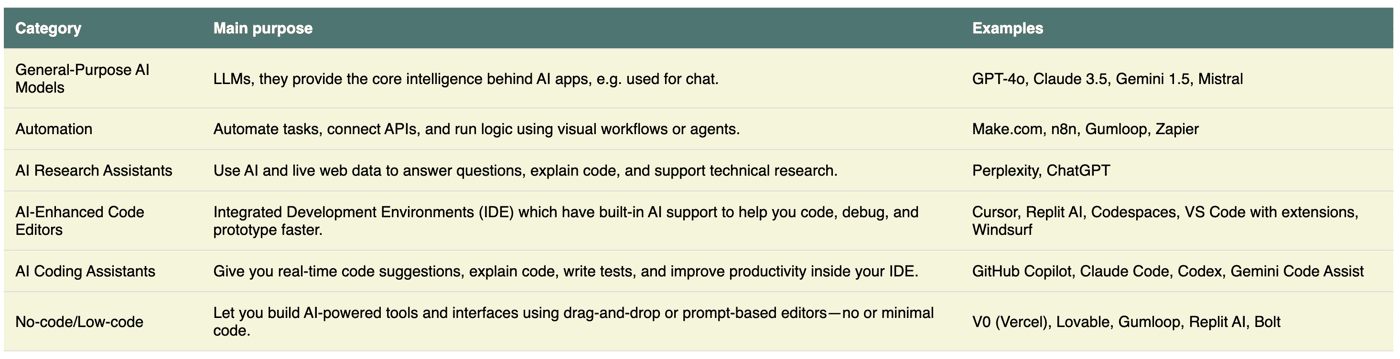
If you're just getting into building with AI, one of the first questions that comes to mind is: "Which tools should I use?"
It’s a fair question, and the answer depends on what you’re trying to build and how you want to work (with or without code).
Let’s break it down by purpose and tool type.
General-purpose AI models are your LLMs like GPT, Gemini, Grok or Claude Sonnet. You mainly see those integrated in chat interfaces like ChatGPT or Claude. Sometimes you see a dropdown menu next to the chatbox, where you can select different model types to handle your request, e.g. in Gemini. Majority of better-quality models aren't available for free, but are hidden behind a paid subscription. If you build with AI, you can use these tools to ask questions, ask to generate basic code or ask how to solve an error if other ways don't work.
Automation tools. Think of these as the glue between apps. Automation tools connect your systems and trigger actions, e.g. everytime someone purchases something from your website, the record is created in your database. Modern tools like Zapier, Make, or n8n now include AI features to help you generate workflows with a prompt, rather than building them manually.
AI Research assistants is your search engine on steroids. You can use e.g. Deep Research to find most recent documentation on tools or frameworks which can act as training data for other AI tools or LLMs. If you have a paid subscription with Perplexity, try Perplexity Labs which works even faster and more agentic-like.
We'll now dive in to the tools which names you've probably already heard of: Bolt, Lovable, Cursor, Claude Code, Replit, V0, etc. Not all of them are equal, so here are three important groups:
AI-powered IDE, or as the table says AI-enhanced code editors. These tools are development environments where your code lives, but enhanced with AI copilots that understand your full project context. You still have access to the terminal, but now AI helps you write, debug, and refactor code. This is your autopilot-kind of tool, but still letting you into the terminal if you want to code. The newcomers are Cursor, Windsurf, Replit AI. If you have some tech knowledge or are a junior and want to get better at coding or building your first AI-native product, this is your space.
AI Coding assistants are often integrated within an IDE, so they work like a plugin to existing code editors, e.g. Github Copilot integrates nicely with VS Code. You would use this as a productivity/efficiency hack to speed up your coding or suggest improvements to existing code or bug fixes. They don't have as full view of the codebase as the AI-powered IDEs, because they're not AI-native code editors. If you build with AI or are an experienced engineer and want to experiment with AI, but still follow what's happening in the code terminal or prefer coding to some degree yourself (hybrid model), this is your space.
No-code/low-code tools, or actually more of AI-native UI/UX & frontend builders are your vibe coding tools. This is a space for people who have zero backround in programming and no coding skills, but build products in hours. Those are mainly simple websites or frontends with small databases, easy deployments and no complicated integrations in the backend (or they use vibe coding tools in combination with automation tools). This is also a great space for designers and UX researchers to test and validate their prototypes, and show something tangible to a developer, to take over. Here is where Loveable, Bolt, V0 come in very handy. You can also deploy your creations to production domains and for an extra plan, upgrade to customize those.
