Top 5 Pest Control and Equipment Inspection Apps in 2026
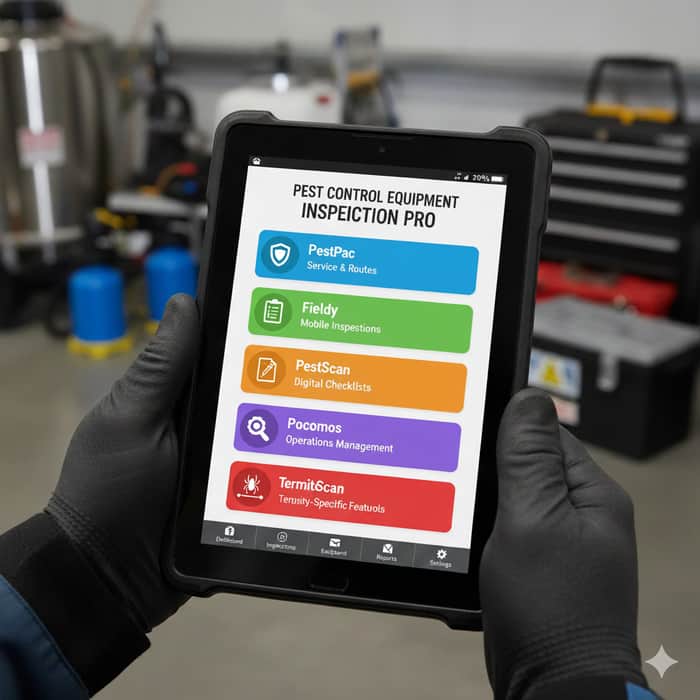
In the highly technical and regulated world of pest management, the reliability of your equipment isn't just a matter of efficiency—it's the bedrock of safety, compliance, and customer trust. A malfunctioning spray rig can lead to an ineffective treatment and a callback, but a faulty piece of safety equipment can have far more serious consequences. For decades, equipment inspection was a paper-based chore, prone to human error and filing cabinet black holes. Today, a new generation of mobile applications has transformed this critical task into a streamlined, data-driven, and accountable process. This guide explores the top pest control equipment inspection apps for 2026, breaking down their features, costs, and how to choose the right digital shield for your business.
The Non-Negotiable: Why Equipment Inspection is Paramount
Before delving into the digital solutions, it's crucial to understand why a rigorous inspection regimen is non-negotiable. Beyond the obvious need for tools to simply work, regular equipment checks serve multiple critical functions:
-
Efficacy and Service Quality: Pest control is a science. Precise chemical application rates and correct equipment calibration are essential for successful treatments. A faulty bait gun or a clogged nozzle compromises the entire service, leading to customer dissatisfaction and costly repeat visits.
-
Technician and Public Safety: This is the most critical factor. Equipment inspections prevent chemical leaks, exposure, and accidents. Checking personal protective equipment (PPE), vehicle-mounted systems, and application tools is a direct investment in the well-being of your team and your clients.
-
Regulatory Compliance and Liability Protection: The industry is governed by strict regulations from bodies like OSHA and state-level agricultural departments. Meticulous inspection records provide an auditable trail that proves compliance during inspections, helping to avoid significant fines and legal liability in the event of an incident.
-
Asset Longevity and Cost Savings: Proactive maintenance is far less expensive than reactive repairs. Identifying a worn seal or a corroded part early can prevent the total failure of a expensive piece of equipment, like a truck-mounted spray rig, saving thousands of dollars in the long run.
Digital apps elevate this process from a tedious task to a strategic advantage, ensuring nothing is ever overlooked.
The Top 5 Pest Control Equipment Inspection Apps for 2026
The market offers a range of solutions, from all-in-one enterprise platforms to specialized inspection tools. Here are the five standout apps for 2026:
1. PestPac by WorkWave: The All-in-One Enterprise Solution
PestPac is far more than an inspection app; it's a comprehensive pest control management platform. Its equipment tracking module is deeply integrated into a broader ecosystem that includes scheduling, routing, billing, and customer management. This allows a manager to see not only the maintenance status of a sprayer but also which technician is assigned to it, the jobs it's scheduled for, and its operational cost.
- Best For: Medium to large pest control companies that need a single, unified system to manage their entire business operations, not just their equipment.
2. Fieldy: The Mobile-First Field Operations Powerhouse
Fieldy is built from the ground up with the field technician in mind. Its intuitive, mobile-first interface makes it easy for technicians to complete digital equipment checklists, log maintenance issues in real-time, and access job details—even offline. The app’s strength lies in providing real-time operational visibility, allowing dispatchers to see technician locations and job progress while ensuring all equipment on the road is in compliance.
- Best For: Companies of any size that prioritize a superior mobile experience for their technicians and demand real-time visibility into their field operations.
3. PestScan: The Streamlined Inspection and Compliance Specialist
PestScan focuses laser-like on digitizing and simplifying the inspection process. It excels at creating custom digital forms for equipment checks, automating maintenance reminders, and generating pristine compliance reports with ease. Its straightforward approach makes it less about managing the entire business and more about ensuring that the critical tasks of inspection and documentation are handled flawlessly and without unnecessary complexity.
- Best For: Small to medium-sized businesses looking for a powerful, straightforward tool dedicated to mastering inspections and meeting compliance standards.
4. Pocomos: The Highly Customizable Operations Manager
For businesses with unique workflows, Pocomos offers a high degree of customization. It allows managers to tailor inspection templates, forms, and reporting dashboards to their exact specifications. This flexibility extends to integrating equipment management with inventory tracking, so you can monitor chemical stocks and reorder parts directly linked to your maintenance schedules.
- Best For: Growing businesses with specific processes that need a flexible and scalable software solution to adapt to their evolving operational needs.
5. TermiteScan: The Specialized Termite & Wood-Destroying Organism Expert
As the name implies, TermiteScan is a specialized tool designed for a specific niche. It goes beyond general equipment checks to offer tailored inspection checklists for the specialized tools of termite and WDO inspections, such as moisture meters, borescopes, and gas leak detectors. Its features for photo documentation and treatment tracking are specifically designed for the detailed reporting required in this segment of the industry.
- Best For: Companies that specialize in, or have a significant focus on, termite and WDO inspections, and need a purpose-built tool that understands their specific requirements.
Core Features of a Modern Pest Control Inspection App
When evaluating any potential app, it should possess a core set of features that define a modern solution:
-
Customizable Digital Checklists: The ability to create and modify checklists for every piece of equipment, from a backpack sprayer to a full vehicle inspection.
-
Offline Functionality: Technicians must be able to conduct inspections in basements, crawl spaces, and remote areas without a cell signal, with data syncing automatically once connectivity is restored.
-
Photo and Video Documentation: The power to visually capture issues, setup conditions, or compliance evidence directly within the inspection report.
-
Automated Scheduling & Reminders: The system should proactively schedule recurring inspections and send alerts to managers and technicians for upcoming or missed maintenance.
-
Digital Signatures: Capturing client and technician signatures on completed inspection reports for verifiable proof of service and compliance.
-
Reporting & Analytics: Generating instant compliance reports for auditors and providing insights into maintenance trends, such as frequently failing equipment.
Understanding the Cost: Buy vs. Build
Cost to Buy a Pre-Built App
Most commercial pest control inspection apps operate on a Software-as-a-Service (SaaS) subscription model, priced per user, per month.
-
Basic Tier ($30 - $70/user/month): Covers core inspection features, digital checklists, and basic reporting.
-
Professional Tier ($70 - $150/user/month): Adds advanced scheduling, custom reporting, and integrations with other software.
-
Enterprise Tier ($150+/user/month): Includes full customization, API access, and dedicated support.
This model offers a lower upfront cost and includes ongoing updates and support.
Cost to Develop a Custom App
For businesses with highly unique needs that cannot be met by off-the-shelf software, custom development is an option. This is a significant undertaking with costs varying based on complexity:
-
Basic Single-Platform App: A simple app with core features for one OS (iOS or Android) typically costs $25,000 - $50,000.
-
Mid-Range Cross-Platform App: A more robust app with an admin panel, custom features, and built for both major platforms can range from $50,000 - $100,000.
-
Complex Enterprise System: A full-featured system with advanced analytics, third-party integrations, and high-level customization can easily exceed $100,000+.
For a custom App development project, it is essential to hire dedicated mobile app developers from a reputable firm. Specializing in Android App Development Services and iOS development, such as Expert App Devs, can provide the technical expertise to guide you from concept to a polished, functional product, though this path requires a substantial investment of time and capital.
How to Choose the Right App for Your Business
Making the final decision requires a strategic approach. Follow these steps:
-
Conduct an Internal Audit: Identify your biggest pain points. Is it missed inspections, failed compliance audits, or inefficient communication with technicians? Gather feedback from your field teams—they are the end-users.
-
Define Must-Have vs. Nice-to-Have Features: Prioritize features critical to your immediate operations (e.g., offline mode) versus those that would be beneficial in the future.
-
Consider Your Growth Trajectory: Choose a solution that can scale with your business. A small, simple app might be outgrown quickly, while an overly complex enterprise system could be cumbersome for a small team.
-
Calculate the True Total Cost of Ownership (TCO): Look beyond the monthly subscription. Factor in setup fees, training time, and the potential ROI from increased efficiency and reduced equipment downtime.
-
Demand a Demonstration: Never buy without a test drive. Use free trials and live demos to see the software in action. Have a power user on your team test it against real-world scenarios.
The right pest control equipment inspection app is more than a digital notepad; it is a strategic tool that builds a culture of safety, ensures operational excellence, and protects your business from risk. By carefully evaluating your options in 2026, you can invest in a digital shield that safeguards your team, your clients, and your bottom line.
