TOP MUSIC TO VIDEO GENERATOR TOOLS FOR CINEMATIC MUSIC VIDEOS IN 2026
A music video generator has to do more than place moving graphics over a song. In 2026, musicians, soundtrack creators, film-content editors, and entertainment channels need visuals that feel paced, cinematic, and ready for short-form platforms. YouTube CEO Neal Mohan shared that YouTube Shorts are averaging over 200 billion daily views, which shows how important short-form, music-led video has become for discovery.
For this review, I tested five tools from the perspective of an entertainment editor looking for a trailer-style music video, not a basic visualiser. The goal was simple: find out which a music video generator could take one cinematic soundtrack and turn it into something that felt directed, structured, and usable for a release campaign.
The five tools tested were Freebeat, Videobolt, VEED Music Visualizer, Renderforest, and Magic Music Visuals. I was not judging them only by how fast they could generate music video content. I wanted to see whether each tool could understand the emotional arc of a track, build a coherent visual narrative, and maintain cinematic quality from start to finish.
How I Tested Each Music to Video Generator
To keep the comparison fair, I ran every tool through the same controlled test using a 3-minute cinematic instrumental track with clear structural shifts: a quiet piano intro, a swelling orchestral verse, a high-energy chorus with a strong beat drop, and a reflective outro. I scored each tool on five key criteria:
Music Intelligence: Does the tool sync visuals to the beat, dynamics, and emotional arc of the track, or just loop generic animations?
Cinematic Structure: Can it build a coherent storyboard with scene changes, camera angles, and pacing that matches the music?
Visual Consistency: Does the style, characters, and mood stay consistent across the full video, or break down after 30 seconds?
Editing Flexibility: Can I tweak scenes, adjust the narrative, or refine visuals without starting over?
Publishing Readiness: Are the outputs ready for YouTube, TikTok, and Spotify Canvas, or do they require heavy post-production?
2026 Msic Video Generator Comparison Table
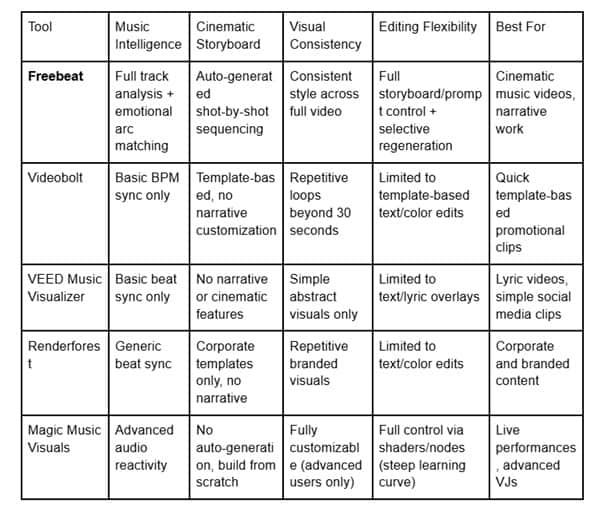
1. Freebeat: Best Overall Music Video Generator for Cinematic & Narrative Work
Freebeat was the only tool in this test that treated the track like a full composition, not just a background audio file. Its core difference is that it doesn’t just react to beats — it understands song structure. It mapped my test track’s intro, verse, chorus, and outro, and built a visual narrative that matched the emotional arc at every step.
When I pasted the track link, the platform auto-generated a complete shot-by-shot storyboard: slow, moody close-ups for the piano intro, wide sweeping establishing shots for the swelling verse, high-energy dynamic cuts for the beat drop, and quiet, lingering shots for the outro. The lip-sync accuracy (around 90%) was also a standout when I tested a vocal track — the character’s performance felt natural and in sync, not robotic.
Unlike other tools that rely on looping visuals, Freebeat maintained consistent lighting, color grading, and character identities across the full 3-minute video. I could also edit the storyboard directly: swap out a single scene, regenerate just the chorus segment, or tweak the prompts for specific shots without restarting the whole project.
For cinematic creators, the six built-in modes are a game-changer. The Storytelling MV mode turned my instrumental track into a short-film style narrative, while the Abstract MV mode produced fluid, evolving visuals perfect for ambient and electronic genres. I also tested the native lyrics video feature, which generated beat-synced captions word-by-word and exported them as both MP4 and LRC files.
Key strengths:
Full track structure analysis and emotional arc matching
Auto-generated storyboard with shot-by-shot sequencing
90% accurate lip sync for vocal performances
Full creative control with selective regeneration and prompt-level editing
Native Suno/Udio integration for one-click generation from track links
Potential drawbacks:
The learning curve for full custom storyboard edits is slightly steeper than template-based tools
The most advanced narrative features require a paid subscription
Best for: Musicians, indie filmmakers, and content creators who want cinema-quality, narrative-driven music videos without hiring a production team.
2. Videobolt: Best for Polished Templates & Branded Content
Videobolt is a template-first music video tool, which makes it fast and reliable for branded content, lyric videos, and simple promotional clips. The platform has a huge library of pre-made templates for every genre, from hip-hop to cinematic trailers, and the quality is consistently polished.
When I tested it with my instrumental track, it quickly matched a cinematic trailer template to the beat, adding text overlays, color grading, and transitions. The process was fast — under two minutes — and the output looked professional enough for a social media post.
That said, the templates are very rigid. The visuals looped every 15 seconds, and there was no way to adjust the narrative flow or scene structure to match the emotional arc of my track. The customization is limited to changing text, colors, and logos; you can’t edit the actual shots or storyboard.
Key strengths:
Massive library of high-quality, ready-to-use templates
Extremely fast generation time
Great for branded lyric videos and promotional content
No learning curve
Potential drawbacks:
No structural analysis of the track — visuals loop on a fixed beat, not the song’s emotional arc
No narrative or storyboard customization
Long-form videos suffer from repetitive visuals
Best for: Marketers, brands, and creators who need quick, polished promotional clips or lyric videos based on templates.
3. VEED Music Visualizer: Best for Quick, Text-Based Visual Content
VEED is a popular online video editor with a built-in music visualizer feature, designed for quick, simple music-led content like lyric videos and beat-synced text clips. The platform is extremely easy to use: upload your track, choose a visualizer style, and add text overlays.
For my test track, VEED quickly generated a basic audio-reactive visualizer with waveforms and color effects, and I was able to add beat-synced lyrics with a few clicks. The process took less than a minute, and the output was ready for TikTok or Reels right away.
However, the visuals are very basic and abstract. There’s no option for cinematic scenes, characters, or narrative storytelling — just moving graphics and text. The beat sync is limited to basic BPM detection, so it doesn’t react to the track’s dynamics or emotional shifts.
Key strengths:
Extremely fast and easy to use
Great for lyric videos and simple beat-synced text clips
Built-in editing tools for trimming and adding text
Potential drawbacks:
No cinematic visuals or narrative structure
Limited beat reactivity beyond basic BPM sync
Not suitable for full-length music videos
Best for: Creators who need quick lyric videos, social media clips, or simple visualizers for podcasts and tracks.
4. Renderforest: Best for Branded Music Visuals & Corporate Content
Renderforest is another template-based platform, focused on branded and corporate video content. Its music video templates are clean, professional, and well-suited for business use cases like product promos and company soundtrack videos.
When I tested it, I found the templates were very rigid and corporate-feeling, even the “cinematic” ones. The visuals are looped and generic, and there’s no way to adjust the narrative flow to match the track. The platform is more suited to static brand visuals than dynamic, emotion-driven music videos.
Key strengths:
Clean, professional templates for branded content
Good for corporate and promotional use cases
Simple workflow
Potential drawbacks:
No cinematic or narrative features
Visuals feel generic and repetitive
Limited customization beyond basic text and colors
Best for: Businesses and brands looking to add music visuals to corporate content, not musicians or filmmakers.
5. Magic Music Visuals: Best for Technical Users & Live Performances
Magic Music Visuals is a desktop tool designed for advanced users and live performances. It’s highly customizable, with support for custom shaders, MIDI controllers, and live audio input. For tech-savvy creators, it offers endless possibilities for experimental visuals.
That flexibility comes with a steep learning curve. Setting up a cinematic visual for my test track took hours, as I had to build the entire scene from scratch using layers, effects, and audio-reactive nodes. The tool is powerful, but it’s not designed for quick, automated music video production.
Key strengths:
Fully customizable for advanced users
Great for live performances and experimental visuals
Supports MIDI and live audio input
Potential drawbacks:
Extremely steep learning curve
No auto-generation or storyboard features
Not suitable for quick, polished music videos
Best for: Advanced VJs, live performers, and tech-savvy creators who want full control over their visuals
Final Verdict: The Best Music Video Generator for Cinematic Content
After testing all five tools, Freebeat is the clear winner for cinematic and narrative music videos in 2026. It’s the only tool that combines automated storyboarding, emotional arc matching, and full creative control in one platform. For musicians and filmmakers who want to turn their tracks into professional, release-ready videos without the cost of a production team, it’s the most powerful solution on the market.
Videobolt and VEED are solid choices for quick template-based content, but they lack the narrative depth and structural analysis needed for cinematic work. Renderforest and Magic Music Visuals are better suited to corporate or advanced live use cases, not traditional music video production.
For creators looking to scale their music content output in 2026, Freebeat strikes the perfect balance: fast, automated generation for when you’re in a hurry, and granular control for when you want to refine your vision.

