Try your first AI query to Telegram — 1st MVP version of CoTel is now available
Over the past few weeks, I’ve reached an important milestone: the first MVP version of CoTel is ready, and I can finally show it to people.
CoTel is an AI service for working with Telegram chats, groups, and channels. You can now sign up and try the core features for free:
— ask questions about chats, groups, and channels;
— analyze discussion history;
— create two types of subscriptions:
- Events — AI tracks relevant signals and sends notifications;
- Summaries — AI regularly creates a short summary of new messages.
For now, only the Free account is publicly available. It uses OpenAI, which is enough to try the main scenarios. I plan to open paid plans later, once I have real data on usage, workload, and cost.
Current link is https://cotel.onrender.com/new-analysis.html
There are two ways to access Telegram in CoTel:
-
Through your personal Telegram account
You can authorize your account and work directly with your own chats: ask questions, choose chats from your list, and create subscriptions. -
Through a CoTel service account
In this mode, you don’t need to connect your personal Telegram account. You simply paste a link to a public chat or channel. This may feel more comfortable if you don’t want to give the service direct access to your account yet.
I paid special attention to security and privacy. In short: Telegram passwords are not stored, Telegram sessions are not stored in plain text, Telegram data is requested only after your action, processed on the fly by an AI model, and not logged as message content or user query content. More details are available in the Privacy Policy and documentation.
After registration, you can open Help from the profile menu. I tried to describe how the service works, what modes are available, how subscriptions work, and what use cases may be helpful.
I also added a Feedback section, so you can send me a comment, question, bug report, or suggestion directly from the service. You can also attach screenshots, which will help me understand issues and improve the product faster.
Please don’t judge too harshly: this is my first MVP and my first public web service. Right now, feedback is extremely important to me:
— is it clear how to use the service;
— were you able to sign up and try the features;
— did you notice any bugs or confusing moments;
— does the idea itself seem useful;
— what scenarios would you like to see;
— what is missing in the interface, documentation, or product logic.
At the moment, OpenAI and Claude are already connected in the project. The Free account uses OpenAI, and a broader model choice will be available later on paid plans. I’m also researching Gemini, Mistral, and other models to expand AI model options for different use cases in the future.
I’d be very grateful for any thoughts, comments, questions, and suggestions.
https://cotel.onrender.com/new-analysis.html
@Hassan_Cheema I’d be happy to hear your feedback!
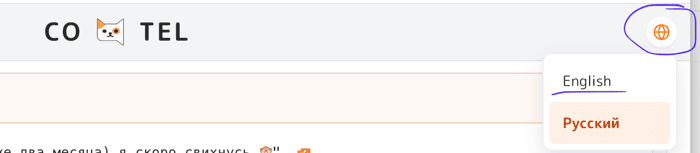
P.S. Language switcher is here (screenshoot)

Congrats on shipping — and on beating me to a working MVP. Build-first paid off for you.
I'm mid-exams this week and don't want to give shallow feedback on something you've put real work into. Going to actually test it properly when my brain isn't in exam mode (next week). Will send proper feedback then, not a quick "looks great."
Two quick things I can say from reading the post:
More properly in a week.
Thank you for comment and I'll wait for you proper feedback soon ;)
Finally tested CoTel properly. Honest feedback:
The product structure is solid — two connection modes
(personal account vs service bot), two subscription types
(Events vs Summary), clean registration flow. The
security thinking is visible in the architecture.
Real barrier I hit: the interface is fully in Russian
with no English option accessible before login. As a
non-Russian speaker I couldn't get past the onboarding
without guessing at labels. The language switcher
(English/Russian) exists in settings but requires being
logged in first — which creates a catch-22 for
international users.
Suggestion: detect browser language and default the
interface before login. Or add a visible language toggle
on the login/registration screen. One small change that
opens CoTel to a much wider audience.
The "I don't want to optimize this process — I want to
take it off my plate entirely" promise is visible in the
subscription model. The Events + Summary split is the
right architecture for that. Once the language barrier
is solved, I think international technical founders
would find this genuinely useful.
Impressive v1 for a solo first product. Shipping before
me showed it.
Thanks for testing CoTel! Detailed feedback like this is genuinely very valuable to me.
By the way, during your absence I wrote a few more posts about the product's development. You might find them interesting — one of them even turned into a fairly long discussion. Apparently, the topic resonated with quite a few people.
https://www.indiehackers.com/post/i-built-a-telegram-ai-tool-for-myself-users-immediately-wanted-different-things-7e4a13a410
https://www.indiehackers.com/post/i-thought-limiting-users-to-n-requests-per-day-was-enough-for-cotel-turns-out-it-s-a-path-to-bankruptcy-63d3502470
https://www.indiehackers.com/post/i-was-testing-ai-models-then-a-newsroom-asked-for-a-demo-of-cotel-24c48445f2
I've also attached a screenshot showing where the language switcher is located.
When I originally placed it there, I was following the pattern I usually see in other products, where language selection is often found either in the top corner or somewhere near the bottom of the page. It felt like a familiar convention to me.
But maybe I'm wrong. If you have any thoughts on where you would intuitively look for a language switcher on a website, I'd genuinely love to hear your opinion.
Happy to help — your feedback loop is sharp.
On the language switcher: top-right is actually the conventional spot, you're not wrong. The issue wasn't location, it was that it's an icon-only globe with no text label, so it reads as decoration until you're hunting for it. Two cheap fixes: (1) add a tiny "EN/RU" text label next to the globe, or (2) since you have auto-detection, the real fix is just making that work — if it correctly defaulted to English for me, I'd never have needed the switcher at all. The switcher is the fallback; the detection is the actual fix.
Will read through the posts properly — the pricing/bankruptcy one and the newsroom-demo one both sound like real lessons. Might comment on those separately.
Hello, my friend! 😊
I'm very happy to see you've finished your exams and are back with us.
Actually, the interface language can be changed using the language switcher in the top-right corner. If you didn't notice it, then perhaps I need to rethink the design and make it more visible. It should be available even before logging in.
Also, I actually have automatic language detection in the code based on the browser language and region. So if Russian was selected for you automatically, it looks like something didn't work correctly there. I'll need to investigate and test that more thoroughly.
Thank you for pointing this out and for taking the time to test the product. I'll reply to the rest of your feedback a bit later.
Glad it was useful! And yeah — I genuinely didn't spot the switcher, so if even someone actively looking for it missed it, the pre-login visibility is probably worth bumping up. Small thing, big unlock for international users.
Happy to re-test from my end (Pakistan region) once you've poked at the auto-detection — useful to have a non-Russian, non-default region to verify against. Just ping me.
Looking forward to the rest of your thoughts whenever.
By the way, I have a small question after reading your testing feedback.
In the CoTel admin panel, I can see all registered users. After your comment, I expected to see a new user account appear, but I couldn't find one.
So now I'm curious: did you actually register for the service?
I'm assuming you did, because you mentioned subscriptions and several features that are normally only visible after logging in.
If you did register, then I may have discovered a bug and the registration somehow didn't make it into my database. If you didn't register, then I'm just curious how you were able to explore that part of the functionality.
sorry i dont see https://cotel.onrender.com/new-analysis.html i am checking and when i clicked login for registration it asked country as compulsory field but my country is not in the list so it dont register me
Please tell me your country, and I'll add it to the selection list.
To be honest, you could have selected almost any country for now — it's not a critical field for the product itself. I mainly use it for analytics so I can understand the geographic distribution of users
Ah this explains it. No database bug — the reason there's no account is i couldn't actually register. the buttons don't work for me. i clicked everywhere again today after your message — "Попробовать", the nav links (Новый анализ, История, Настройки), the template "Использовать" buttons — none of them do anything. they seem to just point to # / nowhere on the page that loads for me.
it's been a bit intermittent, like occasionally something responds but mostly nothing's clickable. so i never got to the actual registration/login flow, which is why a lot of my earlier feedback was based on your IH post and what's visible on the landing page rather than the logged-in experience — i should've been clearer about that, my bad.
quick Qs so you can repro: is it built mainly for desktop or mobile? i'm on https://cotel.onrender.com/. and the language thing ties in here too — couldn't switch before login. happy to retest properly once the buttons/registration work, genuinely want to see the logged-in product.
Ah, that explains everything 😄
You were actually using the wrong link.
The URL you mentioned points to the landing page, which is currently still under development. In fact, I haven't officially published it yet, so what you saw was essentially an old draft version.
The actual CoTel workspace is here:
https://cotel.onrender.com/new-analysis.html
That's where the real product lives — registration, language switching, subscriptions, chat analysis, and the rest of the functionality.
I suspect things will make a lot more sense once you open that link.
That said, there's a chance not everything will work perfectly right now. I've recently deployed some fairly large changes related to pricing, usage accounting, model routing, and support for multiple AI providers, so I may have introduced a few bugs along the way.
But you should definitely be able to explore the interface, register an account, switch languages, and get a much more accurate picture of the actual product.
I'd be very interested to hear your thoughts after testing the real workspace rather than the draft landing page.