Understanding and Creating Test Cases in Software Testing
In software development, test cases are essential components that validate the functionality, quality, and reliability of an application. Writing effective test cases ensures that the code behaves as expected in all scenarios, including edge cases, and can be confidently deployed into production.
In, this blog will dive deep into test cases, covering different types, test coverage, tools used, and how to handle edge cases. Whether you are a beginner or an experienced developer, this guide will provide a solid foundation for writing and managing test cases.
What are Test Cases?
A test case is a set of actions, conditions, and inputs that are developed to verify a particular feature or functionality of a software application. A well-written test case consists of:
-
Test case ID: A unique identifier for the test case.
-
Test description: A summary of what the test aims to verify.
-
Test prerequisites: The initial setup before running the test case.
-
Test steps: The specific steps taken to perform the test.
-
Test data: Input values used during testing.
-
Expected Test result: The result that should be produced if the system works correctly.
-
Actual Test result: The result produced by the system during testing.
Example of a Test Case
Here’s an extended table with additional test cases, including a mix of passing and failing scenarios based on the same login function:

This table covers a variety of scenarios including valid inputs, error handling, UI behavior, and security testing, with a mix of pass and fail results.
What are the types of Test Cases?
There are several types of test cases, each designed to test different aspects of a software application. Let's learn about each type of test case with an example, consider a scenario - "An e-commerce application allows users to browse products, add them to the cart, and proceed to checkout. The application has functionalities like user authentication, product management, cart operations, and payment integration."
a. Functional Test Cases
Functional test cases are designed to verify that the software behaves according to the specified requirements. They are focused on validating the business logic, user interface, APIs, and other functional components of the software.
Scenario Example:
- Testing the user registration and login process.
Test Case Example:
-
Title: Verify successful login with valid credentials.
-
Steps:
-
Navigate to the login page.
-
Enter valid username and password.
-
Click the "Login" button.
-
-
Expected Result: User should be successfully logged in and redirected to the homepage.
b. Non-Functional Test Cases
These test cases check non-functional aspects such as performance, usability, security, and reliability. The goal is to ensure that the system meets non-functional requirements like load handling or UI responsiveness.
Scenario Example:
- Testing the performance of the application when multiple users are accessing it simultaneously.
Test Case Example:
-
Title: Verify application performance with 1000 concurrent users.
-
Steps:
- Simulate 1000 users browsing products and adding items to the cart simultaneously.
-
Expected Result: The application should maintain a response time of less than 2 seconds without crashes or slowdowns.
c. Regression Test Cases
Regression test cases are written to ensure that recent changes or enhancements have not adversely affected existing functionality. They are often re-run after every code change.
Scenario Example:
- Testing the core functionality of the cart after adding a new wishlist feature.
Test Case Example:
-
Title: Ensure cart functionality works correctly after wishlist feature implementation.
-
Steps:
-
Add an item to the cart.
-
Proceed to checkout.
-
-
Expected Result: User should be able to add items to the cart and successfully proceed to checkout without issues caused by the new wishlist feature.
d. Negative Test Cases
Negative test cases are designed to test the system's behavior under invalid or unexpected inputs and conditions. These cases ensure that the application does not break and handles errors gracefully.
Scenario Example:
- Testing the login system when the user enters an incorrect password.
Test Case Example:
-
Title: Verify that login fails with invalid password.
-
Steps:
-
Enter valid username and incorrect password.
-
Click the "Login" button.
-
-
Expected Result: User should see an error message: "Invalid credentials."
e. Boundary Test Cases
Boundary test cases focus on the edge limits of input values. These tests are particularly useful for identifying potential off-by-one errors.
Scenario Example:
- Testing the product description input field which accepts a maximum of 500 characters.
Test Case Example:
-
Title: Verify product description input field accepts up to 500 characters.
-
Steps:
-
Enter exactly 500 characters in the description field.
-
Attempt to save the product.
-
-
Expected Result: The product should be saved successfully.
f. Smoke Test Cases
Smoke tests ensure basic, critical functionalities are working after deployment or code changes.
Scenario Example:
- Testing if the e-commerce site is functioning after deployment.
Test Case Example:
-
Title: Verify basic site functionality after deployment.
-
Steps:
-
Open the e-commerce homepage.
-
Click on the "Shop" button.
-
-
Expected Result: Homepage should load, and the user should be able to navigate to the shop page.
g. Integration Test Cases
Integration test cases ensure that different modules or services work well together. These tests focus on the communication between systems, APIs, or modules within an application.
Scenario Example:
- Testing the integration between the payment gateway and the order management system.
Test Case Example:
-
Title: Verify successful integration between payment gateway and order system.
-
Steps:
-
Add items to the cart.
-
Proceed to checkout and complete payment using a credit card.
-
-
Expected Result: Payment should be processed successfully, and the order should be recorded in the order management system.
What about Test Coverage?
Test coverage is a metric that determines how much of the application’s code is executed when test cases are run. It helps in understanding how thoroughly the software is being tested.
Different Types of Test Coverage
a. Statement Coverage
Statement coverage checks if each line of code has been executed at least once. 90% is often a baseline target for most organizations, with some critical systems targeting 95%-100%. Lower coverage could imply that some parts of the codebase are not tested at all.
- Example: Verifying that every
ifandelsestatement in the code is executed during testing.
b. Branch Coverage
Branch coverage tests both the true and false conditions of every logical branch in the application. 80% coverage is typically viewed as a strong standard, although mission-critical or safety-critical systems (e.g., in aerospace or healthcare) may require higher, sometimes close to 100%.
- Example: Testing both outcomes of an
if-elsestatement by providing inputs that trigger each branch.
c. Condition Coverage
Condition coverage measures whether each condition in a decision statement has been tested. It ensures that every possible outcome of each condition in the code is tested. Aiming for 80% ensures a reasonable balance between testing complexity and coverage, but again, higher percentages may be mandated in highly regulated industries.
- Example: For a statement like
if (A && B), the test should cover both true/false conditions for A and B.
Tool for Measuring Test Coverage
Several tools can help in measuring and increasing test coverage, ensuring that all parts of the code are tested.
-
JaCoCo (Java Code Coverage)
-
Clover (Java, Groovy)
-
Coverage.py (Python)
-
Istanbul (JavaScript, Node.js)
-
Cobertura (Java)
These tools provide detailed reports on test coverage, highlighting which parts of the code have not been executed by test cases, allowing teams to identify gaps in their testing.
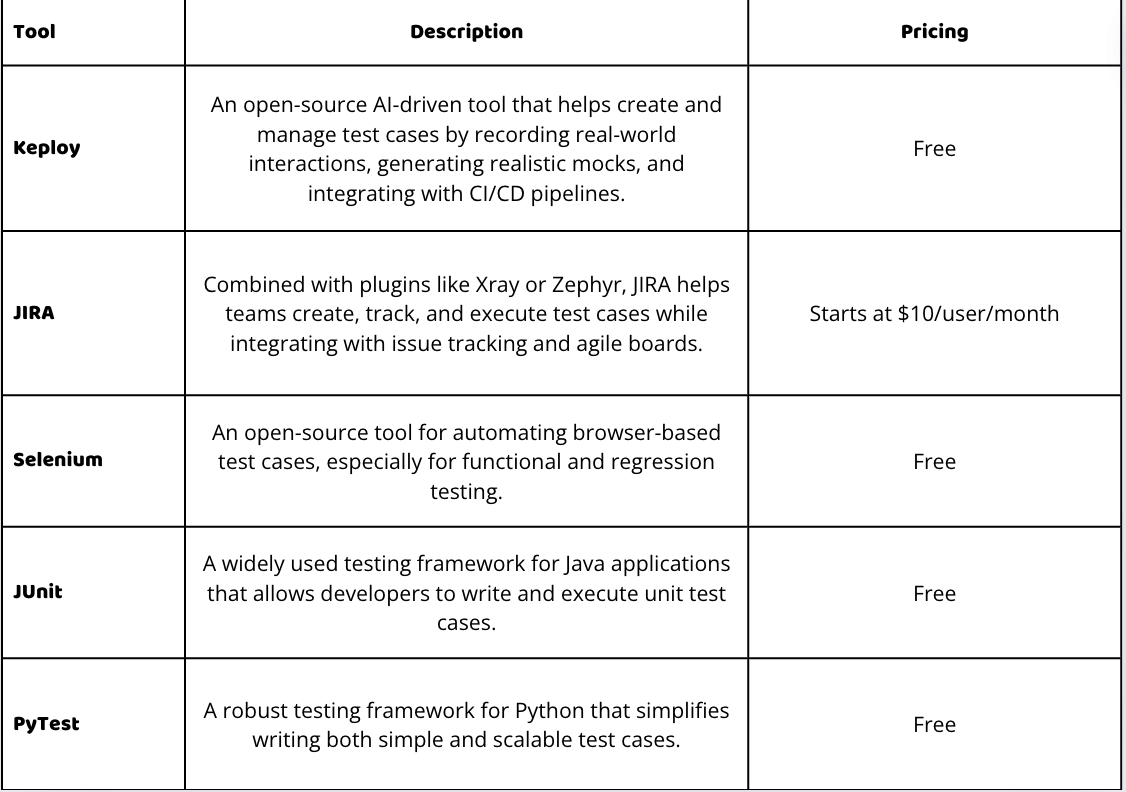
Tools for Writing and Managing Test Cases
Effective test case management is crucial for maintaining high-quality software. Here are some widely used tools for writing, organizing, and executing test cases.
How do you leverage AI to identify edge cases?
Edge cases refer to scenarios that occur at the extreme ends of input parameters or outside normal conditions. These cases are often overlooked, but they can lead to unexpected failures if not properly handled.
With Generative AI tools trained data such as code base, existing test cases, and failure logs it can predict potential edge cases by recognizing patterns and anomalies and automatically generate a wide range of test scenarios, including extreme or rare conditions, ensuring comprehensive coverage.
For example, tools like Keploy play a significant role in this process. It can record and analyze real-time user traffic to create realistic test cases and mocks. Additionally, with the help of the Schema or PRD of the application, it can automatically generate test cases covering a wide range of scenarios. This helps in identifying edge cases that may not be evident from traditional testing methods, ultimately improving system robustness and reliability.
Examples of Edge Cases
-
Text Input Validation: Testing a form that accepts a string input with inputs like an empty string, a string with one character, and a string exceeding the maximum length.
-
Date Validations: Testing date fields with past, present, and future dates, as well as invalid dates like February 30.
-
Concurrent Access: Simulating multiple users updating the same record at the same time to test for data consistency and race conditions.
Conclusion
According to Industry metrics, inadequate testing can lead to severe consequences, including high defect rates and increased maintenance costs. Research shows that 40% of software defects are discovered by end-users, which could be avoided with more comprehensive test coverage. Insufficient test cases not only increase the risk of undetected bugs but also contribute to a 30% increase in post-release defect fixing costs.
By understanding and implementing various types of test cases—covering edge cases, positive, and negative scenarios—you can significantly reduce these risks. Utilizing industry-standard tools and practices to measure and enhance test coverage will ultimately lead to higher software quality, reduced costs, and better user satisfaction.
FAQs
What is the purpose of writing test cases?
Test cases help verify that software functions as intended by outlining specific inputs, actions, and expected outcomes. They ensure that both individual features and the overall system behave correctly and help identify bugs, edge cases, and areas for improvement before the software is released.
What’s the difference between functional and non-functional test cases?
Functional test cases check if the software performs its intended functions (e.g., login, data processing). Non-functional test cases assess attributes like performance, security, and usability, focusing on how well the software performs rather than what it does.
What is test coverage, and why is it important?
Test coverage measures how much of the code is executed when tests are run. It helps identify parts of the application that are untested and ensures that all paths, branches, and conditions are evaluated to minimize the risk of undetected bugs.
Which tools can be used to measure test coverage?
Popular tools for measuring test coverage include JaCoCo (Java), Coverage.py (Python), Istanbul (JavaScript), and Cobertura (Java). These tools provide detailed reports on which parts of the code have been tested and help in identifying areas that require more test coverage.
How do I handle edge cases in test cases?
Edge cases can be identified by analyzing inputs at the boundaries of acceptable ranges, handling unexpected or extreme values, testing for null or empty inputs, and simulating concurrency issues. Testing these scenarios ensures your software remains stable under unusual conditions.
How often should regression test cases be run?
Regression test cases should be run every time new code is added or existing code is modified. Running these tests frequently ensures that updates or fixes do not introduce new bugs or break existing functionality in the software.

I use Test Cycles/Test plans in Jira. I like that I can clone the regression test cycles and reuse it again and also add some new test cases. These tips are pretty awesome though, an important article!
Glad that you like the article
I use go which has an amazing built in testing library, you should try it!
Great article btw. Thanks for sharing.