We pivoted our marketing vision: Why prompt-generated sites need a real CMS backend
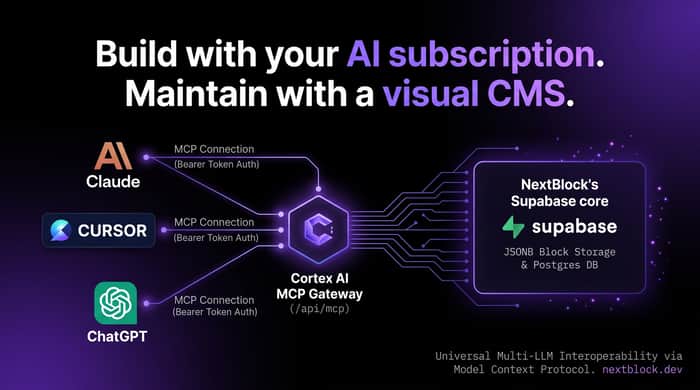
When we first built NextBlock CMS, we positioned it as a developer-focused, high-performance alternative to WordPress and decoupled headless platforms. It featured 100/100 Lighthouse performance, Supabase integration, and a clean Notion-style Tiptap block editor.
However, watching the rise of AI tools like Lovable, Bolt, and v0 highlighted a glaring market issue: The Day 2 Maintenance Crisis.
Prompting a landing page or web app into existence takes minutes. But what happens two weeks later when a copywriter wants to fix a typo, update pricing, or add a blog post?
- You have to open the repo.
- You have to re-prompt the AI (risking layout regressions).
- You have to run a git commit and wait on CI/CD redeploys.
We realized NextBlock solves this problem natively:
- One-Click Deployment: A completely free Vercel + Supabase deployment pipeline that sets up the database, storage, and app in a minute.
- Bring Your Own AI Subscription: Cortex AI now acts as an open MCP server. Users plug in their own Cursor, Claude, or ChatGPT accounts to generate pages using tokens they already own.
- Everyday Visual Editing: AI generations land as structured JSONB inside a visual CMS canvas. Content teams can edit, delete, and duplicate sections intuitively with slash commands without ever seeing a terminal.
We launched a 30-day free trial (completely free to start, no credit card required) to let founders test this bridge between rapid AI generation and long-term site operations.
Would love to hear how other founders manage non-technical client hand-offs after using prompt-based website tools!

I tried this positioning two years ago and found most non-technical clients just avoided the CMS interface altogether—they'd email asking for edits instead. The MCP for generation is clever, but I'm skeptical the visual editor actually solves Day 2. Are trial users doing independent edits or just re-prompting when things need to change?
That skepticism is 100% fair, and to be completely transparent: our tester pool is still very early stage, so I don’t have enough long-term client data yet to prove whether they stick to the editor or revert to emailing requests.
Your point about clients avoiding CMS dashboards entirely resonates. Most traditional admin panels feel like filling out rigid database forms, which intimidates non-technical people and pushes them right back to email. Our hypothesis with the inline, document-style canvas is that if the editing experience feels closer to typing in Notion or Google Docs, the intimidation factor drops significantly.
That said, whether clients actually self-serve or just ask the developer to 're-prompt the AI' is the exact behavior I’m trying to observe right now during this beta.
Since you ran into this wall two years ago, did you find any workflow that actually got clients to make their own edits, or did you eventually just accept that clients will always default to email?