We Tested Three Ways to Simplify AI Video Creation—Here’s What Users Actually Used
AI video generation has become remarkably capable, but using it can still feel like work.
A creator may need one tool for the script, another for images, a third for video generation, and a traditional editor to bring everything together. Even within a single platform, users can face model selectors, credit systems, prompt settings, aspect ratios, and unfamiliar production terms.
[Medeo](https://www.medeo.app/) is an interesting case because it offers three different answers to this problem. Users can begin with a ready-made Recipe, create and revise a video through chat, or choose from several AI models and tools in one workspace.
Each approach makes video production easier in a different way. The more revealing question is not which one looks most impressive on a feature page, but which one fits naturally into the way people actually create.
Approach 1: Start With a Recipe
The blank prompt box is one of the most underestimated problems in generative AI.
It looks simple, but it immediately asks the user to make several decisions: What should the video be about? How should the prompt be written? Which visual style will work? How many scenes are needed? What kind of output can the system produce?
Experienced users may enjoy that freedom. New users often need a more concrete starting point.
[Medeo Recipes](https://medeo.app/create) address this by showing users recognizable video formats they can adapt. Instead of inventing a production brief from scratch, someone can begin with a product showcase, story video, social clip, faceless video, or another existing format.
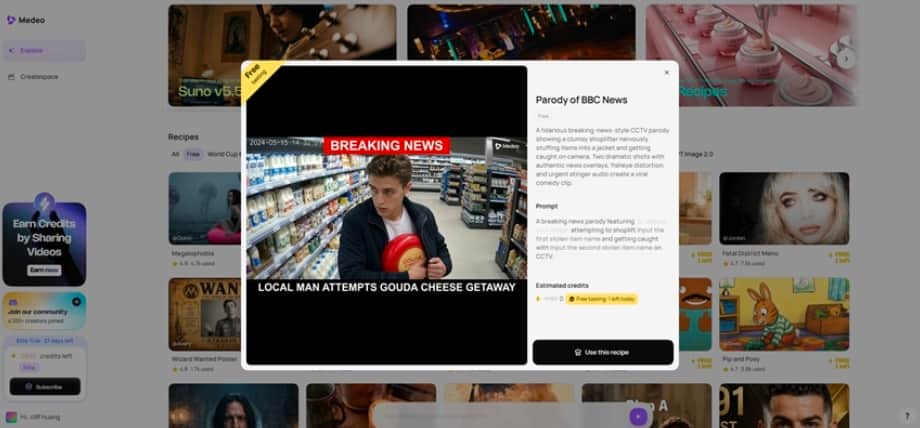
This is more than a collection of visual templates. A good Recipe also gives the user an idea of what to make. It turns an open-ended creative task into a much smaller question: “What would this format look like with my subject?”
That makes Recipes especially useful during the first few sessions with the platform. They help users understand what is possible before they understand how every feature works. They are also practical for recurring content. Once a format works, a creator can reuse its general structure rather than rebuilding the same type of video every week.
There is an obvious limitation, though. Templates are good at helping people begin, but they cannot anticipate every brand, audience, or creative direction. If users stay too close to the original Recipe, the result can feel generic. At some point, they need a way to make the format their own.
That is where the second approach becomes more important.
Approach 2: Create and Edit Through Chat
Most people who struggle with video editing do not lack ideas. They struggle to translate those ideas into editing actions.
They may know that the opening is too long, but not how to restructure the timeline. They may want a scene to feel more energetic without knowing which transitions, shots, or music choices would create that effect.
Medeo’s AI Video Agent lets users describe those changes in ordinary language. A project can begin with a short idea, a script, an image, a document, an audio file, or a URL. Medeo then organizes the material into scenes and assembles a draft with visuals, narration, and other production elements.
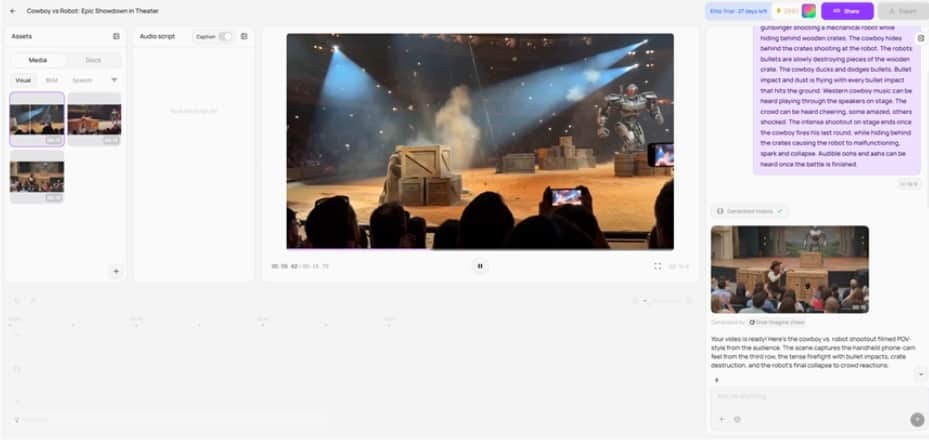
Once the draft is available, the user can continue the conversation:
- Make the introduction shorter.
- Replace this scene with a product close-up.
- Use a more casual voice.
- Remove the third section.
- Turn this into a vertical social video.
- Keep the visuals but rewrite the ending.
This is where chat becomes more useful than a one-shot prompt. The first generation rarely contains every detail a creator wants. What matters is how easily the result can be changed.
Traditional editors solve this with precise manual controls. Medeo tries to solve it by allowing users to express the desired outcome. That is a better fit for marketers, educators, founders, and small content teams who understand their message but do not want to become full-time video editors.
Chat also provides the missing flexibility in the Recipe workflow. A Recipe can supply the starting structure, while conversation allows the user to move away from it. The user does not have to choose between the speed of a template and the freedom of starting from scratch.
This combination is likely to be the most comfortable workflow for a broad audience: select something close to the desired format, generate a first version, and explain what needs to change.
Approach 3: Put Multiple AI Models in One Place
The third approach is more technical. Medeo provides access to multiple image and video generation models alongside tools for animation, upscaling, background removal, video extension, and other production tasks.
This solves a real problem. Different models have different strengths, and creators often end up maintaining accounts across several platforms. Bringing those capabilities together can save time and make experimentation easier.
For an experienced creator, model choice can be valuable. One scene may need realistic movement, another may require stylized animation, and a third may work better with stock footage than generated video. Having several options in one workspace makes it possible to choose the right method for each job.
But more choice does not automatically create a simpler product.
A beginner may not know why one model is better for a certain scene or whether the improvement justifies the additional credits. Model names are meaningful to people who closely follow generative AI, but less meaningful to someone who simply wants a product video by Friday.
This is why the multi-model approach works best when it sits behind the user-facing workflow. The models provide the production power, but users should not always have to think about them. When the platform can recommend or select an appropriate option, the creator can stay focused on the result.
Advanced users can still explore individual models when they want more control. Everyone else can treat them as infrastructure.
What Did Users Actually Use?
The most practical answer is not one of the three approaches in isolation.
Recipes are useful for starting. Chat is useful for shaping and revising. Multiple models are useful for producing the required assets, even when the user does not actively choose them.
The natural workflow looks more like this:
Choose a Recipe → Add the subject or source material → Generate a draft → Refine it through chat → Let the platform handle the underlying models
This sequence reduces decisions at the moment when each decision is hardest.
At the beginning, the user does not have to invent a format. During editing, the user does not have to learn a timeline. During generation, the user does not need to understand the strengths and pricing of every available model.
The notable lesson is that users do not necessarily want less creative control. They want control expressed in a form that matches how they think. “Make this scene shorter” is still a creative decision. It is simply easier to communicate than dragging several clips around a timeline.
What Other AI Products Can Learn From This
Medeo’s three approaches point to several lessons that apply beyond video creation.
First, eliminating the blank page can matter more than adding another advanced feature. Examples, Recipes, and sensible starting points help users reach the first useful result.
Second, revision deserves as much attention as generation. A spectacular demo can attract users, but an easy correction workflow is what makes a tool practical.
Third, technical capability does not always belong in the foreground. Multiple models can make a product stronger while also making the interface more confusing. The best experience may be one that hides model selection until the user asks for it.
Finally, templates need an escape route. Recipes are useful because they reduce uncertainty, but chat makes them flexible enough to support individual ideas.
AI video creation is unlikely to become simpler through a single feature. The more convincing approach is a layered one: offer a clear place to start, a natural way to make changes, and advanced technology that does not demand attention at every step.
Medeo’s most useful idea is not that users can access more AI. It is that they can make fewer production decisions before seeing their idea become a video.

