What do you think about our new control panel design?
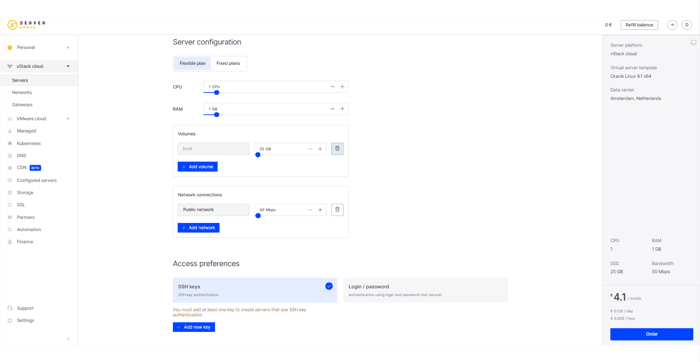
Hey there!
We are cloud provider Serverspace. Recently we have relesed our new control panel design. We will be happy to see your feedback. Leave it below in comments 👇
A litle bit about update!
Our team has made significant changes to the overall layout, calculators, and settings pages.
Key updates :
- right side display of server configuration and cost in the server creation calculator;
- card display of the list of cloud servers;
- tag management;
- status filter and sorting;
- copying code from system tutorials;
- control panel adaptation for mobiles.
To take advantage of the updated panel, simply create a Serverspace account or log into your existing account.
Read more in our news 👇
https://serverspace.io/about/news/serverspace-control-panel-release/

However, if you can describe it to me or provide some details, I can try to provide feedback or discuss any concepts or ideas related to control panel design in general. For more details visit here
Hello!
You can sign up and get to know the new design directly. We can credit you with bonuses so you can test the control panel ux/ui. Just email us at marketing@serverspace.team the email you registered with.
Those sliders for CPU/RAM/etc. are a bit odd. Users should either use +/- to increase/decrease values or the blue dot to click n drag but not both, imo.
The rest is slick, I like!
Thanks for the feedback!
The two slider options are designed to make it easier and quicker for users to set up the configuration. If a user needs a certain large configuration, for example 730 GB SSD, they can first use the slider with blue dot to reach 700 GB and use + to reach another 30 GB. Sometimes this is difficult to do with just the slider with blue dot, or long, using only + button.
Looks pretty clean! Just a design suggestion, I might move tooltips/suggestions under the inputs to make more horizontal room. You can also center your inputs in the main content area and give it some more breathing room.
Hello, thank you!
Can you elaborate on which tooltips/suggestions you mean. Is it a tooltip on the right with configurations? It can be moved down, it's up to anyone's discretion. If you're interested, you can test the service and find out all functions in more detail. We can credit you with bonuses so you can test the control panel ux/ui. Just email us at marketing@serverspace.team the email you registered with.
It is looking amazing but if you will take example from other competitors then it will be good for ranking just like i did in my website.
Hello, thanks!
Could you tell me please what you mean exactly?