What goes inside the Advanced Voice Mode of ChatGPT
I was excited when OpenAI announced the Advanced Voice mode. My mind immediately started buzzing with all the cool ways I could use it. It’s disappointing that I still don’t have access, though. Maybe the rollout is just taking its time in the European Union, but I’m still really impressed with the technology behind it.
The OpenAI Realtime API allows building a low-latency, multimodal conversational experience. The forms of communication:
• Speech-to-speech interactions: A dynamic bidirectional conversation.
• Streaming audio and text: Real-time streaming of audio and text inputs and outputs.
• Function calling: Using external tools to perform custom actions.
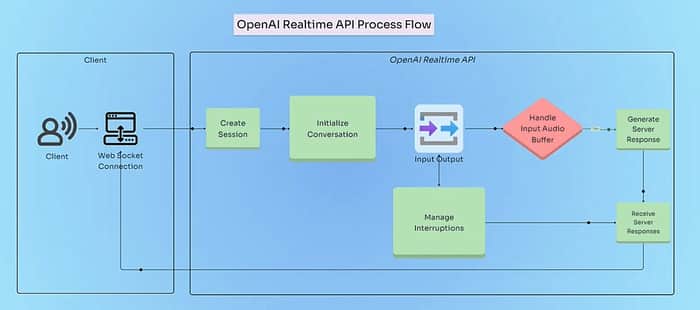
The conversation follows a continuous loop of the following steps:
- Connection Establishment: The client establishes a WebSocket connection to the Realtime API.
- Session and Conversation Setup: The server creates a session and initializes a conversation.
- User Input Handling: The user provides input (text or audio) which the client sends input to the server.
- Server Processing: The server processes input and generates the assistant’s response.
- Response Delivery: The server streams the response back to the client in the form of text, audio, and any function calls.
- Function Execution (if applicable): The client executes functions requested by the assistant and sends function outputs back to the server.
- Conversation Continuation: Process repeats for each user input.
- Interruption Handling: The user or client interrupts the assistant’s response and the server adjusts accordingly.
- Session Termination: The webSocket connection is closed and it marks the Session end.
It opens up an infinite number of applications, but the cost remains an issue at the moment. I would experiment further and post my learnings.
