What Indie Communities Should Check Before Choosing a Messaging Tool
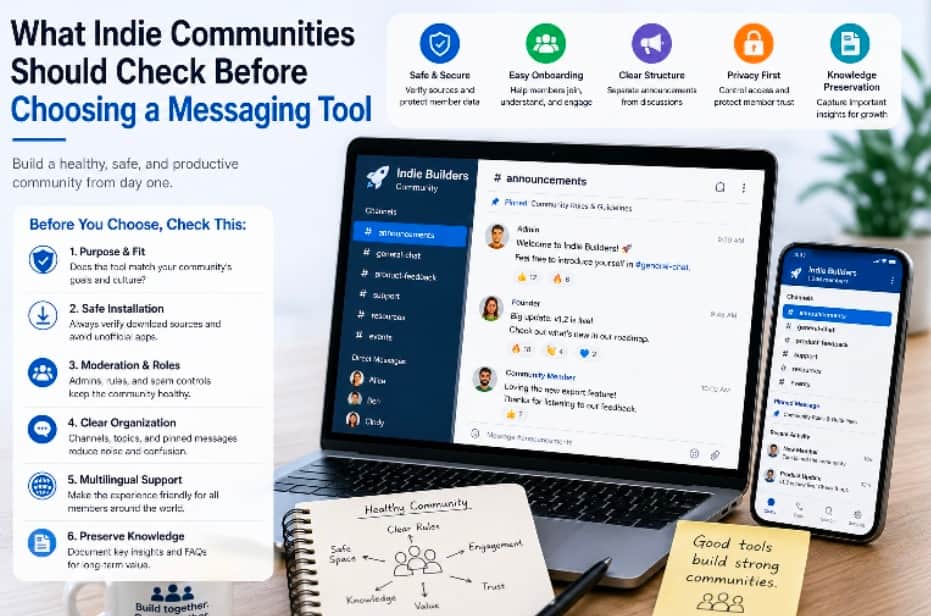
Indie communities often start small. A few founders share progress updates, a small group of builders exchange feedback, or early users gather around a product idea. At the beginning, communication may feel simple. A group chat, a few channels, and a basic announcement space may be enough. But as the community grows, the messaging tool becomes more important than many founders expect.
A community messaging tool is not just a place for casual conversation. It can become the home for product announcements, user feedback, support questions, beta testing, resource sharing, event coordination, and founder-to-founder collaboration. If the tool is chosen casually, the community may later struggle with moderation issues, lost information, confusing onboarding, privacy concerns, or fragmented discussions.
Indie founders and community builders should choose messaging tools with a practical checklist. The goal is not to find the most popular app, but to select a tool that fits the community’s size, habits, privacy expectations, and long-term operating needs.
Start With the Community’s Purpose
Before choosing a messaging tool, founders should define what the community is for. A private founder group, a public product community, a paid membership space, and a customer support channel may all need different features. Without a clear purpose, the community may quickly become noisy or hard to manage.
Useful questions include:
Is the community public, private, or invite-only?
Will members mainly discuss product feedback, business ideas, technical issues, or general networking?
Does the community need announcement channels separate from discussion spaces?
Will the founder or moderators need to manage spam, bots, or low-quality posts?
Will members share files, screenshots, links, or documents?
Does the community need multilingual support?
These questions help founders avoid choosing a messaging app based only on habit. A tool that works for a small private group may not work well for a large public community.
Check Onboarding and Member Access
Good community tools make onboarding simple without making the group too easy to abuse. Members should be able to join, understand the rules, find important channels, and start participating without confusion. At the same time, founders need basic control over who can enter and what new members can do.
For indie communities, onboarding should include a short welcome message, community rules, key channels, and guidance on where to ask questions. If the tool supports pinned messages or welcome notes, founders should use them to reduce repeated questions.
Access control also matters. A founder may want one space for public announcements, another for paying users, and another for internal collaborators. If the messaging tool cannot support these layers clearly, the community may become hard to manage as it grows.
Review Source Verification and Safe Setup
Many community members use messaging tools across multiple devices. They may join from a phone, laptop, tablet, or browser. If users download the app from unclear sources, they may install outdated clients, unofficial packages, or apps that do not match the intended service.
Community builders should provide safe setup guidance, especially when members come from different regions or use different languages. For example, Chinese-speaking users may refer to certain messaging tools with terms such as 电报 when looking for setup information. In any case, users should be reminded to verify the download source, check the domain, review app permissions, and avoid suspicious third-party installers.
A simple setup note can prevent many support issues. It can explain where members should start, how to confirm they are using the right app, and what basic security settings they should review after joining.
Look at Moderation Features Early
Moderation is easy to ignore when a community has only a few members. But once a group becomes active, founders may need to handle spam, repeated promotion, irrelevant links, aggressive comments, or low-quality discussions. A messaging tool should make moderation practical.
Important moderation features may include:
Admin and moderator roles.
Ability to remove or restrict members.
Pinned rules and announcements.
Group or channel organization.
Spam reporting or filtering options.
Control over who can post links or invite new members.
For indie communities, moderation should protect the quality of discussion without making the space feel overly controlled. The best communities usually have clear rules, visible expectations, and consistent enforcement.
Separate Announcements From Discussion
One common mistake is using a single chat for everything. Product updates, user questions, casual conversations, bug reports, and launch announcements all appear in the same stream. This may work at first, but it becomes difficult to follow as the community grows.
Founders should separate high-value communication from general discussion. Announcements should be easy to find. Support questions should not bury product updates. Community feedback should be organized enough for the founder to review later.
A practical structure may include:
An announcement channel for official updates.
A general discussion group for members.
A support or help section for questions.
A feedback area for product ideas and bug reports.
A private moderator or founder-only space.
This structure helps communities stay useful instead of becoming an endless stream of mixed messages.
Consider Multilingual Member Experience
Many indie products attract international users early. A small tool built by one founder may find users in several countries before the founder has a formal localization plan. If the messaging space is difficult for multilingual users, valuable members may stay silent or leave.
Community builders should consider whether the app interface, onboarding notes, and support messages are understandable for the audience. In Chinese-language communities, users may use familiar terms such as 纸飞机 when referring to certain messaging apps. Founders do not need to support every language from the beginning, but they should make core instructions clear enough for the users they actually serve.
If the community includes multiple language groups, founders may also create separate channels or pinned notes for key languages. This keeps the main discussion cleaner and helps members find relevant information faster.
Protect Privacy and Member Trust
Community trust depends on more than friendly conversation. Members may share product feedback, business ideas, private questions, or early-stage company details. The messaging tool should give users reasonable control over privacy and account settings.
Founders should understand what member information is visible by default, how invitations work, whether phone numbers or usernames are exposed, and how users can manage notifications and profile visibility. These details are especially important for communities that include founders, freelancers, investors, or customers discussing sensitive topics.
A short privacy note in the onboarding message can help members adjust settings before they begin participating actively.
Make Important Knowledge Easy to Preserve
Messaging tools are great for fast discussion, but they are not always good long-term knowledge bases. Valuable insights can disappear inside busy threads. For indie communities, this is a major missed opportunity. Good feedback, customer language, feature requests, and founder lessons should be captured somewhere more permanent.
Community builders should create a process for saving important information. This may include weekly summaries, public FAQs, product feedback documents, or a shared resource library. Moderators can collect recurring questions and turn them into onboarding material.
This habit makes the community more useful over time. New members can learn from past discussions instead of asking the same questions repeatedly.
Review the Tool as the Community Grows
The right messaging tool at 50 members may not be the right tool at 5,000 members. As the community grows, founders should review whether the current platform still supports moderation, search, onboarding, announcements, and member trust.
A quarterly review can help founders identify problems early. They can check whether channels are too noisy, whether members understand the rules, whether spam is increasing, whether moderators have enough control, and whether important knowledge is being preserved.
Community tools should support the group’s direction, not trap it in early decisions that no longer fit.
Conclusion
Choosing a messaging tool for an indie community is an operational decision, not just a convenience choice. The tool shapes onboarding, moderation, announcements, support, privacy, and long-term knowledge sharing.
Founders should start with the community’s purpose, verify safe setup paths, review moderation features, separate announcements from discussion, support multilingual members where needed, and create habits for preserving important knowledge. A good messaging tool helps the community grow with clarity instead of turning into noise. For indie builders, that clarity can be the difference between a chat group that fades and a community that becomes a real product asset.

