What Is End To End Testing? A Complete Guide With Examples

Imagine attending a large event as a guest. You check in, find your seat, enjoy the food, and follow the program. Each step depends on the previous one working smoothly. If entry is delayed, payments fail, or the program breaks midway, the entire experience feels broken, even if each setup worked fine on its own.
End to end testing focuses on validating this complete experience. It ensures that every step in a user’s journey works together seamlessly under real-world conditions.
In this article, we’ll explain what end to end testing is, why it is important, and how teams can implement it effectively. We’ll cover its benefits, best practices, common challenges, and real-world examples to help you apply E2E testing with confidence in modern software systems.
What Is End-to-End Testing?
End to end (E2E) testing is the practice of validating an application by executing complete user workflows the way a real user would. Rather than testing parts in isolation, E2E testing evaluates how all components of the system interact to deliver the expected outcome under real usage scenarios.
For example, in an e-commerce application, a typical user journey may include logging in, browsing products, adding items to a cart, completing payment, and receiving confirmation.
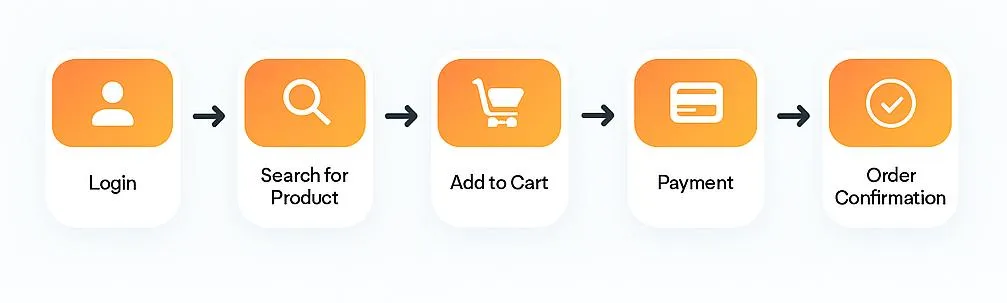
E2E testing connects all these steps into a single workflow, ensuring the entire user journey behaves as expected. While unit tests report that “login works” or “payments go through,” we do end-to-end testing in software testing to see that the full process gives the user what they expect. We guarantee a smooth and dependable user experience by adhering to end-to-end testing best practices.With the rise of CI/CD pipelines and modern open source testing tools, teams can now validate entire user journeys more reliably than ever.
End to End Testing vs Unit Testing vs Integration Testing
Each type of software testing targets a different level of an application. Understanding these differences helps teams apply the right testing strategy.
| Testing Type | Scope | What It Validates |
| ------------------- | --------------------------- | -------------------------------------- |
| Unit Testing | Single function or method | Correctness of individual logic |
| Integration Testing | Interaction between modules | Data flow and API communication |
| End to End Testing | Complete application | Real user journeys and system behavior |
Unit testing focuses on verifying small pieces of code in isolation, making it fast and useful for catching logic level issues early. Integration testing checks whether different components work together correctly, especially at the API or service level. End to end testing validates the entire system by simulating real user interactions, ensuring that all components function together as expected in real world scenarios.
Why Is End to End Testing Important?
End to end testing is important because it validates how an application behaves from the user’s perspective, not just whether individual components work in isolation. It ensures that critical workflows function correctly when all systems interact together, reducing the risk of failures reaching production.
-
Delivers a seamless user experience: End to end testing verifies that key user journeys such as login, checkout, and form submissions work smoothly from start to finish, ensuring users can complete actions without friction.
-
Finds integration issues early: Many defects occur where services interact, such as APIs communicating with databases or third party systems. End to end testing helps detect these problems before they affect real users.
-
Reduces the risk of costly downtime: Broken payment flows or failed confirmations can directly impact revenue. End to end testing improves application reliability and minimizes production outages.
-
Builds confidence before release: By validating complete workflows, teams can ship new features with greater confidence and fewer last minute rollbacks.
-
Protects business reputation: Reliable end to end testing reduces customer facing issues, helping maintain user trust and long term brand value.
Where Does E2E Sit in the Test Pyramid?
In a healthy testing strategy, end-to-end tests form the top of the pyramid, not the foundation.
Unit tests (70–80%) – fast, cheap, and focused on isolated functions or methods.
Integration tests (15–20%) – ensure that modules and services communicate correctly.
E2E tests (5–10%) – reserved for the most critical, user-facing workflows.
Trying to cover everything with E2E tests makes your suite slow, flaky, and costly to maintain. Instead, keep E2E focused on essential flows like sign-up, login, checkout, payment, and other revenue-impacting journeys, while relying on unit and integration tests for deeper logic and edge cases.
Common Challenges in End to End Testing
Despite its value, end to end testing comes with some common challenges that teams often face:
- Flaky tests due to environment instability
- Slow execution when tests involve UI or long workflows
- Managing test data across services and environments
- Dependencies on external services that can fail
- Maintenance overhead as the application evolves
Understanding these challenges helps teams plan better and improves how testing is executed in CI/CD pipelines.
End to End Testing Best Practices
Here are some best practices to get the most value from end to end testing:
- Focus tests on critical user workflows
- Keep tests as independent as possible
- Use mocking for external services
- Run end to end tests as part of CI/CD automation
- Ensure reliable test data management
- Avoid redundant or overlapping tests
While the above practices apply to any end to end testing setup, tools like Keploy help teams implement them with far less effort and ongoing maintenance.
Best Practices for E2E Testing with Keploy
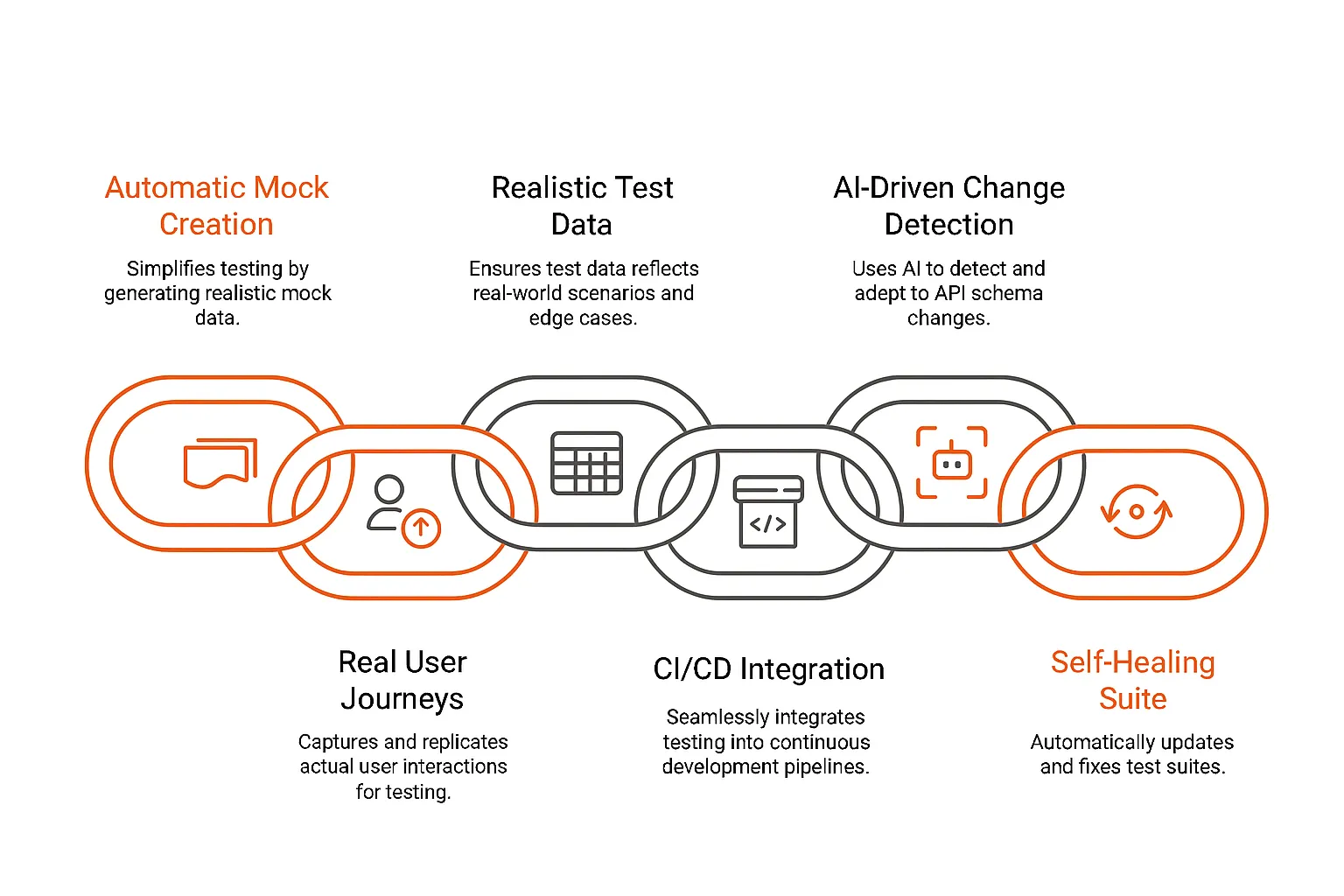
Automatically Creating Mocks:
-
Keploy record --command "<start-app>"is the command. -
You can practice the signup, browse, and checkout workflows in your app. Each API request and response is tracked by Keploy and saved as a mock definition.
-
Advantage: Anytime your services change, you can re-record the mock instead of manually creating, or updating, a mock script.
Give Real User Journeys Priority:
-
For impactful workflows, Keploy also captures the exact sequence of API calls.
-
This allows you to obtain test cases for the actual paths your customers follow without needing to guess about which endpoints are most important.
Keep Test Data Realistic:
-
Payloads contain real-world values and edge-case scenarios (expired tokens, inventory shortage) because mocks are based upon real-time production traffic.
-
Rigid fixtures are avoided, and test data is refreshed with real-world usage.
Smooth Integration of CI/CD:
-
Use
keploy test --command "<run-tests>"in Jenkins, GitLab CI, or GitHub Actions to add a continuous integration step. -
Keploy eliminates regressions before deployment since it starts your app in mock-mode and replays the recorded traffic, failing fast on any divergence on each commit.
Change Detection Driven by AI:
-
Mocks for schema or response changes were captured through Keploy's integrated diff engineer scans.
-
As APIs develop, your test suite will auto-adjust by identifying changed endpoints and suggest when to update.
Retain Your Suite Self-healing and lean:
-
Keploy avoids unnecessary testing if it has recorded user interactions and will only replay those.
-
Keploy's recordings are updated automatically when your application adds or removes endpoints thus cutting down on manual maintenance while ensuring your suite is trustworthy and speedy.
Key Components of End-to-End Testing
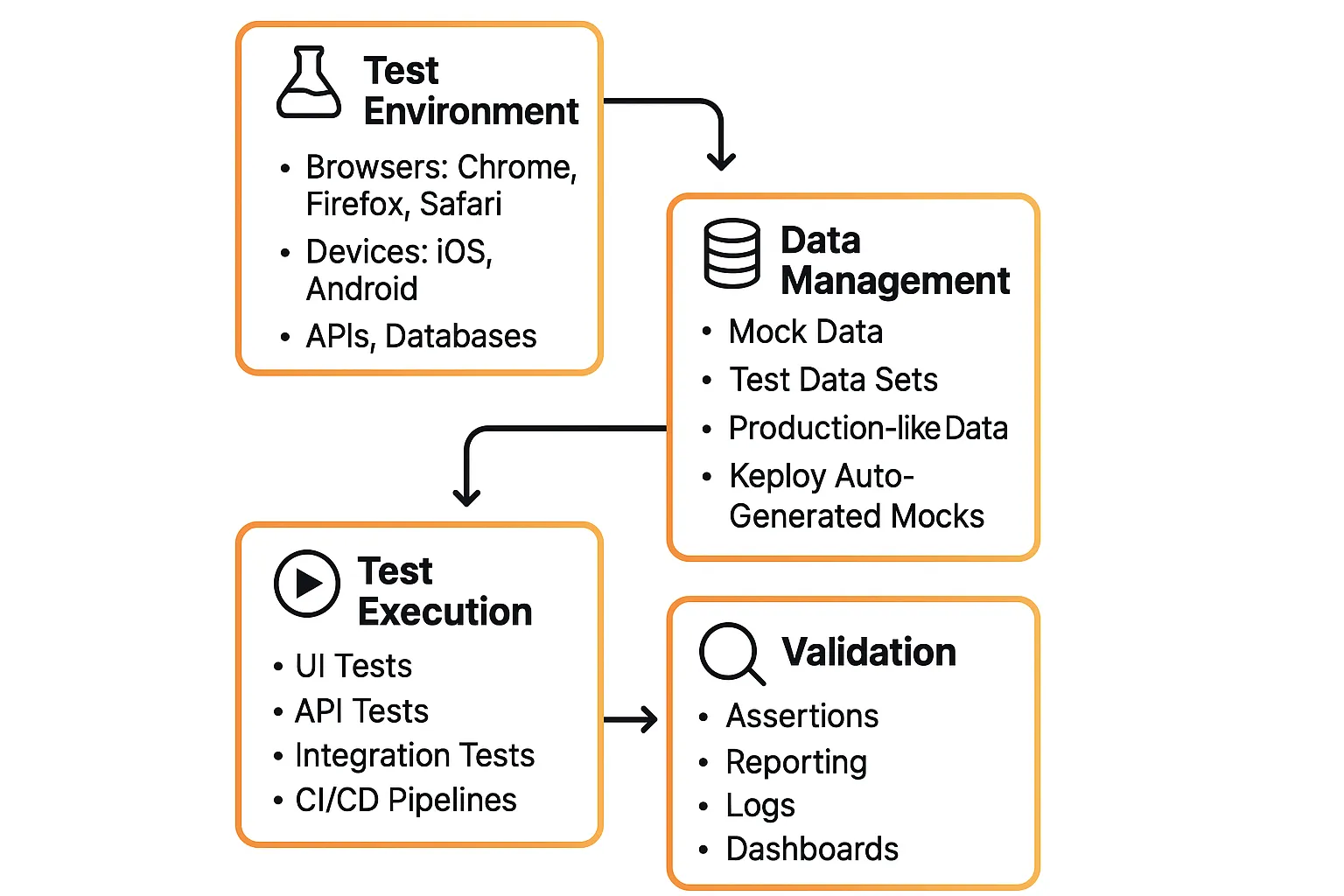
End to end testing requires a well defined setup to deliver reliable results. This includes a stable test environment, realistic test data, clear scenarios, and accurate validation to ensure complete user workflows are tested effectively.
Here are the core components:
-
Test Environment Setup
-
Mimics the environment of the real world, including browsers, gadgets, databases, and APIs.
-
Should be very similar to production in order to prevent "it worked on my machine" problems.
-
Example: Verifying cross-browser compatibility by running tests in Chrome, Firefox, and Safari.
-
-
Data Management
-
Decides how to handle input and output data while testing.
-
Can use production-like datasets for realism or mock data for controlled tests.
-
For instance, Keploy ensures realistic yet maintainable test data by automatically creating test cases and mocks from actual API calls.
-
-
Test Scenarios
-
Discuss UI activity, interactions with APIs, database interactions, and functional flows (paying, login).
-
Guarantees validation occurs on all stack levels.
-
-
Validation & Reporting
-
Verify results against results that were predicted.
-
Failures ought also be prominently highlighted in reportage in order that teams respond in a timely fashion.
-
For instance, CI/CD pipelines that incorporate test reports to provide immediate release confidence.
-
Steps for End-to-End Testing
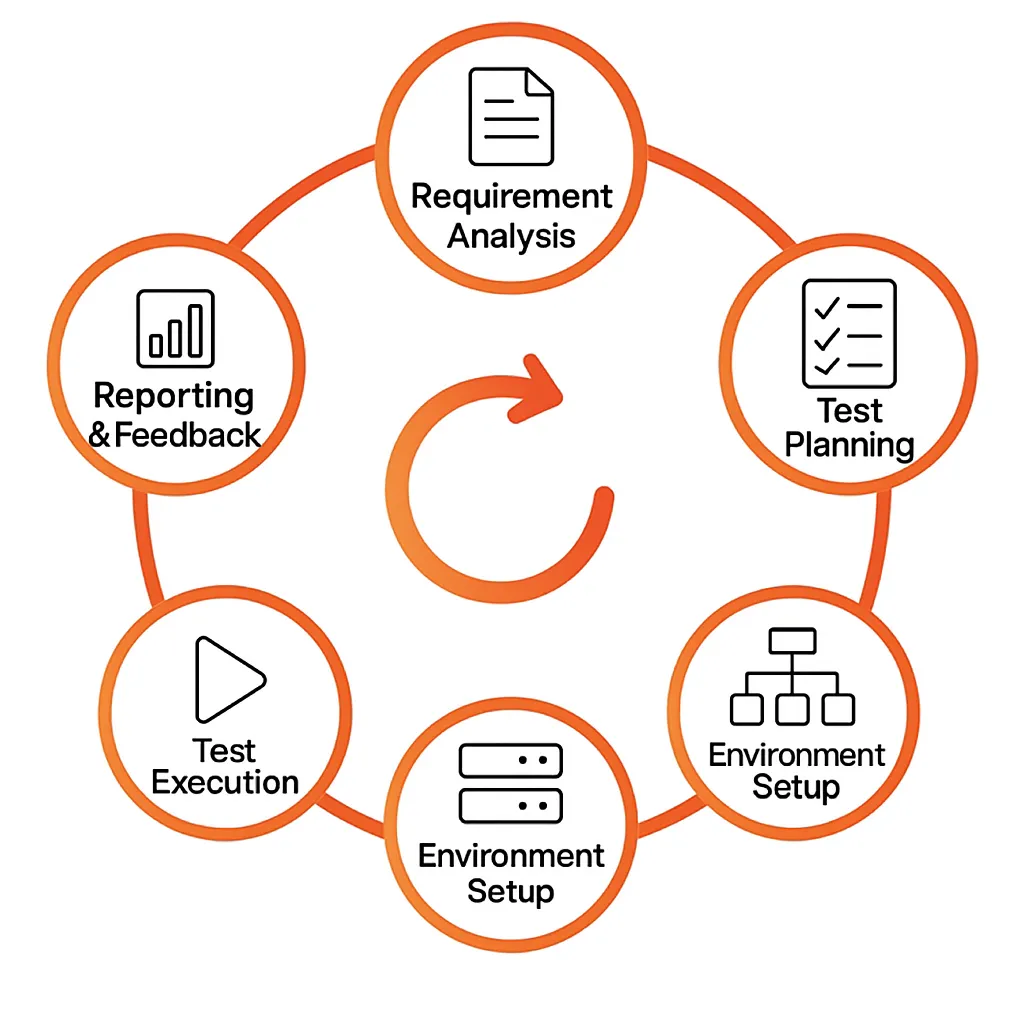
End-to-end testing of software is typically a structured process. The basic steps are:
-
Requirement Analysis: Understand the complete user journey and system expectations. Document the whole user experience while documenting the expected behaviour of the system. Then identify the functional business processes, (ie payment, checkout, login) as well as the success criteria. This way testing will align back to real world expectations.
-
Test Planning: Agree to the tasks, timelines, tools, approach to testing and scope. Specify which tests are automated or manual, and assign a level of risk and business impact to them.
-
Test Case Design: Create scenarios that are representative of real user workflows. Discuss edge cases, (ie successful checkout vs payment failure) as well as a range of positive and negative scenarios. Create test case that will be easy to maintain and reuse again.
-
Environment Setup: Create the test environment accordingly, accounting for third party services, databases, browsers/APIs, and configurations. Ensure the test environment is as close to production as possible, so the results are accurate.
-
Test Execution: Execute the automated or manual test cases, make note of the real results. Monitor for issues, compare results to expected behaviour, and record defects to be fixed.
-
Reporting & Feedback: Pull the results together into short, meaningful reports. Exchange ideas with developers, QA, and stakeholders to identify enhancements for the application and possibly future testing approaches.
Performance Optimization in E2E Testing
When it comes to ensuring an efficient end-to-end testing in software, clearly we need to focus on speed but do not want to compromise on coverage. Here's how Keploy helps to achieve this:
Parallel Testing: Even though it is much quicker to use workers instead of a single agent, you can still get large gains in test completion times by splitting your tests over multiple agents or containers instead of completed sequentially. By letting multiple parallel workers share Keploy's recorded mocks, you prevent unwanted calls to slow external services and every node will behave the same way.
Test Data Reuse: We lose valuable seconds logging in with a different user or rebuilding our database before each test. If you cache common set up between tests, such as a seeded product catalog, or even a valid session token then you can replay those common steps across tests. Instead of recreating the same state, you can instantly replay the mock data of a user flow using Keploy.
Selective Testing: Even though full-suite overnight runs are a must, when you push code, you really only need fast feedback for areas most at risk of introducing a regression (ex. login, checkout, and payments) so run those flows first and tag them. Keploy simplifies this process by automatically discovering which sequences of APIs are used in the core workflows so that you can easily select only the tests that matter with every commit.
Using Keploy's traffic-based mocks, parallel execution, intelligent data caching, and intelligent test selection, it is possible to harness end-to-end testing and get fast and accurate software testing feedback that scales with your team.
Test Maintenance and Updates
Keeping up an E2E suite often feels like running after a moving target since user interfaces are changed, work flows are added, and APIs are updated over time. As your app matures, Keploy self-updates test cases by virtue of end-to-end software testing. You'll never need to handle busted scripts again with its diff engine, which monitors recordings of mocks, identifies changed or removed endpoints, and recreates only impacted tests.
Every time you deploy a brand-new feature, such as a social login, a referral scheme, or a new checkout workflow, simply run a new Keploy recording on that user path. New mocks and test cases immediately mirror your newest logic, so every new workflow is accounted for. Furthermore, Keploy gets rid of stale mocks from retired APIs, leaving your suite tidy, pertinent, and streamlined.
Embedding Security Checks into E2E Flows
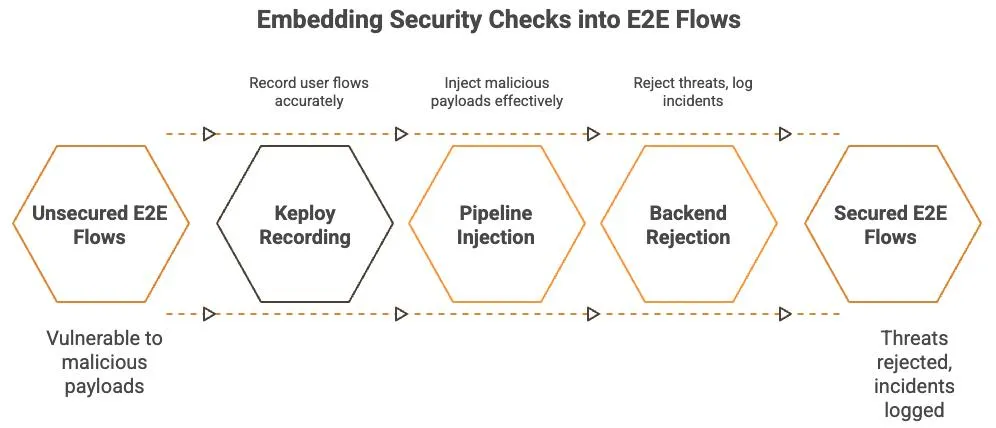
Functional correctness is not the only consideration, security is also a consideration and with end-to-end testing in your software testing's toolbox you can verify that critical paths can stand up to real-world attacks by pairing Keploy's recorded flows with security scanners like OWASP ZAP or Burp Suite. With security scanners such as ZAP or Burp, you can also play the particular calls your users make to replay your login, signup, and payment API paths and play in malicious payloads in the actual fields, like oversized fields, SQL injection strings, expired tokens, etc.
Keploy's realistic mocks verifies that you are testing using realistic conditions and confirms that your backend properly logs incidents and blocks threats. In the event that you find a secure coding problem, you can re-record the flow to keep your security tests updated.
Common Tools Used in E2E Testing
| Tool | Key Features | Best For |
| --- | --- | --- |
| Keploy | Uses reusable test cases, real user traffic, and mocks external services to automatically generate tests. Minimizes the effort required for maintenance and test writing. | Regression test maintenance is time-consuming for modern CI/CD teams and microservice-heavy apps, where speed is crucial. |
| Cypress | Excellent debugging tools, real-time reloading, developer-friendly, and quick setup | Front-end teams (which function best with React, Vue, and Angular) prioritize speed, simplicity, and a seamless developer experience. |
| Selenium | Supports almost every OS, language, and browser. a sizable, highly adaptable ecosystem. | Maximum compatibility is required for large organizations or teams with diverse tech stacks. |
| Playwright | Cross-browser compatibility, intelligent auto-waiting, adept handling of intricate flows, and CI/CD integration. | Teams that require cross-browser testing that is dependable, scalable, and free of legacy framework snags. |
| Puppeteer | Lightweight, quick, simple to use, and perfect for scripting or automation with Chrome or Chromium. | For full enterprise E2E testing, prototyping, scraping, or Chrome-specific workflows are not the best options. |
Test Reporting & Monitoring
Through Keploy's easy monitoring and reporting, it is easier to take test results and turn them into actionable insights.
Monitor Unreliable Tests Over Time: With software testing, you can track test results over time when using end to end testing to determine if any patterns emerge. You can use the payment test example to know that, it's just a test problem and not a problem within your code if a payment test is failing. Use Keploy’s proprietary reports and dashboards within your continuous integration tool to find tests improving failures over time. After identifying the underlying issue, you can introduce retries, increase timeouts, or update mocks to see if the ambiguous score improves across future runs.
Include Notifications and Alerts: Immediate visibility keeps teams engaged. Integrate Keploy's test reports into Slack channels or email alerts to let everyone know of failures in real-time. For example, when you are utilizing end-to-end testing within software testing, you can also include metrics like response times, failure rates, and alert on key methods like "checkout" or "user signup." The solution allows developers and QA to know flaws were found and to fix any of those defects before impacting production.
Keploy’s Role
-
Unified Reports: Keploy presents a pass or fail history in a clear format on a per-API-flow basis by collating mock and live-response comparisons and flagging any drift.
-
Flakiness Metrics: You can narrow down stabilization work by applying its dashboard in assessing test flakiness with inconsistent results.
-
Alert Hooks: Pass/fail summaries by Keploy, and in-context logs links, can be posted on Slack, Teams, or via email through basic webhooks.
You can ensure the stability and health of your E2E suite and build a culture of quality by defect monitoring, test stability improvement observation, and real-time reporting results.
Horizontal vs Vertical End-to-End Testing
<p>End-to-end testing can be viewed through two helpful lenses: horizontal and vertical flows.</p>
<h3>Horizontal E2E Testing</h3>
<p>Horizontal end-to-end tests validate a complete, user-facing journey from start to finish.</p>
<p><strong>Example:</strong><br>
User logs in → searches for a product → adds it to the cart → completes payment → receives an order confirmation.</p>
<p>These tests focus on the UI, navigation, and overall user experience, ensuring the entire workflow behaves exactly as a real user expects.</p>
<h3><strong>Vertical E2E Testing</strong></h3>
<p>Vertical end-to-end tests go deep into the technology stack for a single feature or service.</p>
<p><strong>Example:</strong><br>
The payment service receives a charge request → communicates with the payment gateway → updates the database → emits events to downstream services.</p>
<p>These tests emphasize APIs, databases, queues, and backend integrations that power critical application logic.</p>
<h3><strong>Why Both Matter</strong></h3>
<p>High-performing engineering teams leverage <strong>both horizontal and vertical flows</strong> to ensure full coverage:</p>
<ul>
<li><strong>Horizontal flows</strong> secure business-critical journeys such as onboarding, checkout, and payments.</li>
<li><strong>Vertical flows</strong> verify backend components for reliability, data integrity, and compliance—even when the UI isn’t involved.</li>
</ul>
How to Perform End-to-End Testing
As per our e-commerce application workflow (Login → Search → Add to Cart → Checkout → Payment → Order Confirmation), we will apply the E2E testing lifecycle stages having observed them. From the above example, we shall cover the most crucial procedures in conducting end-to-end software testing.
Test Planning:
Begin by describing the specific test you intend to administer and why it is important.
-
Scope: Since checkout and payment have a direct effect on revenue, concentrate first on business-critical flows.
-
Setting priorities: High-risk paths are first priority. Verifying optional coupon codes is lower priority compared to confirming payment success.
-
Tools & Strategy: Determine whether you'll be using tools like Selenium, Keploy, or Playwright in order to automate certain tests, or if you'll run them manually. Repetitive tasks, as well as login-to-checkout processes, are well-suited for automating.
-
Resources & Timelines: Schedule work before releases, allocate work (devs, QA engineers), and set end dates.
In my scenario, in the planning stage, we make sure that the "Add to Cart → Checkout → Payment" workflow gets priority as a test case.
Designing and Developing Test Cases:
Once we have completed the planning phase, it is time to create realistic user scenarios that include both usual and unusual scenarios.
-
Positive Scenarios: The user paid successfully, the user added an item to their cart, they logged in, and received confirmation of purchase.
-
Adverse Scenarios: Payment fails due to lack of funds or invalid card information; product goes out of stock after the we add to the cart and check out.
-
Edge Cases: Attempting to check out without any items in the cart; paying for the order puts the user into a session timeout.
Every test case ought to contain:
-
Pre-requisites (i.e. product should be available, user account needs to exist).
-
Complete the following steps: log in, search, add, check out, and pay.
-
Expected result (either clear error message or successful order ID.)
"User adds headphones to the cart, enters valid Visa credit card information, completes checkout and receives confirmation of order with a unique ID" is one test case for the e-commerce app.
Test Analysis and Execution:
When test cases are prepared, we execute them in a setting similar to production.
-
Automation: Run login, search, checkout, and payment flows repeatedly across various browsers and devices using test scripts.
-
Manual Testing: Testers mimic actual user interactions for exploratory and edge cases.
-
Tracking results: Record actual results and contrast them with anticipated results. Any discrepancy suggests an error or a breakdown in integration.
-
Reporting: Document all test results with a focus on what scenarios did or did not work.
Taking our example of a checkout case, if a customer successfully checks out, we would expect to see an order ID and an email confirmation. If the customer exited without an error message, the order would be documented as defective.
Continuous Improvement
E2E software testing is iterative and it will need to adapt along with the product.
-
Keep the tests up to date: Add corresponding E2E flows for any new features, such as loyalty points or discount codes.
-
Mitigate flaky tests: Investigate and improve E2E tests that work sometimes, but fail other times due to unreliable environments or denominated services.
-
Feedback loop: Use test runs from the previous weeks to identify patterns of issues and expand coverage.
-
Integrate with CI/CD: Automate E2E tests to run as part of your code pushes, so you make regressions aware earlier.
In our example: If coupons entered in the checkout flow are a frequent reason for customer add to cart abandonment, then once we develop E2E cases related to coupon application, we should start running them as a priority in upcoming test cycles.
Keploy for End-to-End Testing
Traditional E2E tests can get hefty pretty quickly: long scripts, large environments, and tons of hand-wired third-party setup. Keploy shortens all of that by auto-generating API-level E2E tests and packaging up any mocks/stubs those tests will need. Of course, it won't replace every kind of test (Runs around UI flows will still need UI tools), but it usually gets you most of the way for API-centric paths, with a ton less effort.

How Keploy Operates:
Keploy runs as a lightweight proxy alongside your app and records network traffic. Rather than authoring brittle, step-by-step scripts, you just let the app talk how it normally would; Keploy records those network calls and assembles reusable test cases from them. This tends to represent actual behavior more closely, although tightly-coupled dynamic responses or time-sensitive flows may need a little tuning.
The following is the high-level workflow:
Record Mode: Record Real Talks
-
Start your app under Keploy in record mode:
keploy record --command "go run main.go" -
Use the app as a real user would. For example: log in with a test account, search for “wireless headphones,” add one to the cart, and complete checkout with a sandbox payment method.
-
Keploy stores each API call and response as a test case, along with mocks of dependencies such as PostgreSQL/Redis, message brokers, or third-party services like Stripe or Twilio. This keeps later replays isolated from live systems.
Automated E2E Tests with Replay as the Test Mode
-
When you want to confirm a new version of your application, launch Keploy in test mode:
keploy test --command "go run main.go" -
Keploy replays all previously recorded API calls with a small delay (by default 5 seconds, which can be changed to match your app's startup time).
-
Keploy maintains consistency and removes bad tests by using the recorded responses instead of mocking actual dependencies.
-
It then compares the recorded responses against the actual responses to generate a detailed report on the Keploy console.
Execute Anywhere: Local, Production, or Staging
-
Because Keploy doesn't have any restrictions on the environment that the tests are run in, you can execute these E2E tests in any environment setup you have including local development machines, staging servers, or even production!
-
The test cases are always realistic because they are connected to the real traffic captured during the usage of the application.
Combining CI and CD
-
Once you have Keploy integrated, you can also integrate it with CI pipelines like GitHub Actions, Jenkins, or GitLab.
-
This automates the running of your E2E tests after every build and it reduces the time for release cycles and provides early identification of regressions.
Real-World Example: How Keploy Helped Reduce Critical Post-Release Issues
Take the case of an online merchant suffering from post-release problems, most egregiously in payment processing. The failure of end-to-end and integration unit testing, which could not uncover end-to-end integration problems, resulted in lost business as well as angry customers.
Through end-to-end software testing with Keploy, the software development team was able to record real user flows, e.g., login, browse, and checkout, and auto-generate accurate mocks of all dependent services.
Without seamless CI/CD integration, these realistic E2E tests ran as part of every code push, uncovering tiny issues before they were taken to production. The results? fewer payment-related incidents, faster and safer deployments, and less maintenance on test fixtures.
This success case shows how Keploy converts actual user activity into a reliable security shield for modern software development teams.
Automated Audit Trails for Compliance
In regulated industries, like healthcare and financial services, or any industry where sensitive data is present, consideration of auditability and compliance can never be overlooked. With Keploy’s end-to-end software testing, we produce audit trails that can be verified through the recordings and replay logs that are created for each action taken via an API, including; each API endpoint, payload, response, and each relevant timestamp.
When an author E2E tests for GDPR, for example, the author role must clarify that consent banners are shown and that user data is not stored without clear consent. You can confirm that tokenized credit card information is never received in plaintext, thus in compliance for PCI DSS. You have to confirm that Protected Health Information (PHI) was never received, on its path, which can only go through authorized channels, therefore complying with HIPAA.
Keploy audit reports automate the recordkeeping of significant workflows, which means auditors have a clear, automated record that compliance teams can present as clear evidence of a regulation being adhered to.
Conclusion
End to end testing ensures reliable and seamless user experiences by validating complete workflows across frontend, backend, and integrated systems. By catching critical issues early and verifying real user journeys, teams can ship features with greater confidence. Tools like Keploy simplify this process by generating tests from real traffic and integrating seamlessly with CI/CD pipelines.
Frequently Asked Questions (FAQ)
1. Why is E2E testing important for businesses?
E2E software testing is advantageous by identifying integration issues early. E2E testing helps identify and prevent critical failures such as a broken checkout or failed payment; and costly downtime, bad company reputation, and poor user experience can all be avoided and harm avoided easily at this stage.
2. How does Keploy simplify End-to-End testing?
Keploy makes E2E testing straightforward and easy to complete, you only need to set up keploy to record related API calls and it will create test cases with mock or stub. Keploy is also the only solution that provides a simple process to record and combine real time user interactions.
3. How is E2E testing different from unit and integration testing?
E2E testing is about combining single modules like integration tests. While unit tests define isolated functions, E2E tests define the workflow. For example, E2E testing will define whether the login → add to cart → payment → checkout forms a single workflow and not just that "login works".
4. What are the best practices for E2E testing?
Use realistic test data, automate the boring process, focus on important paths (onboarding and payments for example), keep your tests small, and use CI/CD pipelines so that you can pinpoint issues early.
5. When should you perform End-to-End testing?
E2E testing should be run before every major release, after new features have been added, or after any changes to third party services. Continuously run E2E tests with CI/CD to maintain stability.
