What is your approach when it comes to designing your app?
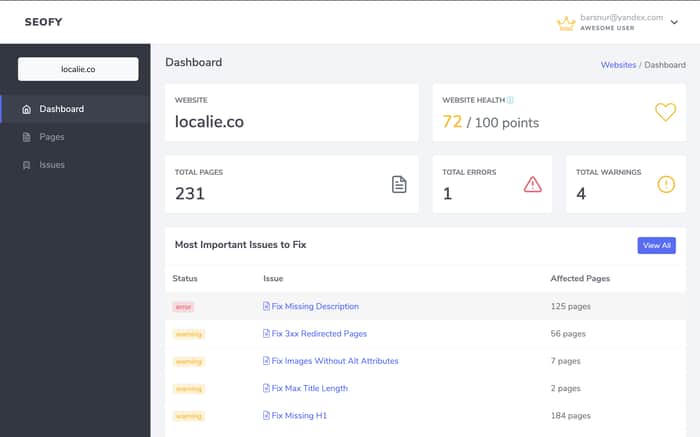
Hey, devs!
Today I want to share this with you. As a developer, I always struggle with design things. I saw only two options:
- Bootstrap wich is noice but not unique;
- Hire a designer to make the things done;
But! This time I found the way between those two and bought a ready to use template on ThemeForest. It saved me tons of hours and costs less than $20.
What about you? What is your approach?
✅ /done Make Seofy responsive and beautiful https://seofy.io

My approach: use anything @adamwathan and Steve Schoger makes. 😅
https://tailwindcss.com/
https://refactoringui.com/
https://tailwindui.com/
I co-sign this message.
Didn't know that are indie hackers. The products are so nice!
Agreed, tailwindcss really helps.
I am using bootstrap, tweaked to look more different. With some custom css, you can basically tweak any component to look more different. I usually target the css attributes that make the biggest difference: border, border-radius, box-shadow, background-color, font-size, font-weight, font-family (set once and forget), padding. These make the most difference. Other than that, I take my inspiration from other startups and companies. When I encounter an UI that feels and looks good, I look around the code to see what are those elements that feel good and how they are styled. I don't copy their designs, but just look around to see what properties they focus on and adapt them to my own theme.
Good point! Tweaking bootstrap is the key to look different. What do you think about bulma or tailwind?
I tried them at some point, but I am sticking to bootstrap because I way more familiar with it and it's easier and faster for me just to continue with it rather than learning a new framework. I think tailwind has potential, but has a bit of ramp-up and a bigger learning curve for my taste. Custom SASS in my React project does just fine, as it allows me to style components on the fly without reloading the page (that's would be my biggest pain point when using Bulma, changing classes would reload the page all the time, and styling certain elements that are not on the "front" such as modals, alerts, notifications, etc would take a lot longer).
An indieha ker recommended bulma.io so I used that to build my next product, due to launch in a few days hopefully.
Tailwindui is beautiful, just a bit outside my budget for the moment. Would definitely consider it later down the road.
Isn't tailwind is free?
Tailwind is free. TailwindUI isn’t - its a very cool collection of components.
Hey @indiehacker433 i'm developing www.bytehub.dev a super cool collection of components. I'm also working on a new design system and bring components like tailwind provides for absolutely free.
This is for react. I was looking for pure html/css elements. I dont even include vuejs let alone something more advanced for my ideas. If something takes off, i'd come back to rebuild parts but I wanna stay lean when testing & looking for the elusive PMF
Oh, Bulma is awesome! I wish one day I'll use it. Want to share with us your project on Bulma?
Its not quite ready (or online) yet but I’ll definitely share it shortly.
Mobile: I did lots of UI (development, not design) the past year all based on Pinterest and personal taste. Pinterest, even though looks like is hijacking the whole scene, served me as a really good tool for inspiration. The difficult part with this approach was that I had to reiterate over the design proposals a lot as the ones given on Pinterest are very far away from actual usage. They are UI without UX. So I had to put the X there.
Web: after hiring an agency to do it for me, I had to learn bootstrap myself and tweak it even further. But the grounds were laid by a professional.
The results can be seen here. Not perfect, but optimal.
How much did the agency charge you for it?
I remember that the initial offer was $1200, but we stretched up to $1800 (which is the final price I paid).
Cheap I'd say yes, but cheap also has a price. The quality was highly impact and I never managed to align with the agency on my product vision. They cared just for execution and pushing me faster to the next invoice.
Celebration looks good! Did you do it by yourself?
Now I think I have to rethink the name, as it's Celebratio (read as "Celebration" just without n at the end) 😂
I did the Mobile UI all by myself, again, based on Pinterest.
The web UI was proposed by agency but didn't like it and reworked it a whole months after 🤷🏼♂️
First you should make a mock-up in Photoshop or whatever graphic program you like, or have a designer design one. Then you can use bootstrap and build out the page, bootstrap doesn't look unique a lot of times because developers do not customize it enough, it is just a framework, so you need to really tweak it - most devs just use the basic "theme" look. That's where the mock up comes in, use it as a guide. ThemeForest is an approach, but I've found that those themes are pretty complicated and are unique to the developer who created it, and they're bloated with un-needed features, so when you need to make a non-elementary change, its like learning someones style and framework they created and it is a big pain. For that reason I never buy any themes from ThemeForest unless it is something I know will not change much or need heavy customization - I personally don't use those themes from ThemeForest.
I've been making common components over time and pushing it to a private git repo. I've always found bootstrap to be too restrictive. As and when required, I've included these components to my templates. I recently redesigned my website https://backslashr.com.
This approach makes sense for smaller projects, but something like large as a dashboard or a full service website might require something like tailwindui which is an amazing effort by Adam.
I prefer to prototype with code. I took a deep breath and bought TailwindUI and haven't looked back. The only downside is it's still rather early in development and needs more work but you can still build a great site with what there is currently.
I kind of just jump into Adobe XD and mess around a bit until something comes up I like. It's not the best way or the most efficient way but it's kind of expressive and I feel attached to what I design in a weird way. That's before I have to tame it down and make it functional anyway 😂
At this stage, the only thing that matters is to keep it as simple as possible. It´s not about the developer and how many features you can implement. It must be intuitively understandable for an average non-tech user. More 1+1 and not the seventh square root of pi
For QueryBoost, I am using tailwindcss for the landing page, and Ant Design with some customization for the app.
Hey @iamarsenibragimov pls give https
://www.bytehub.dev a try, i've started using Seofy and found it helpful. Let me know if you need any help with good UI.
Awesome!
What do you mean about "give https"? Could you elaborate on this?
Do you use telegram btw? Let's chat there maybe?
Sorry, I meant to say give www.bytehub.dev a try, yes I use telegram and WhatsApp.
This comment was deleted 6 years ago