what is your productivity system? mine is all over the place!
recently, I found myself jumping all the time between different productivity apps like Trello, reminders, notes, google docs/sheets.
And now I can't remember where is what. I spent this morning playing around with Notion and it looks promising. I want to have 2 apps max for all I/O and eliminate context switching
what is your go-to productivity app or productivity system?

My favorite productivity app is the Forest app. It’s great to help minimize distractions and allows you to truly focus on the task at hand. Highly recommend it!
But it's not what you use to manage your tasks and notes, do you?
It’s not. OneNote is my go to for taking notes. Ability to create notebooks, tabs, pages. It also allows you to download templates.
You just need one, Simpletasking :)
hehe I love your enthusiasm about your product. but can you tell what are the benefits of using it as go-to
I have tried every single product management platform out there, they are either over-complicated or you need many of them. Slack, Trello, Todoist combo for instance. Now if you work in more than one project with different teams the pain intensifies.
Say you want to create a logo for your product. Do you add the logo designer into your main project, or do you set is a separate project? You could use email. Maybe you don't need Slack/Trello for a Logo, but think in the whole process of creating your product. Need an update to the logo, easy, post a thread, your designer sees it, done. More complicated than a logo, the Board works great. Important discussion? do a thread, something simple, write a chat.
Imagine 10 projects, as things on the threads, board, chat, update.. they are visible on the project column. Imagine multiple products. Try it bro, it works.
This is what my account looks like this morning:
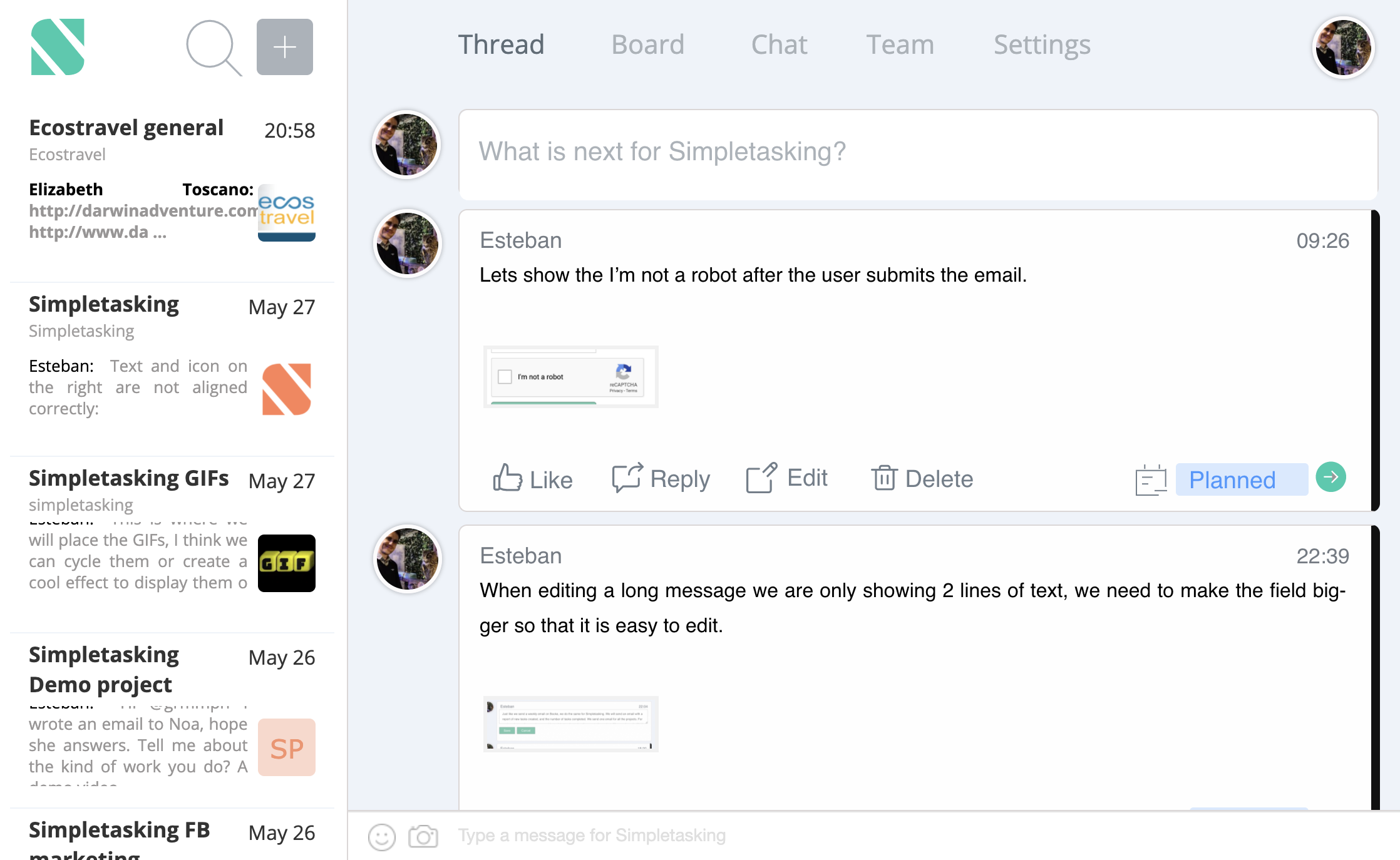 .
.
I also was searching for all in one tool. When I just understood that my problem is not in the tools I use but in the workflow, I don't have.
As an experiment, I started to use Notion for everything (As base workflow tool). After a short time, I started feeling friction in some areas of my workflow. So I introduced new tools in my toolbox to increase productivity.
Daily to-do tasks now managing with Todoist. (I just love creating repeating tasks)
Events and meetings - apple calendar (In quarantine it's good enough tool)
Notes - Still using notion, but actively searching for an ideal tool take quick notes when working.
I use Notion daily it's a big part of my productivity system, but I will still try new tools if I see potential in them.
This is a great question @jamalx31. It is certainly different for everyone depending on their workflow. I asked the iH community about their favourite note apps a couple weeks ago and aggregated the findings here ... you might find it helpful. :)
Thanks for sharing this!
You are most welcome @jamalx31
This is basically the problem we are solving for with Taskable so I use that 😊
How is Taskable comparing to Notion?
Main differentiations:
Notion is definitely more flexible so if that's what you are after hard to think of a better product.
I use the GTD system (using the app NirvanaHQ) for my life in general, and Asana for more fine-grained project planning. GTD is great for keeping track of tasks, ideas, and deadlines, and making sure you prioritize right. However, I like to use a kanban board for my projects to get a more in-depth overview of everything, which is why I prefer Asana for projects
Nirvana looks so simple. and Asana is more like project management tool.
So far NotionHQ is the only tool I found that flexible enough to fit my needs
ClickUp is amazing. You can plan out full projects or add to-do items as well. I scope out my weeks/months/years in there and can collaborate with others seamlessly.
I do use the Microsoft To-Do app for any random thoughts/tasks that pop-in my head like "respond to email" or "cancel subscription". It's just easier to create those on my phone and then address it on my computer.
Does ClickUp work when you mix personal stuff with projects and random notes and links?
Yeah it’s easy to distinguish. They also have docs integrated which I use extensively. Used to use OneNote and Google Docs but now pretty much only ClickUp docs.
Todoist to keep track of everything that must be done. Every external tool required to complete a task is linked in comments, so I don't have to search around. It has built-in reminders and a widget on my home screen on android. It is pretty powerful and lets you organize things in whatever categorization system you come up with.
Evernote for all the notes and keeping thoughts around. I know many folks use Notion for this nowadays.
Piece of paper for any intensive thought process. Cool ideas, if any come up, can be photographed into Evernote.
todoist is simply great. And I also use evernote for all my notes.
I used Evernote for a while in the past but I didn't find value in it and just replaced it with the Apple notes app.
So do you link your notes from Evernote to tasks from Todoist?
No, not really. Evernote generates value for me with its clipper. I can clip pretty much anything I see on the internet in there, scan documents, websites, and stuff. Full disclosure, many of those things are never opened or read again:) But sometimes I can find something valuable in there.
Inside todoist, I'm trying to fit everything into a task description and make use of labels/projects/priorities to navigate my days. Quite often tasks slip into the following days. The key for me is to split tasks into biteable pieces that have a clear ending. Avoid things like "optimize conversion" but rather "try 1", "try 2", "try 3" as separate tasks. Also, I avoid setting a date for something that is not in the next week or two. (unless it is some reminder to cancel some free trial). Every Saturday I plan the next week by going over different labels/projects and all the inputs for this week.
The biggest challenge for me is delegated tasks. They tend to sit there until someone has time to complete them. They used to pile up, but now I put them into the separate labels "waiting for" and just review them weekly, ping people if needed. Or reminders for things urgent. That works for small stuff, for managing the day-to-day operations of my team we use JIRA.
Also, I try to focus on one thing at a time. Todoist has a convenient shortcut on every system, so you can create a task by typing a few words and continue on your current task. You can either assign a project/date to that task immediately or it will just sit in your "inbox" folder. I tend to check it at the end of the day and move things appropriately.