You roasted my MVP. I listened. Here is v1.3 (Crash-proof & 100% Local)
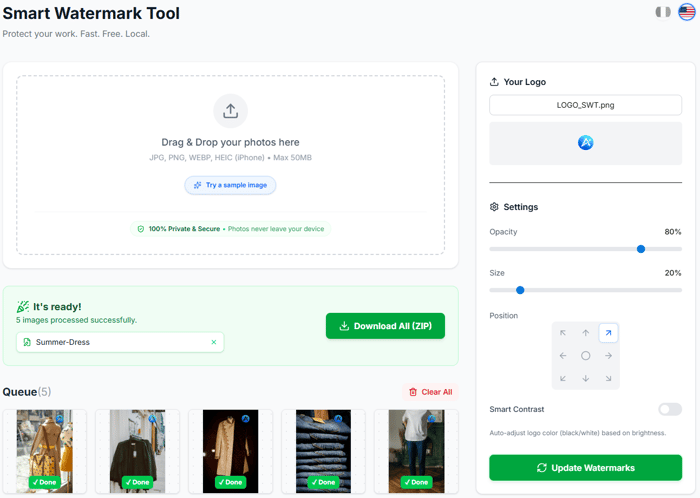
Hi everyone,
Last time I shared my Smart Watermark Tool here, the feedback was brutal but fair. You guys pointed out that while the idea was good (privacy-first watermarking), the UX was clunky and losing data on page refresh was a dealbreaker.
I spent the last few days coding non-stop based on your suggestions. I'm proud to ship v1.3 today.
Here is what changed based on YOUR feedback:
✅ Crash Proof (The "Ghost" System): Accidentally refreshed the page? No problem. The app now saves your workspace state locally. Your images are restored instantly. ✅ E-commerce SEO Renaming: You asked for file naming for Vinted/Etsy. You can now auto-rename 50+ files (e.g., Vintage-Levis-01.jpg) in one click. ✅ 100% Privacy Badge: I clarified the tech stack. It uses Canvas/Wasm. Images never leave your browser. I added a 50MB limit to prevent browser crashes on mobile. ✅ One-Click Demo: Added a "Try Demo" button so you can test the tool without hunting for a photo on your drive.
The Tech Stack: Next.js, Tailwind, and heavy use of localStorage for state persistence.
I would love to get a "Round 2" of feedback. Did I fix the pain points?
👉 Try it here: https://smartwatermarktool.com/
Thanks for pushing me to improve!

By the way, I forgot the link in the previous post!
You can test the frictionless download here: https://smartwatermarktool.com/
I just deployed the analytics to track the friction points you mentioned. Let me know if the UX feels smooth!
This is a great example of building in public done right — taking the roast, shipping again, and making the changes visible.
At this stage, I’ve seen clarity come less from stability itself and more from how users actually behave now that it’s crash-proof.
Curious — what’s the one user action you’re watching most closely in v1.3 to decide what you change next?
Appreciate that! The 'build in public' feedback loop is addictive.
To answer your question: I'm laser-focused on the Upload-to-Download conversion rate, specifically for large batches.
Now that the app can handle 50+ images, I want to see if users actually finish the job. If they upload 50 photos but drop off before clicking 'Download All', it tells me the UI might be too clunky for bulk editing (e.g., maybe they need better bulk-positioning controls).
If they click Download, I know the utility is real.
That’s a very clean signal to watch.
Upload → Download is basically a commitment moment — once someone clicks “Download All,” they’ve mentally decided the job is worth finishing.
One thing I’ve seen help interpret drop-offs here is separating “friction drop” vs “value drop”:
– friction = people pause, adjust, hover, then leave
– value = people upload and abandon quickly
If most drop-offs happen after time spent adjusting, you’re probably right that bulk-editing UX is the lever.
Sounds like you’re asking the right question at the right stage.
That distinction (Friction vs. Value) is brilliant.
I was previously treating all drop-offs as 'lost causes', but you're absolutely right:
Quick exit = "Not what I was looking for" (Value issue).
Exit after tweaking sliders = "This UI is frustrating" (Friction issue).
I'm going to add a simple event tracker on the 'Settings' panel (opacity, scale changes) to separate these two groups. If I see users fighting with the controls and then leaving, I'll know exactly where to prioritize my time.
Thanks for the mental model!
Good question. For me it’s when [specific behavior] happens without friction.
If that shows up consistently, I know the value is real.
Spot on. Consistency is the key word.
For this tool, that 'specific behavior' is hitting the 'Download All' button.
If I see users completing that loop (Upload → Watermark → Download) repeatedly without pausing or 'rage-clicking', I know the UX is doing its job.
I'm going to focus my analytics on that specific flow. Thanks!
Update: I just deployed the tracking!
Took your advice literally. I swapped Vercel Analytics for PostHog and set up 3 key events: 1. Upload (Intent) 2. Tweaking Settings (Potential Friction) 3. Download (Success)
Now waiting for the data to flow in. Thanks again for pushing me to measure this!
local-first is such a smart approach. users are getting more privacy conscious and "your data never leaves your browser" is a real selling point.
the demo button is a nice touch too - removes friction for first-time visitors.
curious how you balance the 50MB limit with users who might have high-res photos? do they complain or do most use cases stay under that?
Thanks! Privacy is definitely the core feature here.
Regarding the 50MB limit: You're actually the second person to bring this up today! It was clearly the weak point.
So I decided not to wait for complaints. Based on the feedback in this thread, I just shipped v1.3.1 an hour ago and switched to IndexedDB. 🛠️
Now the limit is virtually gone (GBs instead of MBs), all while keeping that 'local-first' privacy promise intact. No cloud needed!
Give a try to my Reddit Extension. It's a Chrome extension called Pulse of Reddit that basically acts like my own alert system for Reddit.
Anytime someone posts something with keywords I care about like 'looking for a designer' or 'best SEO tool' it pings me right away. It’s saved me so much time and helped me hop into threads while they’re still fresh.
If you’re tired of manual digging and want to catch those conversations early, I’d really recommend giving it a look.
It’s free to start and super simple to set up.
Website:
pulseofreddit.com
Actually relevant! I'm currently doing this manually (refreshing r/Depop and r/Vinted looking for keywords like 'stolen photos' or 'scam'). 😅
The manual 'sniper' approach works but it's time-consuming. Automating the discovery phase definitely makes sense. I'll take a look, thanks for the heads up.
Sounds Great! Please give it a try and let me know if you need any help Thanks!
Nice
Give a try to my Reddit Extension. It's a Chrome extension called Pulse of Reddit that basically acts like my own alert system for Reddit.
Anytime someone posts something with keywords I care about like 'looking for a designer' or 'best SEO tool' it pings me right away. It’s saved me so much time and helped me hop into threads while they’re still fresh.
If you’re tired of manual digging and want to catch those conversations early, I’d really recommend giving it a look.
It’s free to start and super simple to set up.
Website:
pulseofreddit.com
Impressive turnaround on the v1.3 updates! Managing local image processing with Canvas/Wasm can be tough, so setting that 50MB limit is a very practical fix for stability. We're currently building a mental wellness app with AI agents and a Python backend, and we've been exploring similar privacy-focused local processing to keep sensitive data out of the cloud. This is a great example of listening to user feedback!
Great Insights!
Give a try to my Reddit Extension. It's a Chrome extension called Pulse of Reddit that basically acts like my own alert system for Reddit.
Anytime someone posts something with keywords I care about like 'looking for a designer' or 'best SEO tool' it pings me right away. It’s saved me so much time and helped me hop into threads while they’re still fresh.
If you’re tired of manual digging and want to catch those conversations early, I’d really recommend giving it a look.
It’s free to start and super simple to set up.
Website:
pulseofreddit.com
Thanks! Dealing with browser memory limits while keeping everything local is definitely a balancing act.
I actually just pushed a micro-update (v1.3.1) moving the storage layer to IndexedDB to make it even more robust against crashes during large batches.
Regarding your app: 'Local-first' for mental wellness is a huge selling point. People are rightly paranoid about having that kind of data sent to the cloud. Best of luck with the build, it sounds like a vital tool!
Give a try to my Reddit Extension. It's a Chrome extension called Pulse of Reddit that basically acts like my own alert system for Reddit.
Anytime someone posts something with keywords I care about like 'looking for a designer' or 'best SEO tool' it pings me right away. It’s saved me so much time and helped me hop into threads while they’re still fresh.
If you’re tired of manual digging and want to catch those conversations early, I’d really recommend giving it a look.
It’s free to start and super simple to set up.
Website:
pulseofreddit.com
Nice iteration speed — shipping fixes within days based on feedback is the right approach.
The localStorage persistence for crash-proofing is smart. Curious: did you consider IndexedDB for larger file handling? I've seen localStorage hit size limits (~5MB) with image-heavy workflows.
Also, love the privacy-first angle. That's increasingly important for tools handling user content.
Great Insights!
Give a try to my Reddit Extension. It's a Chrome extension called Pulse of Reddit that basically acts like my own alert system for Reddit.
Anytime someone posts something with keywords I care about like 'looking for a designer' or 'best SEO tool' it pings me right away. It’s saved me so much time and helped me hop into threads while they’re still fresh.
If you’re tired of manual digging and want to catch those conversations early, I’d really recommend giving it a look.
It’s free to start and super simple to set up.
Website:
pulseofreddit.com
Thanks! Glad you like the privacy-first approach.
You hit the nail on the head regarding localStorage limits (that 5MB cap comes fast). 😅
For this v1.3, I'm using localStorage primarily to persist the application state (watermark settings, text, position, opacity) which is super lightweight.
For persisting the actual heavy image blobs in case of a crash, you are absolutely right: IndexedDB (likely via a wrapper like idb-keyval or Dexie.js) is the next logical step for v1.4 to handle high-res workflows without hitting quotas.
Thanks for the technical check, adding IndexedDB to my roadmap right now!
Nice separation of concerns — state vs. heavy blobs. Dexie.js makes IndexedDB feel almost as simple as localStorage. Looking forward to v1.4!
You were spot on about the localStorage limits! I just pushed v1.3.1 which moves all heavy assets (images/logo) to IndexedDB. Now it handles heavy sessions without breaking a sweat. Thanks for the tip!
This comment was deleted 8 months ago
Give a try to my Reddit Extension. It's a Chrome extension called Pulse of Reddit that basically acts like my own alert system for Reddit.
Anytime someone posts something with keywords I care about like 'looking for a designer' or 'best SEO tool' it pings me right away. It’s saved me so much time and helped me hop into threads while they’re still fresh.
If you’re tired of manual digging and want to catch those conversations early, I’d really recommend giving it a look.
It’s free to start and super simple to set up.
Website:
pulseofreddit.com
This comment was deleted 8 months ago
Give a try to my Reddit Extension. It's a Chrome extension called Pulse of Reddit that basically acts like my own alert system for Reddit.
Anytime someone posts something with keywords I care about like 'looking for a designer' or 'best SEO tool' it pings me right away. It’s saved me so much time and helped me hop into threads while they’re still fresh.
If you’re tired of manual digging and want to catch those conversations early, I’d really recommend giving it a look.
It’s free to start and super simple to set up.
Website:
pulseofreddit.com