Your files aren’t messy. They’rejust stuck in the wrong system.
Hey IH,
Time isn’t unlimited, but we keep wasting it looking for files we already made.
I’ve been interested in file workflows for a long time, especially what happens after something is saved.
Most knowledge workers don’t explicitly think of file management as a productivity problem. But in practice, a surprising amount of time gets lost to finding, reorganizing, or recreating files that already exist.
This becomes especially noticeable when you’re working across multiple projects. Founders, designers, and builders all end up with files scattered across different contexts. The files are technically there, but bringing them back into use is where things start to break down.
The interesting part is that people do try to organize. They create folder structures, clean things up, and try to stay consistent. But over time, new work comes in, priorities shift, and the structure slowly stops reflecting how they actually think. At that point, maintaining it starts to feel like work on its own, so people stop doing it.
I think the root issue is this: files live in one place, but they don’t belong to just one context.
A single file can be part of a project, related to an idea, useful as a reference, and something you’ll need again later. But folders force you to choose one location, while your memory is based on context.
That gap is what led us to build Voyager.
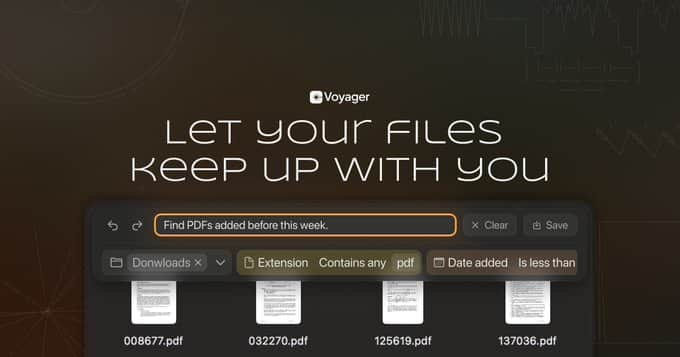
Voyager is a macOS file manager built around properties and reusable collections instead of folders.
Instead of reorganizing files over and over again, you define context once and reuse it.
For example, you can describe something like “files related to the next launch that still need cleanup” or “large files created this year in Downloads,” and Voyager turns that into a collection that keeps updating itself.
Right now, the beta focuses on two early pieces: property-based views and natural language collection creation.
You can combine things like location, name, extension, creation date, and file size without rebuilding the same search every time.
The next step we’re exploring is an agent layer. Instead of managing everything manually, Voyager should help assign context, update properties, suggest useful collections, and let you work across files more naturally.
The goal isn’t just to find files faster.
It’s to make old work usable again.
We’re currently running a closed beta.
I’m especially curious to hear from people who work across many projects and constantly lose track of what they already made.
If your files are technically saved, but not really reusable, that’s the gap we’re trying to close with Voyager.
You can check it out here:
https://voyager.fm
Would love any feedback.

From UX perspective, I find it great that the product value and who it is for is clear. I also like the CTA - it meets expectations, no 'start now' that leads to a hidden beta wall.
Visual hierarchy can be improved: CTA is lost, compared to the headline and background. Also there's a scannability problem. The block of text below the hero section is too big, it is indeed relatable but can be broken down by bullet points for people to grasp the idea quickly. From user research we know that people don't read, they scan
The "files live in one place but belong to multiple contexts" problem is real. I deal with this constantly — same asset needs to be in a project folder, a reference folder, and a client folder. Folders force a hierarchy that doesn't match how work actually happens. The natural language collection idea is interesting — "large files created this year in Downloads" is exactly the kind of thing I'd search for manually every week. Curious about the agent layer — how do you plan to handle context assignment without it becoming another thing the user has to manage?
This is exactly the kind of workflow we’re thinking about.
The same asset often belongs to multiple contexts, but duplicating it or deciding on one “correct” folder creates friction.
That’s also why the current beta focuses on properties and reusable collections. Instead of rebuilding the same searches or reorganizing folders repeatedly, the idea is to let files stay connected to different contexts more naturally through collections and property-based views.
Longer term, I think the system should eventually learn enough structure to help keep collections useful over time, without turning organization into another manual task.