YouTube Summary Extension: Save Time on Long Videos
YouTube has become one of the first places people go when they want to learn something, compare products, follow a tutorial, watch a podcast, or understand a topic in more detail. The problem is that not every video gives you the answer quickly.
A simple tutorial can take 30 minutes to explain one useful step. A podcast can run for two hours before reaching the part you care about. A product review may include a long intro, a sponsor section, and personal stories before it gets to the real details.
That is where a YouTube summary extension can help.
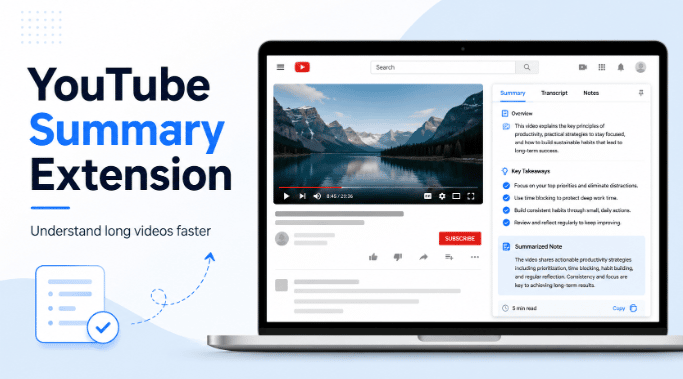
Instead of watching a full video just to find out if it is useful, a summary extension gives you a quick look at the main points. It helps you understand what the video covers, what sections matter, and if the content is worth your time.
For students, researchers, marketers, creators, and regular viewers, this can make YouTube much easier to use. A tool like IsThisClickbait can help users look past the title and thumbnail so they can better understand what a video is actually about before spending time on it.
What Is a YouTube Summary Extension?
A YouTube summary extension is a browser tool that helps turn long YouTube videos into shorter, easier to read summaries. Most tools do this by using the video transcript or captions, then breaking the content into key points.
Instead of guessing from the title or dragging through the timeline, you can get a clearer idea of what the video says in a much shorter time.
This is helpful because YouTube titles do not always tell the full story. Some titles are made to attract clicks. Others are too vague. Some videos sound useful from the outside but spend most of their time on unrelated points.
A summary extension gives you more context before you commit to watching.
It can help you understand the topic, the main takeaways, the important sections, and the parts that may not be useful for your goal. That makes it easier to decide if you should watch the full video, skip to a certain section, save the summary, or move on to another video.
Why People Use YouTube Summary Tools
People use YouTube for many different reasons. Some use it for entertainment. Others use it for school, work, research, marketing, product comparisons, or skill building.
The issue is time.
A written article can be scanned quickly. You can look at the headings, skim the first few lines, and decide if it answers your question. YouTube is different. You may need to watch several minutes before knowing if the video is useful.
A YouTube summary extension helps reduce that friction. It gives you a faster way to judge the value of a video before watching it fully.
This is especially useful when you are comparing multiple videos on the same topic. Instead of opening each one and watching the first ten minutes, you can review the summaries first and choose the one that looks most helpful.
Long Videos Are Useful, But They Can Waste Time
Long YouTube videos are not always bad. In fact, some of the best content on YouTube is long form. Lectures, interviews, tutorials, product breakdowns, and podcasts often need time to explain a topic properly.
The problem is that long videos are harder to manage when you only need one part.
A 50 minute tutorial may include five minutes of information that solves your problem. A podcast may cover ten different topics, but only one section may matter to you. A lecture may be valuable, but you may need quick notes instead of watching the full session again.
This is where summaries become useful.
A YouTube summary extension helps you see the shape of the video before watching it. You can decide if the full video deserves your attention or if only one part is worth reviewing.
That simple step can save a lot of time, especially when you use YouTube for research, learning, or content planning.
How a YouTube Summary Extension Works
Most YouTube summary extensions work by reading the transcript or caption data attached to a video. Once the tool has access to the text, it can shorten the content into a more readable summary.
The process is usually simple. You open a video, activate the extension, and review the summary. Some tools may also show key takeaways, section breakdowns, or timestamps so you can jump to the most relevant part of the video.
For example, if you are watching a long tutorial about editing videos, the summary may show that the real step by step section starts several minutes in. Instead of sitting through the intro, you can go straight to the useful part.
This makes the tool helpful for both quick decisions and deeper research.
How Students Can Use a YouTube Summary Extension
Students often use YouTube to understand lessons, review lectures, prepare for exams, and learn difficult topics in a simpler way. But study time can disappear quickly when every video is 20, 40, or 60 minutes long.
A YouTube summary extension can help students review educational videos faster. It can turn a long lecture into a short set of notes, highlight key ideas, and make it easier to compare explanations from different teachers.
This does not mean students should skip learning deeply. Some topics need full attention, especially when the subject is technical or visual. But summaries can help with revision, note taking, and deciding which videos are worth watching in full.
For students with limited time, this can make YouTube feel less overwhelming.
How Researchers Can Review Videos Faster
Researchers often need to go through interviews, webinars, panel discussions, expert talks, and recorded presentations. Watching every video fully can take hours, especially when researching a broad topic.
A YouTube summary extension can make this process faster. It allows researchers to scan the main points first and decide which videos need deeper review.
This is useful when checking expert opinions, comparing public discussions, reviewing product demos, or collecting notes from industry videos.
A summary will not replace proper research, but it can help with the first round of review. Instead of spending hours on videos that may not be useful, researchers can shortlist the strongest ones first.
How Marketers and SEO Teams Can Use Video Summaries
Marketers and SEO teams can use YouTube summaries to study content trends, competitor videos, audience questions, and common talking points in a niche.
For example, if a team is planning a blog post, they may review several YouTube videos to understand what people are already discussing. A summary extension can help them pull out repeated ideas, missing angles, and useful sections without watching every video from start to finish.
It can also help when repurposing video content. A long webinar, podcast, or product demo can become notes for a blog, FAQ section, social post, or content brief.
For SEO teams, this can be helpful during topic research. YouTube often reveals real user questions and pain points that may not show up clearly in keyword tools.
How Content Creators Can Benefit
Creators can also use YouTube summary tools to study videos in their niche.
Before making a new video, a creator may want to understand what others have already covered. Summaries can help them compare structure, talking points, hooks, and missing information.
This can lead to better content planning. Instead of copying what already exists, creators can find gaps and build something more useful.
A tool like IsThisClickbait can also help creators think about title and content alignment. If a video title promises one thing but the actual content delivers something else, viewers may leave disappointed. Understanding that gap can help creators make better titles and stronger videos.
Why Casual Viewers May Need It Too
A YouTube summary extension is not only for students or professionals. It can also help everyday viewers.
Sometimes you just want to know if a video is worth watching. Maybe the title sounds interesting, but the video is too long. Maybe you are comparing product reviews. Maybe you want to avoid videos that spend too much time on filler.
A quick summary helps you decide faster.
This is useful when watching reviews, tutorials, opinion videos, podcast clips, travel guides, recipe videos, and educational content. You can check the main idea first, then decide if the full video is worth your time.
A Summary Extension Should Not Replace Every Video
A YouTube summary extension is useful, but it should not replace full watching in every situation.
Some videos need visuals. A design tutorial, repair guide, software walkthrough, cooking video, or technical demo may lose value if you only read the summary. In those cases, the summary should guide you to the right section, not replace the video completely.
The same is true for complex topics. If the information is important for school, work, health, finance, or a serious decision, it is better to verify the details and watch the relevant sections yourself.
The best way to use summaries is simple: use them to filter, review, and organize videos faster. Then watch the videos that truly deserve your attention.
What Makes a Good YouTube Summary Extension?
A good YouTube summary extension should make the process easier, not more complicated. The tool should be simple to use, fast enough to fit into your browsing flow, and clear enough that you can understand the video quickly.
The summary should not feel messy or too generic. It should help you understand the main topic, important takeaways, and useful sections. If the tool supports timestamps, that can make it even easier to move through longer videos.
Good formatting also matters. A clean summary is easier to scan, copy, save, and use later in notes or research.
Privacy is another point to keep in mind. Since browser tools can interact with your browsing activity, it is better to choose tools that are clear about how they work.
How IsThisClickbait Fits Into the Process
IsThisClickbait is built to help users understand YouTube videos before they spend too much time on them. Instead of relying only on a title, thumbnail, or first impression, it gives users a better way to judge the actual content.
This is important because YouTube can be difficult to evaluate from the outside. Some videos have exciting titles but weak content. Others may look simple but contain useful information.
For people searching for a YouTube summary extension, this kind of clarity matters. The goal is not just to shorten videos. The goal is to make better viewing decisions.
IsThisClickbait can be useful for students checking educational videos, marketers reviewing content ideas, researchers scanning long videos, creators studying competitors, and viewers trying to avoid misleading titles.
It helps users spend less time guessing and more time watching the right videos.
A Simple Way to Use a YouTube Summary Extension
The best way to use a summary extension is to build it into your normal YouTube workflow.
Start by opening a video and reading the summary before watching. If the summary matches your goal, you can watch the full video or skip to the section that matters most. If it does not answer your question, you can move on without wasting time.
For research or study, you can save the key points in your notes and add your own thoughts. This turns the summary into something more useful than copied text.
If you are comparing multiple videos, open a few options, review their summaries, and choose the one with the strongest information. This is much faster than watching each video from the beginning.
Common Mistakes to Avoid
One mistake is trusting the summary without checking the video when the topic is important. Summaries are helpful, but they can miss small details, tone, examples, or visual steps.
Another mistake is using summaries as a shortcut for topics that require deeper learning. If you are learning a hands on skill, the full video may still be necessary.
It is also important not to treat every summary as perfect. Captions and transcripts may have errors, and the summary depends on the quality of the available text.
Use the summary as a guide, not as the final answer for every situation.
Why YouTube Summary Extensions Are Becoming More Useful
YouTube keeps growing as a search and learning platform. People use it to find tutorials, product reviews, lectures, news, opinions, entertainment, and professional advice.
That creates a new problem. Finding videos is easy. Finding the right video takes more work.
A YouTube summary extension helps solve that problem by giving viewers a faster way to judge relevance and quality. It makes browsing more efficient and helps users avoid videos that do not match their needs.
As more people use YouTube for work, study, and research, tools like this become even more valuable.
Final Thoughts
A YouTube summary extension can make YouTube easier, faster, and more useful. It helps you understand long videos without watching every minute, review key points, compare videos, and decide what deserves your attention.
It is useful for students, researchers, marketers, creators, and everyday viewers who want to get more value from video content without wasting time.
Tools like IsThisClickbait add another layer of usefulness by helping users understand what a video actually covers, not just what the title suggests.
YouTube will always be full of valuable content. The challenge is finding the videos that are truly worth your time. A good summary extension helps you do that faster.

