
Clikdeo
Clikdeo | Free online video editor - Shorts creator, Trimmer

Whatever you do...
DO NOT go to clikdeo.com
They are giving away 8 video editing tools completely free.
No watermark.
No sign up.
No subscription.
This is dangerous for the paid tools industry 😂
#FreeVideoEditor #Shorts #ContentCreator #TikTok
If you are a content creator, YouTuber, TikToker, or someone trying to grow on social media, you already know the struggle. You have the ideas, you have the talent, and you have the drive — but every professional video editing tool you need is locked behind an expensive monthly subscription you simply cannot afford. That was the exact problem that led to the creation of ClikDeo.
ClikDeo is a completely free, browser-based video and audio editing platform that gives every creator access to eight powerful tools — no watermarks, no sign-ups, no subscriptions, and no software to install. Every video you edit is processed locally inside your own browser, meaning your files never leave your device and your privacy is always protected.
Whether you are trimming a clip, creating YouTube Shorts, merging videos, extracting audio, or building viral reels — ClikDeo has a dedicated tool for every task. Here is a complete look at everything ClikDeo offers.

✂️ Video Trimmer
The Video Trimmer is one of the most essential tools for any creator. It lets you cut any video with precision using a simple dual-handle timeline. Drag the left and right handles to select the exact portion you want to keep or remove. You can choose Keep Inward to save only the selected portion, or Keep Outward to remove it and merge the remaining parts together. The result is a clean, watermark-free video downloaded directly to your device in seconds.

🔗 Video Merger
Have multiple clips you want to combine into one seamless video? The Video Merger makes it effortless. Upload your clips, arrange them in order, and ClikDeo merges them into a single smooth final video with clean transitions. It automatically handles videos with different aspect ratios and resolutions, so you do not have to worry about format mismatches. Perfect for compilations, storytelling, and joining separate recordings into one complete video.

✂️ Video Splitter
The Video Splitter gives you four powerful ways to divide any long video into multiple smaller parts. You can split by Average Split — dividing the video into equal segments, Free Split — choosing your own custom cut points, Split by Time — cutting at specific timestamps, or Split by File Size — splitting until each part meets a target file size. This tool is ideal for repurposing long recordings, podcasts, webinars, and lecture videos into bite-sized shareable clips.

🎵 Audio Extractor
Need just the audio from a video? The Audio Extractor pulls high-quality MP3 audio from any video file in seconds. It even supports batch extraction — upload multiple videos and download all the extracted audio files together as a single ZIP file. There is also an optional Audio Enhancement feature that reduces background noise for cleaner, more professional sounding audio. Perfect for podcasters, musicians, and creators who need clean audio without any video editing software.

🖼️ Frame Extractor
The Frame Extractor lets you pull high-quality still images from any video at specific timestamps. Save your frames as PNG, JPG, or WebP — whatever format you need. This tool is incredibly useful for grabbing YouTube thumbnails, capturing key moments from recordings, creating image assets for blog posts, and analyzing video content frame by frame. No screen capture apps or complicated software needed — just upload your video and grab the exact frame you want.

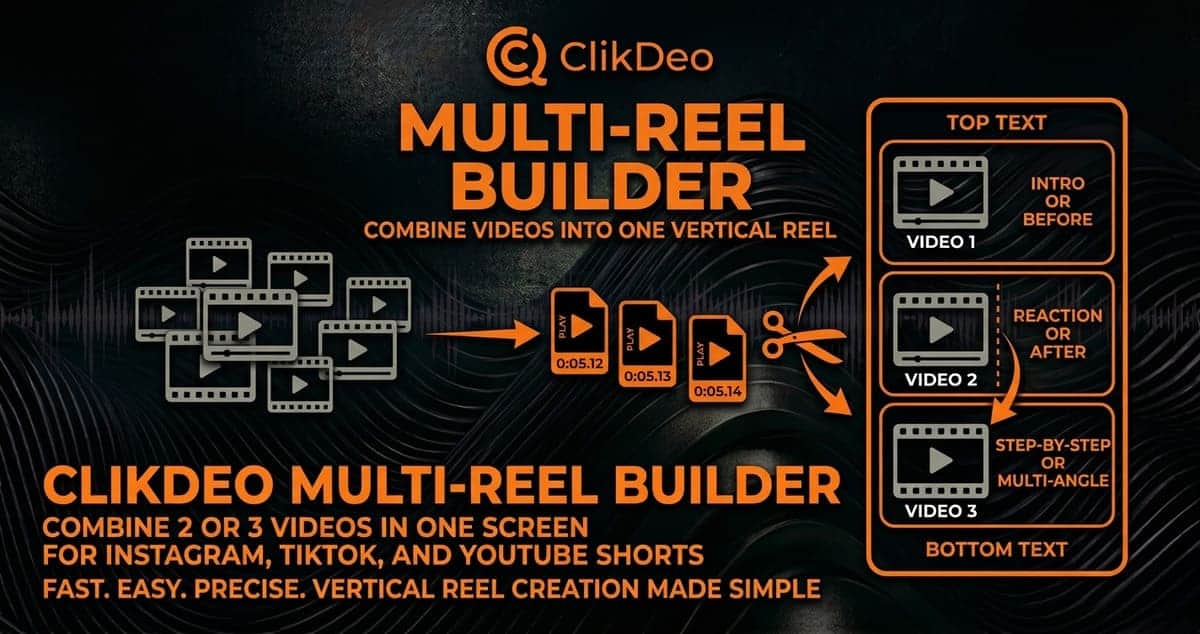
🎬 Multi-Video Reel Builder
The Multi-Video Reel Builder is a creative tool designed specifically for social media content. It lets you combine up to three videos side by side into a single vertical reel frame — perfect for split-screen style content on Instagram Reels, TikTok, and YouTube Shorts. Add custom text overlays, choose your layout, and create visually dynamic content that stands out in crowded feeds. This is a tool that most free platforms simply do not offer.
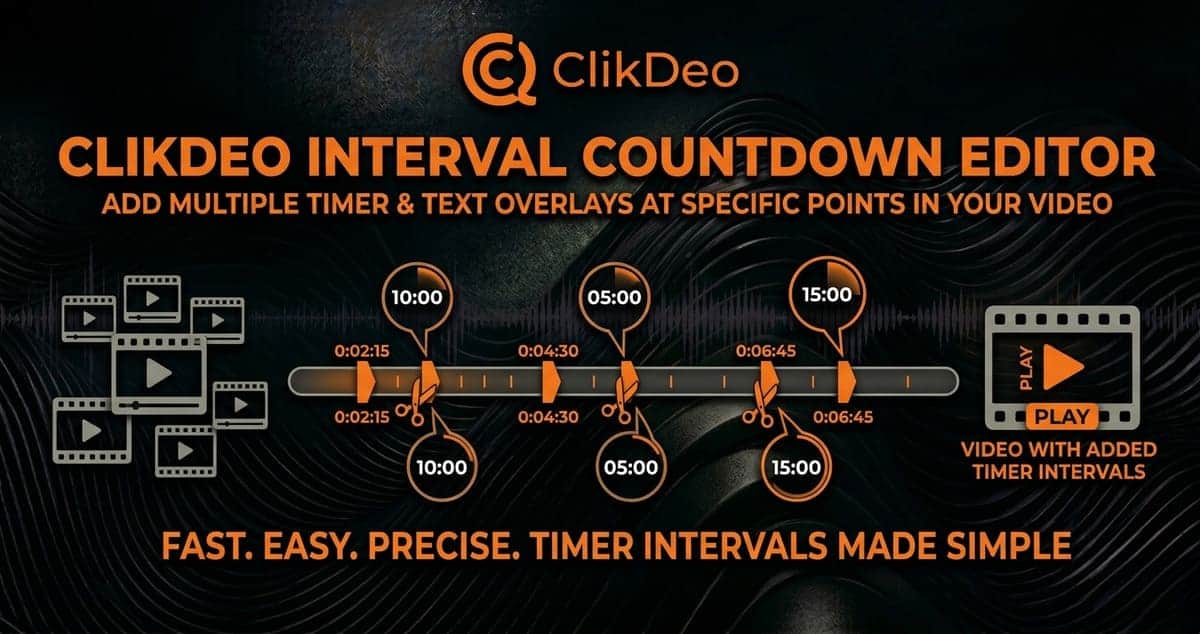
⏱️ Interval Countdown Editor
The Interval Countdown Editor is one of the most unique tools on ClikDeo — and you will not find it for free anywhere else. It automatically places customizable countdown overlays at equal intervals throughout your video. Choose how many intervals you want, customize the countdown style and background, and your video is ready. This tool is perfect for workout videos, cooking tutorials, study timers, presentation countdowns, and any content where timed transitions add energy and professionalism.
📱 Shorts Creator — ClikDeo's Most Powerful Tool
The Shorts Creator is the crown jewel of ClikDeo and the tool that sets it apart from every competitor in the free video editing space. It transforms any long video into multiple ready-to-publish short clips — all in one go.
Here is what makes it exceptional. After uploading your video, you can set the aspect ratio to 9:16 for perfect vertical formatting on YouTube Shorts, Instagram Reels, and TikTok. Choose a background color that fills any empty space around your video. Set your preferred clip duration — deciding exactly how long each short should be. Then add custom text overlays with your choice of font style, font size, and font color for both the top and bottom of the frame. You can even enable auto-numbering so each short in your series is automatically labeled in order.
Press Generate All Shorts — and within seconds, all your clips are created and ready to download. One long video becomes an entire week of social media content in just a few minutes. For creators who want to grow on YouTube Shorts, gain followers on TikTok, or build a presence on Instagram Reels — the Shorts Creator is the single most valuable free tool available online today.

Why Choose ClikDeo?
The answer is simple. ClikDeo gives you professional video editing tools that are genuinely, completely, and permanently free. No watermarks on your exports. No account to create. No subscription to cancel. No files uploaded to any server. Everything runs locally inside your browser on any device — Windows, Mac, Linux, Android, or iOS.
Most platforms promise free tools but hide the real features behind paywalls. ClikDeo was built specifically to break that pattern. It was created by a solo developer who personally could not afford these tools while trying to grow as a creator — and decided to build the solution himself, for everyone.
If you are a creator with goals, talent, and zero budget for expensive software — ClikDeo was built for you.
Visit clikdeo.com and start creating — completely free, right now.
Share
Content
First of all started from clikdeo.com home page . First of all scroll from header to legal section , step by step . After that I visited top feature and How It Works button in the header. I clicked feature button and then it move directly but smoothly to features section. then I hover all the fe
pasted
Comment