
ContentOracle AI Chat
Retrieval-augmented AI Chat for WordPress.
ContentOracle AI Chat is the best WordPress plugin for adding customizable retrieval augmented AI chat for WordPress with no coding and no third-party integrations to your website. For the past 7 months and counting, I have been hard at work developing this plugin to serve 43% of the web.
We recently landed our first big client: a power equipment maintenance company with a library of over 1,000 products. And that customer revealed a glaring problem with out current method method for generating text embeddings for post and product libraries.
How Our Embeddings Worked
You see, to implement RAG in our plugin, one of the core features we were looking for was not having to integrate with third-party vector databases, such as Pinecone. We wanted to keep everything within the core tech stack of WordPress (php and mysql-compatible databases) to make the plugin as easy as possible for non-technical business owners (our target market) to set up and get started with.
So, we generate vectors for all posts types (posts, pages, products, etc.) on the site using an open-source embedding model hosted remotely on our server. The plugin hits our api, gets embeddings for the site content, and then stores them in a custom table. Then, when conducting a semantic search for getting site content for RAG, we use a similarity metric alongside an efficient candidate generation algorithm to retrieve similar content, which we then use to prompt out LLM.
So far, so good, right? Not so fast. It turns out, that simply sending a large list of site content from a WordPress site to a remote api to be embedded is pretty slow and unreliable. It involves sending long-running http requests that sap server resources and are prone to fail due to timeouts. These issues did not appear, of course, on our testing sites, but they were brought to the forefront by the client with the large product library.
A New, Robust System
In solving this problem, a few ideas came to mind. One was to move text embedding generation completely over to the client site's server. But, since I am building a plugin for WordPress, I don't have the luxury of assuming I can install something like an ONNX runtime locally on each client's server. So, I couldn't do that.
Since I can't generate embeddings on the client site, I decided to continue to generate them using the api I built. But, the method of having the user submit a form, gathering every post on the site, sending them to my api, and waiting for that request to finish is bad too.
Embedding Queue
So, I decided to build an embedding queue system. It works like this: first, I create a custom database table that holds the ids of all the posts that need to be embedded. It also contains fields that hold the embedding status, timestamps for when they were added to the queue, and some other helpful data. Then, I could just add records to this table, and assume that any post whose id appears in the table needs to have embeddings generated for it.
I then implemented several ways to add posts to the queue table. Site owners can add all posts on their site manually. They can add all posts on their site that have not already been embedded manually as well. And, every post can be added to the queue using a meta box on the post editor. For good measure, I also built a system that periodically adds posts that don't have embeddings to the queue automatically.
Viewing the State of the Queue
After creating the database table, I knew I wanted to build the UI for seeing the status of the queue before I actually started consuming from it. Having the UI built would make debugging the queue consumption much easier. So, I decided to build out a table that shows what is going on in the queue.
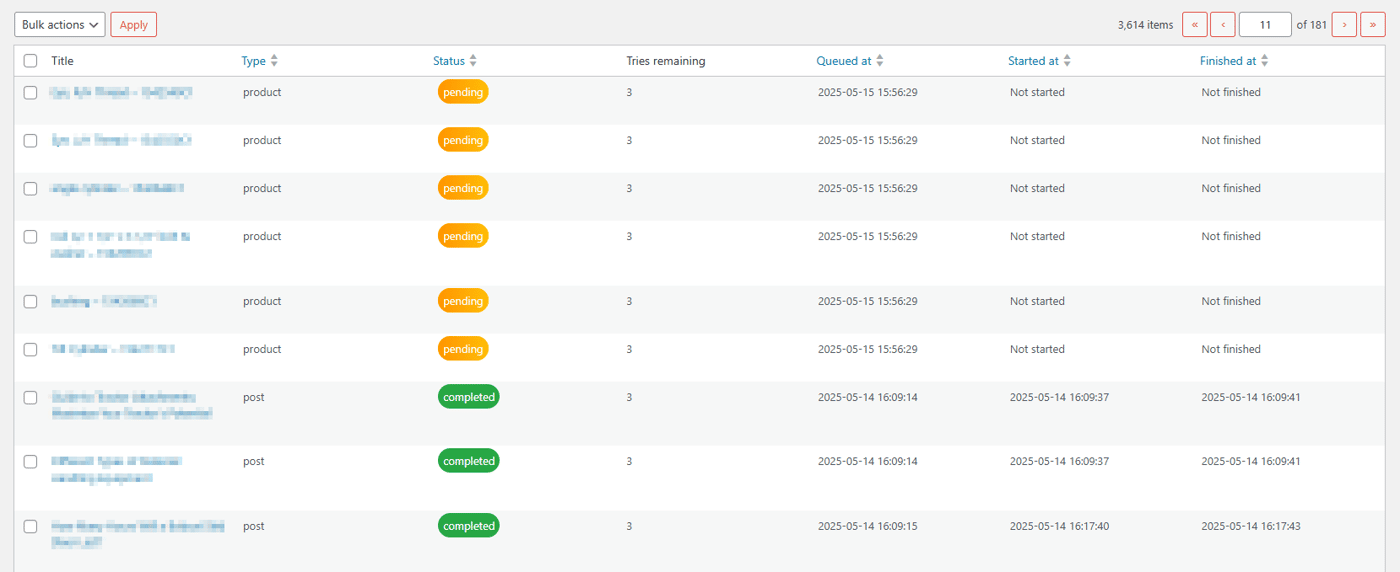
The table works pretty simply. All it does is pull out every record in the queue, grouping them by status: pending, processing, completed, and failed. Each status is color coded for easy identification. Then, I implemented user interface controls to remove posts from the queue. This is important for if the user wants to re-enqueue a post that has a status of completed or failed, since I am currently not allowing duplicate post ids in the queue.
Then, I adjusted my existing embedding form that used to simply gather all posts, and send them to my embedding api to make it instead add all the selected posts to the queue. Thanks to basing my table on the WP_List_Table class, I got a lot of goodies like sorting on columns and WordPress-specific styling out of the box.
Consuming Batches from the Queue
Finally, the time had come for me to consume records from the queue to get embeddings for the post. I already had a function that took in a set of posts, retrieved embeddings for them, and saved them to my text embeddings table. I just needed to retrieve the posts that were in the queue, and pass them into a call to that embedding function at regular intervals.
To accomplish this, I integrated with wp-cron, WordPress' built in task scheduler. Unlike a true cron system, wp-cron does not guarantee that tasks will be run at the exact time they are scheduled for. Instead, wp-cron triggers a check every time a page is loaded, to see if any tasks are due to be run. If they are, it runs them.
For example, let's say we schedule a task to run at 2pm. Currently it is 1pm. Now, we have a page load, but our job does not run yet, because it is not 2pm yet. 2pm hits, but no page load occurs until 3pm. In this case, our job will not run until 3pm because no page was loaded until then, which left no opportunity to execute the job until then.
Of course, we can make things run more consistently, using our system cron to trigger wp-cron. But that is outside of the scope of this post.
WP-Cron Work
Using wp-cron was the right fit for my plugin because I wanted the embeddings to run asynchronously and in the background.
For my embedding system, I needed to schedule three tasks:
One that runs as frequently as possible, to grab a batch of posts and embed them.
One that runs once a day, to empty the queue of posts with status
completedorfailedwith no retries remaining.And one that runs weekly, to automatically add posts that lack embeddings to the queue.
First, and most importantly, is the job that consumes records from the queue, and sends posts off to have embeddings generated. To implement this, I queried from the queue for posts added to the table farthest in the past, and extracted a batch of around 15-20 of them. Then, I used my existing logic to preprocess the posts into 256 word chunks, and sent those chunks to the api for embedding.
My existing logic for embeddings handled this, as well as the logic of storing the returned embeddings. The, all I had to do was update the status of the records in the queue based on whether embeddings were generated successfully.
Second comes the job to remove posts that reached either a completed or failed state. This was relatively straightforward, with a simple query on status to delete the records. The only caveat was that I wanted to retry posts that failed a few times before deleting it.
To achieve this, I used a counter field on the record to track the number of failures. Then, I only deleted records with a status of failed that had failed more than three times. That way, I could retry the embedding of posts a few times before removing them from the queue, leading to more reliable vector database assembly.
Finally, I created a job that runs weekly. Whenever it runs, if the option to auto-enqueue posts for embedding is selected, it adds all posts without embeddings to the embedding queue. This ensures that new products, posts, and other content types that are added later have embeddings made for them.
Conclusion
After building out this system, and fixing some bugs that came up, my plugin ended up with a working system creating embeddings for sites with thousands of posts/products. It works very efficiently, is resilient to failures, and can scale with a website. I released this feature with version 1.9.0 of the plugin, and the reception has been pretty good.
If retrieval-augmented ai chat sounds like something you might be interested in for your WordPress site, please feel free to give my plugin, ContentOracle AI Chat, a try! It is free, easy to set up, and a powerful addition to your site. You can get it on the WordPress Plugin Directory.
Thank you very much for reading!

Discover how ContentOracle AI Chat uses Retrieval-Augmented Generation (RAG) to enhance your WordPress site.
Introduction
In the fast-paced world of digital content, staying ahead is paramount. Enter ContentOracle AI Chat, a revolutionary WordPress plugin that harnesses the power of Retrieval-Augmented Generation (RAG) to supercharge your site. But what exactly is RAG, and how does it benefit your visitors? Let's delve into this transformative technology.
What is Retrieval-Augmented Generation (RAG)?
Retrieval-Augmented Generation (RAG) is an avant-garde AI technique that amalgamates the prowess of large language models (LLMs) with real-time information retrieval. Unlike conventional AI models that rely solely on pre-existing data, RAG dynamically fetches pertinent information from external sources to generate accurate and contextually rich responses. This ensures that the AI's output is not only up-to-date but also highly relevant to the user's query.
How ContentOracle AI Chat Implements RAG
ContentOracle AI Chat seamlessly integrates RAG into your WordPress site, creating a more interactive and informative user experience. Here's how it works:
Data Indexing: The plugin indexes your site's content, converting it into numerical representations stored in a vector database.
Real-Time Retrieval: When a user queries the AI, the plugin retrieves the most relevant documents from your indexed content.
Augmented Responses: The AI combines the retrieved information with its own knowledge to generate a comprehensive and accurate response.
For more details on how ContentOracle AI Chat works, check out our getting started page. Welcome!
Benefits for Your Visitors
Implementing ContentOracle AI Chat on your WordPress site offers numerous advantages:
Enhanced Search Functionality: The AI-powered search bar upgrades your site's search feature, providing visitors with precise and relevant results. This means users can find exactly what they're looking for without sifting through irrelevant content.
Personalized User Experience: By leveraging your site's unique content, the AI delivers tailored responses that resonate with your audience. This personalization can significantly improve user satisfaction and loyalty.
Increased Engagement: Visitors are more likely to stay on your site longer and explore more content when they receive accurate and helpful information. This can lead to higher engagement rates and lower bounce rates.
How to Get Started
Getting started with ContentOracle AI Chat is simple. Visit our installation guide for step-by-step instructions on how to integrate the plugin into your WordPress site. Once installed, you can customize the AI to match your site's tone and style, ensuring a seamless user experience.
Conclusion
ContentOracle AI Chat is not just another AI plugin; it's a game-changer for WordPress sites. By harnessing the power of Retrieval-Augmented Generation, it elevates user experience, boosts engagement, and ensures your content remains relevant and accessible. Upgrade your WordPress site today with ContentOracle AI Chat and experience the future of content interaction.
For more information, visit our homepage and explore the myriad ways ContentOracle AI Chat can transform your WordPress site.
ContentOracle AI - Supercharge your web UX with the power of AI.
Comment