
Divize
HTML/CSS Challenges
We've added a NEW badge label. It's there to help users spot the most recent HTML/CSS challenges we've added to our platform.
Each time we add a new challenge, the NEW badge label appears next to it. This way, users won't miss any new content. This label is a handy tool to help users find and try the latest HTML/CSS challenges.


As part of our commitment to foster consistent activity amongst students undertaking our HTML/CSS User Interface challenges, we introduced a new Streaks feature. This addition provides a visual representation of consecutive days of activity through a color-coded list. It's designed to allow students to easily monitor their progress and keep the momentum going.
Here's the breakdown:
- A dimmed color signifies a day when a student has successfully finished one challenge.
- A day shines with a bright color when a student has triumphed over more than two challenges.
We are confident this enhancement will provide an engaging and intuitive way for students to see their ongoing dedication and success in tackling our challenges. Let's light up those streaks!
Understanding the importance of deadlines in fostering urgency and goal completion, we've added a deadline-oriented scoring system to the Divize HTML/CSS Challenges tool, encouraging students to address challenges promptly and enhance their HTML and CSS understanding.
https://blog.divize.io/product-updates/beat-the-clock-bonus-scores
-
1
Interesting. However, I'm a bit concerned that the countdown timer might have the negative effect of encouraging learners to actually search up solutions rather than take their time and try things out on their own, especially in a competitive environment. But overall, it's a cool concept.

Mastering code writing typically requires hands-on practice rather than resorting to copying and pasting from elsewhere. With this in mind, we've introduced a feature in the Divize HTML/CSS Editor that discourages such practices. This feature does more than just prevent students from copying and pasting – it detects such behavior, issues a warning, and calls for a challenge reset to carry on with the task.
https://blog.divize.io/product-updates/manual-input-only-no-copy-paste-editor

We've added a reset feature into the Divize HTML/CSS Challenges tool. This new function allows students to reset their current challenge at any point, giving them the opportunity to redo a challenge or strive for a better score. The feature is designed to provide a fresh starting point for students to refine their HTML and CSS skills.
https://blog.divize.io/product-updates/challenge-reset-restart-anytime-any-stage
We have added a Challenges Filters. This feature is designed to provide a more tailored and efficient navigation experience through the available challenges for all students.
The new Challenges Filters allow students to quickly locate challenges that align with their skill level, preferences, and progress.
https://blog.divize.io/product-updates/refine-challenges-listing-level-type-status
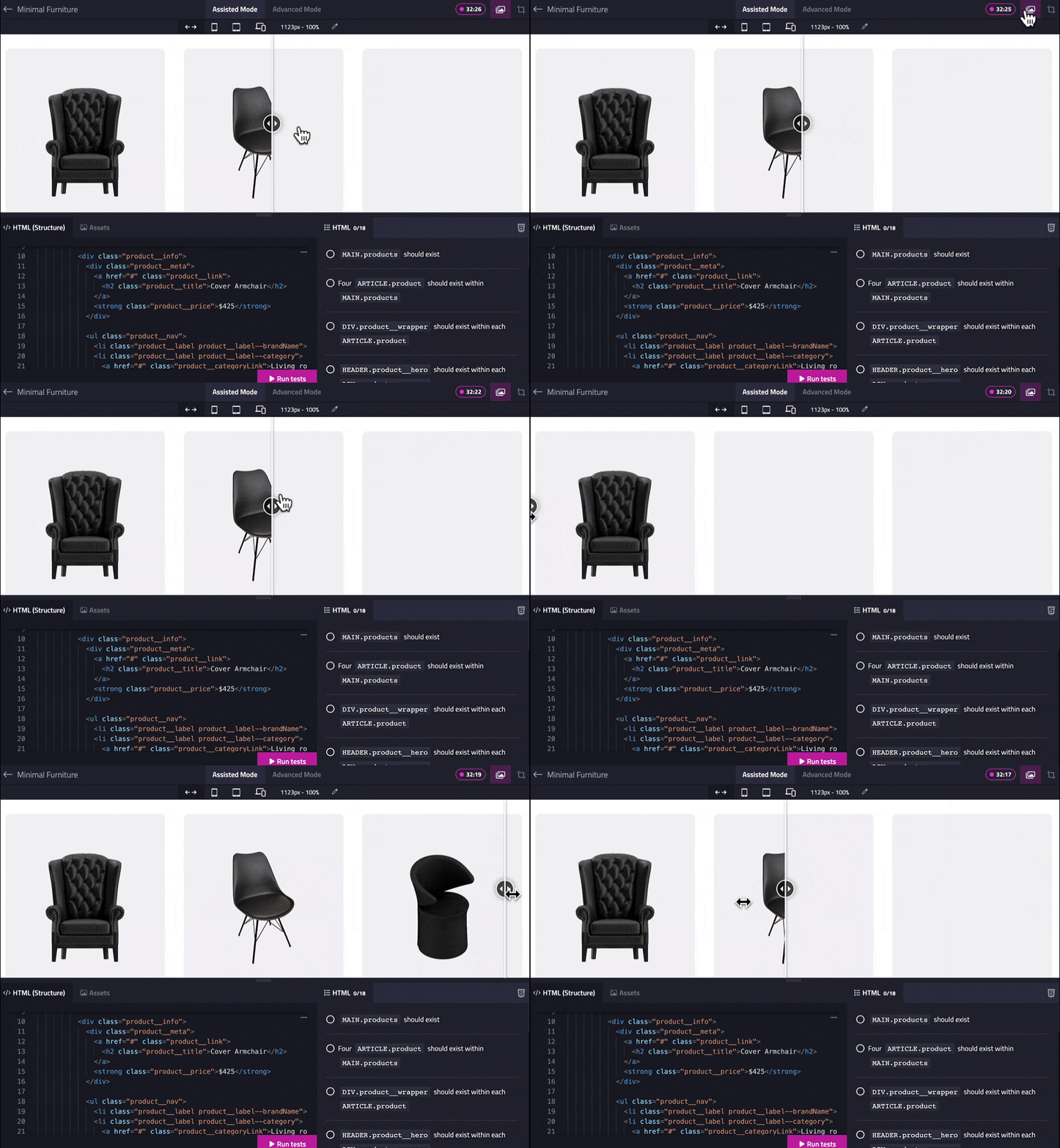
Rolled out a new UI comparison feature in the Divize Editor where users can now visually match their progress with the provided preview, ensuring the final result aligns with their provided code.
As users tackle a coding challenge, writing their HTML/CSS code, this feature gives a real-time visual match of their current progress with the given design. It's like a mirror that not only reflects where the user's design is currently, but also indicates where it should be heading.

Just integrated the powerful and widely-used toolkit, Emmet, into the Divize.io editor. Now, it can transform short expressions into complete HTML markup and CSS. Emmet allows the user to generate and manipulate HTML code with a variety of expressions.
These can be used to perform a range of operations, including creating new elements, nesting them within other elements, adding attributes to elements, and much more. This will seriously streamline the HTML writing process, making it much more in line with the DRY (Don't Repeat Yourself) principle and far less repetitive. Excited to see how this enhances the user experience!
Comment