
DOCKR
AI-Powered Documentation & Diagram Generator


Meet Sarah.
She’s a senior developer at a mid-sized SaaS company. Smart. Experienced. Capable.
Her CTO asked her to document their microservices architecture.
“Should be straightforward,” he said. “Just write down how it works.”
Three months later, the documentation is still outdated.
This is Sarah’s story. But it’s also the story of thousands of developers caught in the same trap: documentation rot. The moment you finish writing it, it’s already wrong.
The Challenge
The Request: “Sarah, we need documentation for our microservices architecture. New developers are struggling to onboard, and we’re losing too much time explaining how things work. Can you handle this?”
Sarah’s Initial Thought: “Sure, I can do this. I’ll start with the core services and work my way out. Should take a few weeks.”
The Reality: Three months later, Sarah is still working on it. And the documentation she’s already written is outdated.
Her CTO expected this to take 2-3 weeks. It’s taken 3 months. She’s exhausted. The documentation is incomplete. And worst of all, nothing stays current.
Why? Because documentation isn’t a one-time task. It’s a race against code velocity. And code always wins.
The 7 Real Documentation Challenges
Sarah discovered that documenting a microservices architecture isn’t about writing better. It’s about battling seven interconnected challenges simultaneously.
Challenge 1: Document Every Service (And There Are Always More)
The scope:
12 microservices
Each with different tech stacks
Multiple databases, message queues, cron jobs, third-party integrations
Hundreds of functions, API endpoints, deployment strategies
For each service, Sarah needs to document:
What does it do?
How does it work internally?
What dependencies does it have?
How does it interact with other services?
What APIs does it expose?
What data does it store?
Time per service: 10-15 hours
Total time for 12 services: 120-180 hours
Sarah’s reaction: “I didn’t realise how complex our architecture had become. Every service has its own quirks, dependencies, and undocumented decisions. I’m documenting code I didn’t write, making assumptions about decisions I wasn’t part of.”
Challenge 2: Create and Maintain Visual Diagrams
What’s needed:
Architecture diagrams (how services connect at the system level)
Sequence diagrams (how services interact in a workflow)
Data flow diagrams (how data moves through the system)
The manual nightmare:
Learn diagram tools (Lucidchart? Draw.io? PlantUML?)
Spend 3-6 hours creating one diagram
Diagram changes when code changes
Manually recreate the diagram
Repeat forever
Sarah’s painful experience: “I spent 3 hours creating a sequence diagram for the payment flow. Two days later, we refactored the flow. The diagram is already outdated. Do I recreate it? When? The code is going to change again next week.”
Challenge 3: Synchronise With Code Changes
The brutal truth:
Code changes daily (50+ commits per week)
Documentation updates are manual and time-consuming
No automatic sync mechanism between code and docs
Developers forget to update the docs when they ship code
Documentation falls behind within weeks, not months
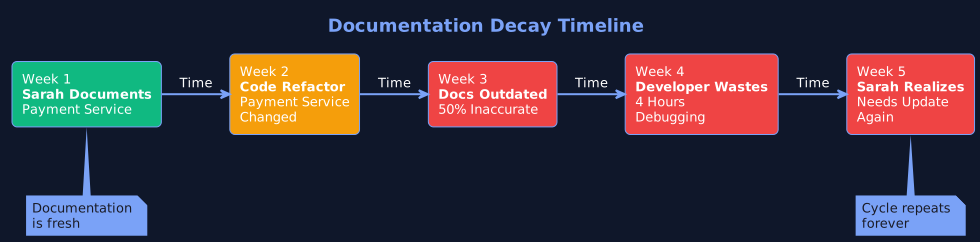
How quickly does documentation become outdated without automation
The math:
50 code changes per week
Each potentially affects documentation
15-30 minutes per manual update
12-25 hours per week just maintaining docs
Sarah’s feeling: “I feel like Sisyphus. Every time I finish documenting something, it changes. I’m on a treadmill that never stops.”
Challenge 4: Make Documentation Discoverable
The scattered reality:
README files in each code repository
Docs in Confluence (scattered across 20+ pages)
Architecture diagrams in Google Drive
Onboarding guide in Notion
API docs in Swagger
Tribal knowledge in Slack threads and senior developer brains
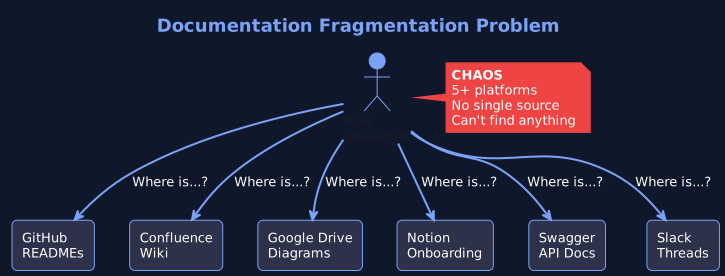
The typical documentation chaos across multiple platforms
New developers ask: “Where do I find this?”
Wrong answer: “It’s in the wiki”
Reality: “It might be in the wiki, or it might be in that Google Drive, or someone needs to explain it to you.”
Sarah’s exhaustion: “We have documentation scattered across five different platforms. I don’t even know where everything is. And we’re duplicating information across all of them.”
Challenge 5: Keep Everything Consistent
The problem:
8 developers, 8 different writing styles
Some services are beautifully documented, others are barely mentioned
No standard format or template
Quality varies wildly
New developers don't know what to expect
Sarah’s frustration: “I’m trying to create standards, but getting buy-in is impossible. Developers are focused on shipping code, not maintaining documentation.”
Challenge 6: Handle Developer Onboarding
The painful reality:
New developers join
Documentation is incomplete and outdated
Senior developers spend 2-4 hours per day explaining basic concepts
Knowledge stays trapped in developers heads
When they leave, you lose that knowledge
Typical new developer week:
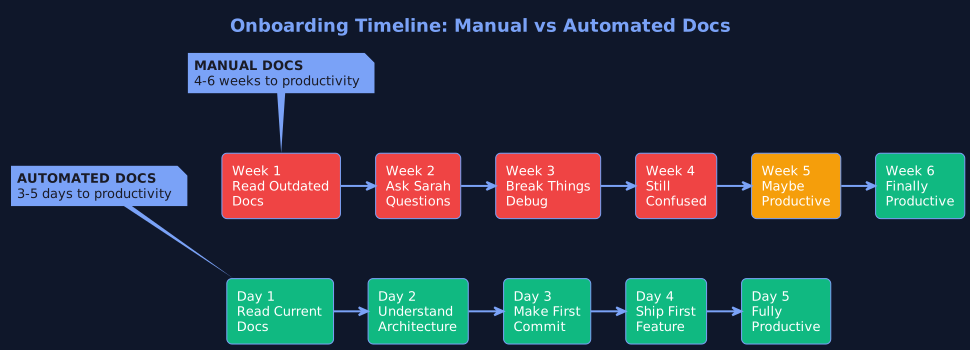
Current onboarding (weeks) vs. ideal onboarding (days)

Time to productivity:
Current: 3-6 weeks
Should be: 3-5 days
Sarah’s reality: “I spend 20% of my time explaining things that should be documented. But when I try to document them, they’re outdated before the month ends. It’s a losing game.”
Challenge 7: Accept That Docs Will Get Outdated
The pragmatic nightmare: Most teams eventually accept: “Documentation will always be incomplete and outdated. That’s just how it is.”
The actual cost:
Slow onboarding (2-3 months instead of 3-5 days)
Senior developers spend 15-20 hours per month explaining basics
Knowledge silos (only Person X understands Service Y)
Bugs from misunderstanding the architecture
Repeat mistakes because lessons aren't documented
Employee frustration and turnover
Lost institutional knowledge
Sarah’s resignation: “This is where we are. And it’s costing us real time and frustration. We keep hiring consultants because critical knowledge isn’t documented. We onboard slowly. We make the same mistakes twice. And there’s nothing I can do about it-not without working 80-hour weeks.”
Why Manual Documentation Always Fails
Here’s the fundamental problem: Documentation can’t keep pace with code.
The Physics of the Problem
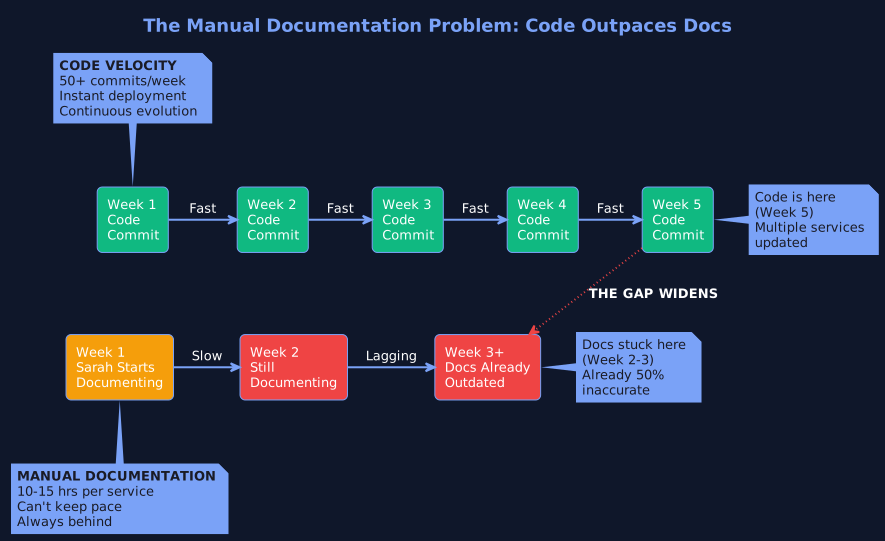
The velocity gap between code changes and manual documentation updates

Within weeks, documentation is stale. Within months, it’s completely inaccurate.
Why This Matters
Outdated documentation is worse than no documentation.
With no docs, developers know to ask for help or read the code. With outdated docs, they follow incorrect instructions, introduce bugs, and waste hours debugging problems that wouldn’t exist if docs were current.
Sarah realised this the hard way. She spent 180 hours documenting. But because the docs go stale within weeks, those 180 hours delivered almost no lasting value.
The opportunity cost is staggering. Those 180 hours could have been:
2-3 major features shipped
Dozens of bugs fixed
Performance improvements deployed
Actual value delivered to customers
Instead, Sarah created documentation that’s already outdated.
The Time Cost: What Sarah Actually Lost
Let’s quantify Sarah’s situation in terms of time spent vs. time saved.
Sarah’s Time Investment

What Those 180 Hours Cost
In engineering productivity:

Ongoing Maintenance Time
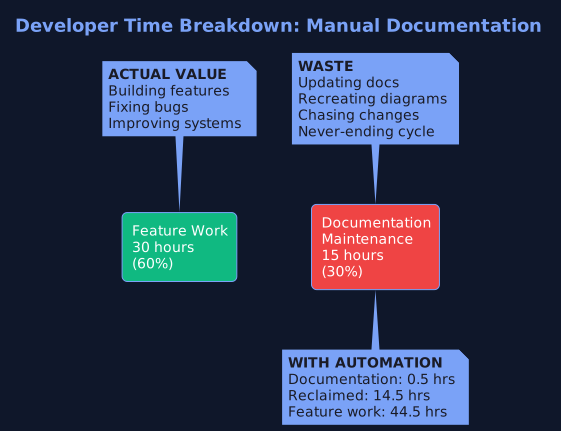
Where developer time goes: Feature work vs. documentation maintenance
Keeping documentation current requires:

New Developer Onboarding Time

With 5 new hires per year: That’s 700-750 hours saved annually
The Real Total Time Impact
Sarah’s team (20 developers):
Current Solutions (And Why They Fall Short)
Sarah explored every option. They all disappointed.
Option 1: Write Documentation Manually
This is what Sarah’s doing.
Pros:
Full control over content
Can add context and nuance
Tailored to your specific needs
Cons:
Incredibly time-consuming (120-180 hours for basic docs)
Goes stale within weeks
Ongoing maintenance is a never-ending treadmill
Doesn't scale as codebase grows
Takes time away from actual feature work
Time impact: Sarah spent 3 months and still isn’t done. Docs are already outdated.
Verdict: Fails at scale.
Option 2: Use Documentation Generators (JSDoc, Javadoc, Swagger)
Tools like:
JSDoc for JavaScript
Javadoc for Java
Swagger/OpenAPI for APIs
Sphinx for Python
Doxygen for C++
Pros:
Faster to generate than manual
Stays closer to actual code
Works well for API documentation
Cons:
Limited to code comments - only documents what's commented
No visual diagrams - no architecture, sequence, or flow diagrams
No high-level context - explains HOW code works, not WHY
Still requires manual updates - developers must update comments
Doesn't explain business logic
Only as good as comments - garbage in, garbage out
Sarah’s experience: “We use JSDoc for our JavaScript services. It generates API docs automatically, which is great. But it doesn’t show how services interact. It doesn’t create architecture diagrams. It’s 10% of the solution.”
Verdict: Works for APIs, fails for comprehensive documentation.
Option 3: Hire Technical Writers
The professional approach.
Pros:
Dedicated resource
Professional documentation quality
Can create comprehensive guides
Cons:
Technical writers don't understand code deeply - they need developers to explain it
Creates a bottleneck - everything goes through one person
Still goes stale - technical debt continues to accumulate
Doesn't solve synchronization - code still changes faster than docs
Doesn't scale - one writer per 10-20 engineers
Time impact: Technical writers still need 20-40 hours of developer time per month for explanations and reviews.
Verdict: Expensive, doesn’t fundamentally solve the problem.
Option 4: “Document as You Go”
The theory: Developers document code as they write it, keeping documentation up-to-date naturally.
The reality:
Developers are under deadline pressure to ship features
Documentation is always "I'll do it later" (it never happens)
When it does happen, quality is inconsistent
It still goes stale as code evolves
No enforcement mechanism
Sarah’s experience: “We tried this. It doesn’t work. Developers are under pressure to ship. Nobody documents. Documentation is always outdated. Or never written.”
Verdict: Sounds good in theory, fails in practice.
Option 5: Accept Incomplete Documentation
The resigned approach: Just accept that documentation will always be incomplete and outdated.
The time cost:
New developers take 3-6 weeks to onboard (instead of 3-5 days)
Senior developers spend 20% of time explaining (15-20 hours/month)
Knowledge silos form (only Person X understands Service Y)
Bugs from architectural misunderstanding
Institutional knowledge lost when people leave
Employee frustration and higher turnover
Repeated mistakes
Sarah’s reality: “This is where we’ve landed. And it’s costing us real time and productivity.”
Verdict: Pragmatic but expensive in time and morale.
Enter Agentic Documentation
What if documentation could update itself?
What if it wasn’t a manual process, but an autonomous system?
This is where Agentic AI changes everything.
The Problem With Every Solution Above
They all assume documentation is a manual process:
Manual writing
Manual updates
Manual synchronization
Manual maintenance
What if it didn’t have to be?
How Agentic Documentation Works
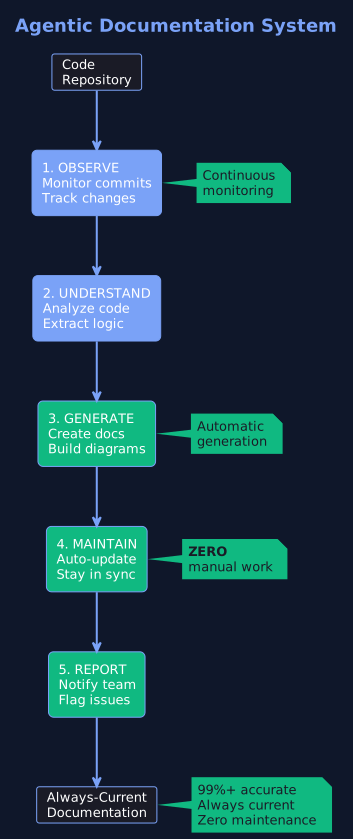
Autonomous documentation system that observes, understands, generates, and maintains docs automatically
Agentic documentation uses autonomous AI agents that:
1. Observe
Continuously monitor your code repository
Track every commit and change
Understand what changed and why
2. Understand
Analyze code to extract business logic
Parse architecture and dependencies
Understand patterns and relationships
3. Generate
Automatically create documentation
Generate multiple diagram types
Create API documentation
Extract and explain complex flows
4. Maintain
Automatically update when code changes
Keep docs in sync with reality
No human intervention needed
Zero manual maintenance
5. Report
Flag potential documentation issues
Notify teams of significant changes
Enable human oversight
Why This Is Different

Sarah’s reaction: “Wait, you’re telling me the documentation could update itself? Without me manually rewriting it every time code changes?”
Exactly.
How Dockr Solves Sarah’s Problem
Dockr is an AI-powered documentation platform built on agentic principles.
Sarah’s New Workflow
Day 1: Connect Your Repository
Sarah connects Dockr to her GitHub repository. Takes 5 minutes.
Dockr immediately begins analyzing the codebase.
Day 2: Initial Documentation Generated
Dockr has automatically generated:
Service descriptions (what each service does)
Architecture diagrams (how services connect)
API documentation (endpoints, parameters, responses)
Data flow diagrams (how data moves)
Dependency mapping (what talks to what)
Database schema documentation
And many more...
Sarah’s assessment: “This is 99% complete. It would have taken me 3 weeks to get to this point. I spent 2 hours reviewing. Done.”
Time saved: 118 hours (120 hours → 2 hours)
Weekly: Code Changes, Docs Update Automatically
Day 8: A developer commits code
The developer refactors the Payment Service. Pushes code to main branch.
What happens automatically:
Dockr detects the change
Analyzes the modified code
Updates relevant documentation
Regenerates affected diagrams
Flags Sarah for review (if needed)
Sarah’s review: 5 minutes to scan changes, approve
Time saved: 2-3 hours per update (manual) → 5 minutes (automated)
Month 1: New Developer Onboarding
New engineer joins the team.
Instead of:
Waiting for Sarah to explain everything (2-4 weeks)
Reading scattered, outdated documentation
Making mistakes from misunderstanding
Asking questions constantly
With Dockr:
Access comprehensive, current documentation
Visual diagrams showing architecture
APIs clearly documented
Service interactions explained
Result: New developer productive in 3-5 days (instead of 3-6 weeks)
Time saved per new hire: 140-150 hours
Sarah’s comment: “This is magic. New team members now have everything they need without asking me a hundred questions.”
The Transformation
Sarah’s stats after switching to Dockr:

What Sarah does with reclaimed time:
Ship features (actual value for customers)
Improve performance
Fix technical debt
Lead architecture improvements
Focus on actual engineering
Sarah’s reflection: “I finally feel like I’m doing what I was hired for. Building things. Not writing documentation.”
The Time Comparison: Manual vs. Automated

The Pattern of Success
Organizations that succeed with documentation automation don’t treat it as a nice-to-have.
They treat it as a strategic investment in developer productivity.
What Successful Organizations Do:
Recognize documentation as a continuous process, not a one-time task
Invest in automation to eliminate manual toil
Free developers to focus on high-value work
Accelerate onboarding from weeks to days
Reduce knowledge silos and dependencies
Build institutional knowledge that persists
Create a culture of documentation excellence
Your Action Plan

Which Challenge Are You Facing?
Sarah’s story is the story of thousands of developers.
The key is recognizing that manual documentation will always fail at scale.
Need Help Solving This?
FLYTEBIT Technologies built Dockr - an AI-powered documentation platform that automatically generates and maintains your code documentation.
Dockr helps you:
Generate comprehensive documentation in hours, not months
Keep docs automatically synchronised with code changes
Create visual diagrams that update themselves
Accelerate onboarding from weeks to days
Reclaim 15-20 hours per week per senior developer
Build institutional knowledge that persists
Ready to get started?
Request a Demo: dockr.flytebit.com
Visit us at: flytebit.com
Follow FLYTEBIT TECHNOLOGIES on LinkedIn for insights and updates
Schedule a free consultation to discuss your documentation challenges
Key Takeaways
✅ The Problem: Documentation can't keep pace with code velocity
✅ The Cost: 1,000+ hours wasted annually on manual documentation
✅ Current Solutions: All require manual effort and still fall behind
✅ The Solution: Agentic documentation that updates automatically
✅ The Impact: 99% time reduction + always-current docs + faster onboarding
Success pattern: Automate + Always Current + Developer Time Reclaimed + Faster Onboarding + Institutional Knowledge

Comment