
Fabio AI Chatbot
Let AI answer your visitors' questions and boost your sales
1️⃣ Dropped the bigger models we didn't need
We were defaulting some flows to full-size models (gpt-5.4, gpt-5.5) when the task — answering FAQ-style questions from scanned site content — didn't need that much horsepower. Swapped those out for gpt-5.6-luna, OpenAI's new nano-tier model built specifically for high-volume, cost-sensitive workloads. Same job, fraction of the cost per request. 💰
2️⃣ Same move on the Gemini side
Moved to gemini-3.5-flash and gemini-3.1-flash-lite instead of the older/discontinued previews. Flash-tier models are consistently the sweet spot for chatbot Q&A — you're not doing complex reasoning, you're doing retrieval-augmented answers, so paying for a frontier model is usually wasted spend. ⚡
3️⃣ Trimmed the Mistral lineup to one model
We used to expose several Mistral variants. Cut it down to just mistral-large-3. Fewer options isn't just simpler for users — it's fewer configs to test and support, which matters a lot when you're a team of one. ✂️
4️⃣ Added Anthropic as a genuinely cheaper alternative
claude-haiku-4-5 is now available as a provider option — for a lot of chatbot use cases it's a strong quality-per-dollar pick, so users who were maybe overpaying elsewhere now have another lever to pull. 🎉
🧠 The bigger lesson
The real cost lever isn't picking "the best model" — it's matching model tier to task. A chatbot answering "what are your opening hours" doesn't need the same model as one doing multi-step reasoning. Most of our savings came from routing the boring 90% of queries to the cheapest capable model, not from any one provider being magically cheaper.
🙋 Curious if other indie hackers running AI features have found other levers — caching, prompt shortening, self-hosted models for narrow tasks? What's worked for you?

Hey Product Hunt community! 👋
We've been running Fabio Chatbot, a paid AI chatbot plugin for WordPress, and we just released a free companion version — Fabio Chatbot Lite — on the official WordPress.org plugin repository. 🆓
👉 https://wordpress.org/plugins/fabio-ai-chatbot-lite/
The idea was simple: give away a solid free version to get discovered by more WordPress site owners through the repo's search & directory, and hopefully drive more traffic (and eventually conversions to the paid version) 📈
We'd love to hear from founders/makers who've tried this strategy:
🤔 Have you released a free/lite version of your product on a marketplace or repo (WordPress, Chrome Web Store, etc.) specifically to boost traffic?
📊 Did it actually move the needle — more visits, more signups, more paying users?
⏳ How long did it take before you saw a real impact?
⚠️ Any downsides — cannibalization of paid users, support overhead, etc.?
Genuinely curious to compare notes with others who've been down this road. Thanks in advance! 🙏
-
1
The WordPress repo seems like a particularly interesting discovery channel because the free version can reach people already looking for a plugin. I’d be curious how much of that directory traffic actually turns into paid users, rather than just installs.

When WordPress 7 shipped its native AI Connectors API, a lot of plugin makers rushed to integrate. We didn't. 🐢
Here's the honest reasoning behind that call, as makers of Fabio Chatbot (an AI chatbot plugin for WordPress):
The trade-off nobody talks about ⚖️ Right now, our users set their own API keys directly inside Fabio Chatbot. We control exactly how those credentials are stored and handled — no middle layer, no surprises. Switching to the native connector means outsourcing that trust to a brand-new WordPress core system. Convenient? Sure. But it's new, unproven at scale, and touching user API keys is not where we want to be an early adopter. 🔐
So we made the unsexy choice: wait and watch, rather than ship a shiny integration that could put our users' credentials at risk. We'll move when the security story is solid, not when it's trendy.
What we shipped instead: v3.6.9.2 🚀 Instead of chasing the new connector, we doubled down on something our users actually asked for — better response tones.
Fabio Chatbot has always let site owners pick how their chatbot "speaks":
🟦 Professional — confident, sales-driven
🟨 Friendly — warm, casual, approachable
🟥 Serious — strictly factual, zero fluff
This release sharpens the prompt engineering behind all three, so responses stay consistently on-brand instead of occasionally drifting into generic-AI-speak.
The takeaway 💡 Sometimes the best move as an indie plugin maker isn't shipping the flashy new integration — it's saying "not yet" and putting that time into polishing what already works. Security debt is way more expensive to pay off later than a missed trend cycle now.
Curious what other makers here think — would you have made the same call, or moved fast on the native connector? 👇
-
1
The decision to delay the connector is interesting because it’s driven by trust rather than feature velocity. That makes the release choice more consequential than a typical integration decision.
-
1
In our actual system, the webmaster enters his own API key, which is stored on his server. The Wordpress connectors stores the API key somewhere, without visibility. For my part, I need more intel on how safe it is .
-
1
That makes the trust concern much more concrete. I’m curious what you learn once you have more visibility into how the connector handles those credentials.
-
-
Hey Indie Hackers,
I’ve built Fabio AI ChatBot, a WordPress plugin that lets users bring their own AI keys (Gemini, OpenAI, Mistral) and deploy a chatbot that understands their entire site—whether it’s 500+ pages, 1000+ WooCommerce products, or bbPress threads.
The Opportunity for Service Providers
I’m reaching out because I think this could be a great upsell for agencies/freelancers who work with WordPress clients. Here’s why:
Clients want AI, but many don’t know how to set it up effectively.
You can offer a premium service: Setup, customization, and intent/analytics optimization (e.g., “Your chatbot data shows users keep asking about X—let’s add this to your FAQ”).
Lifetime deal available: One-time pricing ($69/$249/$419) until Aug 31, making it easy to bundle into your offerings.
Questions for You:
Would you consider adding this as a service for your clients?
What would make it a no-brainer for you to recommend/resell?
Any concerns about pricing, integration, or support?
I’d love to hear your thoughts—especially if you’ve already tried selling chatbot-related services!
Hey Indie Hackers! 👋
Just shipped v3.6.5 of Fabio AI Chatbot, and I wanted to share why this update matters—especially if you’re running a WooCommerce store or looking to cut AI costs without sacrificing quality.
🔥 What’s New?
1. Smarter WooCommerce Product Recognition
If you’ve ever had customers ask your chatbot about a product and get a vague or incorrect answer, this one’s for you. We’ve improved product matching, so the chatbot now understands queries about your catalog way better—even for large or niche stores.
2. Conversations That Follow Your Users
No more frustration from customers having to repeat themselves on every page. Now, their chat history stays with them as they browse your site. It’s a small UX win that makes a big difference in engagement.
💰 The Big One: Cost Savings Without Compromise
Here’s the thing: AI models have gotten way better at being efficient. After testing, we found that GPT-4 Mini performs almost identically to GPT-4 for chatbot use cases—but costs ~50% less in tokens.
So we made the call:
Our demo sites now run on GPT-4 Mini by default.
You can still pick any model (OpenAI, Gemini, Mistral) in large or mini—whatever works for your budget.
Bottom line: You can now save money without your users noticing a difference.
🤔 Why Should You Care?
If you’re a store owner: Fewer support tickets, happier customers, and better conversions from accurate product answers.
If you’re bootstrapping: Lower AI costs mean you can run a high-quality chatbot without breaking the bank.
🚀 Try It Out
Question for the community: Have you experimented with smaller AI models for your projects? What was your experience? Would love to hear your thoughts below! 👇
Fabio AI Chatbot – The WordPress plugin that turns your site’s content into a smart, cost-effective chatbot.
❌ Problem: your visitors hesitate to hit "Buy" because they’re unsure about returns. They keep asking: "What if it doesn’t work for me?" "How long do I have to request a refund?" "Do I cover return shipping?" Without instant answers, they bounce—killing your conversion rate.
✅ How to fix it? With Fabio AI Chatbot, add this buying intent prompt to your additional instructions:
📌 Example prompt: "If the visitor asks about returns or refunds—like whether they can return a product if it doesn’t fit their needs, how long they have to send it back, who pays for return shipping, or when they’ll get their money back → remind them of our 30-day no-questions-asked refund policy with free returns."
Result: ✔ "What if it doesn’t work for me?" → "No worries! 30-day refund, free returns—no questions asked."
💡 Need inspiration? Grab our 20 ready-to-use buying intent templates → fabio-plugins.com/buying-intent/
As an indie hacker, you know every visitor who asks about downloads, trials, or compatibility is a potential user—but most don’t convert. Why? Because they get lost in generic answers or can’t find the next step.
Fabio AI ChatBot solves this by:
✅ Detecting purchase intent in real time (keywords: download, install, trial, license, system requirements, Windows/Mac/Linux, etc.).
✅ Responding with precision—only using your website’s content (no made-up answers).
✅ Triggering custom actions when intent is high:
Offer a free trial download link.
Push a limited-time discount for new users.
Direct them to documentation or installer files.
🔥 Result: Fewer abandoned queries, more downloads, and higher conversions—without lifting a finger.
Example workflow:
User asks: "Does this work on Mac?"
Chatbot replies: "Yes! [Download the free trial here] or check [system requirements]."
User clicks → conversion.
✅ No code. ✅ Plug-and-play for WordPress.
✅ Free 30-day trial.
Question for fellow indie hackers: What’s one question you wish your users would stop asking? (Maybe we can automate it. 😉)
👉 Try it: fabio-plugins.com
-
1
I think the interesting part isn't detecting buying intent—it's deciding what to do with it.
High intent doesn't always mean someone is ready to buy. Sometimes they're ready to compare, reduce risk, or understand implementation. The better the product gets at recognizing which decision the visitor is trying to make, the more natural the next step will feel.
1. The Problem: Most Chat Leads Aren’t Ready to Buy
If you’re using a chat tool on your WordPress site, you know the struggle: most visitors aren’t ready to buy. They ask questions, compare options, or just browse—while the real opportunities (the ones ready to book a call) get lost in the noise.
For indie hackers, this means:
Wasted time responding to low-intent inquiries.
Missed conversions because high-intent leads aren’t prioritized.
Lower efficiency in turning chats into actual sales calls.
The solution? Use AI to automatically detect buying intent in your chats—and guide those leads straight to your booking page.
2. The Solution: A Simple AI Prompt for Buying Intent Detection
Fabio AI ChatBot a WordPress plugin that lets you add a custom AI prompt to your chatbot’s instructions. This prompt analyzes visitor messages in real-time to detect buying intent—and then directs them to your booking page when they’re ready to talk.
How It Works:
Install the plugin on your WordPress site.
Add a custom AI prompt (provided by Fabio AI Chatbot) to the "Additional Instructions" field of your chatbot. This prompt is designed to:
Detect buying signals (e.g., urgency, pricing questions, direct requests for a call).
Ignore low-intent inquiries (e.g., general questions, tire-kickers).
Automatically guide high-intent leads to your booking page.
Customize the prompt based on your own experience (or ask the Fabio team for help).
Let the AI do the work—no manual filtering required.
3. Who Is This For?
This solution is ideal for any business using WordPress and a chat tool to engage visitors, including:
Coaches & consultants (business, life, fitness, etc.)
Agencies (marketing, design, development)
SaaS founders (demo requests, onboarding calls)
Freelancers (developers, designers, copywriters)
E-commerce stores (high-ticket sales, B2B)
If you’re tired of manually filtering chat leads, this is for you.
4. How to Get Started
Install Fabio AI Chatbot on your WordPress site.
Copy and paste one of the AI prompt here into the "Additional Instructions" field of your chatbot.
Customize the prompt to match your business language and needs.
Test and refine based on real conversations.
Need help? The Fabio team can assist you in fine-tuning your prompt for maximum effectiveness.
5. The Big Takeaway: Let AI Do the Heavy Lifting
You don’t need to manually review every chat to find the 20% of leads that matter. With Fabio AI Chatbot’s buying intent prompt, you can:
Automate lead qualification in real-time.
Focus on closing deals instead of filtering tire-kickers.
Scale your business without adding more work.
Fabio AI Chatbot 3.6: The Only Tool That Reveals What Your Visitors Actually Want"
Hey Indie Hackers! 👋
We just launched Fabio AI Chatbot v3.6, and it’s all about turning visitor curiosity into actionable insights.
🔍 What’s New?
A full Analytics Dashboard that lets you:
Track every conversation your chatbot has with visitors.
See the questions they’re asking—and how your site responds.
Identify trends in user intent, so you can optimize your content, UX, or even product features.
💡 Why This Matters
Most chatbots just answer questions. Fabio AI Chatbot helps you understand why visitors are asking them in the first place.
This is the only tool on the market that gives you this level of insight into visitor behavior—no more flying blind.
🚀 Try It Out
Check out the new version: https://fabio-plugins.com
Question for you: How do you currently track what visitors want on your site? Any hacks or tools you swear by? Let’s discuss in the comments! 👇
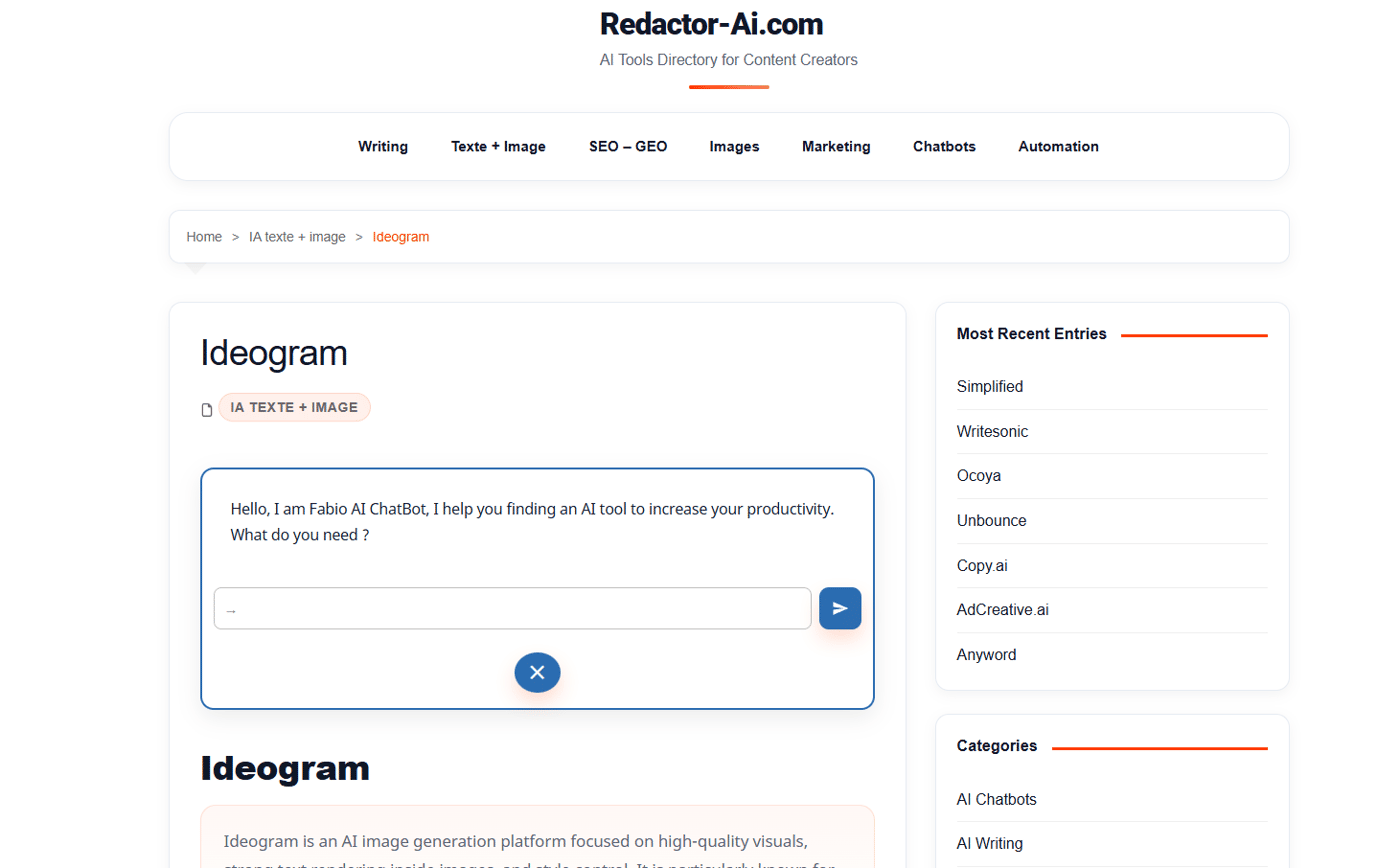
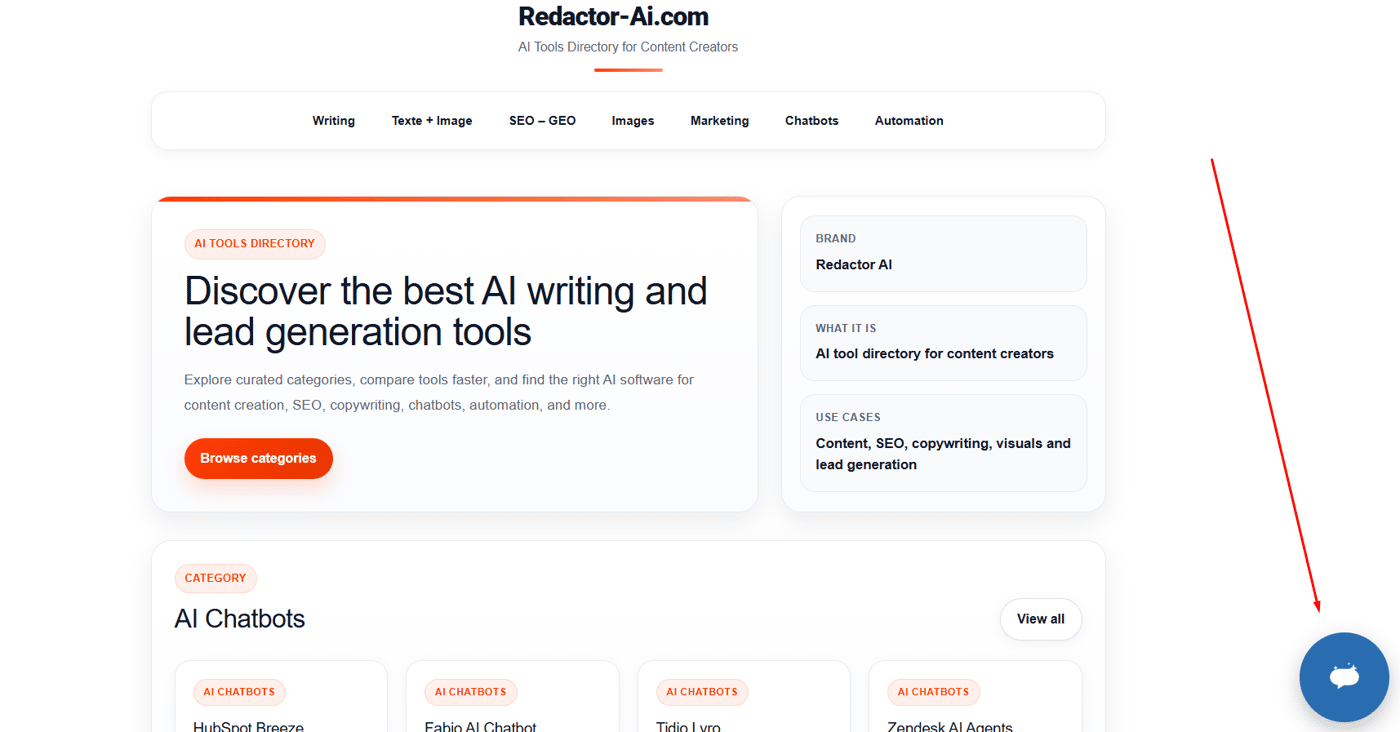
We’ve been testing two different ways to integrate Fabio AI Chatbot into websites:
🧩 Embedded directly inside the page content
vs
💬 Classic popup bubble chatbot
What’s interesting is that the user behavior feels very different depending on the format.
The embedded version seems to encourage more intentional interaction because it becomes part of the content experience itself.
The popup bubble feels lighter and less intrusive, but maybe easier to ignore too.
For those building SaaS, WordPress plugins, landing pages or AI products:
👉 Which format do you think generates the best user engagement today?
👉 More clicks? More conversations? Better conversions?
Curious to hear real-world experiences from other founders and builders 👀
#indiehackers #buildinpublic #saas #ai #chatbots #wordpress #uxdesign
Comment