
GPTWATERMARKER
AI Media, Reimagined.
Most image-cleanup tools want to make things look simple.
One button.
“Remove watermark.”
From a user's perspective, that sounds great. But from a product-building perspective, it can hide a surprisingly important distinction.
A visible corner logo and a hidden watermark-related signal aren't the same technical problem. They don't necessarily require the same processing, infrastructure, or pricing.
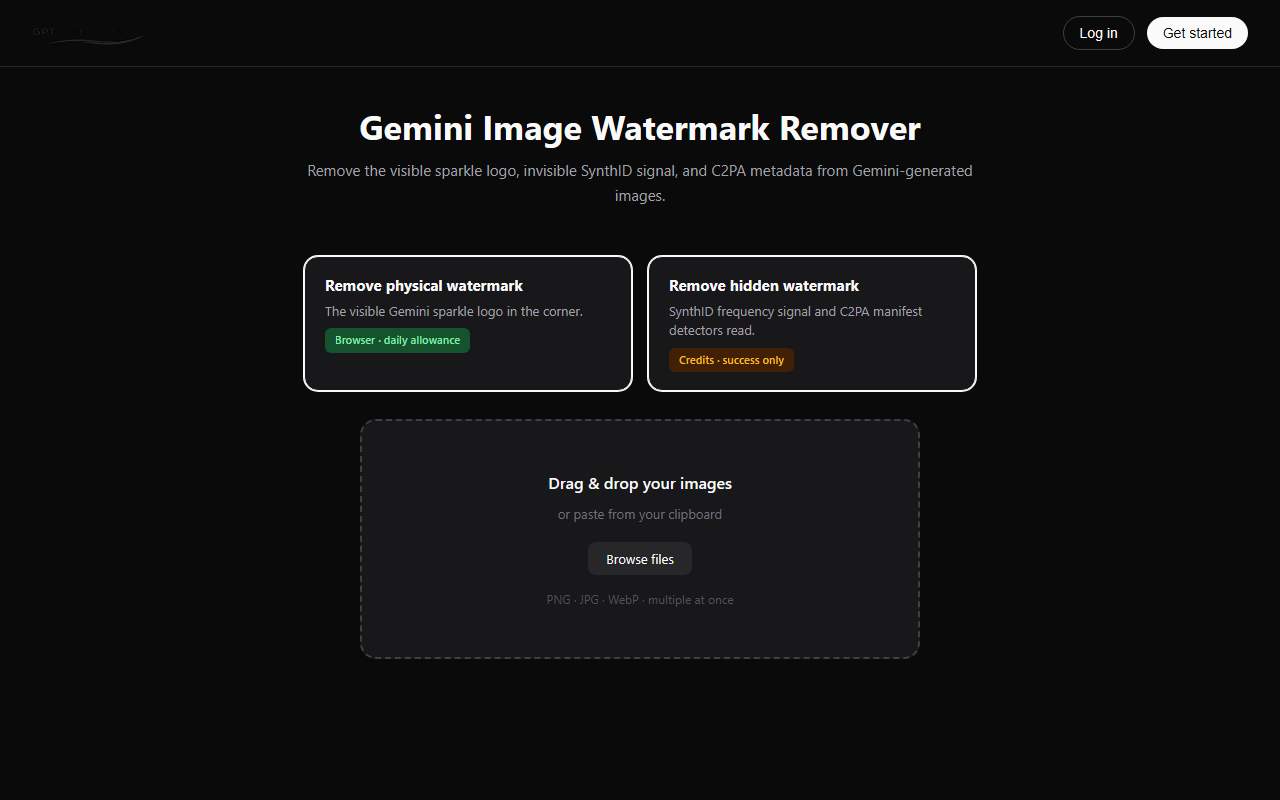
That's why GPT Watermarker separates physical and hidden cleanup on its homepage.
The split isn't just about packaging.
It's about matching the product's workflow to what's actually happening inside the file.

Physical mode and the cost of a visible watermark
Gemini-generated images can come with a visible four-point sparkle in the corner.
You can see it immediately.
Google blends the mark into the image pixels, and GPT Watermarker's physical mode processes that region to remove the visible sparkle and returns a new file.
The important part is that this is a relatively bounded image-processing task.
It doesn't need to be treated like a heavyweight server-side job.
That's why physical mode can sit on the free tier with daily limits.
If a user simply wants an image that looks clean in a presentation, social-media crop, or website hero, charging them for a more expensive hidden-processing workflow doesn't make much sense.
They're solving a simpler problem.
This is one of those decisions that seems obvious after you've made it, but it's easy to get wrong when you're building a product.
You can put every transformation through the same expensive pipeline because it feels cleaner architecturally.
But if your most common request is essentially a small 2D compositing operation, you've just created unnecessary infrastructure costs.
And the user feels that cost too.
They wait longer.
They spend credits they didn't expect to spend.
Then support gets the inevitable question:
“Why did removing a little logo take so long?”
Each physical pass returns a new file. The original upload isn't overwritten, and there's no promise that the result is somehow the untouched original from the image provider.
That's important because clear expectations are part of the product.
Hidden mode is a different business
Now consider the other side.
Frequency-domain signals and signed content-credential data aren't simply visible pixels sitting in a corner.
Cropping the image doesn't necessarily deal with them.
Neither does re-saving the file as a JPEG reliably guarantee that they've disappeared.
The processing problem is different.
GPT Watermarker's hidden mode handles this processing on the server and uses credits when processing succeeds.
That “charge on success” model matters.
If a processing job fails, the user shouldn't feel like they've paid for an unsuccessful result.
It also means the product has to be honest about what the processing does.
The output is a new file.
It isn't presented as a restored vendor original.
And there shouldn't be a blanket promise that every external detector will suddenly report the file as clean.
For example, SynthID verification should be handled with Google's official detector when that specific check is required.
The distinction between processing and verification is easy to overlook, but it matters.
A tool can process a file without being able to guarantee what every external system will report about that file.
GPT Watermarker separates physical and hidden processing because the two jobs have different technical requirements, costs, and expectations.
The hidden cost of a single “Remove Watermark” button
Here's where the product lesson gets interesting.
A single button can make the interface look beautifully simple.
But simplicity isn't always the same thing as clarity.
Suppose a user uploads an image because their designer says:
“Please remove the watermark from the corner.”
They see one button: “Remove watermark.”
They click it.
The system sends the file through an expensive hidden-processing workflow.
Credits are consumed.
The user downloads the result.
Then they open it.
The corner sparkle is still there.
From the user's perspective, the product didn't work.
From the engineering perspective, the system may have successfully completed the operation it was designed to perform.
The problem was the interface.
The product hid an important decision from the user.
That's a dangerous place for a SaaS product to be.
Support tickets are often product feedback in disguise
When physical and hidden processing are lumped together, the same types of support questions start appearing:
Why did I use credits?
Why is the visible logo still there?
Why didn't exporting the image again fix it?
Why does the detector still report something?
What exactly did your tool remove?
It's tempting to treat these as individual customer-support problems.
But when the same question keeps appearing, it may actually be a product-design problem.
The user doesn't understand what the system is doing because the interface doesn't expose the distinction that matters.
Once you separate the modes, the support conversation becomes much easier.
Instead of:
“The watermark remover didn't work.”
You can ask:
“Which mode did you run, and what check are you trying to pass?”
That's a much better debugging question.
It's also a much better product model.
Churn can start with a tiny UX decision
When a market uses one word “watermark” for multiple mechanisms, the consequences eventually show up in churn.
A user can over-process a simple job.
Or under-process a deliverable that has more demanding requirements.
Either way, the product has created the wrong expectation.
GPT Watermarker's physical mode handles the visible corner logo with daily limits, while hidden processing involves server-side work and credits charged on successful processing.
Making that distinction visible lets users connect their spending to the actual requirement in their brief.
They're no longer guessing what a generic “remove watermark” button might do.
And that matters.
The shift here is simple:
When both layers matter, physical processing comes first.
Why?
Because a user can spend credits on hidden processing, download the result, and still reject it immediately because the visible sparkle remains in the exact crop they're going to publish.
That's wasted processing.
Physical-first avoids that mismatch.
It's not a branding decision.
It's a workflow decision.
Which pass should run first?
The practical workflow is straightforward.
1. Run physical processing first
Do this when the visible corner sparkle matters to the final crop or deliverable.
The physical mode removes the visible sparkle and returns a new file.
2. Run hidden processing second
If the project also requires attention to metadata or frequency-domain signals, use the physical result as the input for the hidden workflow.
Credits are charged when processing succeeds.
If only one layer is relevant, only run that mode.
That's the part worth emphasizing.
Don't process everything just because you can.
Unnecessary hidden processing costs credits.
Skipping physical processing when the sparkle is clearly visible can cost you something else: rework.
And that can be even more expensive when a client or designer rejects the final crop.
A useful product-building practice is to log which mode was used.
Put it in support macros.
Put it in onboarding documentation.
Then, when a later version of the file gets flagged, you can identify exactly what happened instead of trying to reconstruct the workflow from memory.
The lesson for builders
There's a broader lesson here that goes beyond watermark removal.
Generative-media products often have complexity hiding underneath a very simple user experience.
The demo shows a corner logo disappearing.
But the real product may also have to deal with file containers, provenance information, hidden signals, processing costs, external detectors, billing, failed jobs, and user expectations.
The hard part is often the layer your user didn't know existed until QA found it.
If you're building in this space, don't wait for your users to discover those layers through failed uploads or refund requests.
Name the important distinctions early.
Split workflows when their costs and outcomes are meaningfully different.
Price the expensive path separately.
Make successful and failed processing clear.
And write product terms that still make sense when a developer reads them at midnight and starts asking uncomfortable questions.
You don't need to expose every implementation detail.
But you should expose the distinctions that affect what the user is paying for and what result they should expect.
That's the real reason GPT Watermarker has separate physical and hidden modes.
One labeled button can make a product look simpler.
But sometimes two clearly labeled buttons make the product easier to understand, cheaper to operate, and much easier to support.
And that's a lesson worth remembering whenever you're tempted to hide complexity behind a single button.

Comment