
Nameless Menu
Digital QR Menu Platform

For months I watched new users hit the same wall.
They loved the idea of a digital menu.
They loved instant price changes, allergens, translations.
Then they reached the painful part.
The part where you sit in front of a blank interface and start retyping your entire menu by hand.
Category one. Product one.
Name, description, price, image, ingredients, sizes, nutrition data.
Repeat for every drink, every dish, every dessert.
If you have a real restaurant menu, that is not a five minute task. That is an evening.
So I decided to see how far I could push this.
Could I make Nameless Menu read menus directly from photos?
Could I let a restaurant owner upload what they already have and skip most of the boring work?
Here is what came out of that experiment.
A real menu, not a polished mockup
To test this properly, I did not use a clean Figma design or a fake demo.
I went to the internet, grabbed a completely random coffee shop menu photo, and used that as my input.
The photo below is exactly what I fed into the system.

The old reality inside Nameless Menu

You start with a clean category.
You click “Add Product”.
You fill a detailed form.
You save.
You repeat.
Every product means typing out the name, description, price, image, ingredients with units and amounts, sizes, macros, allergens, translations.
It is precise and powerful. You can define every detail.
It is also the reason many owners tell themselves:
“I will finish this when I finally have a free Sunday.”
The product was strong.
The first hour of onboarding was not.
The new reality: upload menu photos and let the app work


At the top right there is a new “Import menu” button.
Click it and you see a simple dialog where you drag in photos or screenshots of your existing menu. Up to five images.
Once you hit “Parse images”, the system starts doing its thing.
For this test I used that random coffee shop menu from the internet. The parser’s first instinct was that the category is literally called “pinhole menu”. There is no “Coffees” label anywhere, just a giant PINHOLE MENU across the top, so the AI shrugged and went “guess that’s the category then.”
Behind the scenes it reads the menu layout, detects categories and products, and pulls out names and prices, including multiple sizes.
It tries to understand ingredients and units.
It checks possible allergens and nutrition details when it can.
It does not only work for clean, simple one page coffee menus. It also handles big, messy restaurant menus with many sections, long descriptions, different sizes and a lot of noise, and still turns them into structured data. And it does this in any language, not just English, so you can point it at Macedonian, Italian, German or anything else and let it do the heavy lifting.
From data entry to quality control

Instead of an empty menu that you need to fill, you see a list of detected products with their names and prices.
Your job changes at this point.
Before, you were the person building the menu from scratch.
Now you are the editor.
You scroll through the list.
You remove items you do not need.
You correct the occasional mistake.
If the parser gets even 95% of the menu right, that single “Save” click represents hours of work you did not have to do.
One click, and the items are created. The categories are filled. The boring part simply did not happen.
The result: a live QR menu in the time it used to take to make coffee

The menu is already live in the system.
You can see this menu here.
From here you can do everything Nameless Menu already supports.
You can change prices before a busy weekend.
You can toggle availability when you run out of something.
You can add promotions.
You can translate to more than one hundred ninety languages.
You can export to print ready PDF.
You can track performance in analytics.
The difference is that you reach this point far faster.
What used to feel like a multi hour data entry session now feels like a short review pass.
Why this matters to me
Most restaurant owners do not abandon tools because the features are weak.
They abandon them because getting started feels heavy.
This feature attacks that moment directly.
You already have a menu.
You already have images of it.
Now that is enough to get a working digital menu inside Nameless Menu.
Upload a few photos.
Wait a minute or two.
Review.
Save.
If you run a café, bar, restaurant or hotel and your menu currently lives in PDFs, Canva exports or photos on the wall, I built this for you.
Try importing your menu and tell me where it still hurts.
Every rough edge you point out is the next thing I improve.


Numbers
Total users: 39
Paying users: 1
Today’s tiny UX experiment from Nameless Menu
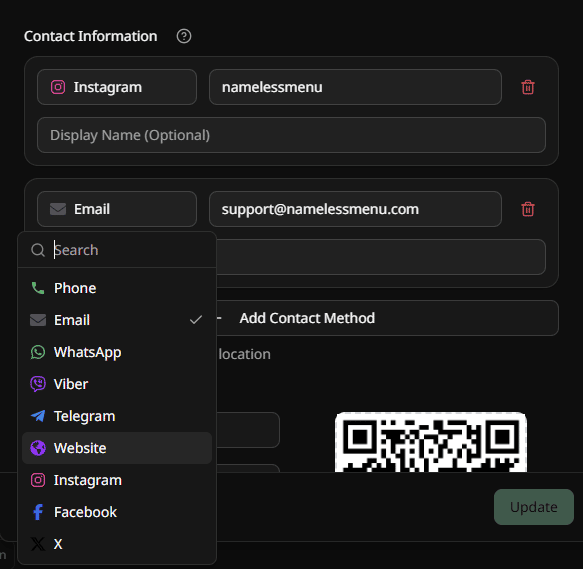
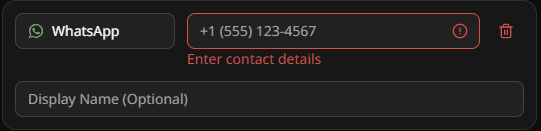
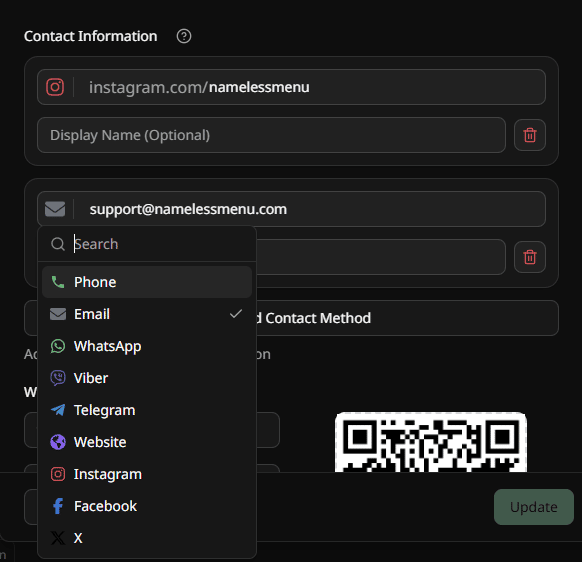
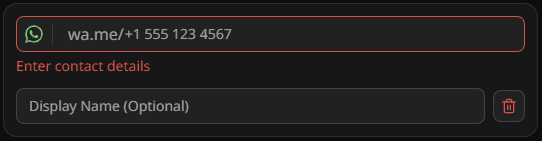
Each location can have multiple contact methods (phone, email, WhatsApp, Instagram, etc.).
From a UI/UX point of view, which feels better to you?
Both are identical technically under the hood, this is purely a style/clarity choice.
Old
New

I kept seeing the same thing, restaurants reprint menus completely or pay agencies four times the price for small changes. No one locally offered a simple subscription. Just one-off projects and big bills for every simple change.
So I built Nameless Menu. It’s a platform where you can build and manage your digital QR menus. Change prices, add products, mark allergens, switch availability, all by yourself. Updates go live on every table, across all locations. It has automatic translations in 193 languages, you can choose from 140 currencies, run promos with or without discounts, export your digital menu to print-ready PDF, invite your staff and analytics to track performance. Runs in the browser and you can also download our app for one-tap access directly from your phone.
The goal is simple: help hospitality businesses stop wasting money on designers for tiny changes they can make in seconds.
If you run a café, bar, hotel, restaurant or any other hospitality business and this hits home, try it and tell me what hurts. Your feedback will shape what I build next.
-
3
This is a classic "pickaxe in a gold rush" play, executed perfectly. While everyone is focused on the food, you're selling the tools. Brilliant.
I'm curious about your pricing strategy. A simple subscription makes total sense. Have you considered a hybrid model where you offer the subscription for self-serve, but also have a higher-tier "concierge" plan where you make the changes for them for a premium? Might be a good way to capture the "too busy to do it myself" segment of the market.
Congrats on the launch!
-
1
Right now I’m keeping the pricing pretty simple: three subscription tiers at 11.99, 15.99 and 19.99 per month.
The main differences between them are:
– The number of locations you can add
– The number of languages you can translate the menu to
– AI chatbot accessI really want this to stay affordable, so all plans include the core features, the more expensive subscription tiers are mostly about scale and extra AI, not paywalling the basics.
Still experimenting and open to tweaking it as I learn more, but that’s the thinking for now.
-
-
2
Reaching this stage is such an exciting milestone — it shows real validation from your early adopters and the strength of what you’re building. Love that you’re focused on learning and growing with your community, not just for them. Keep the momentum going — this kind of foundation always leads to something big. 🙌🔥
-
1
Thanks so much, if anything stands out that we could improve, whether in the product or how we present it, I’d really value your feedback.
-
-
2
Hi Angel
Congrats on Nameless Menu! The auto-translate to 193 languages is brilliant—that's a real pain point for restaurants with international guests.
I'm a UI/UX Designer & Content Writer, and I noticed a few opportunities on your site that could boost conversions (especially around the pricing page and onboarding flow).
Would you be open to a quick 15-minute chat? I have some specific ideas about improving trial-to-paid conversion that might be relevant.
No pitch, just genuinely impressed by what you're building!
-
2
This hits a real pain point. Restaurants constantly spend money on tiny menu edits that shouldn’t cost them anything.
Love how you streamlined everything — especially instant updates across locations and auto-translations. This feels genuinely useful for hospitality teams.
Nice work!
-
1
Thank you so much, Shemith, really appreciate it! 🙌
-
-
2
Hey Angel,
Love this. You've clearly identified a very real, tangible pain point for a non-technical audience. That's 90% of the battle right there, and this feels like you're onto something. The platform looks clean, and the 193-language translation feature is a fantastic, defensible value-add.
Since you asked "what hurts," my founder brain immediately jumped to customer acquisition and onboarding, which are often the real hurdles even with a great product.
Onboarding Friction: How are you handling the initial menu import? This feels like the single biggest friction point. A busy café owner might love the idea but never find the 2 hours needed to manually enter their 80-item menu (with all allergens, prices, etc.). Are you scraping their existing PDF/website, or maybe offering a "white glove" setup service for your first X users to get them over that hump?
Acquisition Strategy: Restaurant tech is a notoriously tough, fragmented market to sell into. How are you cutting through the noise to reach these owners? It seems like partnerships (with POS systems, food suppliers, or restaurant associations) could be a huge lever here vs. going direct door-to-door.
Really solid problem to be solving. Rooting for you!
-
1
Hey Abhi, really appreciate you taking the time to write such a detailed comment and think through this with me.
Onboarding Friction
Right now I’m experimenting with pre-made category templates that can be imported with one click. Things like Coffees, Pizzas, Pastas, Burgers, Desserts, etc. The idea was: these categories are pretty standard, so a busy owner can import a bunch of them and then simply delete what they don’t have and tweak names/prices/descriptions, instead of typing everything from scratch.I’m still not 100% sure how far that gets people in practice, because every menu is a bit different, but it at least removes some of the initial “blank page” pain.
Longer-term, I definitely need to build a proper menu parser: upload a PDF, screenshots, or photos of the printed menu and have the system parse that into structured items/categories (with a quick review step). That feels like the real unlock for onboarding, especially for those 80-item menus you mentioned.
On the “white glove” angle, I actually experimented with that. For a few early restaurants I fully built their menus for them (hours of work), and they were super happy with the result… but none of them converted to paying customers after the trial.
Acquisition Strategy
I actually have a decent-sized list already, around 30–40k emails and phone numbers from restaurant owners. I’ve been running cold email campaigns to that list, but the results have been pretty terrible so far.My current takeaway is that a lot of restaurant owners simply don’t live in their inbox. They’re on the floor, in the kitchen, or dealing with staff and suppliers. Email is a low-priority channel for them, so even a good offer just gets ignored in the chaos of their day-to-day operations.
I also tried cold outreach via Instagram and ran Instagram ads specifically targeting hospitality owners. That didn’t really convert either, we only got one long-term customer from Instagram, and that’s it. So socials haven’t been a reliable acquisition channel for us so far.
If you have any ideas or see obvious gaps in my thinking around acquisition (or even positioning), I’d really love to hear them. You clearly understand this space, so any suggestions or hypotheses you have would be super valuable for me right now.
-
1
If email and IG are dead ends, stop wasting time there. I believe your first instinct was right: Partnerships.
You need to find the "trusted channels" that already have the owner's ear.
POS Systems: This is the Holy Grail. They are the "operating system" of the restaurant. An integration is a 10x multiplier.
Food/Drink Suppliers: The local Sysco, the wine distributor, the produce guy. They talk to owners every single week. Can you offer them a finder's fee for every customer they send you?
This is a tough, classic "founder" problem you're hitting. You've clearly got the skills to build, and now you're deep in the acquisition/positioning puzzle. You're asking all the right questions, and the fact that your white-glove test gave you such a clear (if painful) result is good. That's progress. TBH I'm facing a similar sort of dilemma myself.
Keep digging into that "white glove" churn. The answer to your company's future is in those non-conversion stories.
-
-
1
I keep hearing the same pain in cafes, the expensive part isnt building the menu once, its every tiny change after print. Some teams stick with static PDFs or Bitly, I'm building ScanLoop more around editable QR links plus scan history by table because thats usually the next question once the menu is live. Your pricing angle feels right, I'd just make the before vs after cost painfully obvious on the page.


4 Comments
I ran into the same onboarding wall on QR and menu tools, the blank form is where a lot of owners bounce. Static QR pages or Bitly links are fine once the menu exists, but I'm building ScanLoop around the next headache too, editable destinations and scan history by table after print. Getting people from photo import straight to a live code feels like the right move tbh.
This is a killer feature. Instant value, minimal effort. Nicely done.
This is a perfect example of removing friction from onboarding. You tackled the heaviest moment and turned hours of work into minutes. Huge potential here, keep going!
Amazing innovation! This solves a very real pain point for anyone who’s ever managed a menu. Super impressive how much time it saves - restaurant owners will love this.