O365 Migration Tool
O365 Migration Tool
Microsoft 365 migration can be exciting, but it can also feel overwhelming. Whether a business is moving to a new tenant, consolidating multiple environments, reorganizing after a merger, or restructuring teams across regions, the biggest concern is always the same: how do you move everything without data loss, confusion, or long disruption?
That is where the right O365 migration tool becomes essential. A migration project is not just about moving mailboxes or files. Modern Microsoft 365 environments include Exchange Online, SharePoint Online, OneDrive for Business, Microsoft Teams, Microsoft Planner Basic and Premium Plans, Viva Engage, Forms, Power Automate, Power BI, and other connected workloads. If even one workload is missed, users may lose access to important collaboration history, workflows, reports, forms, or community conversations.
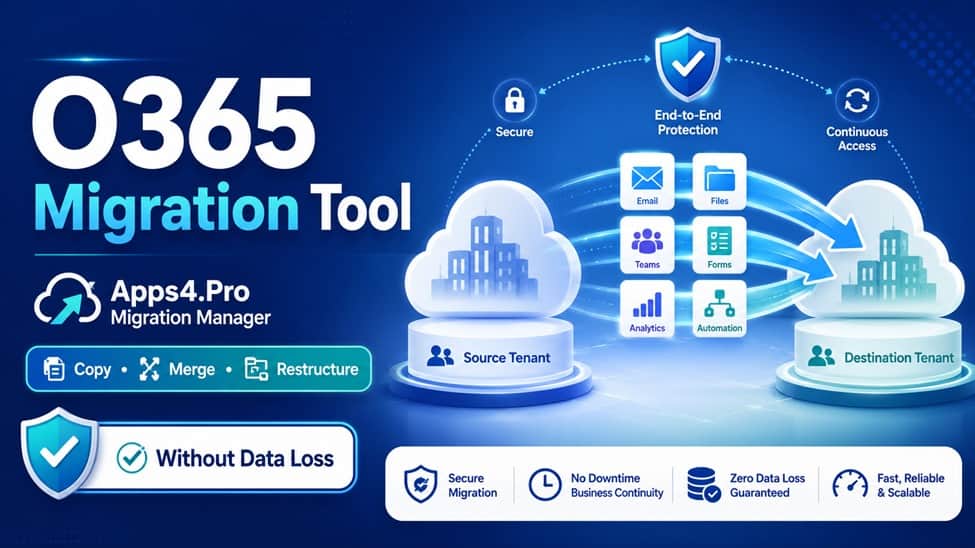
Apps4.Pro Migration Manager is built for this exact challenge. It helps organizations copy, merge, and restructure Microsoft 365 environments with a secure, reliable, and fully managed migration experience. For businesses that want a structured migration path instead of manual tracking and guesswork, Apps4.Pro offers a dedicated Microsoft 365 migration platform at https://apps4.pro/migration-manager.
Why Businesses Need a Reliable O365 Migration Tool
Microsoft 365 migration becomes more complex when an organization is dealing with tenant-to-tenant movement, mergers and acquisitions, multi-geo environments, or enterprise consolidation. These are not simple file transfers. They involve users, permissions, teams, chats, calendars, workflows, reports, sites, communities, forms, and business-critical content.
Many migration tools cover only part of the journey. They may support common workloads, but leave out more specialized Microsoft 365 services. That creates extra work for IT teams, who may need to rebuild forms, recreate workflows, manually handle community content, or manage unsupported workloads separately.
Apps4.Pro Migration Manager is designed to reduce that risk. It covers more than 10 Microsoft 365 workloads and supports both standard and hard-to-migrate workloads. The goal is simple: help organizations complete Microsoft 365 migration with minimal disruption, reliable continuity, and no migration data stored outside the tenant.
For IT teams, that matters. Migration is not only a technical task; it is also a business continuity responsibility. Users expect their mailboxes, files, Teams, tasks, and reports to be available in the new environment. Leaders expect the project to be smooth, controlled, and secure. Apps4.Pro helps bring that structure to the entire process.
Copy, Merge, or Restructure: Choose the Right Migration Strategy
Every Microsoft 365 migration project is different. Some businesses want to create a secure duplicate of their environment. Others need to merge several tenants into a single production tenant. Some need to split, reorganize, or restructure users and collaboration spaces after a business change.
Apps4.Pro Migration Manager supports three clear migration strategies: Copy, Merge, and Restructure.
The Copy strategy is useful when an organization wants to create a secure duplicate of Microsoft 365 tenant content. This can support testing, backup, or phased migration without disrupting the source environment.
The Merge strategy helps consolidate multiple tenants into one Microsoft 365 production tenant. This is especially useful for organizations bringing users, files, Teams, sites, plans, and workflows together while maintaining continuity.
The Restructure strategy is built for businesses that need to split or reorganize their environment. This can help move users, departments, and collaboration spaces into the right future-state tenant structure after divestitures, internal reorganization, or regional changes.
This approach makes Apps4.Pro more than a basic O365 migration tool. It gives businesses a practical way to match the migration process with the real business change behind it.
One Platform for Standard and Specialized Microsoft 365 Workloads
A strong migration plan must account for every workload that users rely on. Apps4.Pro Migration Manager supports core Microsoft 365 workloads at scale while also covering specialized workloads that other tools often miss.
For standard Microsoft 365 migration, Apps4.Pro supports Exchange Online, including user mailboxes, archive mailboxes, shared mailboxes, group mailboxes, calendars, tasks, contacts, rules, and public folders. It also supports SharePoint Online, allowing teams to transfer sites, libraries, list, subsite, permissions, content type, and term store. For user files and folders, Apps4.Pro supports OneDrive for Business migration with minimal disruption.
Microsoft Teams migration is another major requirement for modern organizations. Apps4.Pro helps move teams, channels, channels (standard, private, shared), chats (1:1 chat, group chat, meeting chat), membership, and files, allowing users to continue collaboration in the new tenant. It also supports Microsoft Planner Basic and Premium plans; it helps preserve plans, buckets, tasks, attachments, Progress, Dependencies, Goal, and more.
These standard workloads are important, but they are only part of the Microsoft 365 story. Apps4.Pro also supports complex workloads such as Viva Engage / Yammer, Microsoft Bookings, Microsoft Forms, Power Automate, and Microsoft Power BI.
This specialized workload coverage is one of the strongest reasons to consider Apps4.Pro Migration Manager. Businesses do not want to rebuild forms from scratch, lose community conversations, or manually recreate automation flows and Power BI content. Apps4.Pro helps move these workloads with greater confidence and better continuity.
Designed for Hard-to-Migrate Microsoft 365 Workloads
Many organizations underestimate the challenge of migrating collaboration and Power Platform workloads. Email and file migration may be expected, but services like Viva Engage, Microsoft Forms, Power Automate, and Power BI often require more careful handling.
Apps4.Pro highlights these specialized areas because they are frequently limited or unsupported in alternative migration solutions. According to the site, Apps4.Pro Migration Manager supports Viva Engage, Microsoft Forms, Power Automate, and Power BI, while alternative solutions may not support them.
This is especially valuable for organizations that use Microsoft 365 deeply across departments. A company may have important employee communities in Viva Engage, customer or internal forms in Microsoft Forms, business processes in Power Automate, and reporting content in Power BI. Leaving these behind can create productivity gaps after migration.
Apps4.Pro helps reduce that risk by giving IT teams a migration tool that reaches beyond the basics. It also supports collaboration migration areas such as Teams EDU tenant migration, Teams chats, Basic and Premium Planner Plans, and Viva Engage. For businesses that want a complete Microsoft 365 migration rather than a partial move, this broader workload coverage can make a major difference.
Secure, Low-Disruption Migration With Expert Support
A good O365 migration tool should not only move data. It should also help reduce risk throughout the project. Apps4.Pro Migration Manager focuses on secure, low-disruption migration and states that no migration data is stored outside the tenant.
That is an important point for organizations concerned about control and trust during migration. Microsoft 365 environments contain sensitive business data, and migration should not create unnecessary exposure. Apps4.Pro’s approach keeps migration data from being stored outside the tenant, while also supporting a structured and reliable migration process.
Support is another key part of the Apps4.Pro experience. The platform offers expert migration support from start to finish, along with onboarding handoff, support availability, and support response SLA coverage. The website also states that Apps4.Pro provides 24/7 consulting and support services.
This can be useful for IT teams that want guidance while choosing the right migration strategy or planning the right path for their environment. Instead of guessing between copy, merge, or restructure, businesses can book a migration consultation and work with experts who understand Microsoft 365 migration scenarios.
Trusted by Thousands of Organizations
Apps4.Pro Migration Manager is presented as a trusted platform used by more than 20,000 organizations worldwide, from startups to global enterprises. The website also states that it is rated 4.8 out of 5 by over 1,000 IT professionals.
Those numbers matter because migration tools need trust. IT teams are not simply testing a small app; they are moving critical business content. A strong track record can give decision-makers more confidence when choosing a Microsoft 365 migration solution.
The site also includes a testimonial from Stephen Bala, IT Infra & Cyber Defense Manager in the UAE, who mentioned hesitation about migrating Yammer communities tenant-to-tenant and said Apps4.Pro surprised them positively. This reflects a real migration concern: specialized workloads such as Yammer, now Viva Engage, are often seen as risky because they contain conversations, communities, and attachments that organizations do not want to lose.
Start Microsoft 365 Migration Without Chaos
Migration projects do not have to depend on manual tracking, uncertainty, or disconnected tools. Apps4.Pro Migration Manager gives organizations a clearer way to plan and execute Microsoft 365 migration across both standard and specialized workloads.
It supports tenant-to-tenant migration, M&A projects, multi-geo environments, and enterprise consolidation. It allows organizations to copy, merge, or restructure Microsoft 365 content depending on the business goal. It covers Exchange Online, SharePoint Online, OneDrive for Business, Microsoft Teams, Microsoft Planner Basic and Premium Plans, Viva Engage, Microsoft Bookings, Microsoft Forms, Power Automate, and Power BI. It also offers expert guidance and a fully managed migration experience.
For businesses searching for an O365 migration tool that goes beyond basic mailbox and file migration, Apps4.Pro Migration Manager is a strong option to explore. You can review the platform, book a free demo, or start the free trial at https://apps4.pro/migration-manager.
With a 15-day free trial and no credit card required, Apps4.Pro makes it easier to begin planning Microsoft 365 migration with confidence, structure, and the right level of support.

Comment