
Runbear
DIY Agent for Your Team!
We’re excited to share that we have reached $100K in Annual Recurring Revenue! This is a big milestone for us at Runbear, and we’re proud of how far we’ve come. But this is just the beginning — there’s still a long road ahead. Now is the perfect time to try new things and boost our growth even more.

Runbear — Connect your custom GPT to communication channels like Slack or Teams in 10 minutes without coding.
How We’ve Attracted Customers
We’ve had some success in attracting customers through a few key strategies:
- Content Marketing: By creating valuable content, we’ve been able to attract people to our product. We share tips, insights, and guides to help users understand how our software can make their work easier.
- Social Media Posts: Platforms like Medium, Reddit, and X have been great tools for sharing updates and building our community. These channels allow us to reach a wider audience and get people talking about our product.
What Hasn’t Worked So Far
While some of our strategies have been successful, others haven’t worked as well:
- Outbound Sales: We tried reaching out to potential customers directly, but it didn’t lead to as many sign-ups as we hoped.
- Paid Marketing: From the conversion perspective, spending money on ads also didn’t bring in the results we were expecting. However, we successfully unlocked its potential by boosting performance sevenfold, reducing the CPC from $1.06 to $0.15.
What We’ve Learned
Through all of this, we’ve learned some valuable lessons:
- We Deliver Value: Our customers find our product useful, which is great! But if we want to grow, we need to deliver even more value. We found that after starting with Runbear, our customers generate new ideas and additional requirements as they explore its capabilities.
- PLG Works for Us: Product-led growth (PLG) has been effective for us. This approach focuses on letting the product sell itself by making it so good that people want to use and recommend it.
- Focus is Key: We’ve learned that trying to do too many things at once isn’t helpful. Instead, we need to focus on one strategy at a time so we can see what works best.
What We’ll Do Next
Looking ahead, we have big plans to make Runbear even more valuable to our customers:
- Expanding AI Capabilities: Besides helping customers connect generative AI with communication tools like Slack and Teams, we’re working on new features. These include knowledge base integrations, power-up features, better user engagement insights, and a feedback loop to improve AI assistants.
- Focusing on PLG: Our focus will remain on Product-Led Growth. This means we’ll put more effort into improving SEO, starting affiliate programs, and building community support to help us grow organically.
Please Keep an Eye on Us!
We’re excited about what the future holds and can’t wait to share more updates with you. Stay tuned for new features and improvements, and thank you for supporting us on this journey!


Yes, right. AI can write SQL queries for you. It can understand your database schema, generate SQL queries, and even interact with you to enhance them.
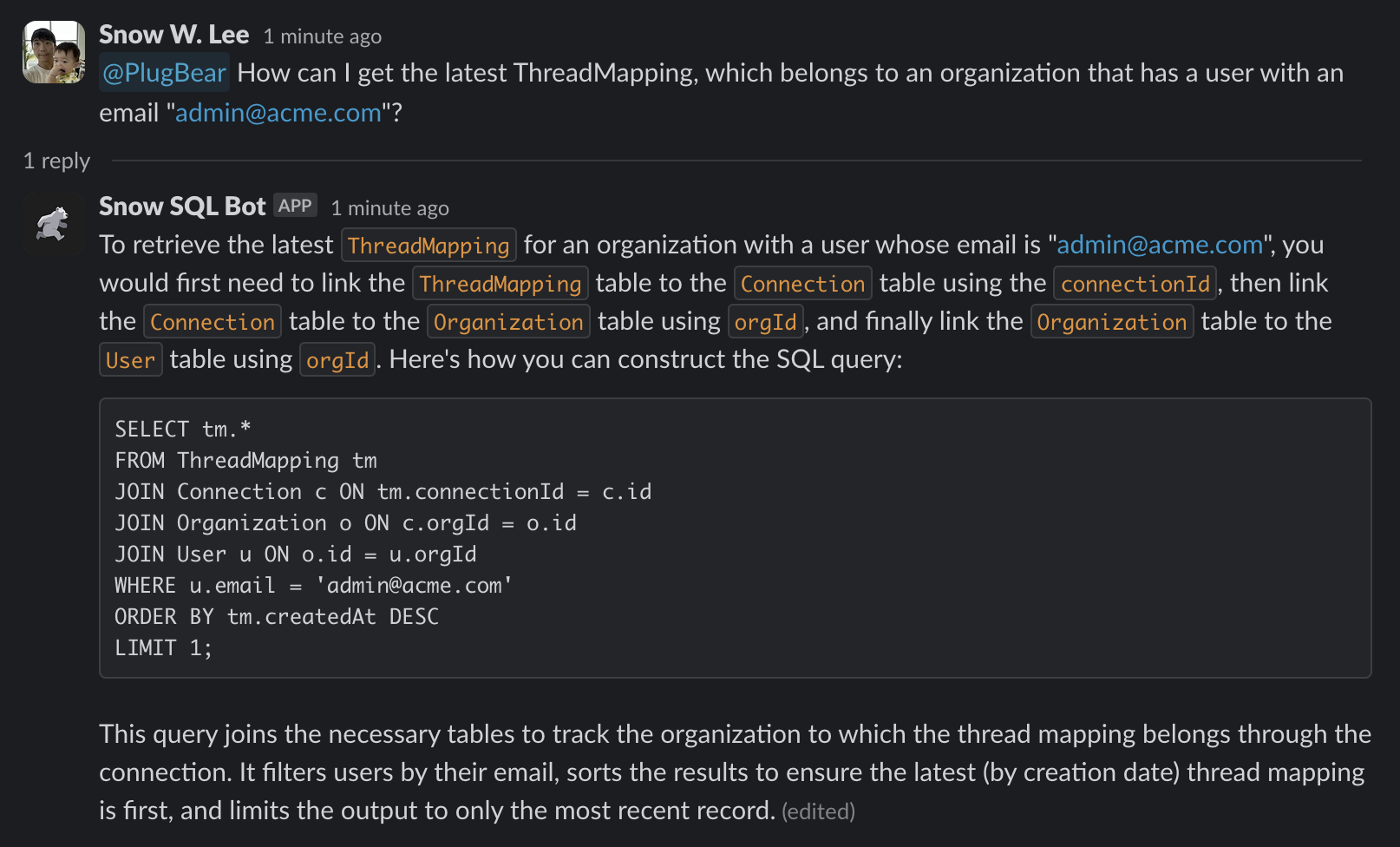
Let's create a bot that helps you write SQL queries, and invite the bot to your communication platforms, such as Slack or Microsoft Teams. It takes 20 minutes to create this without coding.
The image below shows how it works in Slack. Awesome, isn't it?
How to Create It
Don't worry. You don't need engineering knowledge to create yours.
Here are the simple steps:
- Extract database schema.
- Create an Assistant using OpenAI or Anthropic.
- Invite the Assistant to your communication platform using PlugBear.
Let's go through one by one.
1. Extracting database schema
This is the only step you may need help from engineers.
You can extract database schema in many ways. For example, you can extract PostgreSQL database schema using this command:
psql -c "\d *"
With proper parameters, you will get table descriptions like this:
                                  Table "public.User"
   Column   |              Type              | Collation | Nullable |      Default
------------+--------------------------------+-----------+----------+-------------------
 id         | uuid                           |           | not null |
 email      | text                           |           | not null |
 createdAt  | timestamp(6) with time zone    |           | not null | CURRENT_TIMESTAMP
 updatedAt  | timestamp(6) with time zone    |           | not null |
 firstName  | text                           |           |          |
 lastName   | text                           |           |          |
 orgId      | text                           |           | not null |
2. Creating an Assistant
If you are a PlugBear user, simply visit the "LLM Apps" page and click the "Create" button to create your Assistant that uses OpenAI or Anthropic.
All you need is to write simple instructions and attach the table descriptions. Here is an example:
You are the SQL Bot tasked with generating SQL queries based on user
requests. Utilize the provided table schema to retrieve the
information. Only use the specified tables and columns. Do not assume
the existence of any tables or columns not listed. If you are unable
to construct SQL for a given user query, acknowledge the limitation
rather than producing arbitrary SQL.

Table descriptions:

                                  Table "public.User"
   Column   |              Type              | Collation | Nullable |      Default
------------+--------------------------------+-----------+----------+-------------------
 id         | uuid                           |           | not null |
 email      | text                           |           | not null |
 createdAt  | timestamp(6) with time zone    |           | not null | CURRENT_TIMESTAMP
...
3. Inviting the Assistant to your communication platform
Using PlugBear, this can be done with several clicks.
Click a button to integrate your communication platform, such as Slack or Microsoft Teams, connect the Assistant and the channel, and you're all set.

Hi everyone! Our team got accepted by Techstars Oakland'24 last February. I have an interesting story to share about why I decided to build this service, how I found my first users, and more.
What We Built
PlugBear (https://plugbear.io): No-code software that integrates custom AI (e.g., GPTs, Assistants, Claude) into daily work tools such as Slack, MS Teams, HubSpot, and more.
Why We Made This Service
Last October, OpenAI held an event called OpenAI DevDay, which some people called the "red wedding." This event caused serious problems for thousands of startups, including ours. Our original product was an AI assistant for technical support. However, because OpenAI introduced new products that made it easier for people to build their own custom AI, we realized we would have to compete with our customers' engineering teams instead of other service providers.
We had to choose between adding more features to our product or changing directions completely. Although we had some potential customers interested, it was taking them a very long time to make decisions. Big companies would take months just to say no. So, at the end of November, we decided to test out a new idea instead.
Our key idea was that companies would want to create their own custom AI for different purposes. It was clear that creating AI was becoming easier and easier. So, we believed that many companies would create their own AI apps instead of purchasing readymade solutions.
At the same time, creating AI is different from actually using it. While services like GPT and custom GPTs are amazing, it's challenging for people to change their workflow from familiar tools to something new. Also, writing code to integrate new services takes a lot of time. To be honest, integrating new services took more time for us than actually building the AI part.
So, we decided to help users take better advantage of their own GPTs instead of building AI for them.
How We Attracted Our First Users
We didn't plan too much in advance. One of our principles is "Launch fast and learn from users." We built the basic service within just one week and then launched it on Product Hunt. It took courage to do that because we were afraid to release an imperfect product, but we overcame our fear and launched it anyway.
We used most of our social media accounts and connections. We asked friends and family members to upvote our product. We also shared posts about it on LinkedIn and Facebook. Thanks to that, we were ranked as the #5 developer tool that week on Product Hunt.
We also shared posts on Reddit, especially in communities related to OpenAI. We found people in those subreddits who wanted to use AI within their familiar tools. We posted some videos that ended up going viral.
Building in Public is Awesome
We love building our service in public view. It helps us interact with users, stay motivated, focus on the core features, and attract more users. We share weekly updates with users via changelogs and emails. Although it's tough at times, we love hearing feedback from our users.
Where We Are Now
After that, my monthly recurring revenue quickly grew to $3,800. The coolest part was finding new opportunities at the most painful time for our company.
We are now participating in Techstars, one of the top accelerators in the world. We are now learning a lot from Techstars, mentors, and our customers.
I'm grateful to the users who patiently provided feedback. Without them, I'm certain my product wouldn't be as seamless and powerful as it is now.
Thanks for listening to my story, friends!
You can check out my website at https://plugbear.io
1 Comment
AI agents that actually run reliably solid space. Wondering how it lands with serious enterprise teams