
Savvyshot
Craft beautiful screenshots with ease on Windows and Mac

We've been heads-down shipping and this release is packed with things you've been asking for.
What's new:
🌗 Light/Dark theme switcher - work comfortably, day or night
😀 Emoji annotations - add personality and quick visual cues to your screenshots
🔢 Counter annotation with pointed corner - formerly known as Step Bullet, now with a sharper style
📋 Copy source image - grab the original without any edits applied
⌨️ Keyboard shortcut for annotation tool - stay in flow without reaching for the mouse
🔍 Higher zoom limit with scroll - more precision on detailed images
🧰 Expanded toolbar menus - zoom options, pin canvas, and more, right where you need them
Bug fixed:
🐛 Right-click context menu now works correctly inside Text annotation fields
👉 Learn more and download: https://savvyshot.app
Would love your support and feedback! 🙏


Start 2026 with cleaner, more professional screenshots ✨
Savvyshot is a fast, native screenshot beautifier for macOS & Windows. Built for makers, marketers, and anyone who shares screenshots online.
🎁 New Year Sale — 40% Off
To kick off the new year, Savvyshot is available at 40% off.
Promo code:
SAVVY2026Valid until: January 10, 2026
✨ What’s new in version 1.2.4
Scroll Capture Area (Beta)
Capture long, scrollable webpages by selecting a specific scroll area. This feature is still in beta, and we’ll be improving accuracy and performance in upcoming updates.Snap Layouts (Windows 11)
Native support for Windows 11 Snap Layouts for faster, more intuitive window positioning.Pinch to Zoom (macOS)
Smooth pinch-to-zoom support using Mac trackpad gestures while editing screenshots..
Happy to answer any questions or hear what feature you’d like me to build next
👉 Learn more and download: https://savvyshot.app
Happy screenshotting in 2026 🙌

I just pushed out Savvyshot v1.2.3, and I’m excited about a few improvements that make the screenshot editing flow a lot smoother.
Here’s what’s new:
🎨 Transparency in the Color Picker
A small but super useful addition, you can now fine-tune opacity directly while picking colors.
➡️ Improved Arrow Annotation Settings
Arrows feel more intuitive and precise now. I’ve been using them a lot in my own workflow, so this was long overdue.
🔍 Zoom with CTRL/CMD + Scroll Up/Down
This makes it much easier to inspect or adjust details without losing your place.
📋 Open Image From Clipboard
You can now paste images directly into Savvyshot with CTRL/CMD + V, or use the toolbar menu. This really speeds things up if you capture lots of screenshots throughout the day.
Savvyshot is becoming more stable and polished with each release, and user feedback has been super helpful along the way. If you haven’t tried it yet, it’s a screenshot beautifier for Windows and MacOS, an alternative to Xnapper but with features like a pinned window mode and free access to the latest version.
Would love to hear what features you'd like to see next! 🙌
-
1
RECOVER YOUR LOST BITCOIN // WITH THE HELP OF GEO COORDINATES RECOVERY HACKER
I’m Thermos Lucas. I'm here to tell my testimony about how. GEO COORDINATES RECOVERY HACKER enabled me to recover my stolen BTC. A few months ago I lost $673,000 worth of BTC to a fake investment company. I don’t know how they got my email but I received an email from Investment Bank with a good proposal on how I could make millions out of my investment with them. I was convinced when they showed me profits from other clients that had invested in their platform, I began investing with them. When it was time to withdraw my profits, their website was shut down and I tried contacting them but they wanted me to pay a huge amount of fee to be able to withdraw my funds which I did until they cut me off and stopped all communication with me. I was shocked and devastated, I realized there was nothing I could do to recover my funds, I had gone to the authorities but they couldn’t assist me. I did some research online and I came across a post about GEO COORDINATES RECOVERY HACKER Their professional team was super and it took them less than 48 hours to get my funds back from these scammers. Geo Coordinates Hacker is here to provide that service for you. I highly recommend their services to everyone. If you suspect your Credit card, email & password, Facebook, Instagram, twitter Accounts have been hacked, you need to recover stolen money from scammers, report the incident to GEO COORDINATES RECOVERY HACKER, they can help you recover your BTC. in addition, GEO COORDINATES RECOVERY HACKER, can provide you with educational materials for staying safe online. They can also identify potential security breaches or vulnerabilities that may have led to the loss of your information. Please contact the following email address:
Email: geovcoordinateshacker@gmail.com
Website: https://geovcoordinateshac.wixsite.com/geo-coordinates-hack
Telegram: @Geocoordinateshacker
The truth always put the wrong people in the right place, and we all need help getting the truth

Just shipped Savvyshot v1.2.0 🚀 – the screenshot beautifier for Windows & macOS.
New in this release:
Option to start minimized to tray / hide on launch
A Pin feature that lets you keep an edited screenshot in a floating window for quick reference
A cleaner, more compact annotation toolbar
Savvyshot’s been helping indie devs, designers, and marketers level up their screenshot game. This version makes it even smoother for daily workflows.
👉 Try it here: savvyshot.app
We're releasing Savvyshot version 1.1.0 with several improvements and bug fixes focused on enhancing usability and editing flexibility.
What’s New:
Added an option to customize the placement of screenshot images, giving users more control over layout and presentation.
Introduced an image cropping feature to provide finer control during the editing process.
Improvements:
Savvyshot now automatically remembers the last used watermark toggle state, streamlining repeated use.
Fixes:
Resolved an issue where the "Enable Text Selection" setting was not saved properly.
This release marks a step forward in stability and customization. Thanks for using Savvyshot.
This update focuses on improving the screenshot flow—especially for Windows 11 users.
📱 Added iPhone 16 models to device frame customization
🪟 (Windows 11) New hotkey support for window capture
⚡ (Windows 11) Screenshots now instantly copy to the clipboard
🛠️ (MacOS) Fixed: "Capture Window" shortcut key wasn’t saving properly
👉 Download the update now on savvyshot.app!
Let me know if you want any refinements! 🚀
This update brings important fixes and refinements to enhance your experience:
✅ Fixed screenshot issue on Windows 11 – No more capture failures!
📂 Expanded File menu options – Making navigation easier.
🎨 Better tray icon visibility – Improved for Windows light mode users.
✨ Other minor fixes & improvements
This update focuses on usability, making sure Savvyshot runs smoothly across platforms. Let us know if you have any feedback!
👉 Download the update now on savvyshot.app!
Let me know if you want any refinements! 🚀
We’re excited to introduce Savvyshot v0.8.0, bringing even more enhancements to streamline your screenshot editing experience. Here’s what’s new in this update:
🚀 New Features & Enhancements
🌄 Unsplash Image Search for Screenshot Backgrounds
You can now search and add high-quality images from Unsplash directly as screenshot backgrounds, giving your screenshots a professional touch.
🖱️ Duplicate & Delete Context Menu for Annotation Objects
Managing annotations is now easier! Right-click on an annotation object to duplicate or delete it instantly.
⌨️ Ctrl+D / Cmd+D Keybind for Annotation Duplication
Quickly duplicate selected annotation objects with the new Ctrl+D (Windows) / Cmd+D (Mac) shortcut, making your workflow even faster.
🛠️ Bug Fixes
Fixed a highlight delay issue when selecting annotation objects, ensuring a smoother editing experience.
📥 Get the Update
Savvyshot v0.8.0 is available now! Update your app to take advantage of these new features and improvements.
Thank you for your support and feedback—keep those suggestions coming! 🚀
We’re excited to introduce Savvyshot v0.7.0, packed with new features and improvements to make your screenshot editing even smoother and more customizable. Here’s what’s new in this update:
🚀 New Features & Enhancements
📏 More Size Presets for Social Media
Need to create the perfect image for your social media posts? We’ve added more size presets tailored for various platforms, ensuring your screenshots fit perfectly without manual adjustments.
🖼️ Improved Watermark Placement
Your watermark will now be positioned at the edge or corner of the canvas instead of on the screenshot itself, giving a cleaner and more professional look.
🖱️ Context Menu for Closing Tabs
Managing multiple tabs just got easier! Right-click on a tab to quickly close it using the new context menu.
🎨 Rearranged Background Selections & Tabs
We’ve restructured the background selection options and tabs for a more intuitive workflow, making it easier to customize your screenshots.
🛠️ Bug Fixes
Fixed a glitch with annotation objects that occurred when drawing at certain angles, ensuring smoother annotation placement.
📥 Get the Update
Savvyshot v0.7.0 is available now! Update your app to take advantage of these new features and improvements.
Thank you for your support and feedback—keep those suggestions coming! 🚀
Screenshots are often essential for communication, whether for work, presentations, or sharing information online. However, they often contain sensitive data that needs to be hidden before sharing. That’s where Savvyshot, your ultimate screenshot beautifier app for Windows and MacOS, comes in.
Savvyshot not only makes screenshots look polished but also ensures your sensitive information remains private, thanks to its Text Redaction and Manual Redaction features. Let’s explore these tools in detail.
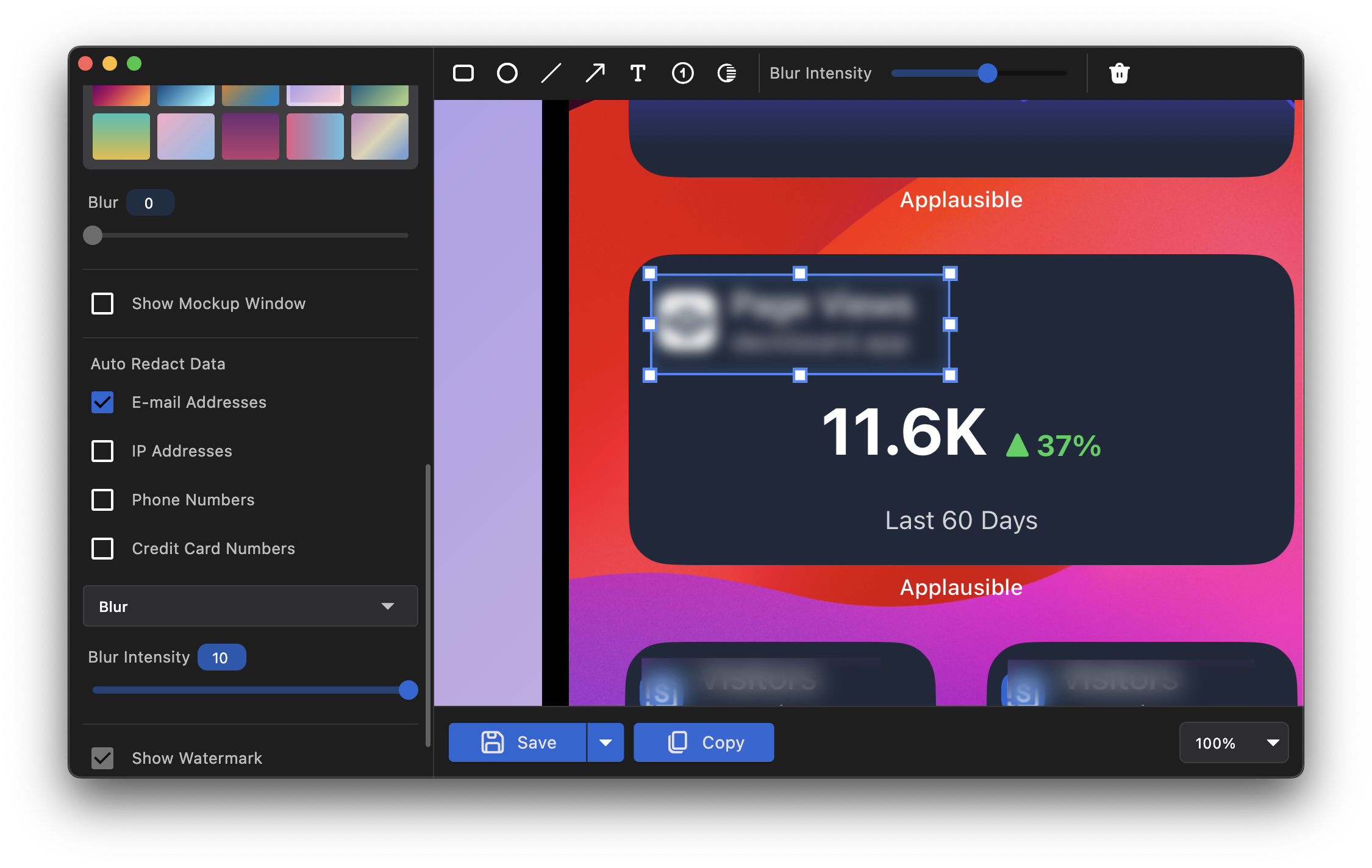
Text Redaction: Privacy with a Click
Savvyshot’s Text Redaction feature is designed to automatically detect and redact sensitive information in your screenshots. This is achieved through the use of advanced technologies: the Apple Vision framework for text recognition on macOS and Built-in OCR on Windows. Whether you need to hide email addresses, phone numbers, or confidential figures, the app’s intelligent algorithm identifies such text instantly.
How It Works:
Take a screenshot using Savvyshot.
Select the type of text you want to redact. The options are:
E-mail addresses
IP addresses
Phone numbers
Credit card numbers
Choose your redaction style:
Solid: Select your preferred redaction color.
Blur: Adjust the blur intensity to your preference.
Watch as Savvyshot scans and highlights sensitive text for redaction.
With a single click, the text is neatly redacted, leaving no trace of the original content.
This feature is perfect for sharing professional documents, protecting client information, and ensuring compliance with data privacy standards.
Manual Redaction: Full Control at Your Fingertips
While automatic text redaction is powerful, there are situations where you need to redact specific areas that aren’t text-based or aren’t automatically detected. This is where Manual Redaction shines.
How It Works:
Select the Blur option from the top toolbar.
Draw over any area of the screenshot using a drag-and-select motion.
Adjust the blur intensity using the slider located in the same top toolbar.
This tool is ideal for hiding images or icons with sensitive information, concealing details in charts or graphs, and gaining precise control over your screenshot’s appearance.
Why Choose Savvyshot for Redaction?
Savvyshot’s redaction tools are more than just functional; they’re designed with the user in mind. Here’s why they stand out:
Ease of Use: Intuitive controls ensure you can redact sensitive content quickly and effectively.
Professional Results: Clean and polished redactions that maintain the aesthetic of your screenshots.
Cross-Platform Support: Available for both Windows and MacOS, so you can rely on Savvyshot no matter your operating system.
Time-Saving: Automated text detection eliminates the need for painstaking manual editing.
Start Beautifying and Protecting Your Screenshots Today
Savvyshot’s Text Redaction and Manual Redaction features are indispensable for professionals, educators, marketers, and anyone who frequently works with screenshots. Say goodbye to tedious editing and hello to seamless, secure sharing.
Ready to elevate your screenshots? Download Savvyshot now and take control of your screenshot editing like never before!
Comment