
UXWizz
Self-hosted analytics with heatmaps and session recordings

Read the blog post regarding their contest and how to vote for UXWizz on our blog: https://www.uxwizz.com/blog/website-analytics-startup-2023
I decided through submit UXWizz after receiving a "spam" email from Hackernoon promoting their competition. The reason why I went through with the submission was because there wasn't any startup submitted yet in my region, so simply adding it meant that it was likely UXWizz would get the top spot. I am not sure if the award has any meaning, but in the worst case it might help a bit with SEO and brand awareness.


The name of the self-hosted analytics platform "userTrack" has been changed to "UXWizz".
In this blog post I will explain what lead to this rebranding.
Motivation
The main reason for rebranding userTrack is that nowadays "user tracking" has a negative connotation, and although userTrack is one of the most private ways in which you can handle website analytics (entirely self-hosted, cookie-less, no data centralization, no data shared with 3rd parties, provides various privacy settings, etc.), the name might still trigger negative thoughts.
This rebranding is based on the feedback received from several external people, potential and even existing customers.
A secondary reason for the rebranding is that the "userTrack.com" domain name is owned by bulk domain-trading agencies, asking a high price for it. I do not want to promote the domain flipping business as it provides no real value to the world. Their business relies on keeping domain names occupied for the sole purpose of reselling them at a higher price, thus hindering other businesses or entrepreneurs.
Finding another suitable name
The new name was chosen considering the following:
- Keep the current logo style, which focuses on the "u" character, thus the name has to start with "u".
- The ".com" domain name must be available
- The name has to be short, easy to say, easy to type.
- The name should suggest that using it should make you feel powerful, like having "super-powers" (compared to "userTrack" which makes it feel like you are doing something frowned-upon).
Found one: UXWizz
After searching for a while, I found a name to check all those boxes: "UXWizz".
The name is still based on two distinct words:
- 🎨 UX - The goal of the product is to improve the User Experience for both the visitors and webmasters by providing private, fast, easy-to-use and versatile ways of understanding user behavior and improving the website.
- ✨ Wizz - You are a wizard Barry! While using the dashboard you should feel like having magical powers and that all your questions can be answered in a few intuitive clicks.
New logo
Apart from changing the name (while keeping the "u" icon), I decided to brighten a bit the secondary color from black to a dark blue (otherwise the "wizz" part would pop out too more). I also played a bit with the dot on the "i", initially I made it a diamond, but everything felt too "square", so I made it a more abstract shape, sort-of resembling a flame/fireball.

Previous logo: userTrack

New logo: UXWizz
Moving forward
I did like the "userTrack" name, but I think the new one will do better in terms of marketing.
The new logo is similar to the previous one, but I still want to make some minor tweaks to it when I have the time.
Post initially published on https://www.uxwizz.com/blog

The old logo
I first created the userTrack logo in 2013, when I released the initial version. The logo has never been changed in any way until now. Even though the old logo was remarkable, it had several flaws that made it look a bit misaligned, unprofessional or made it harder to create a landing page or branding around it.

Main changes
- Color: Replaced the purple color with a blue gradient. The purple added to the uniqueness but made it hard to design around it. Purple doesn't go well for the tech enterprise user audience.
- Simplify: Removed the signal/ripple line below to "u".
- More readable: Recreated the "u" symbol to be more balanced and be more legible when used in a small size.
- Uniform: Used a single, thicker, font weight for both "user" and "Track".
- Balance: Created a custom "k" letter that is shorter, in order to balance the logo around the central "T".
The new logo

I really like how the new logo turned out. I think it's slightly less memorable than the original one, but it is very well balanced, looks more professional, has a more enterprise color scheme and is more readable.
What do you think of the new logo compared to the old one?

I finally released the trial version of userTrack!
You can download and install userTrack now and try it for free here.
For a better user experience and improved user privacy I have decided to not ask for an email address for the trial download.
This is a much bigger step for userTrack than it seems, as now I can start creating free public images for various popular marketplaces and platforms (Docker, Cloudron, DigitalOcean, etc.).
PS: The quickly-made trial page looks very cozy for some reason. I think it's the colorful icons:


I got tired of copying files and committing changes to make a build, even if it's just once a month and it takes 5 minutes.
Should you automate?
You might want to consider this xckd chart when deciding whether it's worth the time spent to automate a mundane task:

According to the chart I should have automated the deploy process that took 5 minutes every month if automating it took under 5 hours. I spent a bit more than that to implement and fix all edge cases, but having a robust deploy process makes it more likely that you will release often and that you can make quick changes when needed.
The biggest advantages that I see with automating the deploy process:
- Less likely to make human error when copying files
- No longer delaying a release feeling too lazy to do the deploy ritual
- Automating tasks is fun (I enjoy watching my robot-vacuum cleaner do my job)
What did I automate?
The deploy command does now every that I was manually doing before. I just run one command and it:
- Copies files via SFTP
- Calculates SHA256 integrity hash of the files
- Copies the hash into some local files
- Commits and pushes the hash changes to GitHub

The deploy process is implemented with GulpJS.
It also supports other neat things like deploying a beta version instead, or a different variant of userTrack (WordPress or standalone).
I still have the build task separated, as having a single button (or command) to build and deploy might be too risky (maybe you accidentally press it, or the build contains something wrong and you don't have time to cancel the command). I used this two-step process before at a different company and it worked great, another advantage is that you can prepare a build and then deploy it in a few seconds at an exact time (otherwise you would have to estimate build time and hope that the build doesn't fail).
Let me know in a comment if you want to know more details about the deploy Gulp tasks or task automation in general.
-
1
This is information is great for me because I am study in created click deploy and more information see the website .https://cleanthese.com


The heatmaps features of userTrack has always been one of its main selling points, but being dynamically generated (heatmap can be generated for any resolution, visitor, country, etc.) it was sometimes a bit too hard to understand how to correctly set the heatmaps inputs to generate the data that you want.
In the new version 3.4.0 the heatmaps UI has been drastically improved by adding quick buttons to filter data for a specific device. Those new buttons automatically set both the viewing iframe size AND filter the input data to only show visitors who had the window size within a specific range.

Pricing is a very tricky thing to get right, and it poses lots of ethical concerns too (eg: localized pricing, A/B testing pricing, etc.).
There is also a hard-to-balance ratio between sustainability/profitability and respecting the customers (all of them). Pricing a product high might lead to higher profits and fewer customers (good for you), but this means your product is really exclusive and can only used by a few people, instead of trying to provide value to as many people as you can.
I think the best way to show the struggle of pricing is to write an approximate history of the pricing structure of userTrack.
2013-2019
- Lifetime license
- Pricing gradually increased over time from $19 to $59 to match the features set.
- The support period lasted 6 months and could be extended for 50% of the price (the default CodeCanyon terms).
Almost no-one renewed the support, as they still got updates.
2020
- Jan-March: Lifetime License - $99
This felt like a really good price point for the product, customers loved it.
- March-August: Added a new "company plan" and increased lifetime prices to $129 Personal License and $399 Company License
It soon started to become clear that it is way too hard to be sustainable having just a lifetime license, something had to change if I want to keep working on userTrack
- August: Added cheap monthly prices as an alternative to the lifetime versions, around $7.99/mo Personal and $24.99/mo Company.
50% of customers started chose the monthly version, as you could test the product for only $7.99 instead of $129
One issue with this pricing model is that the churn was really high, as the customers could just cancel their plan and keep (illegaly) using their userTrack dashboard (but without getting any future updates). I decided not to implement any DRM, as those never actually work and only affect legitimate users.
- October: Removed Lifetime License, switched to yearly plans: $59/year Personal, $199/year Company.
This pricing sounds reasonable, but clients didn't like it, sales dropped. It feels odd to pay a yearly fee for a self-hosted product
- Now (November 2020): Re-added Lifetime License, but with a twist: this only includes updates for one year, if you want to get updates after that, you can get one more year of updates for 50% of License Price.
This means that current pricing is:
- Personal: $99 License + 1 year updates. You can use userTrack forever. After the first year, support/updates cost $49/year.
- Company: $299 License + 1 year updates. You can use userTrack forever. After the first year, support/updates cost $149/year.
I am personally really happy with this new pricing structure: sustainable and reasonable for a self-hosted product (can use it forever instead of a license subscription).
The only thing left to do pricing-wise is to offer a trial version, so customers can test userTrack for 7 or 14 days without paying anything.
I think this is really important for a self-hosted product, as the main push-back is the idea that self-hosting takes too long to get started with. If clients can try setting up userTrack without paying anything, then they will be a lot more likely to consider purchasing it.
You can view the pricing table here: https://www.usertrack.net/pricing
What do you think of this pricing structure (one-time license + paid updates) for self-hosted products?
As a customer, would you prefer a different pricing structure for such a product?
-
1
Very interesting. I like your pricing model. To see the proportion of customers who renew after 1 year to obtain support and updates. This is my only fear on this model but find this pricing very good.
-
2
Thanks, I also really like the current pricing model (one-time cost + paid updates), I think it's the best way to sell self-hosted software.
I will find out in one year how many customers will churn, but I do expect the percentage to be a lot lower than the high churn I had with the monthly plans.
-


Although userTrack is a self-hosted platforrm and although I truly beleive that self-hosting is the future of privacy and decentralization, I can't deny that there are still users who prefer to have someone else manage their server and just take advantage of the awesome userTrack features.
For this, I decided to provide a managed VPS plan, where you will still get your own userTrack dashboard running on a dedicated VPS, only that I will do the initial setup and maintain that VPS. I decided to go with a dedicated VPS per client (instead of squeezing more clients on a server) for improved security, performance and to have the ability to transfer the VPS to the client at any point if he decides he wants full control over it.
I won't focus too much on those plans, my goal now is to make self-hosting as easy as possible so people realize that nowdays self-hosting an application is almost as easy as creating an account for a generic SaaS product.

$70k sounds like a huge amount, but keep in mind that the profit is only around $35k (due to CodeCanyon's fees) and spread over 5-6 years, so the average is around $5k-$7k/year.
Here is the (profit) breakdown by month, since 2017:
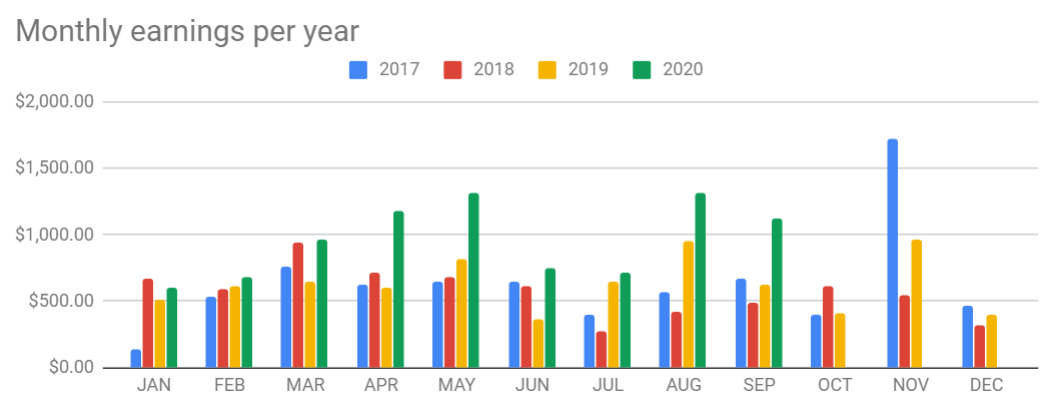
Some notes:
- On November 2017 userTrack was promoted in the Black Friday sale on CodeCanyon and sold around 100 licenses in 1-2 days.
- Starting in 2020 I am working full-time on userTrack and switched to selling directly through Gumroad (instead of CodeCanyon)
Most sales came from the CodeCanyon discovery and from organic traffic (since the switch to Gumroad).
Let me know if you have any questions about userTrack or those numbers!
-
2
Awesome job.
I appreciate you showing a summary of your journey over 5 years. Great things take time and persistence and your product is showing that!-
1
Thanks!
It's a really long story, and until this year userTrack has always been a side-project, so I had a lot of other stuff happening while I continously worked on updates and provided support for userTrack. I am actually thinking about writing a short book about my experiences, as I think it might be interesting/useful for others working on similar side-projects, but I first want to see how the story ends (eg. if this year goes well enough or I have to find a job to sustain myself).
-
1
A small note, I started working on userTrack in late 2012 (as it can be seen in the product page on IndieHackers), so the userTrack story actually started about 8 years ago.
-
-
-
1
Congrats on the milestone, Cristian! I'm in the analytics space as well and it's good to see others making some hard earned $$ with their products.
I'm curious a about your business model. Would you be able to share where most of the profits come from? I see that you're selling licenses for self-hosting, but also as a plugin for Wordpress. I'm curious which is more successful for you. Also, have you tried any other models in the past?
-
1
Hi Razvan,
Thank you!
The WordPress plugin is also self-hosting, only that the installation is easier as it uses the already existing WP database.
The profit share varies from month to month, but it's usually around 60-70% for the standalone version and 30-40% for the WordPress one.
Some people also like the monthly subscription while others prefer the one-time lifetime version, so I am still keeping both.
On CodeCanyon I was very limited to the pricing model, as I was forced to play by their rules within a strict system. So far I only tried lifetime license and monthly subscription. I have also thought about and considered other models (freemium, SaaS with hosting included, agency focused only, etc.), but I think the current model is the best for me, customers and their users.
-
1
Thanks for the answer! I went straght for the generic SaaS model with my product and it's interesting to see other models like your with CodeCanyon for example 😃
-
-
-
1
Congrats, that's amazing. I can see a lot of potential with your tracking tool. Your landingpage could need some improvements ;)
-
1
Thank you! I also hope that I can grow the tool a lot more in the near future now that I work full-time on it.
I agree with you, I have been changing continously the landing page over the past few months, but I need to spend a bit more time on it and take the time to create some nice explainer/demo videos that could really boost the conversions.
Do you have any specific feedback/comment for the landing page?
-
-
1
It is always interesting to know the real statistics. And what do you think, is it worth moving from CodeCanyon to another distribution platform? What pros and cons.
-
1
I moved away from CodeCanyon mostly due to the fact that Envato no longer cares about the marketplaces or authors the way they used to do.
The props of CodeCanyon are their huge audience and that you don't have to worry about payments, licenses or downloads. The biggest cons is that they take a huge cut of your profits and you have to always play by their rules.
I would say that CodeCanyon is a really good place to start if you just work on your products as a side-project, but if you want to grow bigger and start your own marketing, it makes no sense to pay for ads and then give 50% of the revenue to CodeCanyon just for handling the payment. If you just want to create products and not spend any time or money on marketing, then CodeCanyon is a great choice, otherwise I would recommend using something like Gumroad as you have a lot more control and, very importantly, you can directly contact your customers and build an audience. With CodeCanyon you don't get the contact information of customers, so if you ever release a new product, having an existing CodeCanyon audience wouldn't help much.
-
1
Thanks for your opinion .)
-
-


Previously I was selling on Envato, and affiliates were already promoting userTrack through Envato's affiliates system. Since I switched to Gumroad, the affiliate program for userTrack has been missing.
🎉Until today!
You can now earn money while helping userTrack grow.
Learn more on the userTrack affiliates page.
I am using Gumroad's affiliate system, so I have to manually add affiliates, but I don't have to worry about the conversion tracking and payments part.
I decided to give away up to 30% of my revenue for each sell. I opted for a commission ladder, so the more clients you refer, the larger your commission will be. This is mostly to make sure that the affiliate is legitimate and to provide a higher reward to those actively promoting userTrack to a larger audience.
1 Comment
Thats a smart way to do it