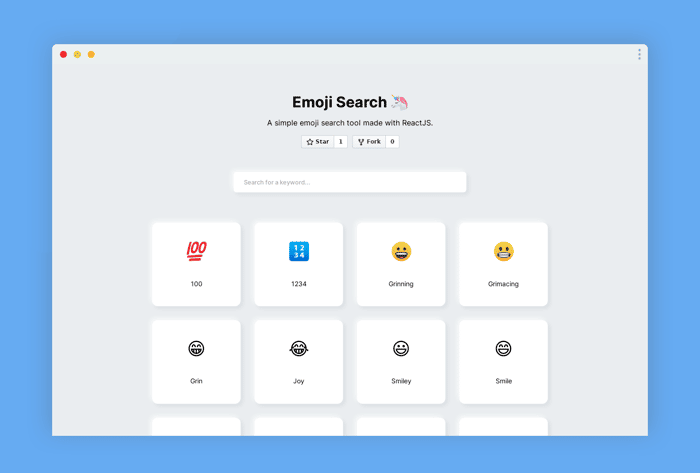
After learning React for a week I made an emoji-searcher tool 🔍😎
Hi everyone!
About a week ago I posted about a CRM tool that I made with React after learning the framework for 24 hours. The final app turned out to be pretty cool and I got tons of feedback and compliments from you all. 🙏
But this time I wanted to step it up. 💪
I've been learning ReactJS for about a week now and learned concepts such as:
- Components
- Hooks
- State Management
- Styling
- Optimization (kinda 😅)
So this is the final product after a week's worth of practicing.
How did it turn out?
I was looking online for some React project ideas that I can try out on my own. I stumbled across an emoji search-up tool that I thought looked pretty cool.
Fast forward a few days, I finished the design and functionality of the app.
📕 Github Repository: https://github.com/BraydenTW/react-emoji-search
💻 Live Demo: https://braydentw.github.io/react-emoji-search
A ⭐ on the repository is very much appreciated. Thanks :D
Any feedback or ideas for what I should try next would be awesome.
Thanks again!

Awesome design Brayden! You should seriously try making a UI component library and open sourcing it. It would do great for your reputation and give you something to put on your portfolio. 👍
Thanks! I will consider doing somehting like that in a week or so. Stay tuned :D
🙃
Nice one mate! That's a great way to learn something new.
Similarly, a few years back when I was learning Vue.js, I built Emoji Homepage (~200 visits per day for the last year)
Given that your emoji-search is open-source, it could stick for quite some time. Good luck!
Thanks! I’ll do my best :)
This looks great! Looks like you're making a lot of good progress.
Quick tip... depending on the situation, I like to destructure my props in my functional components. Helps me see the props/arguments more clearly.
So instead of:
function Item(props) { }Try:
function Item({ id, symbol, title }) { }This way, you can also supply default props like so:
function Item({ id, symbol, title = "No Title" }) { }Keep up the great work!
Thanks for the tip :D
Great work! I am wondering if you can share some good resources to learn React and maybe a short roadmap.
I think you already have some experience with this kind or frameworks that’s Why your learning process was so fast.
React itself has great tutorials. https://reactjs.org/tutorial/tutorial.html
Actually no. This is my first time learning a framework like React or Vue. Any info is helpful. Thanks :D
Wow, you are doing a great learning process.
Thanks :D
Great work mate.
I noticed on mobile I wasn’t getting any results when searching, turns out it’s because of auto capitalisation on iOS. Where you’re doing your filter you might want to do a .toLowerCase() on your values so it doesn’t matter if the user is using caps or not.
Also you can't see results when searching on phone because of the keyboard.
Good idea! I'll be sure to fix that :D
Great work! 👏
Thanks Ben :)
This comment was deleted 6 years ago