How to Use AI Marketing Tools to Boost Your Campaigns in 2025
AI marketing tools can really change how you do campaigns in 2025. You see brands everywhere using these tools. They help make messages personal, automate jobs, and help people make better choices. Just look at these numbers:
90% of businesses use AI to stay ahead
73% of U.S. companies use AI in their work
You might wonder what this means for your results. See how much AI can help:
Metric Improvement Description
Conversion Rates 25% increase AI-driven personalization and targeting
Click-Through Rates 41% increase Better ad targeting and content relevance
Time Spent on Site 40% increase Improved user experience with AI personalization
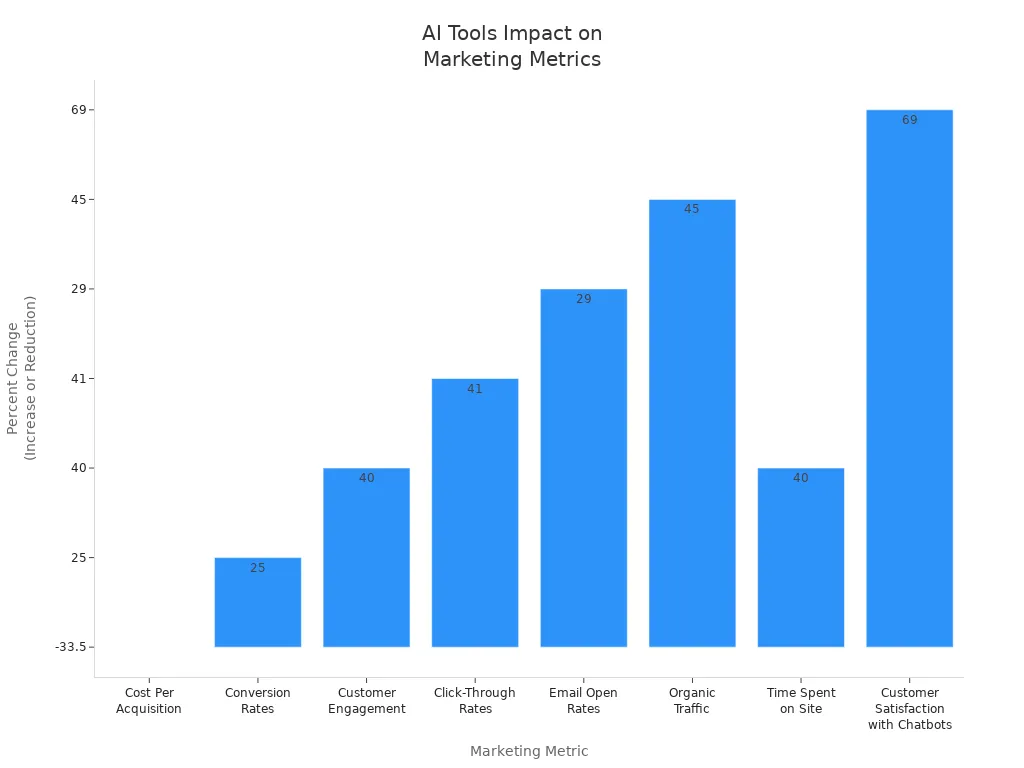
Think about getting these results for your next campaign.
Key Takeaways
AI marketing tools save you time by doing simple jobs for you. They also help your campaigns do better with smarter targeting and personalization. Using AI can make important numbers like conversion rates and click-through rates go up a lot. It can also help you get more people interested in what you offer. Start using AI by making clear goals that you can measure. Make sure these goals fit what your business needs. Pick tools that match your goals. Good data and a ready team are very important for AI marketing to work well. Clean data and training your team often help AI do a better job. Choose AI tools that are simple to use and work well with your other systems. Make sure they have good support and strong security. Try small projects first to see how AI tools work. Check the results fast and slowly use AI more as you learn. Watch your campaigns closely by looking at important numbers. Use what AI tells you to keep making your marketing better. Solve problems like data privacy, AI bias, and missing skills by making clear rules. Use both AI and human thinking together. Spend time teaching your team new things.
Why Use AI Marketing Tools

Key Benefits
You want your marketing to stand out and get results. That’s where AI marketing tools come in. These tools help you understand your customers better, predict what they want, and send them messages that feel personal. You can use them to analyze huge amounts of data in seconds. This means you can spot trends and make smart choices faster than ever.
Here’s what you get when you use AI marketing tools:
Do more with fewer people. You save money on hiring and agency fees.
Grow faster by creating more content and reaching more people.
Make smarter decisions with instant reports and predictions.
Get live optimization and automated testing for stronger campaigns.
Free up your time by letting AI handle 80% of routine tasks, so you can focus on creative ideas.
Tip: Let AI handle the boring stuff. You get more time to brainstorm and connect with your audience.
Check out how these benefits show up in real life:
Benefit What Happens for You
Time saved on repetitive tasks You spend less time on boring work, more on strategy
Workflow efficiency Your team works faster and gets more done
Lead generation You get more leads through chatbots and smart tools
SEO improvement Your content ranks higher and gets seen more
Personalization Your messages hit the right people at the right time
AI marketing tools also help you run campaigns across many channels at once. You can personalize emails, ads, and even website content for each visitor. This leads to higher engagement and better results.
Modern Marketing Challenges
Marketing today moves fast. You face new problems every day. Maybe you worry that AI will take away creativity, or you feel pressure to learn new tech. Sometimes, you might get wrong info from AI or struggle to keep up with all the changes.
Here are some common challenges:
Feeling like you need to learn AI or get left behind.
Spending extra time learning how to use AI well.
Not having clear processes for using AI in your team.
Worrying about data privacy and security.
Getting poor quality or inaccurate content from AI.
Fearing that AI might replace jobs.
But you can tackle these challenges. Start by using AI as a helper, not a replacement. Always double-check AI-generated content. Work with your team to set up clear rules for using AI. Stay open to learning, and remember, most marketers say AI helps them grow their careers.
Note: AI works best when you combine its power with your creativity and experience. Use it to boost your skills, not replace them.
Types of AI Marketing Tools

Content Automation
You want to make more content in less time. AI-powered content automation tools help you do this. These tools can write blog posts, emails, and social media updates. They also make product descriptions, images, and videos. You give them a topic or some keywords. The tools do most of the work for you.
Here’s a simple look at what these tools can do:
AI Capability What It Does How It Helps You
Grammar Correction Fixes grammar and spelling mistakes automatically Saves time and improves accuracy
Style Adjustments Changes tone to match your brand (formal, casual, etc.) Keeps your voice consistent
Predictive Text Suggests sentences or paragraphs as you type Speeds up writing
Content Summarization Shortens long articles into easy-to-read summaries Makes content more accessible
Translation Translates content for global audiences Expands your reach
Voice-to-Text Turns audio or video into written text Saves time and adds new content formats
You can use Shopify Magic for product descriptions. Klaviyo AI helps with email campaigns. These tools let you make content much faster and save money. They also help you avoid mistakes, so your brand looks good.
Tip: Let AI do boring jobs like tagging images or typing out videos. You will have more time for fun and creative work.
Predictive Analytics
Predictive analytics tools help you guess what will happen next. They look at old data and find patterns. You can use them to see which products might sell best. They also show which customers may buy soon or what content will get clicks.
These tools use smart algorithms that learn from your data. Amazon uses predictive analytics to suggest products. This helps them sell more and keep customers happy. You can also use these tools to spot trends and plan your next steps.
Machine learning models like decision trees and neural networks get smarter over time.
They help you guess what customers will do and make your marketing personal.
You can mix numbers with real feedback to make better guesses.
When you use predictive analytics, you make better choices. Your campaigns get better results.
Audience Segmentation
Audience segmentation tools help you find the right people for your ads. Instead of showing everyone the same ad, you can target groups. You can pick groups by what they like or how they act on your site.
AI marketing tools gather data from many places. They make profiles for each customer. These tools find patterns and group people into useful segments. For example, you can target shoppers who spend a lot or people ready to buy.
AI matches visitors to your best customer profile using past data and buyer intent.
It guesses who will buy by looking at things like repeat visits and session length.
You can send these groups to ad platforms for better retargeting and lookalike ads.
With AI segmentation, you spend less on ads and reach people who care about your brand. Some companies get up to four times better results by using these tools.
Note: AI segmentation works right away, so your targeting stays good even when customers change.
Lead Scoring
You want to spend time on leads who might buy soon. AI-powered lead scoring helps with this. These tools look at your leads and sort them by how ready they are. You do not have to guess who to contact first. The system checks things like website visits and email opens. It also looks at what people bought before. Each lead gets a score from the tool.
AI marketing tools help you find good leads faster. Your sales team spends less time on leads who are not interested. They spend more time closing deals. You get alerts when a lead’s score goes up. This helps you act at the right time.
Look at these numbers to see how much AI-powered lead scoring helps:
Metric Measurable Impact (%) Source / Example
Increase in sales conversion rates 25-30% Forrester, Salesforce Einstein
Increase in sales productivity 32% Forrester, SuperAGI
Reduction in sales cycle length 21% MarketsandMarkets, SuperAGI
Increase in revenue 15% MarketsandMarkets, SuperAGI
Lead scoring accuracy 90% SuperAGI
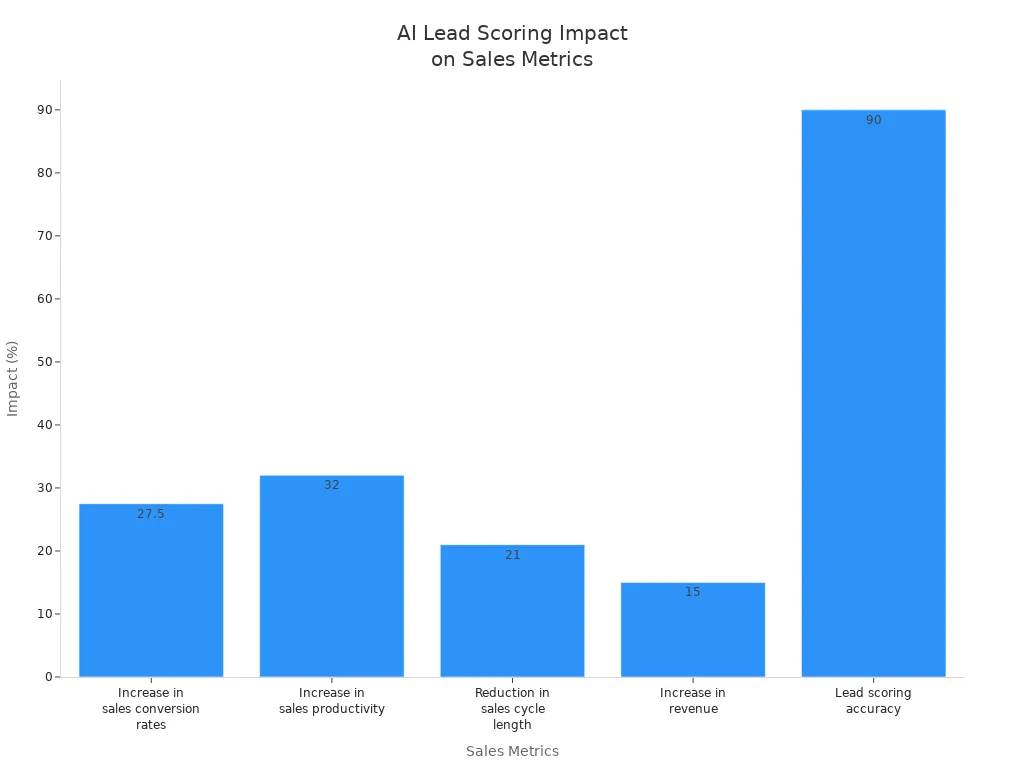
You can see that AI lead scoring helps you close more deals. You work faster and make more money. You also waste less time on leads who will not buy. This is good for your whole team.
Tip: Make your lead scoring rules fit your business goals. Check them often to keep your scores right.
Personalization
Personalization helps your customers feel important. AI marketing tools let you show the best message to each person. You can use these tools to suggest products or send special emails. You can even change your website for every visitor.
When you use AI for personalization, you see big changes. Customers get offers and content they like. They stay on your site longer and visit again. You also get more sales and better reviews.
Here is what happens when you use AI-driven personalization:
Metric / Outcome Impact / Improvement Example / Source
Customer engagement increase Up to 30% increase Sephora’s Beauty Insider program
Customer retention improvement Up to 35% higher redemption rates Fashion retailer personalized emails
Churn reduction Up to 35% lower churn rates AI-driven predictive analytics
Customer lifetime value (CLV) 20% to 40% increase General AI personalization studies
Conversion rates 15% to 80% increase Companies using AI personalization
Sales increase Up to 25% increase Various companies implementing AI
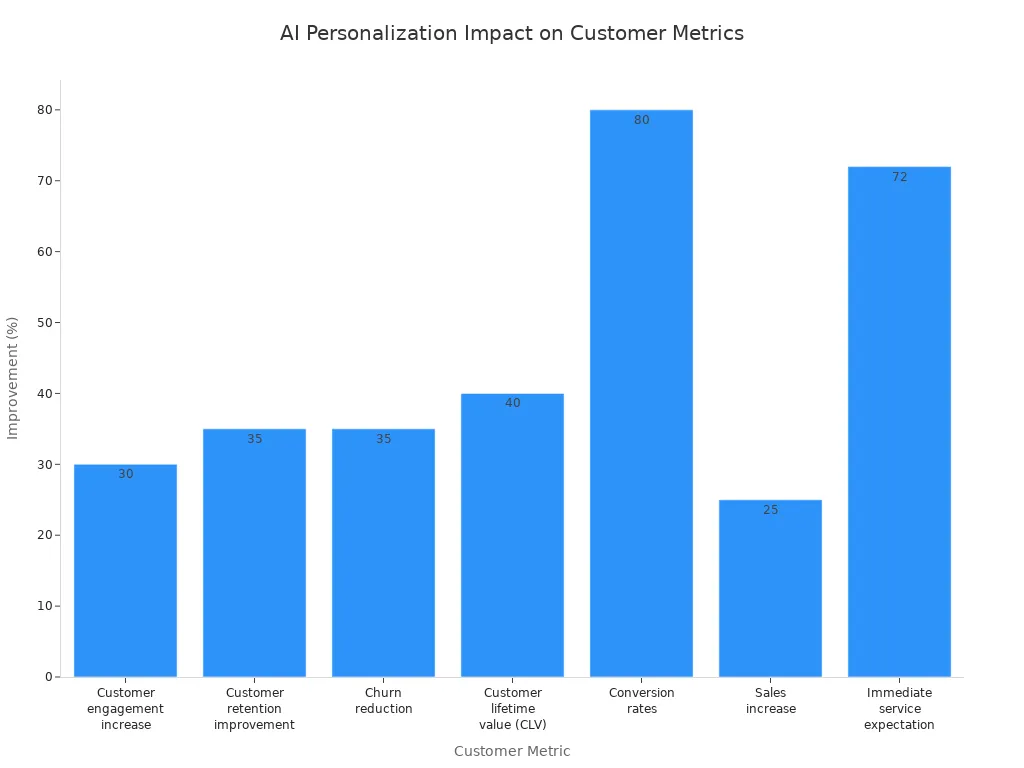
You can use personalization in emails, ads, and chatbots. Customers notice when you remember what they like. They trust your brand more and feel special.
Note: Start small with personalization. Try different messages and see which ones work best.
Setting Campaign Objectives
Defining Goals
You want your campaigns to work. That starts with clear goals. Before you use any new tool, ask yourself what you want to achieve. Do you want more leads? Maybe you want to boost sales or keep customers coming back. Pick one or two goals to focus on first. Trying to do everything at once can make things messy.
Here’s a simple way to set your goals:
Write down what you want to improve. For example, “Increase leads by 20% in three months.”
Choose numbers you can track. Use things like lead generation rates, customer acquisition costs, or sales conversions.
Make sure your goals match your business needs. If you want more sales, track revenue per customer.
Use dashboards to see your progress. Many tools show you real-time results.
Check if your investment pays off. Compare the cost of your tools to the extra money or time you save.
Don’t let the computer do everything. Always review what the system creates and keep an eye on your campaigns.
Tip: Start small. Test your ideas with a pilot project. You can always grow bigger once you see what works.
You can also use a table to keep your goals clear:
Goal Example KPI to Track Timeframe
Boost email signups Number of new subscribers 3 months
Lower ad costs Cost per click (CPC) 1 month
Improve customer retention Repeat purchase rate 6 months
Aligning AI Capabilities
Now, match your goals with what your tools can do. If you want to save time, look for tools that automate tasks. If you want better targeting, use tools that segment your audience or predict what customers want.
Start with a small project. Pick a campaign that matters, like a new product launch or a holiday sale. Set clear numbers to measure success, such as cost savings or more sales. Train your team so everyone knows how to use the new tools. If you need help, bring in an expert to get started faster.
Here’s a checklist to help you align your tools with your goals:
Define your main goal, like more website traffic or higher conversion rates.
Pick the right tool for the job. For example, use a tool that analyzes ad data if you want better ad results.
Set up your campaign with clear steps and KPIs.
Let the tool run, but check the results often.
Use what you learn to make your next campaign even better.
Note: Keep watching your numbers. Adjust your plan if you see something isn’t working. The best results come from mixing smart tools with your own ideas.
Data and Resource Audit
Data Quality
Before you jump into using AI, you need to check your data. Good data makes everything work better. Bad data can mess up your results and waste your time. So, what makes data “good” for AI? Here are some things to look for:
Your data should be accurate and up to date.
It needs to be complete. Missing pieces can cause problems.
Make sure your data is consistent. If you use different formats, AI can get confused.
Data should be relevant to your goals. Don’t collect things you don’t need.
Each record should be unique. Duplicates can throw off your results.
Keep your data well-structured. Organized data is easier for AI to use.
You need to be able to find and access your data quickly.
You also need to think about privacy and rules. Make sure you follow laws like GDPR or CCPA. Set up strong rules for how you collect and use data. This keeps your business safe and builds trust with your customers.
Here’s a table to help you check your data:
Assessment Dimension What to Look For
Data Quality Is it accurate, complete, and consistent? Are there gaps or errors?
Data Accessibility & Infrastructure Can you get to your data fast? Does your system handle lots of data without slowing down?
Governance & Compliance Do you follow privacy laws? Do you have rules for using data the right way?
Tip: Clean your data often. Fix mistakes, remove duplicates, and fill in missing info. This makes your AI results much better.
Team Readiness
You need more than just good data. Your team must be ready to use AI in marketing. Start by checking what skills your team has. Do they know how to work with data? Can they use new tools? Are they open to learning and trying new things?
Here’s a checklist to see if your team is ready:
Does your team know how to collect and clean data?
Can they use data analysis tools?
Are they good at testing and improving campaigns?
Do they think creatively and solve problems?
Is your team open to change and new ideas?
Do you have support from leaders and other departments?
Is there a plan for training and learning new skills?
Training is key. Give your team hands-on practice with AI tools. Set clear goals and show how AI fits into your business. Start small, track your progress, and adjust as you go. Make sure everyone knows the rules about privacy and data use.
Note: A team that learns together grows together. Keep learning, stay curious, and support each other as you try new things.
Choosing AI Marketing Tools
Selection Criteria
It can be hard to pick the best AI marketing tools. There are lots of options. You want tools that help you do your job better. The right tool should help you reach your goals. Here are some things to think about when picking a tool:
Check if the features fit your plan and daily work.
Pick tools that are simple to use. You should not spend a long time learning.
Make sure the tool works with your other software. This saves you time and trouble.
Choose tools that can grow as your business grows. This is important if you want to get bigger.
The tool should give you good data and clear reports.
Good support and training help you use the tool well.
Look for proof the tool works. Read reviews and stories from other users.
Make sure the tool keeps your data safe and follows privacy laws.
Tip: Try a tool on a small project first. This helps you see if it fits your team and goals.
You should also match the tool to your business goals. Set clear targets, like getting more leads or sales. Make sure your team is ready to use the tool. Check if the tool uses good data and follows safety rules. Test the tool with a small campaign and see the results. Training and support are important, too. The best tools help you track things like sales, costs, and time saved.
Top Tools
There are many AI marketing tools you can use. Some help with content, others with analytics, social media, or email. Here is a table to help you compare top tools for each job:
Marketing Category AI Marketing Tools Key Features and Benefits
Content Creation Buffer's AI Assistant, Typeface, Narrato AI Content Genie, HubSpot AI Social Media Caption Generator, Canva Make social posts, reuse content, design images, write captions, keep your brand voice the same
Analytics & Social Media Monitoring Mentionlytics, Meltwater Listen to what people say online, check feelings, watch competitors, find trends, spot influencers, get reports
Competitor Analysis Predis.ai, Rival IQ, Unmetric Study competitors, compare results, get ideas for social media, check hashtags, get alerts
Email Marketing (Check for new AI email tools in 2025—many platforms now add AI features for subject lines, timing, and personalization) Get more people to open emails, improve clicks, and send personal messages automatically
Let’s see how these tools work for real companies. BuzzFeed used generative AI to make quizzes and special content. They made ten times more content and got more page views. Starbucks used predictive AI to study orders, weather, and place. This helped them get more visits and sales. Sephora added an AI try-on app. Shoppers felt sure and bought more. Lexus used IBM Watson to write a commercial. They saw a 13% jump in people seeing them as creative and a 53% higher view-through rate.
Other brands like Farfetch and Unilever had big wins too. Farfetch used AI to write better email subject lines. They got up to 38% more clicks. Unilever used AI to make content faster and cheaper. They cut costs by 30% and finished campaigns 50% faster.
Note: Real companies get real results with the right AI marketing tools. Start with one tool, check your results, and grow from there.
Integration and Workflow
Implementation Steps
Getting AI into your daily marketing work can feel big, but you can break it down into simple steps. Here’s a clear path you can follow to make the process smooth and less stressful:
Spot the Right Tasks
Look at your current marketing work. Find jobs that take a lot of time or repeat often. These are perfect for AI. Talk with your team to see where you all spend the most effort.Check the Benefits
Think about how much time you could save. Will AI help you do things faster or better? Focus on the tasks where you see the biggest wins.Pick the Best Tools
Explore different AI options. Choose tools that fit your goals and are easy for your team to use. Make sure they work well with your other software.Start Small
Begin with a simple project. Try AI on a low-risk task first. This helps your team get used to the new way of working.Measure Results Fast
After you start, check how things are going. Look at the results in the first month or two. Ask your team what works and what needs fixing.Keep an Eye on Performance
Watch how the AI is doing. Collect feedback from your team. Use this info to make things better.Grow Step by Step
As you see good results, add AI to more parts of your marketing. Move at a pace that feels right for your team.
Tip: Always keep your data clean and up to date. Good data makes your AI smarter and your results stronger.
You might run into some bumps along the way. Here’s a table to help you spot common problems and how to fix them:
Challenge Description Solution
Choosing the right tool Hard to find tools that fit your needs and work with your systems Try free trials and demos. Pick tools that can grow with your business.
Lack of strategy No clear plan for using AI Set clear, measurable goals before you start.
Poor data quality Bad or old data hurts your results Clean your data often. Check for mistakes and fill in missing info.
Over-automation Too much automation feels cold to customers Mix AI with human touches to keep things personal.
Stale workflows Old routines make customers lose interest Update your workflows often. Use feedback and analytics to stay fresh.
Note: If you ever feel stuck, ask your team for ideas. Sometimes the best solutions come from people who use the tools every day.
Training and Adoption
You want your team to feel confident using new AI tools. Training makes all the difference. Here’s how you can help everyone learn and grow together:
Build a Simple Training Plan
Create lessons that mix basic ideas with real tasks. Show how AI works, then let your team try it out. Use real projects so learning feels useful.Use Different Ways to Teach
Start with a kickoff workshop to get everyone excited. Offer short lessons, webinars, and safe places to practice. Let your team play with the tools before using them for real work.Track Progress
Watch how your team improves. Check if they use the tools more, save time, or get better results. Ask for feedback and see what needs more practice.Make Learning Fun and Rewarding
Talk about the good things AI brings. Give easy guides and help when needed. Celebrate team members who try new things first.Keep the Momentum Going
Add AI steps to your daily work. Pick team champions who can help others. Share tips and stories in regular meetings. Update your training as tools change.
Tip: Hands-on practice helps the most. Let your team try real tasks, like writing a LinkedIn post or setting up an email, using AI.
Most teams use a mix of in-house classes, webinars, and one-on-one coaching. Let your team experiment and share what they learn. Use surveys and chats to see how everyone feels about the new tools. Bring in real examples and case studies to make lessons stick. Keep your training fresh and focus on both creative and technical skills.
Challenge Description Solution
Lack of information and data mix Data is scattered and AI tools seem confusing Bring your tools together and make sure your data is organized and easy to use
Trusting AI outputs People worry AI might make mistakes Always double-check AI work and let humans review important results
Privacy and compliance Rules like GDPR and CCPA can be tricky Be open about how you use data, get clear consent, and keep up with privacy laws
Confidence and budget Some team members feel unsure or worry about costs Offer training, show how AI saves money, and encourage everyone to keep learning
Note: People—not just tools—make change happen. Support your team, answer questions, and keep learning together.
Optimization and Monitoring
Performance Tracking
You want to know if your campaigns work. Tracking the right numbers helps you see what’s going well and what needs fixing. With AI, you can watch your results in real time and spot trends fast. Here are some important things to track:
Cost per acquisition (CPA): Shows how much you spend to get a new customer.
Engagement rate: Tells you if people like your content.
Click-through rates (CTR): Measures how many people click your ads or emails.
Conversion rates: Shows how many people take action, like buying or signing up.
Churn rate: Tells you how many customers leave.
Forecasting accuracy: Checks if your AI predictions match what really happens.
Response time: Measures how quickly you answer customers.
Mean Squared Error (MSE): Helps you see how close your predictions are to real results.
Customer sentiment: Shows how people feel about your brand.
Net Promoter Score (NPS): Tells you if customers would recommend you.
Tip: Set a baseline before you start. This way, you can see how much you improve over time.
You should also look at accuracy and precision. Accuracy tells you if your AI hits the mark. Precision checks if your messages reach the right people. Both help you avoid wasting money and make your campaigns stronger.
Here’s a table to help you remember what to track:
Metric What It Shows
CPA Cost to get a new customer
CTR How many people click
Conversion Rate How many people take action
Churn Rate How many customers leave
Forecasting Accuracy How close predictions are to real
NPS Customer loyalty and satisfaction
Continuous Improvement
You want your campaigns to get better every time. AI helps you do this by making changes fast and learning from results. You can use real-time data to tweak your ads, emails, or website. If something isn’t working, you can fix it right away.
AI lets you adjust your SEO, ads, and messages as soon as you see a change in the market.
You can test different headlines, images, or offers. AI will show you which ones work best.
Personalization gets easier. AI studies what your users do and sends them the right content.
You can use tools like HubSpot, Salesforce Marketing Cloud, or Mailchimp to automate and optimize your campaigns.
AI can move your budget to the best-performing ads, so you don’t waste money.
You can keep your message the same across all channels, making your brand stronger.
Note: Amazon cut cart abandonment by 25% in one month using AI to retarget shoppers with special deals. HubSpot boosted LinkedIn ad clicks by 40% with AI-powered targeting.
Keep an eye on your key numbers every day. Review what AI changes and make sure it matches your goals. Mix AI with your own ideas for the best results. When you spot something new, try it out and see if it works. Over time, your campaigns will get smarter and more effective.
Overcoming Challenges
Data Privacy
You want your customers to trust you with their information. Data privacy is a big deal in marketing today. When you use smart tools, you collect a lot of personal data. This can lead to problems if you are not careful. Some of the biggest risks include data breaches, misuse of information, and sharing data without permission. Sometimes, companies keep data for too long or use it in ways people did not expect.
Here are some common privacy concerns you might face:
Data breaches that expose personal details.
Using data for profiling or spreading wrong information.
Algorithms making unfair choices.
Storing data longer than needed.
Not getting clear consent from users.
Sharing data by accident.
Hackers trying to steal sensitive info.
You can protect your customers by following a few simple steps:
Set up clear rules for how you use and check your tools.
Run regular checks to make sure you follow laws like GDPR and CCPA.
Train your team on privacy best practices.
Build privacy into your tools from the start.
Watch for new risks all the time.
Use encryption and make data anonymous when possible.
Try privacy tools that spot and fix problems fast.
When you do these things, you keep your customers safe and build trust. You also avoid big fines and bad press.
Tip: Always tell your customers how you use their data. Clear and honest messages help people feel safe.
AI Bias
AI can sometimes make unfair choices. This happens when the data used to train the system is not balanced. For example, Amazon once used a hiring tool that picked more men than women because the data came from mostly male workers. Some online ads have shown more arrest records to people with African-American names. Other times, AI links women with art and men with science. These are real problems that can hurt your brand.
You can fight bias by:
Using special tools that look for bias before you launch a campaign.
Picking algorithms that focus on fairness, not just accuracy.
Testing your system with fairness checks, like demographic parity.
Having a team with different backgrounds review your results.
Making sure your AI decisions are easy to explain.
Setting up clear rules and training for everyone who works with AI.
Fixing bias is not just the right thing to do. It also keeps your brand strong and helps you avoid legal trouble.
Note: Always mix human judgment with AI. People can spot problems that machines miss.
Skills Gap
You might worry that your team does not have the right skills for new technology. This is a common problem. Only about 1 in 10 workers feel ready to use AI at work. Most employees want more training, especially on ethics and safety. If your team does not know how to use these tools, you could fall behind your competitors.
Here is a table to show the main issues and ways to fix them:
Challenge What You Can Do
Not enough skilled staff Offer workshops and certifications
Employees feel unprepared Give hands-on practice and real projects
Training takes too long Use no-code tools and short, focused lessons
AI fatigue Talk openly about how AI helps, not replaces jobs
Keeping skills fresh Set up mentorship and regular skill checks
You can also work with schools or other companies to help your team learn faster. Try to make learning part of your daily work. Give people time to practice and ask questions. When you invest in your team, you build a future-ready business.
Tip: Celebrate small wins. When someone learns a new skill, share it with the team!
System Integration
Getting your new AI tools to work with your old systems can feel like solving a big puzzle. You might run into problems that slow you down or make your work harder. Let’s look at what can go wrong and how you can fix it.
You may notice these common challenges when you try to connect new AI tools with your current marketing systems:
Old platforms might not “talk” to new tools. Some legacy systems don’t have APIs or use data formats that don’t match.
Data can get messy. You might have information in different places, with different formats, or missing pieces.
Switching between lots of platforms can break your workflow. You lose time and make more mistakes.
Sometimes, your team can’t get real-time data from all your tools. This makes it hard to make quick decisions.
AI models may not always work well together. Different versions can give you mixed results.
Security can become a headache. You need to keep data safe as it moves between systems and make sure only the right people have access.
Your old hardware might not be strong enough for new AI features. This can slow things down or even stop them from working.
Some team members may feel nervous about new tech. Change can be hard, and not everyone likes it at first.
You don’t have to let these problems stop you. Here are some ways to make integration smoother:
Start small. Try a pilot project before rolling out big changes.
Pick tools that work well with your current systems. Look for ones with good support and easy connections.
Use cloud-based platforms. These often make it easier to connect different tools and scale up when you need more power.
Run regular data audits. Clean up your data, fix errors, and make sure everything is in the right format.
Set up clear rules for who can see and use your data. Role-based access controls help keep things safe.
Train your team. Show them how the new tools work and why they matter.
Work with experts if you need help. Sometimes, outside advice can save you time and money.
Here’s a quick table to help you spot problems and find solutions:
Challenge What You Can Do
Old systems don’t connect Use compatibility layers or upgrade
Messy data Audit and clean your data regularly
Workflow interruptions Choose unified platforms
Security worries Centralize security and access controls
Team resistance Offer training and support
Tip: Change takes time. Celebrate small wins and keep your team involved. When everyone feels included, integration gets easier.
You can make your systems work together. Take it step by step, and soon you’ll see smoother workflows and better results.
You have the power to make your campaigns smarter and more personal. Start by setting clear goals, picking the right tools, and keeping your data clean. Try new ideas, watch your results, and keep learning.
Let AI help you understand your audience and predict what works.
Always check for privacy and fairness.
Ready to boost your marketing? Take the first step and see how far you can go!
FAQ
What is the easiest way to start using AI marketing tools?
You can start with a free trial or demo. Pick one tool that solves your biggest problem. Try it on a small project. Watch how it works and see if it helps you save time or get better results.
Do I need to know coding to use AI marketing tools?
No, you don’t need coding skills for most tools. Many platforms use simple dashboards and drag-and-drop features. You can follow step-by-step guides or watch short videos to learn quickly.
How much do AI marketing tools cost?
Prices vary. Some tools offer free plans with basic features. Paid plans can start at $20 per month and go up. You can compare prices and features in a table before you choose.
Plan Type Price Range
Free $0
Basic $20–$50/month
Pro $100+/month
Will AI replace my marketing job?
AI helps you do your job better. It handles boring tasks and gives you more time for creative work. You still need to plan, review, and add your personal touch. Think of AI as your assistant, not your replacement.
How do I keep my customer data safe with AI tools?
You should pick tools that follow privacy laws like GDPR or CCPA. Always use strong passwords and update them often. Train your team on privacy rules. Check your settings to control who can see or use your data.
Can AI tools really improve my campaign results?
Yes! Many marketers see higher open rates, more clicks, and better sales after using AI. You can track your results with built-in reports. Try A/B testing to see what works best for your audience.
What if my team feels nervous about using AI?
Start with a team meeting. Show how AI makes work easier. Offer short training sessions. Celebrate small wins together. Let everyone share tips and ask questions. When your team feels supported, they learn faster and enjoy the change.

