How we built an Offline AI Pronunciation Scorer (Elsa Alternative) using Rust & ONNX
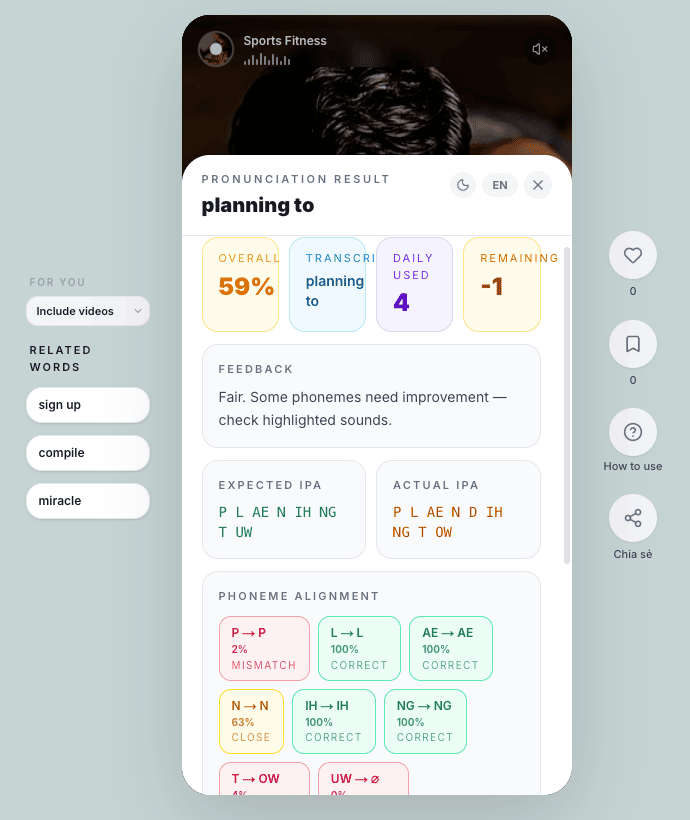
When building an AI language app in 2026, the standard developer playbook is simple: Plug into a Cloud API (Whisper/Google Cloud), pay the monthly bill, and launch.
But while developing Listen & Learn by WynAI, a desktop app focused on English immersion, we hit a massive wall: Latency and Cost.
For pronunciation practice, users need instant feedback. Recording 2 seconds of audio, sending it to the cloud, processing it, and waiting for a JSON payload takes 2-3 seconds. That delay completely destroys the learner's "flow" state. Not to mention, as our user base scales, cloud API costs would balloon enough to eat all our revenue.
So, we made a tough architectural decision: Move the entire AI pronunciation scoring engine locally to the user's machine.
Here is how we built an offline pronunciation scorer with accuracy rivaling Elsa, powered by Tauri, Rust, and ONNX Runtime.
The Architecture: Solving the Offline AI Puzzle
To make the AI run smoothly on average laptops without cooking the CPU, we couldn't use massive, multi-gigabyte models. Every byte had to be optimized.
1. Blazing-fast Audio Processing with Rust
Instead of relying on fragile JavaScript audio libraries, we offloaded the heavy lifting to Rust & Tauri. The millisecond the user stops speaking, our Rust backend intercepts the audio, normalizes the signal (zero-mean, unit-variance), and converts it into a 16kHz mono PCM (float32) array—all in a fraction of a millisecond.
2. The Ultra-light Acoustic Model (Quantized)
The soul of our system is the acoustic analysis core. We integrated a specialized Acoustic Model (based on Frame Classification architecture) and dynamically quantized it down to INT8. Thanks to this extreme compression, the model runs flawlessly via ONNX Runtime using only the CPU, no expensive GPUs required.
3. Alignment & Micro-level GOP Scoring
How does the AI know you pronounced the /θ/ in "think" as a /t/?
We embedded a robust phonetic dictionary (over 130,000 words) directly into the app. Upon receiving the audio, the system uses a highly optimized Monotonic Dynamic Time Warping (DTW) algorithm to align every single audio frame to the standard expected phonemes.
For the Goodness of Pronunciation (GOP) score: Instead of using primitive edit-distance algorithms like older apps, we developed a custom frame-level log-posterior algorithm. It’s smart enough to distinguish micro-deviations. For example: accidentally pronouncing /p/ as /b/ receives a much lighter penalty than completely missing it as /m/. The result is a smooth, granular phoneme-level scoring system that goes toe-to-toe with the big players.
The Results
Tearing down the Cloud API to build our own Local AI engine using Rust & ONNX brought mind-blowing results:
Latency: Under 50ms. The exact moment you release the record button, your score is on the screen. It feels instantaneous.
Resource usage: The entire AI engine consumes around ~130MB of RAM.
Server Costs: $0. We no longer care how many times a user checks their pronunciation.
Building a true "offline-first" desktop app with Tauri and Rust requires a lot of architectural R&D, but the UX payoff is incredible. By moving the AI pipeline locally, Listen & Learn by WynAI has become one of the most efficient desktop applications for English pronunciation practice, offering real-time feedback without cloud costs.
Want to test the latency yourself?
If you want to see how this Rust + ONNX pipeline feels in real-time, you can test the app here:
🌐 Website & Details: wynai.pro/listen-learn
🪟 Windows App: Download directly from Microsoft Store
I’d love to hear your thoughts! Have any of you guys experimented with running local ONNX models in your desktop apps?
---
P.S. I originally published this technical deep-dive on my [WynAI Engineering Substack]. If you enjoy reading about Rust, AI, and building indie apps, I'd love to have you subscribe and connect with me there!

