
Listen & Learn by WynAI
an AI-powered English immersion platform
Since publishing our architectural deep-dives on how Listen & Learn by WynAI runs a local ONNX pronunciation scorer in Rust, we’ve received amazing feedback from the engineering community.
However, AI researchers and language experts naturally asked a deeper question:
“Running a 50ms local phoneme scorer is great engineering, but what about Suprasegmental features like rhythm, stress, and connected speech? And more importantly, what is your pedagogical moat compared to traditional pronunciation coaches like ELSA?”
Today, I want to address the “Speech Science” vs. “Real-world Fluency” debate, and reveal the second half of our AI architecture: The Local Whisper Fluency Engine.
The “Phoneme Trap” and Why Users Quit
Traditional pronunciation apps are built like medical clinics. You walk in, the AI puts a microscope on your mouth, tells you that your /θ/ sounds like a /t/, gives you a score, and makes you repeat the isolated word 10 times.
Is the speech science behind this impressive? Yes.
Is it pedagogically effective for long-term learning? Absolutely not.
Most working professionals and adult learners quit these gamified drill apps after a few weeks. Why? Because drilling isolated sentences without context is boring. It lacks dopamine, emotional engagement, and real-world applicability. You can score 100% on a pronunciation drill but still freeze when talking to a real native speaker.
True language acquisition (as proven by Stephen Krashen’s Input Hypothesis) requires Comprehensible Input and High Context.
The Architecture: A Dual-Engine Approach
To solve this, we realized a single Acoustic Model wasn’t enough. We needed a Dual-Engine architecture running entirely locally on the user’s desktop:
Engine 1: The Microscope (ONNX Acoustic Model)
As discussed in Part 1, we use a quantized frame-classification model for phoneme-level GOP scoring. When a user highlights a single word in a PDF and clicks “Pronounce”, this engine catches micro-deviations (e.g., /p/ vs /b/) in under 50ms.
Engine 2: The Flow State (Local Whisper.cpp)
When a user is doing “Shadowing” with a 5-minute BBC Podcast or having an AI Voice Chat, isolating phonemes destroys the flow. We need to measure Connected Speech, Rhythm, and Fluency.
For this, we integrated Whisper.cpp (ggml-base.en.bin) via Rust bindings directly into the app.
When a user speaks a full sentence, we don’t just naive-match the text. We extract Whisper’s token-level probability distributions (logprob).
Our custom fluency algorithm aligns the expected transcript with Whisper’s hypothesis using Longest Common Subsequence (LCS), and calculates a weighted score:
Fluency Score = (0.6 * LCS Accuracy) + (0.4 * Average Token Confidence)
If you stumble on one word but maintain native-like rhythm, linking, and intonation for the rest of the sentence, Whisper’s high confidence on those tokens pulls your score up. This perfectly models Suprasegmental fluency. It grades you like a human native speaker would: prioritizing flow and comprehensibility over robotic perfection.
The Real Moat: Contextual Immersion > Academic Drills
Our biggest technical achievement isn’t just running AI offline. It’s using that offline AI to turn the entire internet into a speaking playground.
Instead of reading random app-generated sentences, Listen & Learn users:
Import EPUBs (like The Great Gatsby) and use the Highlight-to-Speak popup.
Shadow over 5,000 BBC and TED Talk podcasts, getting instant Whisper fluency scores.
Sing along to 30,000 bilingual songs, training rhythm and connected speech naturally.
Argue with custom AI characters (with adaptive slang and tone) in real-time voice chats.
Conclusion
Building a massive dataset of isolated phoneme recordings is a great moat for a pronunciation API. But building a Desktop-native English Operating System that combines 0-latency offline AI with infinite, real-world contextual content is a moat for user retention.
We aren’t trying to build another “drill and quiz” app. We are building the ultimate immersive environment for serious learners who are tired of playing mobile games and want to actually live inside the language.
If you want to see what a desktop-first, AI-native English learning environment looks like, check out Listen & Learn by WynAI or download it directly from the Microsoft Store.

Part 2 of our journey building Listen & Learn's dual-engine Offline AI. How we turned any EPUB - PDF or text into an interactive speaking test using Whisper.cpp and Longest Common Subsequence
In [Part 1 of this series], I shared how we built a lightning-fast offline pronunciation scorer using a Quantized Acoustic Model (Charsiu) and DTW alignment to catch micro-mistakes at the phoneme level (like confusing /p/ and /b/).
But phonemes are only half the battle. Real language isn't just isolated sounds; it's about Flow, Rhythm, and Sentences.
If you read a 15-word sentence, hesitate, stutter, or skip a word entirely, a strict phoneme-level checker will break down. The alignment fails. We needed a "Brain" that understands natural speech fluency, not just a "Microscope" that looks at syllables.
So, for sentence-level scoring in Listen & Learn by WynAI, we built a completely independent, secondary AI pipeline.
Here is how we implemented a 100% local, zero-latency sentence scoring system using Whisper.cpp, Rust, and a "humane" mathematical formula to power our killer UX feature: The SelectionSpeakPopup.
The UX Challenge: Reading meets Speaking
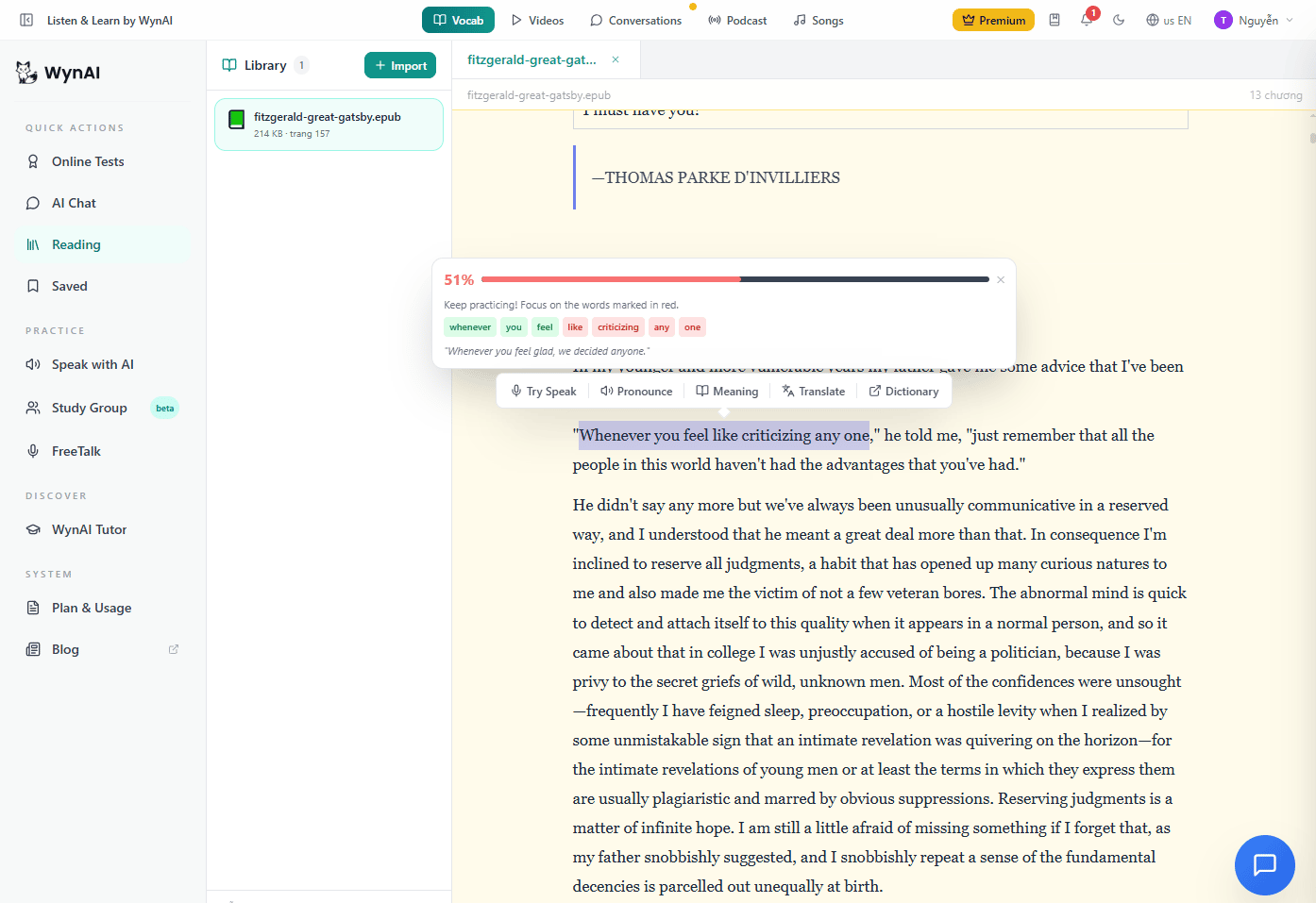
Most apps separate reading and speaking. You read in one tab, you take a speaking test in another.
We wanted a seamless workflow for serious learners (engineers, professionals) reading long-form content like The Great Gatsby (EPUB) or BBC News.
The goal: Highlight any text -> Click "Try Speak" -> Read it out loud -> Get instant red/green feedback on exactly which words you missed or mispronounced.
To do this without cloud latency, we brought OpenAI's Whisper model locally to the user's desktop.
Step 1: Local Whisper Inference (No Cloud Needed)
When the user finishes speaking, our Rust backend (Tauri) grabs the 16kHz float32 audio array and feeds it directly into a locally loaded ggml-base.en.bin (148MB) model using whisper-rs.
Why not Quantize Whisper to INT8 like we did in Part 1?
Because we need the exact, uncompressed probability distribution (Confidence scores) of the AI. At 148MB, the base model runs in under 100ms on a modern CPU. It's incredibly fast and gives us the exact transcript and the logprob of every single token.
Step 2: The Alignment Magic (LCS Algorithm)
Now we have two strings:
Expected: The text the user highlighted in the book.
Transcript: What Whisper actually heard.
How do we match them if the user skipped a word or mumbled?
Instead of basic Sequence Matchers, we implemented the LCS (Longest Common Subsequence) algorithm using Rust's similar crate.
LCS is brilliant here. If a user tries to say "conversations" but completely fails, Whisper won't transcribe it. LCS doesn't panic; it just marks that specific word as missing/wrong and correctly aligns the rest of the sentence without shifting all the subsequent words into the red zone.
Step 3: The "Humane" Scoring Formula
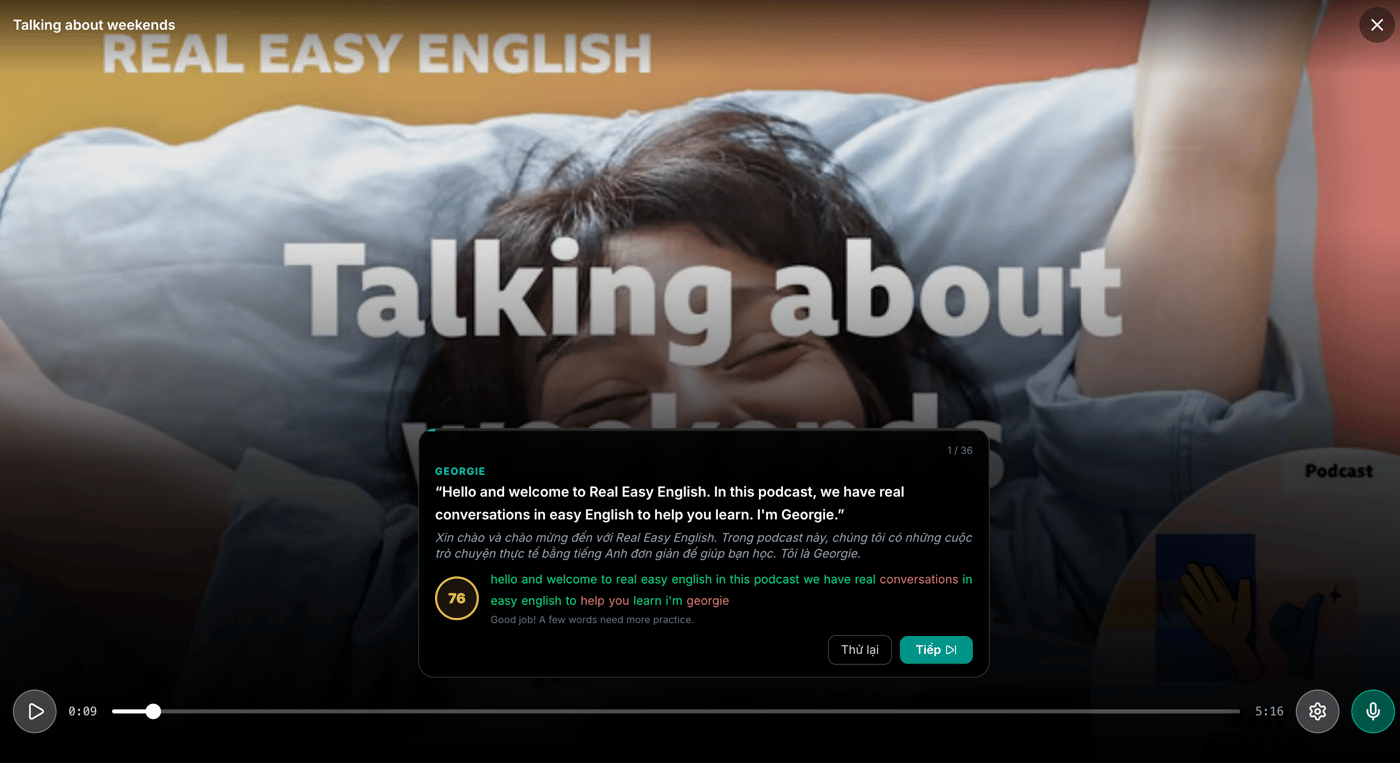
We don't want a robotic, punishing grading system. If a sentence has 24 words and you miss 6, pure math says you get 75%. That's discouraging.
Instead, we designed a weighted formula:
Overall Score = (0.6 Accuracy) + (0.4 Token_Score)
Accuracy (60%): Did you say the right words in the right order? (Calculated via LCS).
Token_Score (40%): How confident was the AI in what it heard? We dive into Whisper's token-level data, extract the probability (exp(logprob)), and average it.
If you stumble on one word but pronounce the other 18 words with loud, clear, native-like confidence, the Token_Score pulls your overall grade up. It behaves exactly like a human teacher: "You stumbled a bit at the end, but your accent and flow were great. 76%!"
The Result: An OS for Language Immersion
By combining the Phoneme-level engine (Part 1) for strict pronunciation, and the Whisper-level engine (Part 2) for sentence fluency, we’ve created an offline AI architecture that completely outclasses mobile apps.
You aren't just doing flashcards anymore. You are reading classic literature, highlighting complex sentences, and having a local AI instantly grade your fluency. No loading spinners. No API costs.
If you want to see what a desktop-first, AI-native English learning environment looks like, check out Listen & Learn by WynAI or download it directly from the Microsoft Store.
I’d love to hear how other devs are handling audio diffing and scoring. Are you using Whisper locally for anything similar?
When building an AI language app in 2026, the standard developer playbook is simple: Plug into a Cloud API (Whisper/Google Cloud), pay the monthly bill, and launch.
But while developing Listen & Learn by WynAI, a desktop app focused on English immersion, we hit a massive wall: Latency and Cost.
For pronunciation practice, users need instant feedback. Recording 2 seconds of audio, sending it to the cloud, processing it, and waiting for a JSON payload takes 2-3 seconds. That delay completely destroys the learner's "flow" state. Not to mention, as our user base scales, cloud API costs would balloon enough to eat all our revenue.
So, we made a tough architectural decision: Move the entire AI pronunciation scoring engine locally to the user's machine.
Here is how we built an offline pronunciation scorer with accuracy rivaling Elsa, powered by Tauri, Rust, and ONNX Runtime.
The Architecture: Solving the Offline AI Puzzle
To make the AI run smoothly on average laptops without cooking the CPU, we couldn't use massive, multi-gigabyte models. Every byte had to be optimized.
1. Blazing-fast Audio Processing with Rust
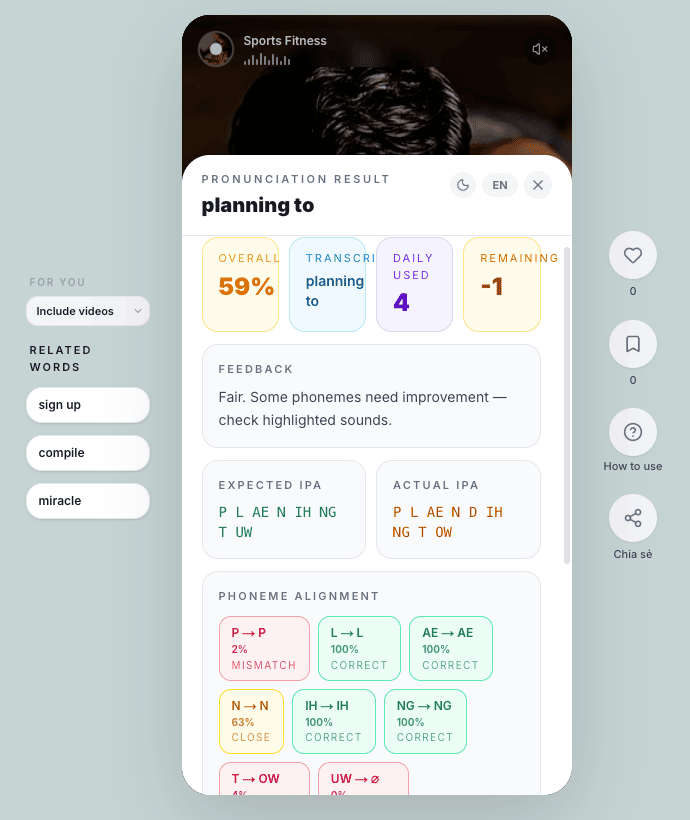
Instead of relying on fragile JavaScript audio libraries, we offloaded the heavy lifting to Rust & Tauri. The millisecond the user stops speaking, our Rust backend intercepts the audio, normalizes the signal (zero-mean, unit-variance), and converts it into a 16kHz mono PCM (float32) array—all in a fraction of a millisecond.
2. The Ultra-light Acoustic Model (Quantized)
The soul of our system is the acoustic analysis core. We integrated a specialized Acoustic Model (based on Frame Classification architecture) and dynamically quantized it down to INT8. Thanks to this extreme compression, the model runs flawlessly via ONNX Runtime using only the CPU, no expensive GPUs required.
3. Alignment & Micro-level GOP Scoring
How does the AI know you pronounced the /θ/ in "think" as a /t/?
We embedded a robust phonetic dictionary (over 130,000 words) directly into the app. Upon receiving the audio, the system uses a highly optimized Monotonic Dynamic Time Warping (DTW) algorithm to align every single audio frame to the standard expected phonemes.
For the Goodness of Pronunciation (GOP) score: Instead of using primitive edit-distance algorithms like older apps, we developed a custom frame-level log-posterior algorithm. It’s smart enough to distinguish micro-deviations. For example: accidentally pronouncing /p/ as /b/ receives a much lighter penalty than completely missing it as /m/. The result is a smooth, granular phoneme-level scoring system that goes toe-to-toe with the big players.
The Results
Tearing down the Cloud API to build our own Local AI engine using Rust & ONNX brought mind-blowing results:
Latency: Under 50ms. The exact moment you release the record button, your score is on the screen. It feels instantaneous.
Resource usage: The entire AI engine consumes around ~130MB of RAM.
Server Costs: $0. We no longer care how many times a user checks their pronunciation.
Building a true "offline-first" desktop app with Tauri and Rust requires a lot of architectural R&D, but the UX payoff is incredible. By moving the AI pipeline locally, Listen & Learn by WynAI has become one of the most efficient desktop applications for English pronunciation practice, offering real-time feedback without cloud costs.
Want to test the latency yourself?
If you want to see how this Rust + ONNX pipeline feels in real-time, you can test the app here:
🌐 Website & Details: wynai.pro/listen-learn
🪟 Windows App: Download directly from Microsoft Store
I’d love to hear your thoughts! Have any of you guys experimented with running local ONNX models in your desktop apps?
---
P.S. I originally published this technical deep-dive on my [WynAI Engineering Substack]. If you enjoy reading about Rust, AI, and building indie apps, I'd love to have you subscribe and connect with me there!
Comment