I built a web-based vector editor from scratch and integrated an AI Agent. Need just ONE beta tester!
Hi Indie Hackers,
I've been coding solo behind closed doors for months, and I finally shipped Rayzia.com — a lightweight, web-based vector editor.
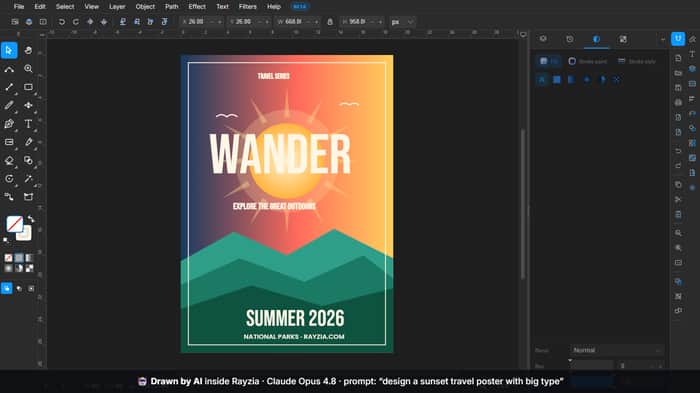
The feature I'm most excited about: I built in an AI agent (powered by Claude). Instead of just exporting a flat, messy SVG, the agent actually controls the editor's own tools — createShape, addGradient, setPaint and the rest — live on your canvas, over MCP.
So the moment it finishes drawing, you can grab any node or layer and keep editing it by hand, right in the browser. Nothing is flattened into a picture — it's a real, editable file the second the AI stops.
As a solo dev, honestly getting even one person to put it through a real workflow feels like climbing a mountain. I'd be hugely grateful if you'd try it and give me raw, honest feedback before Tuesday: Does it feel smooth? Is the AI agent actually useful in your workflow — or does it get in the way?
Try it here → https://rayzia.com/vector
Thank you so much 🙏

The first beta tester could shape the product more than the next hundred casual users, especially for a tool with both a complex editor and an AI layer.
I would look for someone who already has a repetitive vector-design workflow and a clear reason to improve it. They should bring a real task, not a hypothetical one. For example, creating ad variations, cleaning imported SVG files, generating icon sets, modifying brand assets, or preparing graphics for multiple formats.
The important test is not whether the AI produces something impressive once. It is whether the user understands what the agent changed, can correct it easily, and feels confident using the output in real work. Control and predictability may matter more than raw generation quality.
Watching the tester work without guiding them too much could reveal whether the editor’s mental model is clear. Their first confusion may be more valuable than their final compliment.
What kind of designer or workflow would be the ideal stress test for the current version?
Thank you for the incredible, deep insights! Your advice on how to screen and observe the first beta tester is spot on. I'm definitely going to apply these strategies to improve Rayzia. Really appreciate your support!
The "will AI take my job" market splits into meme quizzes that disclaim themselves out of seriousness, and paid reports that hide their methodology behind the same five recycled citations. I'm building the honest one.
AIRA is a free AI job-risk assessment with a fully public methodology — the results page shows you line by line how your score was composed. The business model is a paid personalised Kit (waitlist for now; checkout is next on the roadmap).
Solo founder in Adelaide, built with Next.js + Supabase + Claude doing most of the code under spec-driven review.
Live: useairanow
The bet I'd love feedback on: that transparency converts better than urgency in a category built on anxiety. If you run the score — did it feel right, and did the breakdown make you trust it more or less?
Building from native tools instead of dumping SVG is the right architecture — editable output is the whole differentiation. Sharp execution.
One layer to validate: the tester you choose determines what you learn. A solo designer who makes quick icon sets will stress-test iteration speed. A product team member will stress-test whether the AI can handle brand consistency across assets. Those are different use cases pulling different roadmap directions.
Your real stage fit is probably Solo/Pre-seed product builders who need 'fast asset variations without leaving the editor.' That's a specific enough wedge to test. List on SoftRankings (design tool directory) — stage-segmented discovery tells you instantly which cohort actually converts, saving you weeks of guessing.
Done! Just submitted Rayzia to SoftRankings as you suggested. Appreciate the solid advice on targeting solo/product builders — let's see how it goes!
I can see that your product is live on SoftRankings.
https://softrankings.com/products/rayzia
You can claim your product page to further add your custom details.
Thanks for the heads up and the solid recommendation! Claiming the page now. Really appreciate all the great insights on the architecture and target audience too!
Congrats on the launch! I really like the idea of having the AI generate fully editable vector graphics instead of flattened SVGs. That makes a huge difference for real design workflows. Wishing you a successful Product Hunt launch, and I hope you get plenty of valuable feedback from the community!
Hey israr034, thank you so much for the kind words and the support! You hit the nail on the head—having truly editable vector paths instead of just flattened SVGs is a game changer for actual design workflows. Really appreciate your support and wishing you all the best too!
Looks neat on the first peek. Will dive into it a bit more later in the day!
Thanks, Arun! 🙏 When you do dive in, here's the one minute worth spending: open the AI panel, ask it to draw something, then grab a node it just made and bend it by hand — that little moment is the whole idea. Would genuinely love to hear what you think.
The vector editor + AI agent combo is interesting positioning. Most tools focus on either the editing experience or the AI capabilities—combining them well is rare. What problem does the AI solve that plain vector editing doesn't? Is it design suggestion, automation, or something else? The beta single-person angle is also smart—one power user can reveal more than surveys.
Good question — and the honest answer is: mostly automation and collapsing intent into execution, not design suggestions.
Plain vector editing isn't hard because you don't know what you want. It's hard because getting there is 40 clicks: draw the shapes, align them, match the palette, name the layers, spin three variants. The AI's job is to erase that mechanical gap. "A 3-card pricing row, aligned, on my brand colors" becomes one sentence, and it operates the real pen/shape/align/recolour tools to build it — as editable objects, not a suggestion you have to redo by hand.
So it's less "here's a design idea" and more "you already know what you want — let me do the tedious 20 minutes." The recolour-to-brand, restyle-a-set, rename-and-organize, spin-safe-variations grind. And because it edits the live file, your taste and judgment stay in the loop — it's an operator, not an oracle. That's the deliberate line: I don't want it deciding whether the design is good, just removing the labour between your idea and a real, editable file.
(And agreed on the single power user — one person running a real project surfaces the exact moment it breaks. Surveys never do.) It's open and free if you ever want to poke it: rayzia.com/vector. 🙏
Building the editor from scratch is technically impressive, but the strongest beta feedback will probably come from choosing one very specific workflow for the tester. A general request to test a vector editor can produce vague opinions about the interface, while a task such as recreating a logo, cleaning an SVG, or generating editable social graphics can reveal where the product succeeds or breaks. The AI agent also needs a clear advantage over existing design tools. What task can it complete significantly faster than a normal vector-editing workflow?
Totally agree on the specific-workflow point — I'm scripting the first sessions around one concrete task, not "go explore." The one I'd hand a tester, and the clearest speed win, is: take an existing asset, recolour it to a new brand palette, and spin out three on-brand variations.
By hand that's genuinely 20–30 minutes of pure tedium — select a shape, change the fill, repeat, duplicate, restyle, keep them all consistent. With the agent it's one sentence, and you're auditing the result instead of doing the labour. Same for building a structured layout from nothing (a pricing row or icon grid — aligned, grouped, named) and cleaning up a messy imported SVG.
Where it does not win, and I'll say it plainly: a quick one-off shape is faster by hand than typing a prompt. The advantage kicks in the second a task is repetitive, multi-object, or "do this consistently across a set" — which, for real product work, is most of the boring half of the day.
So the test I actually want run is exactly your framing: recolour + variations on a real logo, then hand the still-editable file to a teammate. If that's meaningfully faster and they can take it from there without me, that's the proof point — not a demo render. It's live and free if you want to time it yourself: rayzia.com/vector. 🙏
The AI + vector editor combo is brilliant! Most design tools either have clunky AI or disconnected workflows, but integrating it natively so the AI understands context (layers, vectors, positioning) changes everything. Editable output instead of flat SVG exports is huge. Really impressed with the thoughtful execution here. This could genuinely shift how people design. Ship it! 🚀
This honestly made my day — thank you. "Understands the context" is exactly the bet: because it reads the real layers and vectors, it's editing your file, not guessing at a picture. That's the whole reason I didn't just bolt a generator on the side.
Means a lot coming from someone who clearly gets the space. It's live and free if you want to put it through its paces — rayzia.com/vector — and I'd love whatever you find. Shipping Tuesday 🚀🙏
The editable-output angle is the strongest part here. A lot of AI design tools feel impressive for 30 seconds, then fall apart the moment you want to tweak one layer by hand. Having the agent drive native editor actions instead of dumping a final SVG makes the workflow much more believable. For your beta, I’d push one concrete benchmark task like ‘generate 20 icon variations, then manually refine 3 of them’ because that will tell you fast whether the AI is saving real iteration time or just creating a cool demo moment.
You've named the exact failure mode I built against — the "great for 30 seconds, then you can't touch it" wall. That's the whole reason the agent drives the real editor actions instead of dumping an SVG: the point is that second 31, when you grab a node by hand, actually works.
And that benchmark is sharp — I'm adding it to the beta battery. "Generate 20 icon variations, then refine 3 by hand" is sneaky-good because it stresses both ends at once: the batch has to produce 20 genuinely distinct, named, editable objects (not 20 near-dupes), and then the manual refine is the real test of whether the handoff holds up. If it saved time on the 20 but those 3 are a pain to touch, I've failed the actual promise — and that shows up instantly, exactly like you said.
That "real iteration time vs cool demo moment" line is the exact bar I'm measuring against. It's live and free if you want to run it yourself: rayzia.com/vector 🙏
The tool call approach over MCP is the right instinct here compared to shipping a flat SVG blob. That is the same reason I care about diffs over summaries when a coding agent touches a repo, seeing each concrete action instead of trusting the end state that gets described to you. One thing I would want as a user is visibility into the individual calls as they happen, createShape then addGradient then setPaint in sequence, so I can catch and undo one step without discarding the whole thing if it goes most of the way right and one shape ends up wrong. Editable output solves half of that problem, the other half is being able to see the sequence, not just the destination.
This is exactly the mental model I built it on — the diff-over-summary instinct is spot on, and it's why the panel narrates every call as it happens: you literally watch createShape → addGradient → setPaint stream in as rows, not a "here's your result" summary. So the "see the sequence, not just the destination" half is already there — plus a History panel where each step is labeled and you can jump to any point.
On undo granularity, let me be precise: today an AI action is designed to undo as one clean unit (one Ctrl+Z reverts the whole thing, not five presses). For your "one shape came out wrong" case, the editable-output half solves it a different way — you don't roll back, you just grab that one wrong shape and fix or delete it directly, since it's a real object, and the visible sequence tells you exactly which call produced it.
But your sharper ask — reject/undo a single call mid-sequence without discarding the rest — is genuinely good, and it's not something I have yet. A per-step "keep / drop this one" control on the streamed calls is exactly what a power tester surfaces that I'd never think to build alone. Adding it to the list. 🙏
Live and free if you want to watch the calls stream: rayzia.com/vector
This picture is very beautiful, 10 out of 10. Congrats on shipping this, rayzia_official! Building a full vector editor from scratch as a solo dev is seriously impressive — and integrating an AI agent that actually drives the native tools (createShape, gradients, etc.) instead of just dumping a flat SVG is a really smart differentiator. The fact that everything stays fully editable right after the AI finishes is exactly what most AI design tools are missing.
Just tried it quickly at rayzia.com/vector and the live canvas interaction feels promising. The "prompt → edit by hand → prompt again" loop could be huge for iterative work.
A couple quick questions:
How's the undo/history handling when the AI makes multi-step changes?
What's the workflow you're most excited about for early users (icons, UI mockups, illustrations, etc.)?
Wishing you a strong Product Hunt launch on Tuesday! Happy to give more detailed feedback if I spend more time with it. Keep going!
Thank you — genuinely, this means a lot, and I'm glad the "prompt → edit → prompt" loop clicked for you, because that loop is the whole thesis.
On your questions:
Undo/history for multi-step: each AI action collapses into one clean, labeled step — so a change that touched five shapes is a single Ctrl+Z, not five, and it never gets lumped into one giant blob with your own edits (each AI action and each manual edit is its own entry). There's also a History panel where every step is named, so you can jump back to any exact point instead of only walking back linearly.
The workflow I'm most excited about: honestly, icons and small UI/marketing graphics — the stuff you make in sets and revise constantly. That's where the "generate a batch → recolour to brand → tweak 3 by hand → ask for a variation" loop really pays off. And I'll be straight: pure expressive illustration is less the sweet spot — hand-drawing still wins there. It's the structured, iterative, repetitive work where the agent earns its place.
Really appreciate the kind words and the offer — I'd take detailed feedback any day. Launch is Tuesday, and it's free and open right now if you keep poking. 🙏
The "need just ONE beta tester" framing is smart - it reframes help from "I need 100 users" to something very achievable and removes the intimidation factor.
Building a vector editor from scratch is genuinely hard (layer management, transform logic, undo/redo, export formats). The interesting timing choice is integrating the AI agent at the beta stage rather than waiting for a stable core. Usually that trade-off breaks down into: either AI helps you iterate faster on the core (it's valuable early), or it's premature optimization (your first user needs a working editor, not AI features).
Curious how you're thinking about the core use case though - are you building this for designers, illustrators, or a specific workflow (e.g. creating social media graphics, icons, presentations)? That use case usually determines whether the AI integration feels essential or nice-to-have at the beta stage.
Sharp framing — I'll answer the trade-off head-on, because it's the right thing to poke at.
The core isn't skeletal, and that's the key. The editor is a full standalone tool first: pen, node editing, gradients, real OpenType text, ~200 path effects, SVG/PNG/PDF export. It's genuinely useful with the AI panel closed. So the AI isn't propping up a half-built core — the core shipped stable, and the AI is a projection over the same command layer the manual tools use. That's exactly why it can drive createShape/setPaint instead of bolting on a separate generator. Timing-wise that makes it neither premature nor a crutch: your first user gets a working editor regardless, and the AI just removes the boring half.
On who it's for: designers and product folks doing icons and small UI/marketing graphics — structured, set-based, iterate-constantly work. Not fine-art illustrators (hand-drawing still wins there), and not a presentations tool. In that lane the AI is the difference between "nice free editor" and "the thing I reach for," because that's exactly where the recolour / variation / cleanup grind lives.
So, honestly: essential to the positioning, optional to basic usefulness — and I think that's the healthy version of shipping AI at beta, not the premature one. 🙏
Nice launch — the MCP approach is the interesting part.
Most “AI → SVG” tools dump a flat file and you lose editability. If the agent actually drives createShape / addGradient / setPaint inside the editor, that feels much closer to a real design workflow.
A couple of questions from a builder perspective:
Good luck .
Thanks — and these are exactly the questions I'd ask too.
Partial failures mid-sequence: every call returns a structured {ok, error}, and ops are serialized (one at a time, never interleaved), so "shape created, paint failed" ends with a real, committed shape and an errored paint call — not a corrupted doc. The agent gets that error back in the loop and can retry or adjust; worst case you're left with a real editable object you finish by hand. The part I obsessed over is the multi-step version — a batch runs under one history transaction, and I hammered the mid-transaction cases hard (long adversarial AI-plus-human interleave runs) specifically so a failure partway never eats prior work or leaves a half-committed undo entry.
Runaway loops / cost on BYO key: the biggest lever is that the agent batches — it plans a whole change and sends it as one call instead of a chatty 20-step loop, so cost and loop-risk both drop a lot. On top there's retry-with-backoff on 429/5xx (bounded, honours Retry-After), and since it's your own key, your provider's rate limits and budget are the hard backstop. Fully honest though: a strict per-prompt iteration + token ceiling is the one guardrail I still want to make airtight before this is ever hosted/paid — it's on the list, and exactly the kind of thing I'd love a builder like you to try to break.
Appreciate the sharp questions — good luck to you too. 🙏
I'd genuinely be up for testing this — I work a lot with digital product design so a vector editor with an AI agent layered in is right up my alley. What does the agent actually help with inside the editor, generating shapes/layouts or more like automating repetitive edits?
Honestly, both — and that's kind of the point. It's not a "generate button," it drives the actual tools, so it sits on either end of the workflow.
Generative side: "lay out a 3-card pricing row," "draw a settings icon," "build a hero with a gradient background and a headline" — it creates the shapes, text and layout as real objects, aligned and grouped, not one flat blob.
The repetitive side is where I think it earns its keep for product work: recolor every shape to a new brand palette, apply the same shadow or corner radius across a whole set, rename and organize the layer stack, align/distribute, swap a component's contents, boolean-merge a pile of paths. The tedious 20 minutes becomes one sentence.
And because it reads the live document first — ids, layers, current styles — it edits what's already there instead of redrawing, so you stay in control and can grab any node the second it stops.
For UI/product work that "kick it off, then let it grind the boring edits" loop is the sweet spot I'd most want your eyes on. No invite needed either — it's live and free at rayzia.com/vector, AI panel's built right in. If you run it through a real project, brutal feedback is exactly what I want before Tuesday. 🙏
The editable output is a strong differentiator. For the first beta, I’d resist testing “can the agent make something impressive?” and instead give one designer a real before/after task: import a messy SVG, make three brand-safe variations, then hand the file back to a teammate.
Watch where they stop trusting the agent or cannot recover from a change. If they can understand, edit, and confidently export the result without your help, you have a much sharper proof point than a demo image. What is the most repetitive real task you want the first tester to replace?
This is the sharpest testing note I've had — thank you. "Can they recover, edit and export it without me" is a far better bar than "did it look cool," and I'm going to structure the first sessions exactly like that: import → variations → hand-off, watching for the precise moment trust breaks or someone can't undo their way back out.
To your question — the repetitive task I most want it to replace is the "make this on-brand, now give me a few consistent variations" grind: take an existing asset, recolor it to the palette, normalize the spacing and layer names, and spin out two or three safe variants. By hand that's 30 minutes of tedium and a perfect way to introduce inconsistencies — and it's exactly where "edit the live file, don't redraw" has to earn it. If the agent nails that and the designer hands a clean, still-editable file to a teammate, that's the proof point I care about, not a hero render.
Funny thing is your before/after task is almost a spec for it. If you're up for being that first designer, it's live and free at rayzia.com/vector — I'd take your "here's where I stopped trusting it" notes over a hundred upvotes. 🙏
The agent controlling the editor's tools instead of spitting out flat SVGs is the right architecture, and it is also your entire marketing message. For the Product Hunt launch, lead with a 30-second clip of someone typing a prompt and then grabbing the exact node the AI just drew, that one moment is the whole differentiator. Limiting the first batch is smart positioning too, not just cost control, so keep the scarcity framing front and center.
You just described my launch plan back to me — the whole thing rides on that one cut: prompt in, then a hand reaching over and dragging the exact node the AI just drew. That's the beat I'm leading the video with, because you're right, it's the entire argument in about three seconds.
One place I'll gently push back, though: I went the opposite way on scarcity. There's no gated batch and no signup wall — it's open and free right now at rayzia.com/vector. For a free browser tool, the gap between "saw the demo" and "actually tried it" is the real enemy, and that node-grab moment converts far harder than a waitlist ever could. When I say "first testers," I just mean the people I'll sit with for structured feedback — not who gets in. Anyone can already walk through the door.
Appreciate the positioning eye, though — you clearly think about this stuff properly. 🙏
The editable output is the part that stands out. Most AI design tools stop at generation, but keeping every node and layer fully editable is a much stronger workflow.
One thing I'd test during the beta is where the agent breaks down. Try prompts that require precise alignment, reusable components, or multiple revisions to the same design. If those cases work well, they say much more about the product than a perfect one shot demo.
I'd also ask testers to rate two things separately: whether the final result was good, and whether editing the AI's output was actually faster than drawing it from scratch. That distinction will help you understand if the real value is the AI, the editor, or the combination of both.
Really appreciate this — you've put your finger on the exact thesis. Generation is the easy 10%; keeping every node and layer live so you can keep working is the hard part, and it's where most of the build has gone.
Your "where does the agent break down" test is the one I care about most, so honestly:
Precise alignment — the assistant drives the same align/distribute + snapping the manual tools use, on exact coordinates, so it can place things pixel-true rather than "roughly there."
Reusable components — it can create and reuse Symbols (with overrides), so editing the master ripples across every instance.
Revisions on one design — this is the real split from a generator: it edits the live document with full undo history. "Make the roof steeper, recolour the sky, now group it" all land on the same file instead of a fresh render.
I won't pretend it's flawless in beta — those exact prompts are where I'll be watching, and blunt bug reports there are gold.
And the two-question rating idea is genuinely sharp — I'm stealing it. Separating "was the result good?" from "was editing the AI's output faster than drawing from scratch?" is right, because my honest bet is the value is the combination (AI + a real editor), not either alone. The day editing-vs-scratch comes out slower, that's a real signal something's off.
Thanks for actually thinking this through — this is the kind of feedback that shapes the roadmap. 🙏
Glad we're aligned.
The real benchmark isn't whether the AI can generate something impressive.
It's whether it stays editable and speeds up iteration over multiple revisions. Looking forward to seeing how the beta performs on those real-world workflows.
Couldn't have put the bar better myself — "stays editable, and faster over multiple revisions" is the exact scoreboard, and your two-question framing from earlier is basically how I'm going to grade it. Impressive-in-30-seconds is the trap I'm trying hardest to avoid.
I'll actually report back once the first real-workflow runs are in — you helped sharpen how I'm measuring this, so you should get to see the numbers. Thanks for thinking it through with me. 🙏
The MCP-controlled canvas is a smart move over flat SVG exports — it means the AI’s changes stay inspectable and editable instead of being a black box. One thing I’d want to know as a tester: when the agent makes a multi-step change (say, restyling five shapes at once), can you undo just that one batch, or does it collapse into a single giant undo step? That’s usually where AI-assisted editors get messy. Happy to be your beta tester if you’ve still got a slot open — I do a fair amount of design/diagram work (motorcycle mods, tattoo concepts) so I’d actually run it through a real workflow, not just poke around once.
Thanks — and yeah, "not a black box" is the whole reason it runs on the canvas instead of just piping SVG in and out. If you can't inspect and undo what the AI did, it's really just a slower generator.
Your undo question is the exact part I obsessed over, because you're right — that's where these tools turn to mush. Every agent action is wrapped in one labeled history step. So "restyle these five shapes" is a single undo: one Ctrl+Z reverts all five together — you don't press undo five times, and it also doesn't get lumped into one giant blob with your manual work. Each AI action, and each of your own edits, is its own entry. There's also a History panel where every step is named (Batch / Set paint / Apply effect…), so you can time-travel straight to any point instead of only walking back linearly.
And since AI-and-human edits interleaving is exactly where undo usually breaks, I've hammered on that case hard — running the agent and a human editing the same file back and forth on purpose, so a mid-action undo never eats your work. Still beta, so if you ever catch it dropping a step, that's the #1 report I want.
One thing I'd be curious about is how well it handles iterative changes. For example, if I ask it to "make this icon simpler" or "change this illustration to match my brand colors," does it modify the existing vector intelligently, or does it mostly redraw it from scratch? I think that's where a lot of AI design tools still struggle.
Great question — it's the one that separates "AI design tool" from "AI image tool," so let me be straight about it.
It edits the existing vector; it doesn't redraw. The agent reads the current file first — object ids, bounding boxes, the actual fills and strokes, the layer tree, even a rendered snapshot — and then acts on those exact objects. So:
"Match my brand colors" is a recolor in place: it walks the existing shapes and swaps their fills/gradients by id. Same geometry, new palette — not a regenerated illustration. Hand it the hex codes and it'll map them across everything.
"Make this icon simpler" runs on the existing path — it can reduce and merge nodes with the real Simplify command, strip decorative bits, or boolean-combine parts, instead of starting over.
And because every change lands on the same objects with full undo, iterating is the normal loop, not the exception — "now warmer, now thinner strokes, now drop the shadow" all stack on the same file.
"This is a really interesting approach. I'm working on something similar – an API relay to reduce costs for AI developers. Curious about how you handle the reliability side of things."
Thanks! And nice — cost and reliability on top of LLMs is a real pain, so that's a good problem to be chewing on.
On my side, reliability comes mostly from leaning on the client and keeping the surface small:
It's provider-agnostic and BYO-key (Anthropic / Gemini / OpenAI-compatible / a local model), so I'm not a single point of failure sitting between the user and their provider.
Requests are batched — the agent plans a whole change and sends it as one call instead of ten, which cuts both cost and rate-limit exposure.
Calls are serialized and timeout-bounded, with retry + backoff on 429/5xx, so a slow or flaky response degrades gracefully instead of corrupting the document.
This is an incredibly important warning. The rise of identity fraud and proxy interviewees in remote tech hiring has become a massive issue, and your gut instinct to push past the surface-level CV was spot on. When a candidate's accent doesn't match their claimed background, they refuse to turn on the camera initially, and they completely freeze up or read from a script the moment you ask an unscripted, highly specific technical question about your product, those are massive red flags that they are a proxy candidate.
It's terrifying how polished their fraudulent profiles and CVs can look on paper before you get them on a live call. When you asked him specific situational questions or to tackle a problem unique to your company, did he completely dodge the technical reasoning, or was it just painfully obvious he was reading AI-generated or pre-written answers off a second screen?
Building a web-based vector editor from scratch is a massive technical milestone for a solo developer, but having an AI agent control the actual editor's native tools via MCP instead of just outputting a generic, flat SVG code block is a massive differentiator. It bridges the gap between generative AI and practical editing workflows beautifully since users can instantly tweak any node or layer manually right afterward. I’d love to test out how smoothly the agent handles complex layouts and multi-step canvas commands before your Product Hunt launch—drop me an invite link if you still have an opening!
Thanks — and you've nailed exactly why I went the MCP route instead of the "here's an SVG blob" approach. The point is the agent uses the same pen, shapes, align and layer tools you do, so the moment it stops, you're already holding an editable file — not decoding someone else's export.
On the parts you want to test:
Multi-step commands land as one action — "add three cards, align them, group and label" is a single labeled undo, not a pile of loose ops you have to clean up.
Complex layouts lean on the real tooling — align/distribute, snapping, symbols for repeated elements, groups and exact coordinates. The agent drives those, so it's placing things precisely, not eyeballing.
Both are exactly where I want more real-world stress, so I'd genuinely value your eyes on it.
No invite needed — I've made it public, so you can jump in right now: rayzia.com/vector. It's free, no signup wall, and the AI panel is built right in — just open it and start asking. Would genuinely love your feedback once you've run it through a real workflow (complex layouts + multi-step is exactly what I want stress-tested). 🙏
Building a web-based vector editor from scratch is already a massive technical achievement for a solo developer, but integrating an AI agent that actually manipulates the canvas via MCP is next level. Most 'AI design tools' just spit out a flat, messy SVG, so having the agent interact directly with tools like createShape or setPoint live on the canvas is a huge differentiator. I'd love to jump in as a beta tester, try it out, and give you some raw feedback before your Product Hunt launch. Drop me an invite link!
Appreciate that — and yeah, "flat, messy SVG" is exactly the wall I didn't want to hit. Watching the agent call createShape and setPaint live on the canvas, then being able to grab any node yourself a second later, is the whole reason it exists.
Good news: no invite needed — I've made it public, so you can jump straight in at rayzia.com/vector. Free, no signup wall, the AI panel's built right in. Raw feedback is exactly what I'm after before launch, so please be brutal with it — send me your email or handle and I'll wire your reports straight to me. 🙏
This comment was deleted 2 months ago
Hey i can beta test it for you
Awesome! I'd love to have you as the first beta tester. Could you please DM me or drop your email so I can send over the access and details? Looking forward to working with you!
Building a web-based vector editor from scratch is already an ambitious technical project. Adding an AI agent makes the product even more interesting, but it also creates an important product-design challenge: the agent must do more than demonstrate that AI can control the editor.
The strongest use case will probably be one where the agent removes several tedious steps from a real design workflow. For example, turning a rough description into an editable layout, cleaning up inconsistent spacing, generating several variations, converting a reference into reusable vector elements, or making precise changes through natural-language instructions.
For the first beta tester, I would choose someone who regularly works with vector graphics rather than someone who is only excited about AI. A real designer will quickly discover where the agent saves time, where it becomes unpredictable, and which controls are required before they can trust it.
It may also help to give the tester a specific task instead of simply asking them to explore the product. Observing where they hesitate or switch back to manual editing could reveal the most important improvements.
What is the single workflow that your AI agent currently handles better than a traditional vector editor?
Thanks for the awesome breakdown and questions! Focus on removing tedious design steps is exactly the direction I'm taking. Your tips on setting specific tasks for the tester will be super helpful. Appreciate the support!
The beta test I'd run is one round trip: import an external SVG, ask the agent for a structural edit, tweak two nodes manually, then prompt again. If layer names, paths, and manual changes survive that loop, the agent is collaborating rather than just generating into a canvas.
That’s the ultimate test of a true collaborative AI! You nailed exactly what makes building Rayzia so challenging yet exciting. Preserving the user's manual edits (paths, layer structures, nodes) while letting the AI iterate on top is indeed the core goal. I’d love for you to put Rayzia through this exact loop during our Beta! Would love to hear how it holds up.
I cannot promise a beta test here, but you can make the loop measurable: hash the scene graph after each manual edit, then assert untouched objects keep their IDs, hierarchy, and geometry after the next prompt. A clean-looking canvas can still hide destructive rewrites.
Got it. That’s a brilliant way to track it programmatically. Thanks for the awesome suggestion, really appreciate the insights!
Needing just one honest beta tester is a smart way to lower the ask, way easier to get a real yes than pitching a full beta commitment. The top comment's reframe is the interesting part though, tracking what people manually fix after the AI finishes tells you more about the real gap than watching what the AI generates. Once you have that beta tester, what's the first thing you're hoping to learn from watching them use it?
Spot on! Watching where users manually intervene is where the real gold is. For my first beta tester, the number one thing I want to learn is where the 'creative friction' happens. I want to see exactly at what point they feel the AI didn't understand their design intent and had to manually correct it. That gap is where we will find the most valuable features to build next.
I quickly played with the editor for 30 seconds, feels similar to Inkscape. One feature that'd be an a must for someone like me is the ability to copy and paste in external SVG graphics. I work with both SVG code in VS Code and vectors inside Illustrator frequently — so being able to copy in paste the graphics around is core to my workflow ... including into tools like an optimizer or SVG to CSS convertor.
Thanks for the awesome feedback, Visiwig! I can definitely make that happen for you. Copy-pasting external SVG graphics/code directly onto the canvas is a fantastic addition for a pro workflow. I'll get to work on this right away. Stay tuned!
The interesting opportunity isn't putting an AI agent inside a vector editor—it's making design iterative instead of generative. I'd keep validating which edits people still make after the AI finishes. Those moments will tell you where the real product advantage is.
Thanks for the awesome feedback, Aryan! You totally nailed it.
That is exactly the core thesis behind Rayzia. Most generative tools today are "one-shot" and leave you with a flat, locked image. I want the AI to act as a collaborative partner on the canvas—where you can prompt it, let it draw, then manually tweak it, and then prompt it again to build on top of your manual edits.
Tracking what users edit manually after the AI finishes is a brilliant suggestion. I will definitely keep a close eye on those patterns during this Beta phase. Thanks again!
I'm glad it resonated.
Reading your reply gave me one thought about what those manual edits might reveal about the product direction. I'd rather explain it in the context of Rayzia than try to reduce it to a few comments.
If you're interested, what's the best email to reach you on?
I'd love to hear your thoughts on this, Aryan! That sounds incredibly valuable.
You can reach me directly at support@rayzia.com.
Looking forward to connecting and diving deeper into this!
Thanks! I’ve just sent it over.
Looking forward to hearing your thoughts whenever you have a chance.
Hey Aryan, it seems my custom domain email is having a slight delay and hasn't shown up yet.
Could you please resend it to my backup email at rayzia.official@gmail.com instead?
Sorry for the trouble, and thanks a lot!
Thanks for letting me know.
I've resent it to rayzia.official@gmail.com. Hopefully it comes through this time.
Looking forward to hearing your thoughts whenever you get a chance to read it.
I'll test it. Do the layers come out clean enough to actually edit after, or is it nice-looking paths that are hell to touch? That's the whole reason to drive the tools instead of dumping an SVG.
Spot on! That’s the exact frustration I had with other tools, and why I took this approach.
Since the agent literally drives the same underlying tools (like drawing shapes and adding gradients step-by-step), it behaves just as if a human designer built it. The layers are generated as native canvas objects, meaning they are fully clean, grouped, and easy to grab, scale, or edit manually.
No messy, autogenerated SVG spaghetti code here.
I'd love for you to put it to the test and break it! Sending you the direct Beta link right away. Let me know what you think of the layer structure.
Nice, got it. Will try to break it this week and tell you if the layers hold up.
Awesome! Can't wait to hear your honest feedback.
Go ahead and try to break it as much as you can—if it breaks, it just means I have a great opportunity to make it even stronger.
Have fun testing, and let me know whatever you find!