I got tired of training ML models to read invoices. So I built a YAML-based OCR pipeline instead.
I got tired of training ML models to read invoices. So I built a YAML-based OCR pipeline instead.
Here's the honest backstory.
I was working on a project that needed to pull data out of supplier invoices — invoice number, line items, totals, billing info. Seemed straightforward. It was not.
The problem isn't OCR itself. Raw text extraction works fine. The problem is structure. Every supplier lays out their invoice differently. Invoice number top-right on one, bottom-left on another. "Due date" vs "Payment due" vs just "Due". Tables that span two columns on one doc, four on the next.
The classic answer is: train a document extraction model. Label 200+ invoices, run a fine-tuning job, pray the next supplier doesn't use a slightly different template, repeat.
That felt like a lot of overhead for what is ultimately a pattern-matching problem. I know where the invoice number is — it's always after the word "Invoice" and a colon. I know the line items are in a table with headers "#", "Description", "Qty", "Unit Price", "Amount". I just need a way to express that knowledge without wrapping it in a neural net.
What I ended up building
I started using SoceTonAI Script OCR, which takes a completely different approach. Instead of training anything, you write a YAML rules file that describes:
What keyword to look for as an anchor (e.g.
"Invoice")Where the value lives relative to that anchor (a positional offset bounding box)
What type of field it is — free text or a table
Then you POST the image + YAML to their API and get structured JSON back. That's it.
Here's what a field definition looks like:
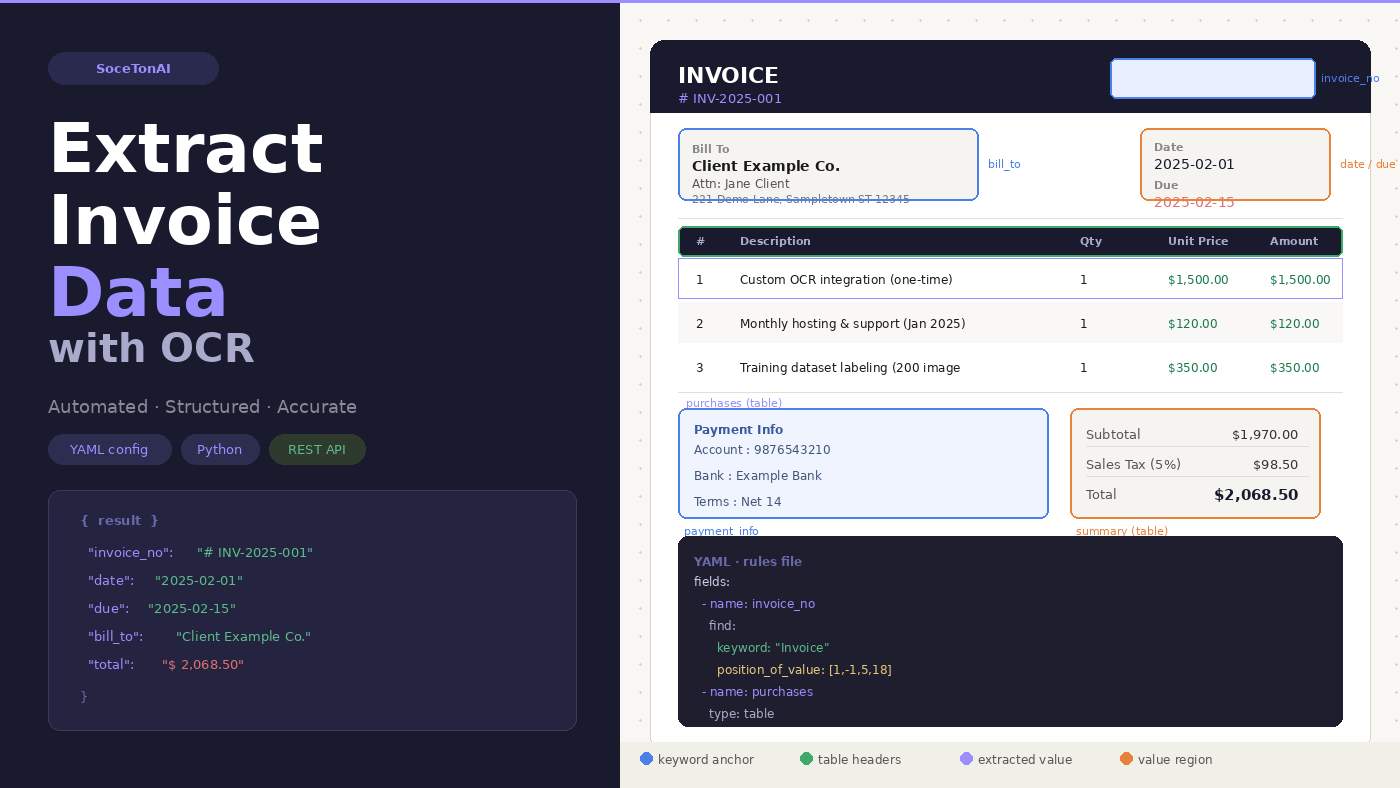
- name: invoice_no label: "Invoice No" find: type: text keywords: - keyword: "Invoice" index: 0 position_of_value: [1, -1, 5, 18] words: 5 returns: - keywords - words - position
And for tables:
- name: purchases label: "Purchase Table" find: type: table row_orientation: horizontal headers: - header: - keyword: "Description" - header: - keyword: "Qty" - header: - keyword: "Amount" - keyword: "(USD)" returns: - headers - column_words
The result comes back as clean, structured JSON:
{ "invoice_no": "# INV-2025-001", "date": "2025-02-01", "due": "2025-02-15", "bill_to": "Client Example Co. Attn: Jane Client 221 Demo Lane...", "purchases": [ ["1", "2", "3"], ["Custom OCR integration", "Monthly hosting", "Training dataset labeling"], ["$1,500.00", "$120.00", "$350.00"] ], "summary": [["$1,970.00"], ["$98.50"], ["$2,068.50"]] }
Every word also comes back with a confidence score and normalized bounding box coordinates (0–1 relative to image dimensions), so you can flag uncertain extractions for human review.
The debugging workflow that made this actually usable
The thing that pushed this from "interesting" to "production-ready for me" was being able to annotate the original image with what the engine found.
The API response includes pixel-level coordinates for every keyword anchor and extracted word. So I wrote ~40 lines of OpenCV code to draw colored rectangles on the invoice:
🟩 Green = keyword anchor (what it used to locate the field)
🟥 Red = extracted value words
🟦 Blue = value bounding box
When something extracts wrong, you open the annotated image and immediately see whether the keyword matched the wrong occurrence, or the positional offset was off by a bit. Tune the YAML, re-run. Usually takes 2–3 iterations to get a new document type working.
Compare that to debugging a fine-tuned transformer model. No contest.
Numbers that matter to me
Time to first working extraction: ~45 minutes for a new invoice layout (writing the YAML, testing, tuning offsets)
Confidence scores: consistently 0.95–0.99 on clean scanned invoices
Lines of Python to call the API: ~15
GPU hours required: 0
What I wrote up
I turned this into a full step-by-step tutorial on Medium covering:
How the YAML rules file works (keyword anchoring, positional offsets, multi-keyword chaining, table detection)
Sending the API request in Python
Parsing the structured JSON response
Annotating the image for visual debugging
Tips for writing YAML rules for new document types
If you're building anything that involves parsing documents — invoices, purchase orders, receipts, contracts — and you're not excited about the prospect of labeling training data, it's worth a look.
What's next
I'm exploring:
Batch processing a folder of invoices and writing results to a spreadsheet
Confidence threshold alerting — if any field scores below 0.90, flag it for human review
A lightweight wrapper that maps the column-oriented table output to proper row-oriented records automatically
Happy to answer questions about the YAML spec or the API — drop them below.

