
SoceTonAI Script OCR
Automate document data extraction with your own simple YAML.
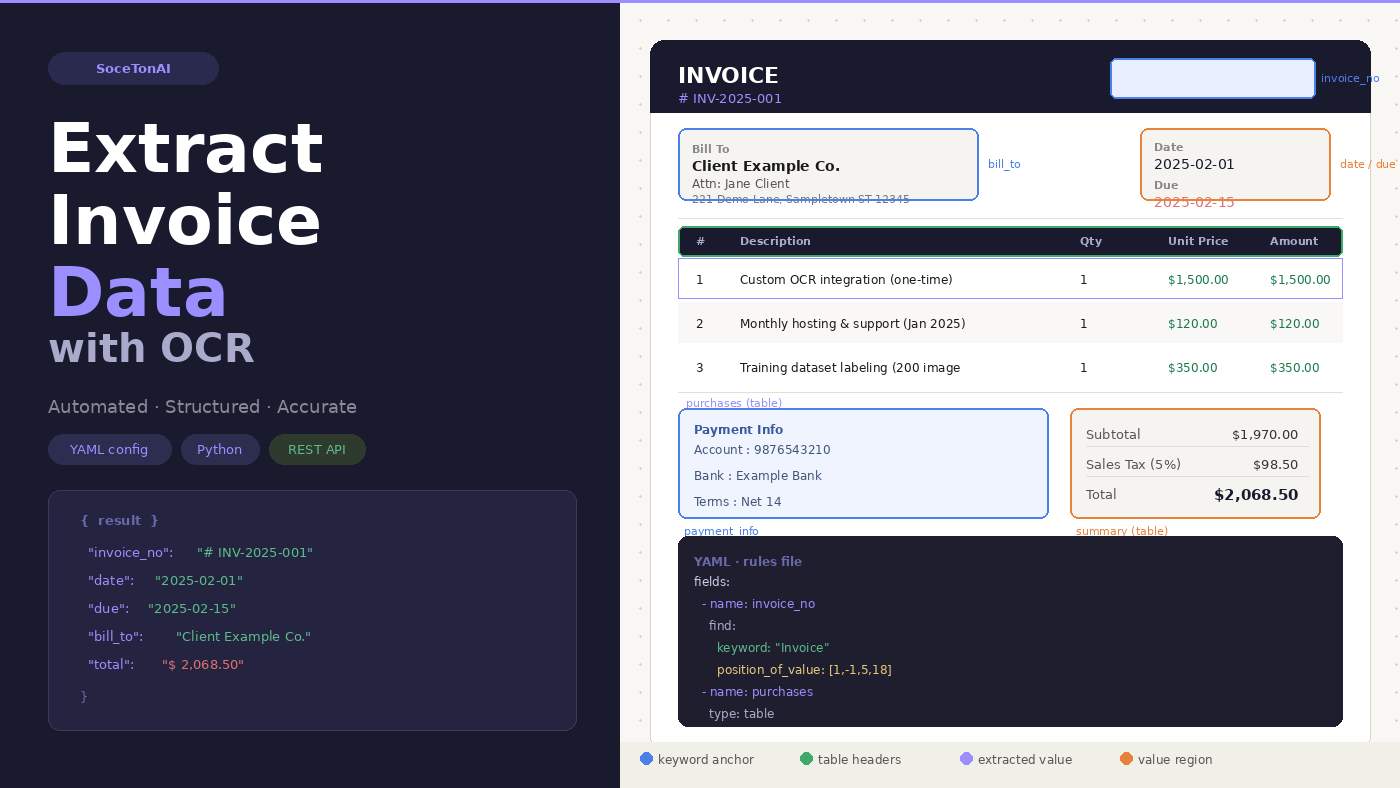
I got tired of training ML models to read invoices. So I built a YAML-based OCR pipeline instead.
Here's the honest backstory.
I was working on a project that needed to pull data out of supplier invoices — invoice number, line items, totals, billing info. Seemed straightforward. It was not.
The problem isn't OCR itself. Raw text extraction works fine. The problem is structure. Every supplier lays out their invoice differently. Invoice number top-right on one, bottom-left on another. "Due date" vs "Payment due" vs just "Due". Tables that span two columns on one doc, four on the next.
The classic answer is: train a document extraction model. Label 200+ invoices, run a fine-tuning job, pray the next supplier doesn't use a slightly different template, repeat.
That felt like a lot of overhead for what is ultimately a pattern-matching problem. I know where the invoice number is — it's always after the word "Invoice" and a colon. I know the line items are in a table with headers "#", "Description", "Qty", "Unit Price", "Amount". I just need a way to express that knowledge without wrapping it in a neural net.
What I ended up building
I started using SoceTonAI Script OCR, which takes a completely different approach. Instead of training anything, you write a YAML rules file that describes:
What keyword to look for as an anchor (e.g.
"Invoice")Where the value lives relative to that anchor (a positional offset bounding box)
What type of field it is — free text or a table
Then you POST the image + YAML to their API and get structured JSON back. That's it.
Here's what a field definition looks like:
- name: invoice_no label: "Invoice No" find: type: text keywords: - keyword: "Invoice" index: 0 position_of_value: [1, -1, 5, 18] words: 5 returns: - keywords - words - position
And for tables:
- name: purchases label: "Purchase Table" find: type: table row_orientation: horizontal headers: - header: - keyword: "Description" - header: - keyword: "Qty" - header: - keyword: "Amount" - keyword: "(USD)" returns: - headers - column_words
The result comes back as clean, structured JSON:
{ "invoice_no": "# INV-2025-001", "date": "2025-02-01", "due": "2025-02-15", "bill_to": "Client Example Co. Attn: Jane Client 221 Demo Lane...", "purchases": [ ["1", "2", "3"], ["Custom OCR integration", "Monthly hosting", "Training dataset labeling"], ["$1,500.00", "$120.00", "$350.00"] ], "summary": [["$1,970.00"], ["$98.50"], ["$2,068.50"]] }
Every word also comes back with a confidence score and normalized bounding box coordinates (0–1 relative to image dimensions), so you can flag uncertain extractions for human review.
The debugging workflow that made this actually usable
The thing that pushed this from "interesting" to "production-ready for me" was being able to annotate the original image with what the engine found.
The API response includes pixel-level coordinates for every keyword anchor and extracted word. So I wrote ~40 lines of OpenCV code to draw colored rectangles on the invoice:
🟩 Green = keyword anchor (what it used to locate the field)
🟥 Red = extracted value words
🟦 Blue = value bounding box
When something extracts wrong, you open the annotated image and immediately see whether the keyword matched the wrong occurrence, or the positional offset was off by a bit. Tune the YAML, re-run. Usually takes 2–3 iterations to get a new document type working.
Compare that to debugging a fine-tuned transformer model. No contest.
Numbers that matter to me
Time to first working extraction: ~45 minutes for a new invoice layout (writing the YAML, testing, tuning offsets)
Confidence scores: consistently 0.95–0.99 on clean scanned invoices
Lines of Python to call the API: ~15
GPU hours required: 0
What I wrote up
I turned this into a full step-by-step tutorial on Medium covering:
How the YAML rules file works (keyword anchoring, positional offsets, multi-keyword chaining, table detection)
Sending the API request in Python
Parsing the structured JSON response
Annotating the image for visual debugging
Tips for writing YAML rules for new document types
If you're building anything that involves parsing documents — invoices, purchase orders, receipts, contracts — and you're not excited about the prospect of labeling training data, it's worth a look.
What's next
I'm exploring:
Batch processing a folder of invoices and writing results to a spreadsheet
Confidence threshold alerting — if any field scores below 0.90, flag it for human review
A lightweight wrapper that maps the column-oriented table output to proper row-oriented records automatically
Happy to answer questions about the YAML spec or the API — drop them below.

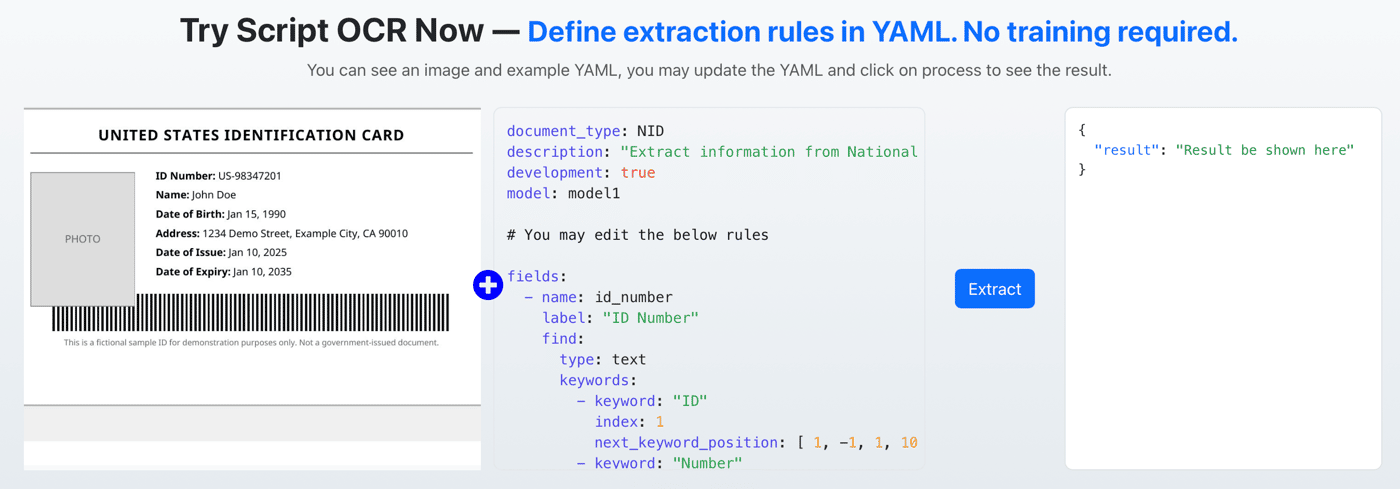
I just shipped something small but important for my OCR product:
👉 You can now try Script OCR instantly — no signup required
What it does
Visitors can:
see a sample document (ID card)
view the YAML extraction rules
edit the YAML directly
click Process
instantly see the structured output
All in the browser.
Why I built this
Previously, the flow was:
Landing → Signup → API key → Test
That’s a lot of friction just to understand the product.
Now it’s:
Landing → Play → Understand
Much better.
What users are actually doing
Interesting behavior so far:
tweaking keywords to see how extraction changes
breaking the YAML (then fixing it)
testing how flexible the system is
understanding “how it works” without docs
It’s less like a demo, more like a sandbox.
Key idea
Script OCR is not obvious at first glance.
Once someone tries it, it clicks immediately.
So instead of explaining it better, I just let people use it instantly.
Curious about this
For other founders:
Did removing signup for demos increase conversions?
How do you balance free usage vs abuse?
Do interactive demos outperform videos/docs for you?
If you want to try it yourself:
No signup needed — just edit the YAML and hit run.
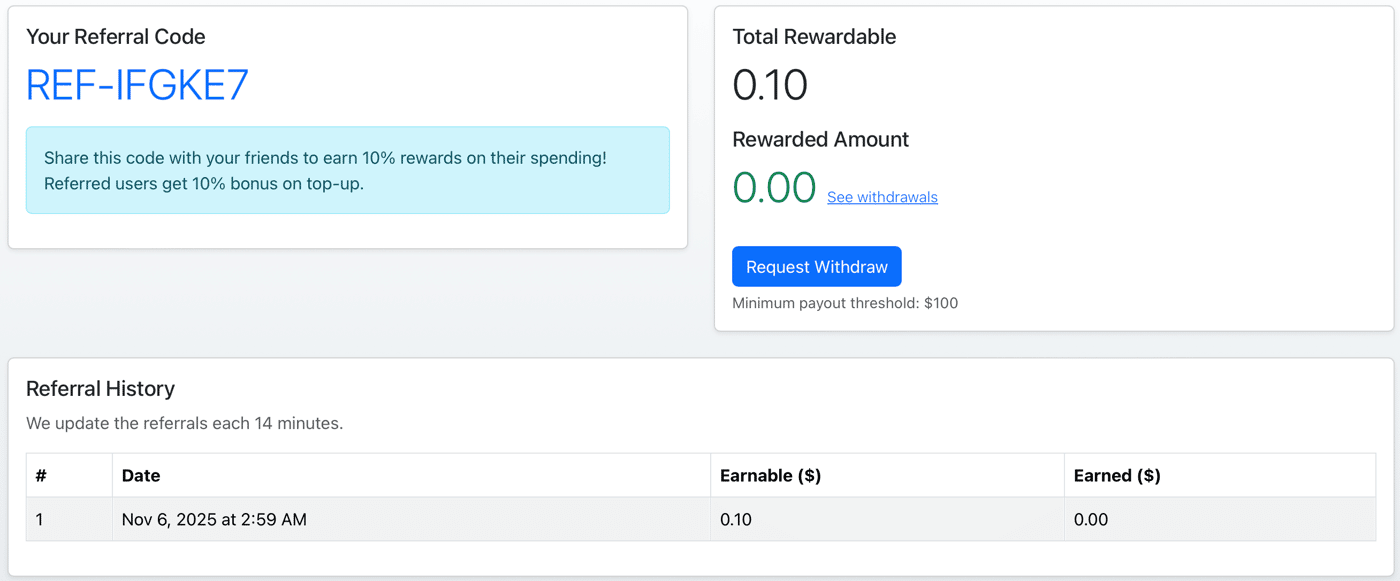
I just implemented a referral system for SoceTonAI Script OCR, and tried to keep it dead simple.
How it works
Every user now gets a unique code like:
REF-######
They can share it with anyone.
Incentives
Referrer earns 10% of the referred user’s spending
Referred user gets +10% bonus on top-ups
So both sides win.
Why I added this
Most of my users are:
developers building KYC / OCR pipelines
indie hackers
small startups
These people already share tools with each other — I just added a small incentive layer on top.
Design decisions
I avoided:
complicated tiers
point systems
expiring rewards
Kept it:
predictable
easy to explain
easy to calculate
Learn more about the product: https://soceton.com/docs
What I’m curious about
For those who’ve implemented referrals:
Did simple % rewards work better than credits/points?
Is 10% enough to motivate sharing?
Any abuse patterns I should watch for early?
I just rolled out a freemium model for SoceTonAI Script OCR.
You can now use:
👉 1000 dev requests/month for free using model: freemium
No credit card, no setup complexity.
What makes this different?
Instead of training OCR models or writing messy regex pipelines, you define extraction logic using a simple YAML script.
That’s it.
Script OCR handles:
locating keywords
extracting values relative to them
multi-line fields (like addresses)
structured JSON output
Example use case
Extracting a full National ID card:
ID number
Name
Date of birth
Address
Issue & expiry dates
→ with ~100% accuracy
→ no model training
How to use the free tier
Just set:
model: freemium
And start sending requests.
Who this is for
If you’re building:
KYC / onboarding flows
document automation tools
internal back-office systems
fintech / govtech products
This removes a huge chunk of complexity.
Full example (with YAML + output)
👉 https://soceton.com/docs/examples/receipt-1_0-freemium
I’d love feedback from other builders:
Is YAML-based OCR easier than ML pipelines?
What documents are you trying to automate?
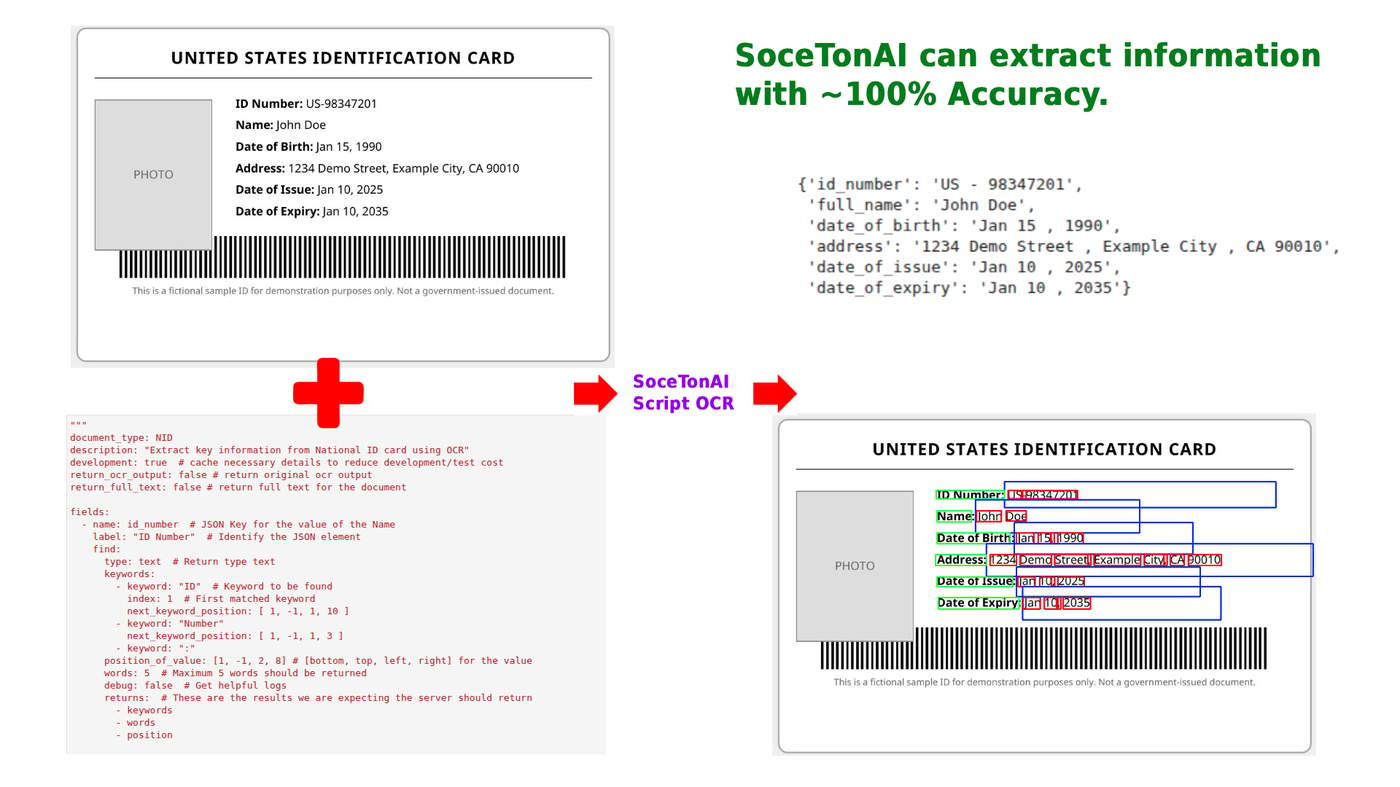
I just published a full example showing how SoceTonAI Script OCR can extract structured data from a National ID card with ~100% accuracy — without training any models.
Using a simple YAML script, you can define exactly what fields you want (ID number, name, DOB, address, issue date, expiry date), and SoceTonAI handles the OCR + logic for you.
The example includes:
✅ A sample ID card
✅ The full Script OCR YAML
✅ The exact output JSON
✅ Visual bounding box extraction
✅ Copy-paste code to integrate into your project
If you're building anything related to IDP, KYC, onboarding, or document automation, this example will save you hours of work.
You can check out the full example here:
👉 https://soceton.com/docs/examples/nid-1
Hey Indie Hackers! 👋
Quick update on our progress with Script OCR.
A bunch of early users asked for a crypto-friendly payment option — especially those building global apps or working in markets where traditional payment processors are a hassle.
So… we’ve added Cryptomus! 🎉
You can now pay using crypto with zero friction.
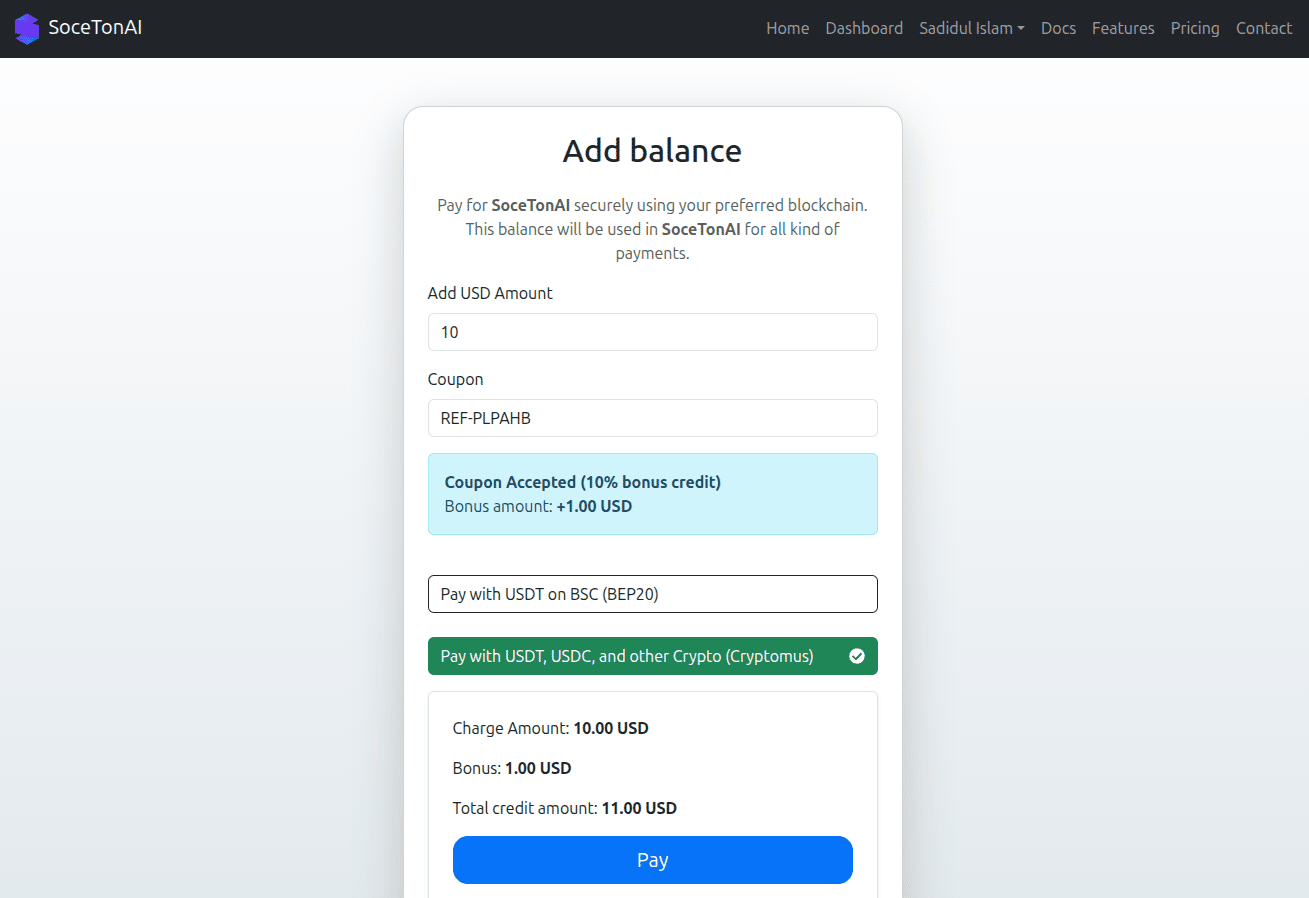
Why Cryptomus?
Fast global payments
Low fees
Supports a wide range of coins
No banking restrictions
Perfect for indie projects and developers worldwide
This should make it much easier for builders in emerging markets to try Script OCR without card issues or payment failures.
We’re Still Early (Special Perks)
To celebrate the new payment integration, we’re offering:
🔥 Bonus credits for crypto payments
🔥 Early-bird lifetime discounts
🔥 Custom deals for developers building in public
Just DM me if you want something special — happy to support early testers.
Your turn
If you’re already using crypto payments in your product, I’d love to hear:
What’s working well for you?
What issues have you run into?
Any improvements you’d like to see from us?
Thanks again for all the feedback — it’s helping shape the product every day. 🚀
Calling all early testers & developers!
We’re giving exclusive perks to anyone helping us test Script OCR in the early stage:
🔥 Bonus credits
🔥 Special early-bird discounts
🔥 Locked-in lifetime pricing (never increases!)
If you want a custom deal or need extra credits to experiment — just DM me. Happy to support builders who support us early. 💙
Let’s build this together. 🚀
Hey Indie Hackers! 👋
I’m working on a tool to solve a problem I’ve personally struggled with for years: extracting structured fields (like Name, ID Number, Date of Birth) from messy document images.
Traditional OCR gives you text.
But businesses need data.
Website: https://soceton.com
🧩 The Problem
OCR tools are great at reading text…
but terrible at finding the exact fields you need.
If you’ve ever tried to extract:
Name
ID number
Date of birth
Address
Invoice totals
Certificate numbers
…you know the pain.
You receive one giant blob of text, then spend hours trying to parse it with Regular Expressions, manual cleanup, or error-prone logic.
OCR ≠ structured extraction.
🔧 How We’re Solving It (in simple terms)
We combine OCR with a rule-based extraction system that lets you define exactly what fields you want and how to find them.
Instead of raw text, you get clean JSON output with the specific values you care about.
That’s it.
No complicated setup.
Just document → rules → structured data.
🛠️ What Script OCR Is Perfect For
National ID cards
Driving licenses
Certificates
Registration forms
Bank/utility documents
Any document where specific fields need to be extracted reliably
🙏 How You Can Help
Since we’re still early, community input is super valuable.
✔️ Looking for feedback
What documents do you commonly struggle to extract data from?
What formats or workflows should we support next?
Would you prefer a low-code UI to create extraction rules?
✔️ Looking for testers
If you have sample documents you’re willing to test with, it helps improve accuracy tremendously.
✔️ Looking for collaborators
If you want to contribute rule files for your country’s ID cards, licenses, or common documents, we’d love to showcase them.
Comment