Instant OCR Playground: Edit YAML → Click Run → See Results
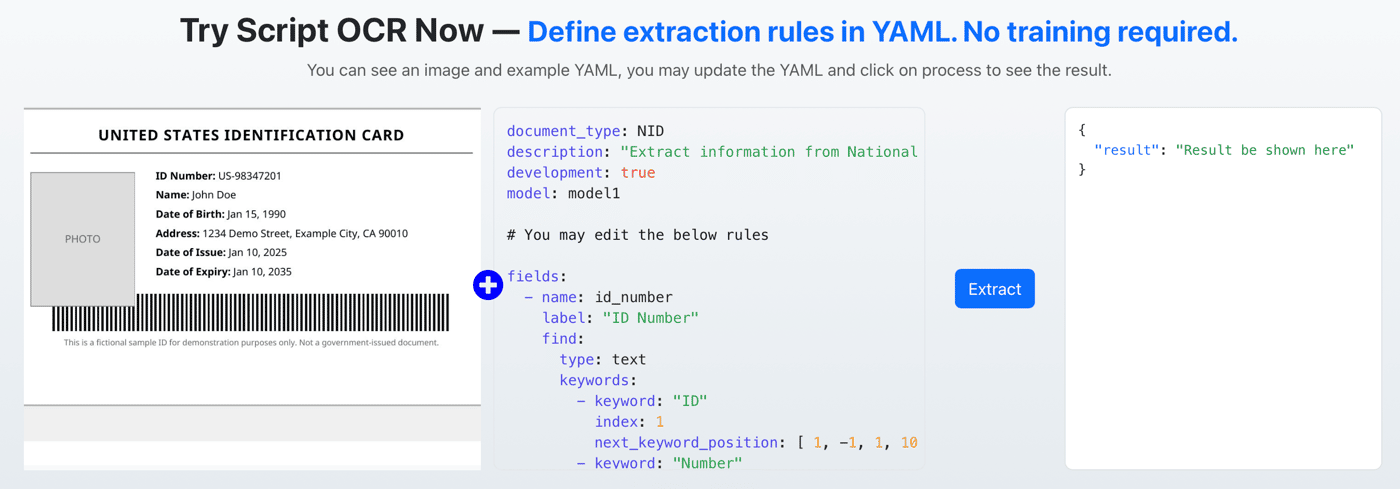
I just shipped something small but important for my OCR product:
👉 You can now try Script OCR instantly — no signup required
What it does
Visitors can:
see a sample document (ID card)
view the YAML extraction rules
edit the YAML directly
click Process
instantly see the structured output
All in the browser.
Why I built this
Previously, the flow was:
Landing → Signup → API key → Test
That’s a lot of friction just to understand the product.
Now it’s:
Landing → Play → Understand
Much better.
What users are actually doing
Interesting behavior so far:
tweaking keywords to see how extraction changes
breaking the YAML (then fixing it)
testing how flexible the system is
understanding “how it works” without docs
It’s less like a demo, more like a sandbox.
Key idea
Script OCR is not obvious at first glance.
Once someone tries it, it clicks immediately.
So instead of explaining it better, I just let people use it instantly.
Curious about this
For other founders:
Did removing signup for demos increase conversions?
How do you balance free usage vs abuse?
Do interactive demos outperform videos/docs for you?
If you want to try it yourself:
No signup needed — just edit the YAML and hit run.

