M3U IPTV Explained: How Playlists Work & How to Use
What is M3U IPTV? Learn how M3U playlists work, how to load one safely, and how to avoid scams, malware, and dead links in 2026.
📺 Compare Legal IPTV Services:
📺 Compare Legal IPTV Services:
If you've started looking into IPTV, you've probably run into the term "M3U" within the first five minutes and had no idea what it actually meant. It sounds technical, but the concept is simple once you see it laid out — and understanding it will save you a lot of confusion (and a few bad downloads) once you start setting up an IPTV service.
This guide breaks down what an M3U file actually is, how M3U IPTV playlists work, how to load one into a real player, and — just as importantly — how to tell a safe source from one that's going to hand you malware or a dead playlist in 48 hours.
What Is M3U IPTV? (The Plain-English Version)
An M3U file is just a plain text document. That's it — no video, no audio, nothing fancy. It's a list of links, formatted in a way that a media player can read and turn into a channel guide.
When people say "M3U IPTV," they mean using that text file as the source for your live TV channels. Your IPTV player — VLC, TiviMate, IPTV Smarters Pro, whatever you're using — opens the file (or fetches it from a URL), reads through the entries one by one, and builds your channel list from it. Tap a channel, and the player connects directly to the stream URL listed next to that entry.
The format itself dates back to the mid-1990s, originally built for MP3 playlists (the name literally stands for "MPEG-1 Audio Layer 3 Uniform Resource Locator"). It got repurposed for IPTV because it's lightweight, universally supported, and doesn't require any proprietary software to read.
🔍 Find a Verified Provider
How M3U Playlists Actually Work
Here's the technical version, without the jargon overload.
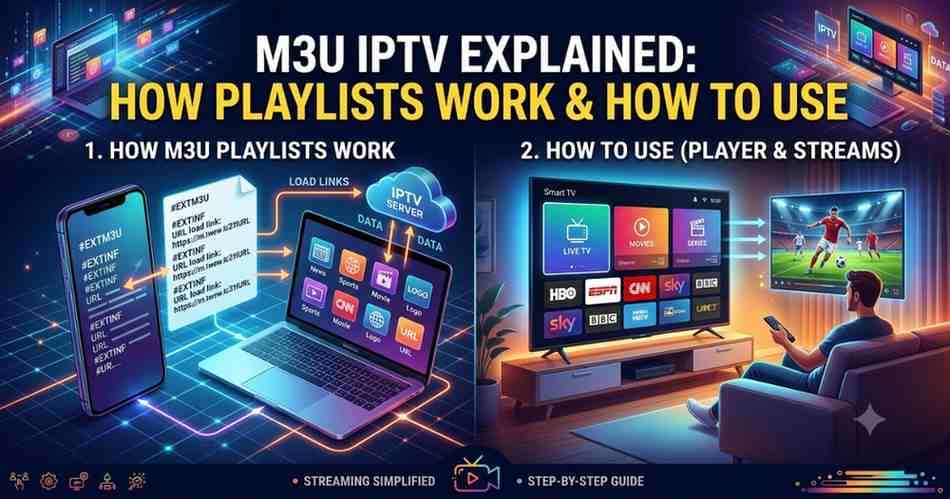
An M3U file for IPTV uses an extended format, marked by #EXTM3U at the very top. Below that, each channel gets two lines: an #EXTINF line containing metadata (channel name, logo, category), and the actual stream URL on the line right after it. A simplified example looks like this:
#EXTM3U #EXTINF:-1 tvg-id="bbc1.uk" tvg-logo="https://example.com/bbc1.png" group-title="UK",BBC One https://example.com/stream/bbc1.m3u8
When you load this into a player, here's what happens step by step: the app sends a request to fetch the file, reads the #EXTM3U header to confirm it's a valid playlist, parses each #EXTINF line for the channel name and category, and stores the stream URL beneath it. Nothing is downloaded in advance — the player only connects to a specific stream URL when you actually select that channel.
This is also why M3U files are usually delivered as a URL rather than a file you download once. Your provider can update or swap stream links on their server, and your player picks up the change automatically the next time it refreshes the playlist — you never have to touch anything.
M3U vs. M3U8: What's the Difference
You'll see both extensions used interchangeably, and for most users, it genuinely doesn't matter which one you have. The difference is encoding: .m3u is the original format, while .m3u8 is the UTF-8 encoded version, built to handle non-English characters (accented letters, non-Latin scripts) reliably. Since most modern live streams use HLS (HTTP Live Streaming), which packages video in .m3u8-formatted chunks, the vast majority of current IPTV providers hand out .m3u8 links by default. Your player doesn't care which one you paste in — both load the same way.
M3U vs. Xtream Codes: Which Should You Use
If you've subscribed to an IPTV provider, you've likely been given a choice between two delivery methods, and it's worth understanding the tradeoff.
An M3U URL is the simplest option — one link, and your player builds the entire channel list from it. The downside: if your provider changes their stream URLs, you may need to manually refresh or re-add the playlist, depending on your player's settings.
Xtream Codes is a different delivery method that gives your player structured data instead of a flat list — separate categories for live TV, movies, and series, plus the ability for your provider to update streams on their end without you changing anything in your app. It typically requires a server address, username, and password instead of a single URL.
For day-to-day reliability, Xtream Codes generally edges out a plain M3U link, especially for larger channel libraries. But both work fine for most setups, and which one you use usually just comes down to what your provider issues you.
How to Add an M3U Playlist to a Player (VLC and Mobile Apps)
Getting an M3U playlist running takes about two minutes regardless of platform.
In VLC (desktop): open VLC, go to Media → Open Network Stream, paste your M3U URL into the field, and hit Play. VLC will parse the playlist and let you browse channels through its playlist panel. This is the fastest way to test whether a playlist URL is actually working before committing to a dedicated IPTV app.
In a dedicated IPTV app (TiviMate, IPTV Smarters Pro, GSE Smart IPTV): open the app, choose "Add Playlist" or "Add User," select M3U URL as the source type, paste the link, and give it a name. The app fetches the playlist and builds your channel list automatically, usually refreshing it each time you open the app.
On a Smart TV: most modern Smart TV platforms don't read M3U files natively through their built-in apps — you'll need to install a third-party player (TiviMate, IPTV Smarters) from the app store first, then load your M3U URL inside that app.
✅ Test Your M3U Link
Where M3U Playlists Actually Come From — and the Legal Line
This is the part most guides skip, and it's the one that matters most.
An M3U playlist is just a format — it says nothing about whether the channels inside it are legal to stream. The format is identical whether the streams belong to a fully licensed IPTV provider or someone illegally rebroadcasting cable channels they have no rights to. That distinction lives entirely in where the stream URLs actually originate, not in the file itself.
Legally, M3U playlists come from a few legitimate places. Licensed IPTV subscription providers generate an M3U URL (or Xtream Codes login) tied to your paid account, with your authentication embedded in the link. Some broadcasters and public media organizations publish official M3U links for their own free-to-air content. And open-source projects like iptv-org, hosted publicly on GitHub, aggregate links to channels that are already freely and legally available over the air or via official broadcaster streams — it's worth noting these directories explicitly exclude paywalled or pirated content and document the licensing status of what they list.
What you should be cautious of: random "free IPTV M3U" links circulating on forums, Telegram groups, or unofficial GitHub gists promising thousands of channels including premium cable and sports networks. These almost always rely on unauthorized rebroadcasts. Beyond the legal exposure, they're also just unreliable — links expire constantly, and several security researchers have found IPTV player apps tied to these lists requesting excessive permissions (location, device ID, SMS access) and transmitting data to third-party servers.
The rule of thumb: an M3U playlist offering free access to premium channels you'd normally pay your cable provider for is a red flag regardless of how it's packaged. A legitimate IPTV streaming provider charges a transparent subscription fee because they're actually paying for content licensing — that cost doesn't disappear just because it's delivered as a text file instead of a cable box.
Troubleshooting Common M3U Playlist Problems
Channels won't load or show as offline: Stream tokens embedded in many M3U URLs expire — some refresh every 24 hours. If a channel that worked yesterday is dead today, try reloading the playlist from your provider's URL rather than a saved local copy.
Logos aren't displaying: Usually caused by a broken or relative tvg-logo path in the #EXTINF line rather than a full working URL. Open the file in a text editor to check if the logo paths are complete.
Playlist loads but channels are mislabeled: This happens often with playlists compiled from multiple sources — a channel tagged "UK" might actually stream content from a different country entirely if whoever compiled the list mislabeled the metadata. Don't rely on filenames or folder labels; check the actual tvg-id and stream content.
Playback works in VLC but not in your IPTV app: Some apps are stricter about playlist formatting than VLC, which is fairly forgiving. If VLC plays a stream fine but your app rejects it, check that the file starts with #EXTM3U exactly and that each entry has its #EXTINF and URL line correctly paired with no extra blank lines between them.
Frequently Asked Questions
Is M3U IPTV legal? The M3U format itself is completely legal — it's just a text file. Legality depends entirely on whether the channels it points to are properly licensed. Using an M3U playlist from a licensed subscription provider is legal; using one built from pirated rebroadcasts is not, regardless of how the link was shared with you.
Can I create my own M3U playlist? Yes. M3U files are plain text, so you can open one in any text editor and add, remove, or reorder entries manually. Each channel just needs its #EXTINF metadata line followed by the stream URL on the next line.
Why do M3U links stop working? Most commonly because the embedded authentication token expired, the provider rotated their server URLs, or — for free public playlists — the original stream was taken down. Paid subscriptions are far more stable specifically because the provider maintains the links on your behalf.
How many devices can I use one M3U playlist on? That depends entirely on your subscription's connection limit, not the M3U format itself. Most paid IPTV plans allow 2-5 simultaneous connections; using the same playlist on more devices than your plan allows typically gets the account suspended.

