SSL Certificate Expiry Monitoring Guide
Introduction
SSL certificates are essential for securing communication between servers and clients, protecting sensitive data, and maintaining user trust. However, expired or misconfigured SSL certificates can have severe consequences that directly impact business operations:
- Business Disruptions: Expired certificates make websites, APIs, and other services inaccessible, halting operations and causing significant disruptions.
- Reputation Damage: Browser warnings such as “Your connection is not private” discourage users from trusting your website. This erodes customer confidence and loyalty.
- Compliance Violations: Industries like finance and healthcare mandate secure data transmission via SSL certificates. Expired certificates can result in non-compliance fines.
Proactive SSL monitoring ensures that certificates remain valid and properly configured, preventing issues. For DevOps professionals managing multiple certificates, aggressive reminders and automated tools are essential to avoid costly disruptions.
This guide covers why SSL monitoring is essential, the tools and strategies for proactive monitoring, and how Bubobot simplifies the process for DevOps professionals with advanced SSL certificate expiry monitoring.
Why SSL Monitoring is Critical?
SSL monitoring is not just about avoiding expiry—it’s about maintaining secure, compliant, and trusted systems. Here’s why it’s crucial:
-
Impact on Production Systems and Business Disruptions
Expired SSL certificates can make websites, APIs, and other services inaccessible, directly disrupting production workflows. This downtime halts critical operations, delays processes, and escalates into broader business disruptions. -
Impact on Security and User Trust
An expired certificate triggers browser warnings that discourage users from accessing your website. These warnings damage user trust, tarnish your brand reputation, and expose systems to potential security breaches. Regular monitoring of SSL certificate expiry helps prevent such incidents.

A browser warning triggered by an expired or invalid SSL certificate, damaging user trust and site credibility.
- Impact on Compliance
SSL certificates are a fundamental requirement across industries, ensuring secure data transmission and compliance with regulatory standards. An expired or misconfigured SSL certificate can disrupt operations and even critical services non-functional.
Nowadays APIs, which rely heavily on secure HTTPS communication, demand complete and properly configured SSL certificates. If an endpoint has an incomplete SSL chain, secure APIs will refuse to connect, leading to failed integrations and disrupted workflows.

The SSL configuration receives a “B” grade due to an incomplete certificate chain and support for outdated protocols like TLS 1.0 and TLS 1.1
- Challenges in Managing Multiple Certificates
Organizations managing dozens or even hundreds of certificates face added complexity:- Certificates spread across multiple environments (e.g., production, staging).
- Different expiration dates and renewal processes.
- Difficulty tracking configurations without centralized tools.
Proactive SSL certificate expiry monitoring helps overcome these challenges.
What Are the Best Tools to Validate SSL Certificates?
Before diving into SSL monitoring, it’s essential to validate certificates for proper configuration and expiry. Here are some of the best tools for monitoring SSL certificate expiry and ensuring secure configurations:
-
SSL Labs
- Website: https://www.ssllabs.com/ssltest/
- Overview: A popular online tool for testing the security and validity of SSL certificates.
- Key Features: Provides a detailed analysis of supported protocols, ciphers, and vulnerabilities.
- Use Case: Use SSL Labs as a complete solution to identify misconfigurations and ensure your certificates are compliant with security standards.

A fully-detailed scanning result for SSL
-
OpenSSL
- Overview: OpenSSL is a powerful CLI tool available by default on most Linux servers, offering features for managing, validating, and inspecting SSL certificates.
- Example command:
openssl x509 -in certificate.pem -noout -text
- Use Case: View detailed information about a certificate, including issuer, validity period, and key usage.
-
SSL Checker
- Website: https://www.sslchecker.com/sslchecker
- Overview: An online tool for quickly verifying certificate details, including chain validity and expiration.
- Key Features:
- Identifies incomplete certificate chains that may lead to browser warnings.
- Highlights expiration dates to help you monitor SSL certificate expiry.
- Use Case: Use SSL Checker to troubleshoot certificate errors affecting end users, such as browser warnings or failed connections.
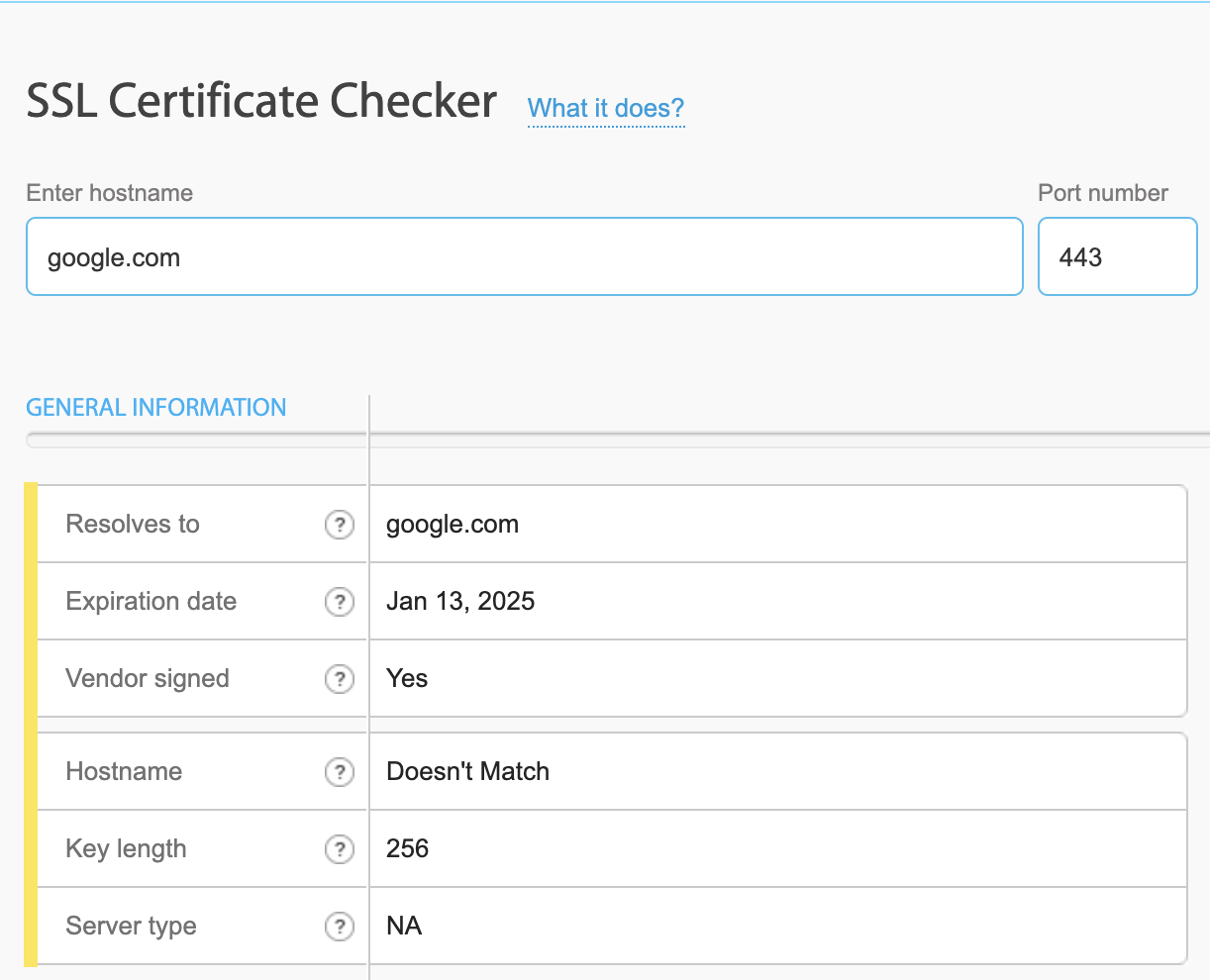
Simple and actionable information from SSL Certificate Checker
How to Proactively Monitor SSL Certificates?
Proactive SSL monitoring is essential for ensuring certificates remain valid and avoiding disruptions caused by expiry or misconfiguration. Here’s how to stay ahead:
- Best Practices
- Regular Validation: Periodically check certificates for validity across all environments.
- Multi-Channel Reminders: Set reminders via email, chat platforms, SMS or Phone Call to ensure certificates are renewed on time.
- Centralized Management: Use tools to manage certificates from a single dashboard for greater visibility.
- Automate Renewal Processes: Leverage Domain Registry’s automated certificate lifecycle management to minimize manual intervention and reduce the risk of certificate expiration
- Aggressive Reminders
Set alerts for multiple intervals, such as:- 1 Month Before Expiry: Begin planning renewals.
- 7 Days Before Expiry: Ensure certificates are ready to renew.
- 1 Day Before Expiry: Final alert to avoid last-minute disruptions.
- Automation is a foundation of proactive SSL monitoring. Use monitoring tools to:
- Perform periodic checks for validity and expiry.
- Automatically notify teams of expiring or misconfigured certificates.
- Enable centralized tracking of certificates across domains and environments.
What Are the Best Tools for SSL Monitoring?
-
UptimeRobot
- SSL monitoring features in its Solo, Team, and Enterprise subscriptions, providing basic expiry checks and alerting capabilities.
- Limitation: The Free subscription does not include SSL monitoring, which means individual users or smaller teams cannot try out this feature without committing to a paid plan.
-
ssl-cert-check
-
A lightweight CLI tool for periodic checks of certificate expiry. Notifications are sent using the following methods:
- Email Alerts: This configuration typically requires access to an SMTP server or a local mail agent for email delivery.
- Cron Jobs for Automation: Administrators can automate ssl-cert-check using cron jobs to run regular checks and trigger notifications.
- Log Outputs: ssl-cert-check can write results to log files for manual review or integration with monitoring systems.
-
Basic commands:
ssl-cert-check -s google.com -p 443 Host Status Expires Days ----------------------------------------------- ------------ ------------ ---- google.com:443 Valid Jan 13, 2025 42 -
Limitation: Lacks advanced features like multi-channel notifications or escalation policies.
-
-
Bubobot
Bubobot stands out as a comprehensive solution for SSL monitoring, offering advanced features tailored for modern DevOps teams:
- Flexible Reminders: Customize reminders for 1 month, 7 days, and 1 day before expiry.
- Multi-Channel Alerts: Get notifications via Slack, email, SMS, and even phone calls for critical issues.
- Immediate Alerts for Critical Issues: Detect invalid or misconfigured certificates and notify teams instantly.
- Escalation Policies: Ensure unresolved issues are escalated to higher-level stakeholders via multiple channels.
Seamlessly way to enable SSL monitoring Bubobot:

Conclusion
SSL monitoring is essential for maintaining secure communication, avoiding downtime, and protecting user trust. By implementing best practices like automated reminders and centralized management, DevOps teams can ensure certificates remain valid and compliant.
Bubobot simplifies SSL monitoring with features like aggressive reminders, multi-channel alerts, and escalation policies, making it the go-to solution for modern teams.
👉 Ready to take control of your SSL monitoring? Try Bubobot today for smarter, more reliable SSL management!

I appreciate this perspective on SSL certificate expiry monitoring. It's crucial to stay on top of these certificates to prevent business disruptions. Bubobot sounds like a handy tool for proactive management.