
AI Nexus
All your AI models. One powerful interface.

Hey IH community! 👋
I'm Michael, building AI Nexus – a professional workspace for working with AI models (think ChatGPT but with access to 100+ models, better organization, and actual workflow tools).
We've been in beta for a few months now, and something interesting happened: we started getting traction with larger teams and companies. Not the typical "2 founders in a garage" startup customers, but actual enterprise-y organizations – consulting firms, research teams, development agencies.
And they all wanted the same thing: team collaboration.
The problem:
These companies had 10-50 people all using AI Nexus. We installed a "private-cloud" version just for these companies. But those teams had zero visibility or control. They wanted to:
Share projects and prompts across teams
Manage who has access to what
Consolidate billing and usage
Actually work together instead of in silos
Fair enough. But here's the thing – I'd been avoiding building team features because:
It felt like scope creep (we're still in beta!)
I wanted to nail the individual experience first
Team features = complexity = slower shipping
What changed my mind:
Three specific customers came to us within the same week saying "we love this, but we need teams or we'll have to build something in-house." One was a 30-person consulting firm, another was a research lab, the third was an agency.
When you have paying customers basically begging for a feature and threatening to churn without it... you listen.
What we shipped:
The full spec is pretty detailed (happy to share if anyone's curious), but the core features:
Team workspaces – Switch between personal and team contexts
Project sharing – Share AI projects with granular permissions (view/comment/edit/admin)
Team prompt libraries – Build and share effective prompts across the org
Member management – Invite, roles (owner/admin/member/viewer), remove
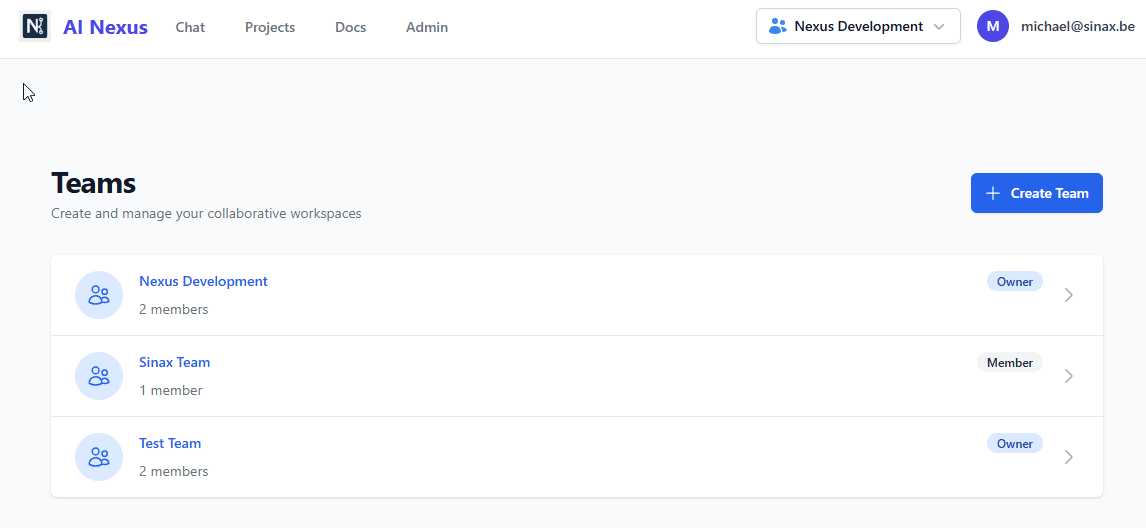
The interesting part: we kept our BYOK (bring-your-own-key) model working for teams too. So enterprises can use their own Azure OpenAI, AWS Bedrock, or Google Vertex credentials. This is huge for regulated industries.
Early results:
Shipped 2 weeks ago. The three customers who requested it have already upgraded and brought their teams on. One went from 8 individual accounts to a 32-seat team plan. Another is rolling it out to 50+ people.
The interesting insight: these features aren't just for "enterprise" – we're seeing 3-5 person dev teams and small consulting shops signing up for team plans too.
What I learned:
Listen to paying customers – If multiple customers ask for the same thing, that's signal
Enterprise doesn't mean corporate – Small teams want collaboration too
BYOK is a moat – Letting teams use their own cloud credentials removes a huge barrier
Complexity is worth it – Yeah, teams added complexity, but the revenue impact justified it
What's next:
Now that teams can collaborate, the next requests are already coming in:
Shared conversation threads (multiple people in one chat)
Team analytics and usage tracking
Better permission controls for sensitive projects
Honestly, I'm glad we waited until we had product-market fit with individuals before tackling teams. But once we had it, shipping teams unlocked a whole new segment.
Anyone else dealing with the "should I build team features?" question? Happy to share more details on the implementation or trade war stories.


Hey Indie Hackers!
I’m thrilled to announce a brand-new feature in AI Nexus that’s going to change how you interact with AI: Conversation Branching!
The Problem: Linear Conversations Kill Creativity
Ever sent a message to an AI, only to realize you want to tweak your question or try a different approach—but don’t want to lose the entire conversation? Most AI tools force you into a rigid, linear flow, making it impossible to experiment without starting from scratch or duplicating conversations.
The Solution: Branch by Editing Messages
With Conversation Branching, you can now:
✅ Edit any of your previous messages to create a new branch
✅ Explore alternative approaches without losing your original work
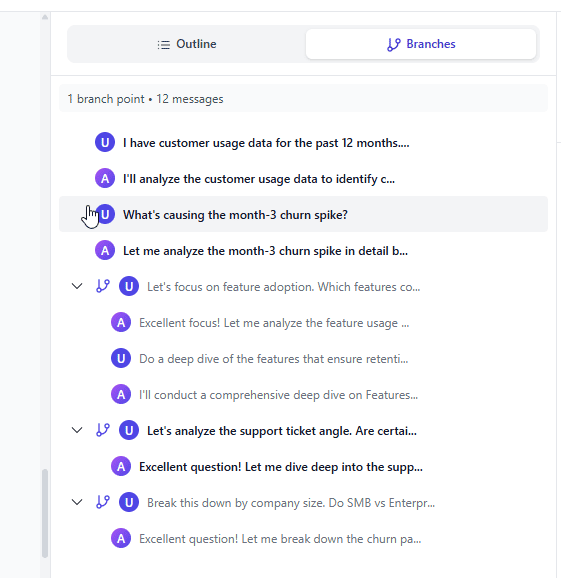
✅ Switch between branches to compare different paths
✅ Keep all context intact—including model settings and parameters
Here’s how it works:
Hover over any message you’ve sent
Click the "Edit" button
Modify your message to explore a new direction
Continue the conversation in the new branch with full context preserved
Key Detail: Each branch retains the same LLM model and parameters as the original conversation, ensuring consistency across all your explorations.
Screenshot: Branching in Action
Why This Is a Game-Changer
For Developers: Try different code implementations or debug alternative approaches without losing your progress.
For Writers: Experiment with different plot twists, character dialogues, or writing styles—all from the same starting point.
For Researchers: Test hypotheses or refine questions without re-entering context.
For Analysts: Compare how slight changes in prompts affect the AI’s output.
Built for Professionals
AI Nexus isn’t just another chat interface—it’s a powerful workspace for serious AI users. With 100+ models, project-based organization, shared context files, and now conversation branching, it’s designed for people who need more than basic chat tools.
Try It Today!
AI Nexus is currently in free beta—no credit card required. Sign up now and start branching your conversations to unlock new levels of productivity!
What do you think? How would you use conversation branching in your workflow? Let me know in the comments!
Most AI chat tools lock you into their ecosystem. AI Nexus takes a different approach.
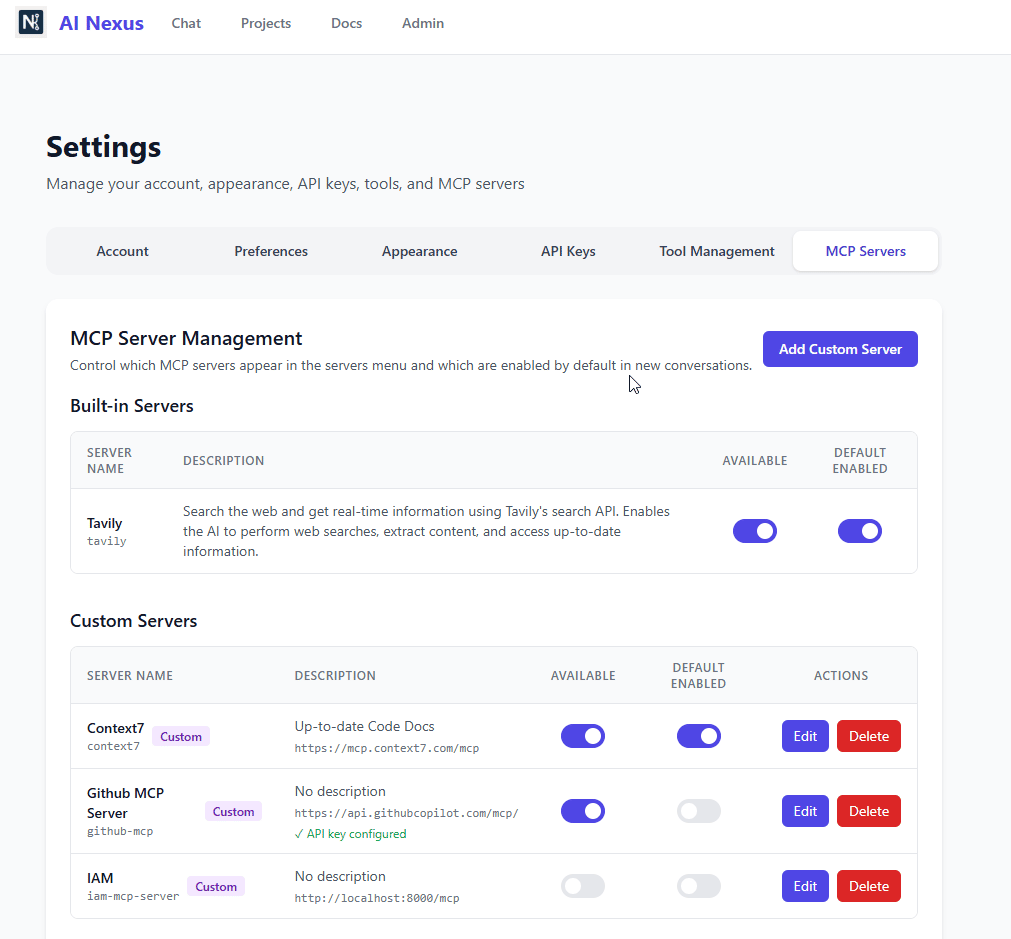
With Model Context Protocol (MCP) server support, you can extend your AI conversations with custom tools and real-time data sources:
✅ Connect to databases for live queries
✅ Access file systems for document management
✅ Integrate APIs for real-time information
✅ Build custom business tools
✅ Enable workflow automation
All configurable through a clean, intuitive interface. Enable the servers you need, disable what you don't. Full control over your AI's capabilities.
This is what professional AI tooling looks like—extensible, flexible, and built for real work.
Hey Indie Hackers! 👋
Wanted to share what we're building right now for AI Nexus: Conversation Branching.
The problem we're solving:
Ever been deep in an AI conversation and thought "what if I tried this differently?" Your options are pretty terrible:
- Copy/paste everything into a new chat (tedious)
- Lose your original work (risky)
- Keep messy notes in 5 different places (chaos)
We kept seeing users struggle with this, so we're building a solution.
What we're building:
Think of it like Git branches, but for AI conversations. Users will be able to:
✨ Create alternative conversation paths from ANY message
✨ Edit previous messages and see how the conversation would've evolved differently
✨ Switch between approaches instantly to compare results
✨ Keep full context - everything before the branch point is inherited
Real-world example:
You're asking an AI about state management with Redux. It gives you a detailed answer. Then you wonder: "How would this differ with Zustand?"
Currently: Start over in a new chat, manually recreate context 😤
Soon: Click "Branch-Edit" on your original question, change Redux → Zustand, and boom - you're exploring an alternative timeline with full context intact 🎯
How it'll work:
- Hover over any message → see "Branch" and "Branch-Edit" buttons
- Create a branch with one click
- All branches share the same project context and files
- Switch between branches via a clean sidebar interface
- Name, rename, or delete branches as you experiment
Why we're building this:
People don't think linearly. We explore, backtrack, try alternatives. AI tools should support that natural workflow instead of forcing you into a single conversation thread.
The interesting challenge:
We're treating this like a tree structure where each branch inherits all context up to its divergence point. The tricky part is keeping the UI simple while supporting complex scenarios like:
- Branching from a branch (nested branches)
- Managing 10+ branches in one conversation
- Making it instantly clear which branch you're viewing
- Preventing users from accidentally deleting branch points
Questions for the community:
1. Would you use something like this? What would you explore with branches?
2. How many branches do you think is reasonable before it gets overwhelming?
3. Should we allow duplicate branch names or enforce uniqueness?
We're aiming to ship this in the next few weeks. Building in public and would love your feedback!
Hey IndieHackers!
I've been sharing my journey building AI Nexus in my build log, and today I'm opening up beta access.
What is it:
A professional workspace for working with AI models. Think ChatGPT, but you can use 100+ models (GPT-4, Claude, Gemini, etc.) through one interface, with real workflow tools.
The problem I'm solving:
I was paying for ChatGPT Plus ($20), Claude Pro ($20), and still using API calls for other models. Switching between tools killed my flow, I'd lose context, and I had zero organization.
The solution:
- 100+ models through one interface (OpenRouter integration)
- Projects with shared context files (upload once, use everywhere)
- Conversation branching (explore ideas without losing your thread)
- Intelligent context management (never hit token limits)
- BYOK pricing: €5/month + your own OpenRouter key
Tech stack:
- Frontend: React (SPA)
- Backend: Node.js
- Database: PostgreSQL
- Integration: OpenRouter API
- Hosting: [Your hosting]
Current status:
- Beta launched today
- Free 30-day trial (no credit card)
- Looking for 100-300 beta users for feedback
- After beta: €5/month BYOK or managed subscriptions (€15-75/month)
What I'm looking for:
- Honest feedback (what works, what doesn't)
- Bug reports (it's beta, there will be bugs 😅)
- Feature priorities (what should I build next?)
- Validation on pricing (does BYOK + €5/month make sense?)
Beta access:
https://getainexus.com
Happy to answer any questions about the tech, business model, or building process!
-
1
Really like the direction with AI Nexus — a clean hub that brings all AI tools into one place without the chaos. That kind of “curated utility layer” helps people actually use AI instead of drowning in prompts and tabs.
Two ideas that could compound fast:
Add a “top workflows” gallery showing real user setups (e.g., marketing flow, research flow, coding flow).
Ship a “save + compare” feature so users can shortlist tools and see what fits their stack best.
Curious — what single activation best predicts a paying user: first saved workflow, first integration used, or a return session in week one? And which channel’s driving qualified users right now — communities, search, or creator shoutouts?
P.S. I’m with Buzz — we build conversion-focused Webflow sites and pragmatic SEO for product launches. Happy to share a short GTM checklist if useful.


Hey IndieHackers 👋
I'm building AI Nexus - a multi-model AI interface that lets you access GPT-4, Claude, Gemini, and 100+ other models through one workspace.
One of the most frustrating problems with AI chat tools is hitting token limits in the middle of important conversations. You're deep into a complex discussion, then suddenly: "Your context is too long. Please start a new conversation."
So we built Intelligent Context Management to solve this.
The Problem
Every AI model has a context window limit (how much text it can "remember" at once). For example:
GPT-4 Turbo: 128k tokens (~96k words)
Claude 3.5 Sonnet: 200k tokens (~150k words)
GPT-3.5: 16k tokens (~12k words)
When you're working on complex projects with:
Long conversation histories
Uploaded files (code, docs, data)
System prompts
Project context
...you can hit these limits fast. Most tools just error out or silently truncate your context, losing important information.
Our Solution: Smart Context Management
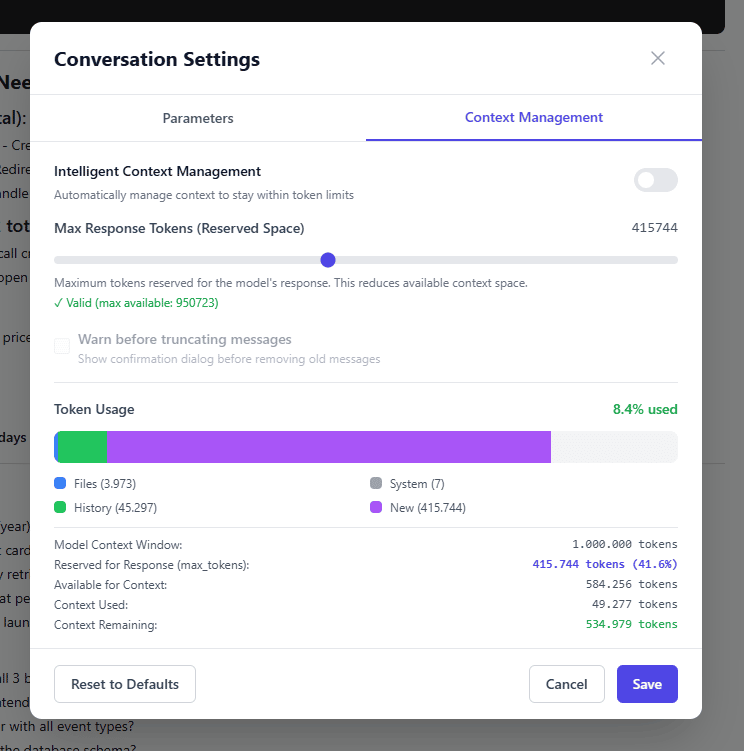
We built a visual context manager that shows you exactly what's using your tokens and gives you control:
What it does:
1. Real-time token tracking Visual breakdown of where your tokens are going:
📁 Files (project context)
💬 History (conversation)
⚙️ System prompts
✨ New message space
2. Intelligent auto-management Toggle on "Intelligent Context Management" and AI Nexus automatically:
Keeps your context within limits
Prioritizes recent messages
Preserves important context (files, system prompts)
Warns before truncating anything
3. Response space reservation Set how many tokens to reserve for the model's response. The UI shows you exactly how much context space remains.
4. Manual control You can see:
Model context window: 1,000,000 tokens (in this case, Sonnet 4.5)
Reserved for response: 415,744 tokens (41.6%)
Available for context: 584,256 tokens
Context used: 49,277 tokens
Context remaining: 534,979 tokens ✅
Why This Matters
Most AI chat tools treat context as a black box. You don't know:
How much context you're using
What's taking up space
When you're about to hit limits
What gets truncated when you do
This creates anxiety and breaks complex workflows.
With transparent context management:
✅ No surprise errors
✅ Work with large files confidently
✅ Have longer, more valuable conversations
✅ Understand your costs (more tokens = higher costs)
Technical Implementation
For the curious:
Backend:
Calculate token counts using model-specific tokenizers
Track context across: files, messages, system prompts, tools
Implement sliding window with semantic preservation
Warn before auto-truncation
Frontend:
Real-time token visualization
Color-coded breakdown (files=blue, history=green, system=gray, new=purple)
Responsive slider for response token reservation
Validation against model limits
Edge cases handled:
Different models, different context windows
Switching models mid-conversation
Adding/removing files
Multi-turn conversations with tool calls
What's Next
We're quickly preparing for our free beta (3 months free, then €5/month). You bring your own OpenRouter API key and get access to 100+ models.
Other features:
Projects - Group conversations, share context files
Conversation branching - Explore parallel ideas
Prompt library - Save and reuse what works
MCP server integration - Extend with custom tools
Questions for the community:
How do you currently handle long conversations in ChatGPT/Claude? Start fresh? Manually summarize?
Would you pay for better context management? Or is this table-stakes?
What other context-related problems do you face? We're thinking about:
Auto-summarization of old messages
Smart context compression
Context presets (e.g., "keep last 10 messages + all files")

Hey IndieHackers!
Quick update on what I've been building for AI Nexus - shared memory across different AI models.
The Problem
Ever notice how you have to re-explain context every time you switch between Claude, GPT-4, and Gemini? It's like having amnesia between conversations.
Last week I was debugging an API issue:
Started with GPT-4 to plan the approach
Switched to Claude for code review (it's better at catching edge cases)
Went to Gemini for some specific Google Cloud stuff
Had to re-explain the entire context. Every. Single. Time. 🤦♂️
What I'm Building
Memory that persists across ALL models in AI Nexus. Here's how it works:
Basic idea: You teach something to one model, all models remember it.
Example workflow:
You → GPT-4: "I'm building a SaaS called ProjectX that does Y"You → Claude: "What security concerns should I consider?" Claude: "For ProjectX, given that it does Y, you should..."
Claude already knows about ProjectX. No re-explaining. 🎉
Memory Segments (The Cool Part)
I'm also experimenting with memory segments - basically folders for your AI's brain:
Project A Segment: API endpoints, architecture decisions, deployment notes
People Segment: Team members, their roles, communication styles
Code Standards: Your specific linting rules, naming conventions
Personal: Your preferences, writing style, timezone
Switch segments based on what you're working on. It's like having different workspaces for your AI assistant.
How It Actually Works
Without getting too deep in the weeds:
Natural language updates: "Remember that our API uses REST, not GraphQL"
Memories stored in markdown format (easy to read, edit, export)
Injected into system prompts based on active segment
Smart retrieval - only pulls relevant memories to save tokens
Current Status
✅ Basic memory persistence working
✅ Cross-model sharing functional
🔄 Building segment management UI
🔄 Testing memory search/retrieval
📋 Planning memory version control (track changes over time)
Questions for You All
What would you store in AI memory? I'm curious about use cases I haven't thought of
How would you want to organize segments? By project? By type? Both?
Privacy concerns? Currently memories are user-specific and encrypted, but what else?
Want to Try It?
I'm rolling this out to beta users next week. If you're already using AI Nexus (or want to start), drop a comment and I'll prioritize your access.
The goal is simple: Make AI assistants actually feel like assistants, not goldfish. 🐠
What do you think? Would this save you time?

Hey IndieHackers! 👋
I'm building something I desperately needed myself - a unified platform for managing OpenAI, Claude, and Gemini without the constant tab-switching and prompt-losing chaos.
Why I'm Building This
Like many of you, I've been integrating AI into everything I build. But the workflow is broken:
3+ browser tabs for different AI providers
Copy-pasting prompts between platforms
Losing track of what worked where
No visibility on actual costs until the invoice hits
I needed one clean interface to manage it all. So I'm building AI Nexus.
What AI Nexus Will Do
Core features I'm shipping for launch:
Unified access: OpenAI, Anthropic, and Gemini in one interface
Smart prompt library: Save, organize, and reuse your best prompts
Real-time streaming: See responses as they generate
Transparent pricing: Pay only what you use + small margin
What makes it different:
Built specifically for founders and developers
No bloat - just the features power users actually need
Usage tracking that actually helps you optimize costs
Current Status 🛠️
I'm in active development and targeting a public launch in [timeframe]. Here's where things stand:
✅ Core platform architecture complete
✅ API integrations working smoothly
✅ Basic prompt management system built
🔄 Polishing the UI for public release
🔄 Setting up billing and user management
📋 Building the waiting list
The Plan
Next 30 days:
Finish the public-facing website
Open early access for beta testers
Gather feedback and iterate fast
Pricing model (keeping it simple):
Transparent margin on API costs
No surprise fees or hidden charges
Optional subscriptions for heavy users
I Need Your Input! 🎯
Before I launch, I want to make sure I'm building something you'll actually use:
What's your biggest frustration with managing multiple AI providers?
What features would make you switch from your current setup?
How much time/money are you currently spending on AI tools?
Want Early Access?
I'm building a waiting list for IndieHackers who want to:
Get early access when I launch
Shape the product with direct feedback
Lock in founder-friendly pricing
Drop a comment if you're interested and I'll make sure you're first in line when signups open!
-
1
This is super relatable. I’ve been juggling OpenAI and Gemini for different tasks and constantly losing track of prompts and usage. A unified dashboard sounds like a massive time-saver — especially with real-time tracking and prompt management. Would love to get early access once it’s live.
-
1
Hey,
I just launched the beta of AI Nexus - a professional workspace for working with AI models.Instead of switching between ChatGPT, Claude, and API calls, you get:
- 100+ models through one interface
- Projects with shared context files
- Conversation branching
- Smart context managementIt's free during the Beta period. Would love your feedback if you're interested.
-
1
Thanks for you comment!
The prompt management has been a killer feature for me personally. I hope to be able to let more people try out AI Nexus soon!
I'll make a post about a new feature I've been working on, shared memory. Stay tuned!
-

Comment