
Sensq
Professional Community right on your site with LinkedIn.
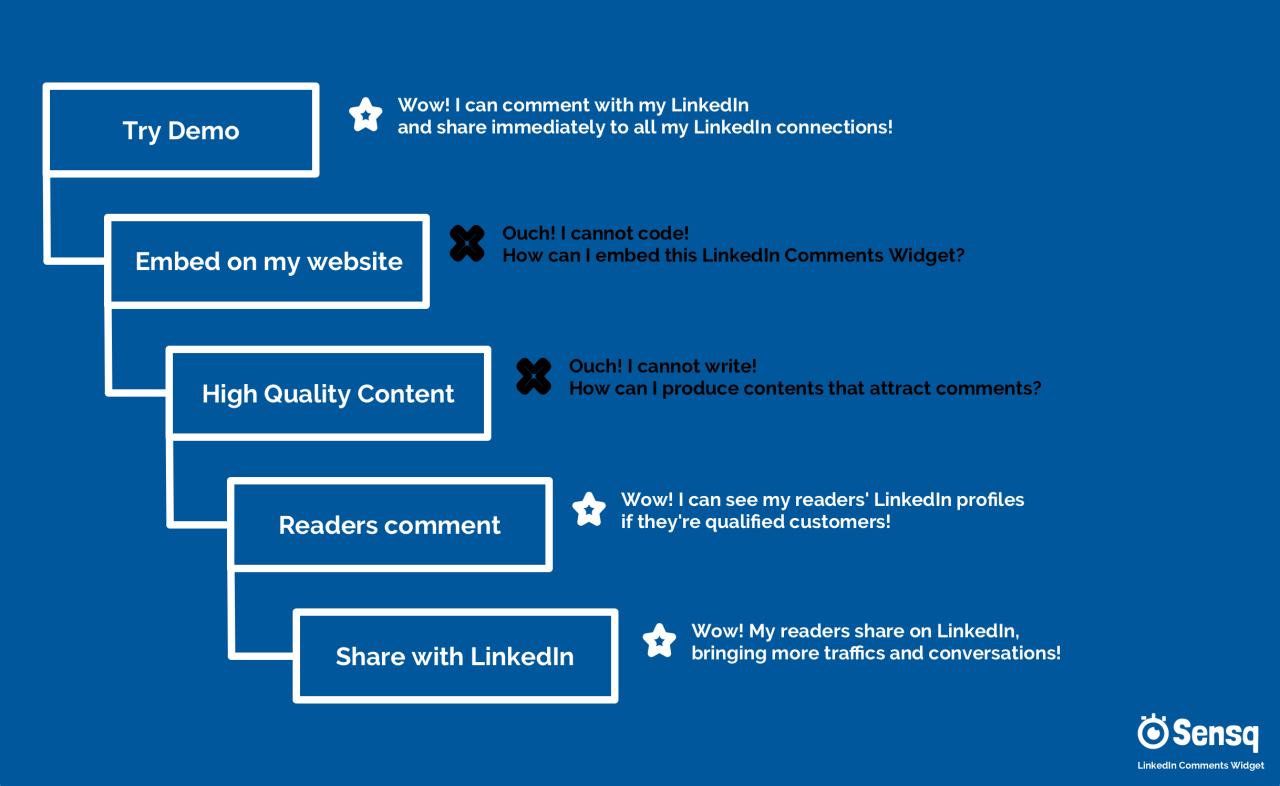
I created a WOW! Funnel with Persona Analysis for my LinkedIn Comments Widget MVP.
LinkedIn Comments Widget is a 3rd party embeddable comment plugin (think Facebook Comments, Disqus, SpotIM, .. etc) based on LinkedIn.
TL;DR
- Selling to LinkedIn users through Web.
- Having a LinkedIn Community of Customers right on my Web.
- I don’t know how to embed the LinkedIn Comments Widget!
- I don’t know how to write high quality contents that will make my customers engage!
Source: https://www.indiehackers.com/post/wow-funnel-and-persona-analysis-for-my-idea-comment-066e56cbfb


For self-service developers, we can only access to 2 LinkedIn APIs, which are:
- Share on LinkedIn
- Sign In with LinkedIn
Unless you’re a LinkedIn Partner with the access to the Enterprise Products, we cannot even get the profile url or job title of an user.
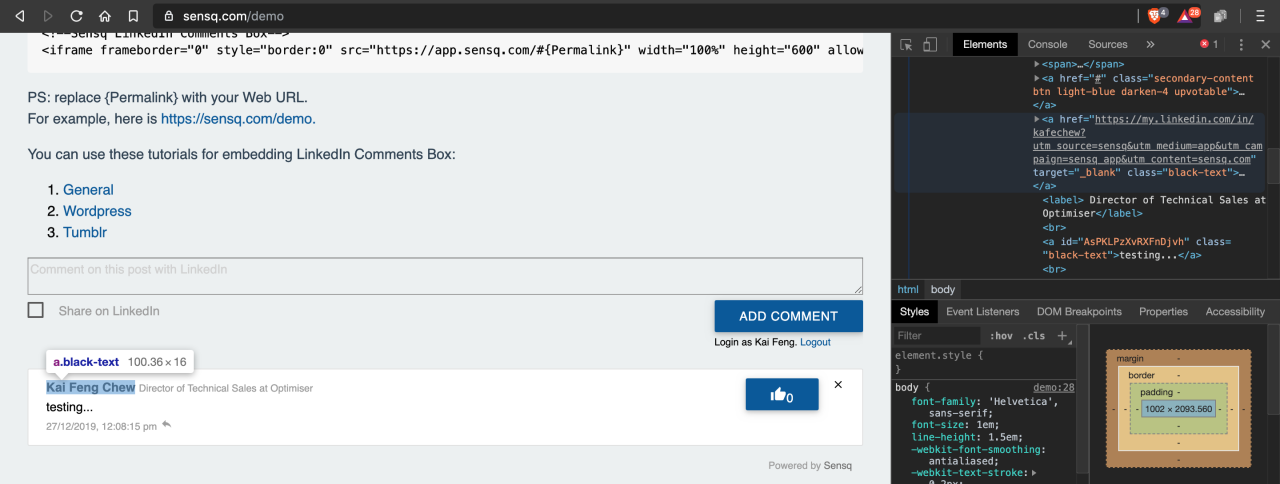
I don’t like to access the data LinkedIn doesn’t allow me, but I wanted to get the url to link back to correct LinkedIn Profile, which actually directing the traffic back to LinkedIn.
My best option is through google or bing, or any web search engine, which can kind of getting the url without 100% accuracy.
Something like:
site:linkedin.com {query}
Any thoughts?
-
1
This comment was deleted 6 years ago
-
2
Filling the relevant Partner Program form, apply for partner status with LinkedIn, explaining what your integration is and how it works. If it meets the criteria of "we feel that they’re providing value to members, developers and LinkedIn". They should reply to you about the status of the submitted application in about 15 business days. Then r_basicprofile endpoint will remain open for that app, and ONLY that app.
Learn more different criteria for different partner programs (i.e. Talent, Marketing, Selling, Learning) here: https://www.linkedin.com/developers/products
ps: Please do not apply to a partner program like the Marketing Developer Platform if you are seeking access to member profile data that is not made available via the new “Lite Profile” permission. Access to partner programs is appropriate for select use cases only, and all other requests for access will be rejected.
-


I wanted a very simple homepage and focus more on the blogs (long posts) and statuses (quick notes of my progresses and learnings).
The website was actually built with Tumblr with a custom bootstrap + materialize template. The customisation is very limited but I will try my best, given how simple to use Tumblr (and Free!), comparing to hosting some complex CMS (Yes, Wordpress is complex for me :-P).
After viewing an example by @volkandkaya, I did some changes to the homepage:
- hide blog posts from homepage
- split half-half for Headline/CTA and Hero image
Here is the result:
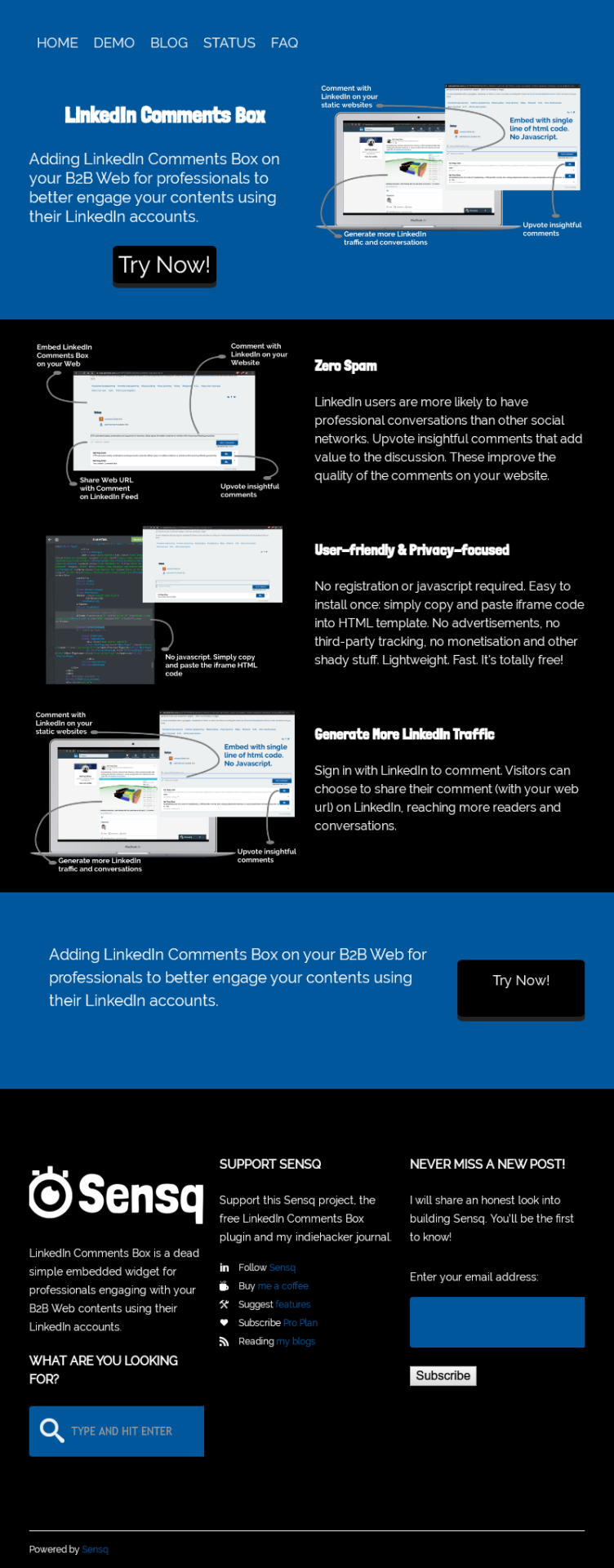
Does it communicate the values well while staying simple?
-
2
For me, I'm hit with way too many things demanding my attention immediately on landing on that page. It's not at all simple, and is instead rather cluttered. Spread the sections out, with clear call to action and clear education.
Also, as you are going after LinkedIn, a font more suited to that audience than Londrina would be called for.
-
2
Here. I spaced things out a bit more comfortably https://i.imgur.com/S6nP3iV.png also, homepage seems like it should have a logo.
Good luck with the project :)
-
1
Wow! Thanks for that!
PS: The logo is near the footer, because nobody would care in the early stage :-P
-
-
1
Noted on the font~
I had actually thought of using Palatino (Title) & Helvetica (Body) which are the safest.Not sure if the full-page screen making you think so?
Above the fold, it is just the headline and "Try Now!" CTA button.
Then, a section of 3 rows describing the main benefits.
After that, another CTA section with the same "Try Now!" button.
Finally, the footer may have a lot info and links there (cluttered) :-PDo you have any good example of simple web that may suit for this idea?
-


I had redesigned the homepage's Hero image:
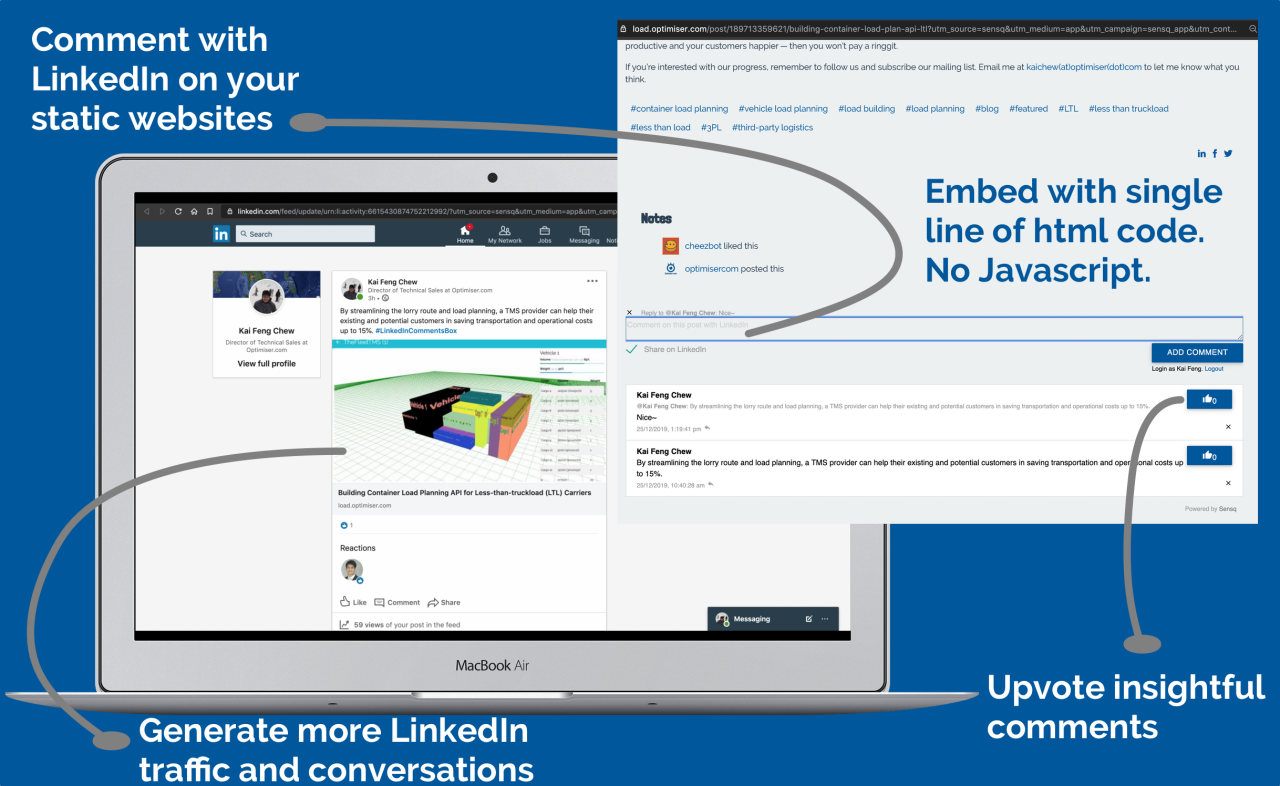
This single image may show the visitors what the LinkedIn Comments Box plugin is about.
-
1
I agree that the site needs a redesign but my biggest problem is that I don't get what the product does. Maybe it's just me? I'm not big on Linkedin.
-
1
You can think of Facebook Comments Plugin but for LinkedIn :-)
Or Disqus, Spot IM, ... without ads.The idea is let B2B Businesses to embed LinkedIn Comments into their websites with just single line of code, so that professionals (most likely using LinkedIn) engaging the contents using their LinkedIn accounts.
What do you think?
-
-
1
I will be candid, the site needs a complete redesign.
After that I don't mind giving some more advice :)
Have a look at https://sumit.versoly.com/ or https://saaspages.xyz/ for good examples.
-
1
Did some changes:
- remove blog posts from homepage
- split half-half for Headline/CTA and Hero Image
Does it nicer a little?
-
1
Your examples are great! I just did a quick design and wanted to start sharing the idea asap :-P Need to improve from times to times~ Any quick but important tips? Thanks for that!
-
1
@volkandkaya finally you've made the subdomains! Looks neat Volkan! Did you pitch to him?
-
-
1
This comment was deleted 6 years ago
-
1
Are you using the built-in comment system or third-party comment plugins (like Facebook Comments, Disqus, ..) for your blog ?
The product is called "LinkedIn Comments Box", a comment plugin for your blog with a single line of code, focus on B2B business websites.
Adding LinkedIn Comments Box on your websites for better engagement among professionals using their LinkedIn accounts. And reaching more LinkedIn users!
Try: Demo.
Does it make sense?
-


I’m using Sensq, a 3rd party comment system based on LinkedIn for Load Plan Optimiser (LPO) project website, which was hosted with Tumblr. In this post, I’m sharing how to add the LinkedIn Comments Box into a Tumblr blog.
TL;DR
- Popular 3rd party comment plugins are Disqus and Facebook Comments.
- Embedded LinkedIn Comments Box on your B2B Web for professionals to better engage your contents using their LinkedIn accounts.
- Step-by-step adding LinkedIn Comments Box on Tumblr Blog.
LinkedIn Comments Box is very easy and useful for Tumblr blogging platform. Although there is no SEO benefits, we’d receive a lot of traffic from LinkedIn and more engagement.

Deployed Sensq, a dead simple embeddable LinkedIn Comments widget for professionals engaging with your B2B Web contents using their LinkedIn accounts.

Here are some whys of using Sensq LinkedIn Comments Box:
- Free
- Lightweight and Fast.
- Easy to install once: No registration or javascript required. Simply copy and paste the iframe code into HTML template.
- Privacy-focused: No advertisements, no third-party tracking, no monetisation and other shady stuff.
- Zero Spam: Sign in with LinkedIn to comment. LinkedIn users are more likely to have professional conversations than other social networks.
- Quality Engagement: Upvote insightful comments that add value to the discussion.
- More LinkedIn traffic: Visitors can choose to share their comment (with our web url) on LinkedIn, reaching more readers and conversations.
Give LinkedIn Comments Box a try and looking forward to your feedback!! :-D
-
1
Hi @kafechew
is this solution is working?
I am keen to try and even publish a review post if it's good.I am running a niche blog targeting new DIY onlinepreneurs.
https://www.migmarketingresources.com/wordpress-plugins-to-install-for-any-type-of-websites-5min-read/


For email communication and marketing purpose, I had setup a custom domain mail with Yandex Mail for Domain (including spf & dkim). I used to be GSuite and Zoho user. Yandex won me over for free unlimited email accounts and accessible in China. My email is kaichew(at)sensq(dot)com and official support email is support(at)sensq(dot)com.
6 Comments
Hey @kafechew, I really liked your wow+ouch analysis! Is it based on someone's framework or your own method?
Would love to know more about it!
Thanks~ the funnel was based on Growth Hacking: Creating a Wow Moment by David Skok which I had posted here. The Persona Analysis was based on many enterprise sales books or articles I read before. I simply combined these two idea together :-P
I knew it sounded a bit familiar :D David is a great source on these topics!
Thanks for the pointers :)
Are you considering addressing / solving both Ouch points with your product?
"High quality content" seems to me more of a constraint on your target demographic, or at least a constraint to define your initial early-adopter niche, more than something you would want to address given Sensq's scope.
Is that similar to your perspective?
You were using WOW! Funnel on Monitoro too!
The first Ouch! is relatively easier: I can embed the widget for the persona. Just need a one-time access to his Content Management System (CMS). Once it’s ready, he can turn-off my access immediately. I will not do anything else without his permission.
The second one, "High quality content", is a lot lot harder. That's why there are so many big agencies for content creation.
Using the LinkedIn Comments Widget or not, he cannot run from this, content is the long term way to establish brand and communicate with customers. Else, some competitors will do it for him and take his shares.
So, he has to face it. I can help him to create the first set of contents that resonate with his readers. If it is in very high technical industry, I can link him to some researchers and content writers.
Besides that, we will work together to drive professionals to read, comment and share your website through many growth hacking tactics. It will take time but the best time to start is Now!
There might have a better ways, still exploring to fix these 2 Ouch!s. Before that, I need to make sure if these Wow!s or Ouch!s are actually correct :-P
Thank you for your answer in depth!
I completely endorse this approach, kudos for keeping it simple. "Do things that do not scale"
This is where your persona comes into play. Do you distinguish this factor in your current persona? i.e. does your persona have a characteristic of writing content already? Or are you considering people who do not write content and potentially would like to?
This could be an interesting perspective to develop, to find out the best way to tackle the second ouch.
To give you a second pair of eyes on this, I think it's a pretty sensible model from an outsider's perspective.
The best way anyway to do this is to take a hypothesis (you have one currently), and test it concretely to understand if it's accurate or you need a twist on it - and of course your strategy will change depending on those results!
My initial target would be those LinkedIn Users with B2B Web/Blog, selling to other LinkedIn Users. They do write but not optimised for the best reach or engagement.
People who do not write, as long as they decide to take this approach, I'm happy to help.
Another thing is LinkedIn Marketing. Few hours ago, I did try using the LinkedIn Comments Widget myself (it was built for my other enterprise project, my day job). The widget was optimised for LinkedIn distribution. The initial result was good.
I would definitely use it personally, now, I want to know if others will find it useful for them too. Keep testing~