
TeamIndieHackers
Follow @IndieHackers on X for stories and insights.

AI-assisted writing has quietly changed how training materials are produced. From onboarding manuals to certification courses, content is now assembled faster than ever. Yet speed introduces a new problem that many educators and training managers only notice after rollout: materials feel complete, but learners finish them with a shallow understanding. An AI Checker, such as Dechecker,helps teams identify where AI-generated language has diluted instructional intent, ensuring training content transfers knowledge rather than merely presenting information.
Why Training Materials Fail Differently Than Other Content
Training content occupies a unique position. It is neither purely academic nor purely persuasive. Its success is measured by behavior change, skill acquisition, or decision quality after instruction ends.
Training Is Meant to Change What People Do
Unlike blogs or reports, training materials are judged by outcomes. If learners cannot apply what they read, the content has failed, regardless of how polished it appears. AI-generated text often explains concepts but avoids committing to specific actions or trade-offs. Detection helps reveal where instructions feel descriptive rather than directive, allowing trainers to rewrite sections with clearer expectations and practical guidance.
Learners Interpret Clarity as Authority
In training environments, especially corporate or professional settings, learners often assume written materials are authoritative. AI-generated explanations that oversimplify processes or gloss over constraints can mislead learners without triggering immediate questions. Detecting these areas early reduces the risk of teaching incomplete or misleading practices at scale.
Reusability Amplifies Small Errors
Training materials are reused across cohorts, departments, and regions. A minor conceptual flaw introduced by AI can propagate widely. Detection provides a way to audit content before reuse, catching weaknesses that would otherwise repeat silently.
Why AI detection actually safeguards instructional depth
Detection matters most when it zeroes in on instructional depth, not who wrote it.
Revealing Where Reasoning Has Been Replaced by Summaries
AI excels at summarization. In training contexts, this often replaces step-by-step reasoning with conclusions. Detection highlights sections where outcomes are stated without showing the process behind them, prompting trainers to reintroduce reasoning paths learners need to follow independently.
Preserving Domain-Specific Judgment
Good training wrestles with real-world constraints, messy exceptions, and trade‑offs. AI‑generated content kind of flattens these nuances. An AI Checker helps trainers see where specificity has been lost, allowing them to restore domain judgement that learners rely on in practice.
Preventing False Confidence in Learners
Overly slick explanations can make learners feel confident before they’ve earned it. Detection calls out spots where the wording overstates certainty, nudging edits that own the complexity and the unknowns.
Where detection really moves the needle in training
Detection hits hardest where training quality directly shapes performance—or keeps you compliant.
Employee Onboarding Programs
Onboarding materials usually mix policy, process, and the company’s vibe. AI-generated drafts may capture structure but miss contextual explanation. Detection helps ensure new hires receive guidance that explains not just what to do, but why practices exist.
Compliance and Risk Training
In regulated industries, ambiguity isn’t just messy—it’s dangerous. Detection spots the fuzzy, generic lines and pushes for sharper wording—so people don’t misread it and risk non‑compliance.
Skills-Based Certification Courses
Certification programs bank on consistent standards; no surprise there. Detection helps line up explanations with the assessment, so what’s taught matches what’s tested—without those awkward gaps.
Detection Within Modern Training Workflows
Training teams increasingly rely on AI across multiple stages of content creation. Detection works best when embedded into these workflows.
From Live Sessions to Structured Modules
Many training programs begin as workshops or webinars that are recorded and transcribed using an audio to text converter. As AI assists with reorganizing these transcripts into lessons, detection helps ensure that original expert explanations are preserved rather than diluted by generic restructuring.
Supporting Distributed Training Teams
Large organizations often have multiple trainers contributing to shared materials. Detection provides a neutral reference point, helping teams maintain instructional consistency even when styles differ.
Enabling Iterative Improvement
Training content evolves based on feedback and performance data. Detection helps teams identify whether revisions improve instructional clarity or simply add more AI-generated filler, supporting continuous improvement.
Choosing an AI Checker for Training Environments
Training teams operate under a different set of pressures than marketing or content teams. They must balance instructional quality with operational reality, often updating materials on short notice while ensuring accuracy and clarity. An effective AI Checker in this context needs to support decision-making rather than introduce friction.
Insight Over Simple Classification
Binary labels that declare content as AI-generated or human-written offer limited value in training environments. Trainers do not need a verdict; they need insight. Dechecker emphasizes interpretability by surfacing language patterns that correlate with weakened instruction, such as over-summarized processes, abstract recommendations, or missing rationale. This allows training teams to understand not just where automation appears, but how it affects learning outcomes. With this visibility, revisions become intentional and pedagogically grounded rather than cosmetic.
Fast Feedback for Tight Timelines
Training materials are frequently revised close to launch due to policy updates, product changes, or compliance requirements. Tools that require long analysis cycles or complex setups are impractical in these situations. Dechecker’s fast feedback fits naturally into last-minute review workflows, enabling teams to validate instructional clarity without delaying deployment. This speed ensures that quality checks remain feasible even under pressure, rather than being skipped when time runs short.
Supporting Learning Goals, Not Limiting Tools
Detection should reinforce learning objectives, not restrict how teams work. Dechecker is designed to complement AI-assisted drafting by highlighting where automation weakens instructional intent. This approach empowers trainers to use AI confidently while maintaining accountability for outcomes. Instead of discouraging AI use, detection creates guardrails that keep efficiency gains aligned with educational effectiveness.
Conclusion: Training Quality Depends on Instructional Intent
AI has transformed how training materials are created, but it has not changed how people learn. Skill development still depends on clear reasoning, realistic examples, and intentional guidance. Dechecker helps training teams protect these elements by showing where AI-generated content has replaced instruction with surface fluency. By integrating an AI Checker into training workflows, organizations ensure that efficiency gains do not come at the cost of learning effectiveness. In training, clarity without depth is not progress. It is a risk.

In the creative world, imagination has always outpaced execution. For artists, designers, and developers, transforming a concept into a production-ready 3D model is a traditionally slow, complex, and iterative struggle. Now, AI 3D model generators are revolutionizing this workflow, making asset creation faster, more accessible, and profoundly intuitive.
Leading this transformation is Tripo AI, the engine behind Tripo Studio—an all-in-one, AI-powered platform that unifies the 3D creation workflow and empowers creators to bring their visions to life with unprecedented speed and efficiency.
Your Unified 3D Creation Workspace
Tripo Studio, as an AI 3D model generator, streamlines the entire 3D creation process by integrating a full suite of tools into a single platform. Creators can generate high-quality 3D models directly from text, images, or sketches, then refine, optimize, and prepare them without switching between disconnected applications. What once required multiple tools and lengthy manual workflows can now be completed entirely within one system, significantly reducing friction and decision overhead.
Discover Tripo's Revolutionary Capabilities
Tripo represents a fundamental leap beyond simple conversion—it's a fully integrated AI 3D model generator engineered to streamline the complete asset creation workflow. Every tool is meticulously designed to accelerate creativity while eliminating technical barriers. Here's how its core features are transforming 3D creation:
Text to 3D: Instant Creation from Words

Just type a description of your idea in plain language, and Tripo instantly generates a detailed 3D model with realistic PBR textures. This powerful Text to 3D feature also lets you create a preview image from your prompt, making it easy to visualize the result. By simplifying the modeling process, it lowers the barrier to entry, allowing designers, game developers, and concept artists to quickly prototype concepts and export them in widely used formats like GLB and FBX for major engines. The generated models can also be exported for 3D printing, making Tripo an ideal AI 3D model generator for 3D printing.
Image to 3D: Turning 2D Concepts into 3D Reality
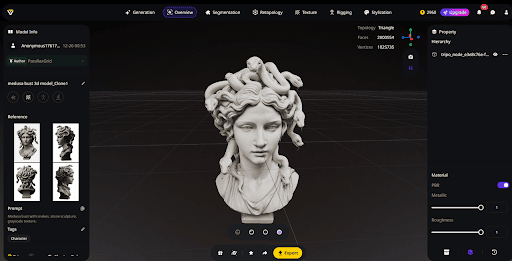
For creators working from visual references, Tripo's Image to 3D model feature significantly accelerates the workflow. Simply upload any 2D asset—whether it's a character sketch, product photo, or fan art—and the AI interprets depth and structure to generate a fully coherent 3D model that remains faithful to your original design.
For greater accuracy, Tripo supports multi-view inputs. Providing several angles of the same object allows the AI to better understand its shape, producing more precise geometry and richer detail than single-image generation alone. To streamline larger projects, batch generation lets users upload and convert up to 10 images at once—perfect for creating product variations, generating multiple concepts for a game scene, or quickly building a library of base assets.
Combined, these capabilities allow creators to transform 2D visuals into detailed AI 3D models with minimal manual effort—ideal for refining characters, visualizing product ideas, or developing early-stage prototypes at scale.
Intelligent Segmentation
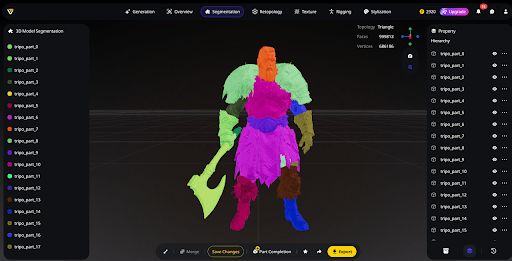
Editing a complex, single-piece 3D model used to be a tedious, manual process. Tripo Studio—one of the leading AI 3D model generators—revolutionizes this with its Intelligent Segmentation. The AI analyzes a model's structure and automatically divides it into logical, editable components—like a character's head, torso, and limbs.
Once segmented, each part can be modified, swaped, or refined independently, without affecting the rest of the model. Want to test a new helmet, swap wheels, or create outfit variations? It's fast, flexible, and non-destructive. This modular workflow accelerates iterative design, simplifies production of asset variations for games, and streamlines preparation for 3D printing or assembly—turning monolithic models into versatile building blocks for complex, rapid development.
Smart Retopology
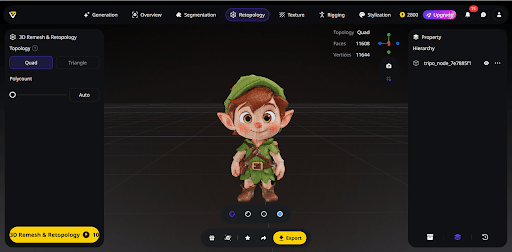
AI-generated 3D models often come with dense or uneven geometry, making them difficult to animate or use in real-time engines. Tripo's Smart Retopology automates this cleanup process, analyzing the model's structure, simplifying the mesh, and intelligently redistributing polygons—preserving important details while eliminating unnecessary complexity.
The result is a clean, optimized low-poly mesh, ready for animation and real-time applications. Creators can also select their preferred topology style, whether quad-dominant layouts for smooth character deformation or triangle-based meshes for robust hard-surface assets. Combined with Tripo's high-quality generation pipeline, this ensures every model is fast to produce, fully optimized, and production-ready for games, mobile apps, VR, and AR.
Advanced AI Texturing with Magic Brush
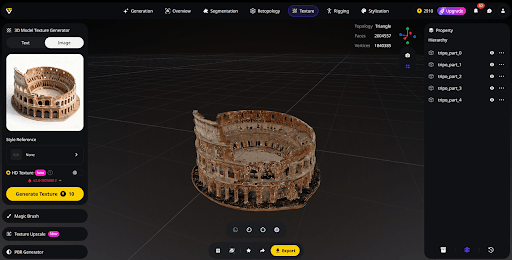
Tripo transforms the texturing process by providing a fully AI-driven material system, going beyond simple procedural automation. With this AI texturing system, creators can generate complete, shader-ready PBR textures directly from a text description or reference image—producing any surface, from brushed metal to stylized fabrics, in mere seconds.
For more precise artistic control, the Magic Brush lets users paint directly on the model with real-time feedback, refining details or adding custom touches without leaving the platform. By combining full-texture generation with hands-on adjustments, artists gain both speed and accuracy, effortlessly achieving production-quality materials.
A high-performance Ultra HD engine preserves fine surface details and delivers realistic lighting, while built-in Texture Upscale enhances resolution without altering the original style—ensuring consistently high-fidelity materials across diverse assets and production environments.
Auto-Rigging
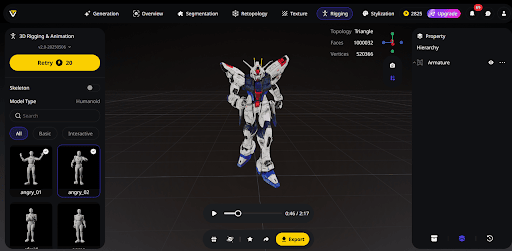
Rigging a 3D character is traditionally a complex and time-consuming step. Tripo simplifies this with one-click auto-rigging, instantly converting static meshes into animation-ready assets. The AI analyzes the model's form—whether humanoid, creature, or mechanical—and automatically generates the correct skeletal structure.
Joints are placed accurately, and skin weights are applied for smooth, natural deformation. In seconds, Tripo can auto-rig nearly any model and even produce ready-to-use test animations, allowing creators to validate motion immediately. This eliminates tedious manual setup and lets artists jump straight into performance, iteration, and storytelling.
This AI 3D model generator provides access to a library of over 100 motion-capture-quality biped animations, covering both essential and interactive movements for instant preview and validation. A Lock Frame feature lets creators capture any pose and export it as a standalone static 3D model—making pose variations and 3D printing possible without re-rigging.
AI Model Stylization
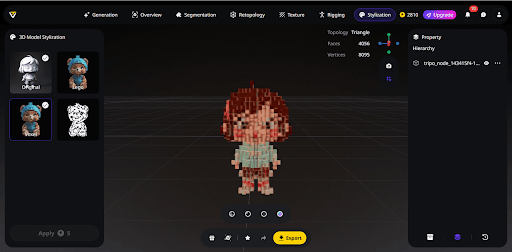
Tripo's AI Model Stylization lets creators give any 3D mesh a fresh artistic look with just one click. Instead of spending time remodeling or retexturing, users can immediately apply style transfers—turning realistic models into styles like LEGO or voxel aesthetics. The system supports both generating stylized outputs from the start or applying preset styles during post-processing, offering full flexibility to match any workflow.
What distinguishes Tripo is its ability to maintain visual consistency across platforms and outputs, ensuring that stylized assets remain coherent whether used in games, cinematics, or marketing materials. Outputs stay fully compatible with major game engines and rendering pipelines, making this feature valuable for entertainment, collectible design, architectural visualization, and promotional content alike. By embedding AI-driven style transfer directly into the 3D creation workflow, Tripo allows creators to explore artistic variations quickly—without compromising production quality or readiness.
Industry Applications
The all-in-one platform is transforming the way industries that rely on 3D content approach design and production. Its integrated AI tools streamline workflows, enabling faster, more flexible, and higher-quality results across multiple fields.
Game Development
For game developers, especially indie teams with limited resources, Tripo Studio significantly speeds up asset creation. Features like rapid generation, intelligent segmentation, automatic retopology, and integrated rigging allow teams to produce game-ready assets in a fraction of the traditional time.
"Before tools like this, asset creation was our biggest bottleneck," shared an indie developer using Tripo Studio. "Now we can generate, refine, and implement assets quickly, letting small teams achieve results that previously required larger departments or outsourcing."
Product Design and Visualization
Product designers benefit from Tripo Studio's ability to turn concepts into detailed, editable 3D models almost instantly. The intelligent segmentation feature enables fast experimentation with different design variations, helping teams explore multiple options before committing to costly physical prototypes.
"We can upload reference images, generate a base model, and then use segmentation to test different component designs," said a product visualization specialist. "This drastically speeds up our conceptualization phase."
Architectural Visualization
Architects and interior designers can bridge the gap between technical plans and immersive presentations. Tripo Studio allows for rapid generation, modification, and stylization of 3D environments, enabling more effective client communication and faster iteration on designs.
The Future of 3D Creation Begins with Tripo
Tripo AI has grown far beyond an experimental idea—it is now a foundational AI 3D model generator, empowering the next generation of creators. By combining AI-driven model generation with intelligent editing tools in a single, unified workspace, Tripo Studio enables users to bring their artistic vision to life while meeting real-world production standards.
For beginners and aspiring creators, Tripo offers a free AI 3D model generator plan, providing a limited allocation of credits to explore and experiment without any upfront cost. Now is the time to redefine your creative workflow. Start creating your AI 3D models from texts or images today and experience the speed, flexibility, and innovation Tripo brings to 3D design.

Why Transcription Tools Feel Promising—Until You Actually Use Them
Most audio-to-text tools make a strong first impression. The demos look clean. The sample transcripts seem usable. The promise feels simple enough: upload a file, get text, move on.
The frustration usually shows up later.
It tends to appear after the first real transcript — when the text is technically correct but awkward to read, when the speaker turns blur together, or when cleaning things up takes more time than expected. On paper, the tool did its job. In practice, it quietly added work you hadn’t planned for.
That gap between expectation and reality explains why many people try transcription once or twice and then stop using it. Not because transcription isn’t helpful, but because the tool never quite fits into how the work actually happens.
Before jumping to another option, it’s worth looking at where most tools fall short — and what still matters once the novelty wears off.
Why Most Audio-to-Text Converters Disappoint After the First Try
People rarely abandon transcription tools right away. The first attempt often feels encouraging. You upload a short clip, skim the output, and think, this might actually work.
The disappointment usually arrives with longer or messier recordings. Small issues begin to stack up. Speaker labels drift. Sentences lose rhythm. Important details flatten into text that technically exists but isn’t pleasant to read or easy to reuse.
This is where many audio to text converter tools start to disappoint. Not because they completely fail, but because they introduce friction in places users didn’t expect. Instead of saving time, they create new decisions — what to edit, what to rewrite, what to leave alone.
These problems are easy to hide in marketing examples. Short samples don’t reveal how a transcript behaves across a full conversation or how it holds up when you need to quote a specific moment later. The mismatch only becomes clear once the tool is used as part of real work, not a quick test.
It’s Not That Accuracy Is Bad—It’s That It’s Not Enough
Accuracy is usually the first thing people check when evaluating transcription tools. That instinct makes sense. If the words are wrong, nothing else matters.
The trouble is that accuracy alone doesn’t determine whether a transcript is actually useful.
Many tools produce text that is technically correct but still uncomfortable to work with. Sentences feel overly literal. Punctuation interrupts the flow. Spoken language is captured exactly as heard, without any adjustment for how people read. The result is text that feels dense and tiring, even when it’s accurate.
Once a transcript needs constant cleanup to be usable, the cost shifts back to the user. Time saved during transcription gets spent again during editing. Over time, that trade-off makes the tool feel less helpful, no matter how strong its accuracy claims sound.

Where Transcription Starts to Break in Everyday Work
Problems with transcription rarely appear all at once. They tend to surface gradually, often in places people don’t think to test early on.
Longer recordings are usually the first stress point. What feels acceptable in a five-minute clip becomes harder to scan across an hour. Finding a specific moment later takes more effort than expected, even though the transcript technically contains everything.
Multi-speaker conversations expose another weakness. When transcripts struggle to reflect overlapping speech or natural turns, readers have to slow down and mentally reconstruct who said what. At that point, the text stops feeling like a shortcut.
These issues aren’t dramatic, but they’re persistent. A transcript that’s slightly annoying to work with often gets avoided. Over time, people return to scrubbing through audio or video instead.
The Cost You Don’t Notice Until You Stop Using the Tool
The real cost of a transcription tool often becomes clear only after you stop using it.
At first, the extra cleanup feels manageable. But over time, transcripts get opened less often. Useful passages don’t get reused. Content meant to be searchable quietly turns into something you revisit only when necessary.
This affects how work compounds. Teams start from scratch more often than they should. Questions get answered again. Audio and video get rewatched because the text version never fully earned trust.
The tool didn’t fail. It just faded out of the workflow. And when that happens, the promise of transcription never fully materializes.

What Actually Holds Up in Audio to Text Transcription
After trying a few tools, patterns begin to emerge. Not around which features look impressive, but around what remains useful over time.
What tends to hold up in audio to text transcription is whether the text feels immediately workable. Transcripts that are easy to scan, quote, and revisit tend to get used again. Those that require constant adjustment slowly fall out of the workflow.
Consistency matters more than people expect. Small details — how speaker changes are handled, how sentences are broken up, how readable the structure feels — make a real difference over time. When those details are handled well, the transcript becomes a reference instead of a chore.
Why Speed and “Free” Often Just Move the Work Somewhere Else
Fast and free transcription tools exist for a reason. For quick checks or one-off tasks, they can be genuinely helpful.
The problems start when expectations expand. Speed often comes from simplification, and free tools often shift the cost to editing time. Extra cleanup, manual formatting, and double-checking slowly change how often the tool gets used.
That doesn’t make fast or free options bad choices. It just means they’re better suited for limited situations. When transcription becomes part of an ongoing workflow, those trade-offs matter more.
Conclusion
Most transcription tools don’t fail in obvious ways. They produce text and appear to work as expected. The difference shows up later, in whether that text actually gets used.
When transcription quietly reduces friction, it becomes something people rely on without thinking about it. When it introduces small but repeated obstacles, it slowly gets pushed aside.
Choosing the right tool isn’t about chasing features or bold claims. It’s about paying attention to where your time and attention go once the novelty wears off. The tools that last are the ones that make work easier — without asking to be managed.

Students now have to deal with an academic world that moves faster than anything previous generations experienced. Assignments, deadlines, part-time work, and the pressure to perform create a perfect storm where shortcuts feel almost practical. Artificial intelligence has become the most tempting shortcut of all, especially for writing essays. On the surface, these tools seem harmless. They save time, produce clean sentences, and offer a quick fix when motivation runs low. But beneath the convenience is an entire layer of risk that many students either underestimate or simply don’t acknowledge. Those risks aren’t just technical issues. They shape learning, credibility, and even long-term academic growth. When students rely too heavily on AI, they often compromise far more than they realize.
The Illusion of Originality and the Threat to Academic Integrity
One of the biggest risks students overlook is the false sense of originality that AI-generated text creates. Because the writing looks polished and varies from one prompt to another, it’s easy to assume it will pass unnoticed. What students tend to forget is that academic institutions have adapted far more quickly than expected. Professors now use multiple tools to check for patterns, unusual language shifts, and inconsistencies that suggest outside assistance. Some systems use machine learning to spot non-human rhythm or structure, while others flag sections based on probability analysis. Even something as simple as a sudden jump in writing quality can raise questions. This is where tools like an AI detector influence outcomes. The more universities rely on these systems, the more students discover that AI writing has a detectable fingerprint. What feels like a shortcut often ends up becoming a red flag that puts academic integrity at risk.
The Loss of Critical Thinking Skills
Another major concern is how easily AI weakens a student’s natural thinking process. Writing essays is not just about producing paragraphs. It is an exercise in reasoning, building arguments, and learning to express ideas with clarity. When students offload this entire workflow to AI, they lose the mental stretch that writing was meant to create. Over time, they start noticing that forming original thoughts becomes harder. They rely on pre-structured explanations rather than developing their own analysis. What makes this risk subtle is that it doesn’t show immediately. A student might pass a few assignments effortlessly and assume everything is fine. Then comes a class discussion or an exam, and suddenly the missing skills become painfully obvious. The erosion of critical thinking is gradual, but it is one of the most damaging long-term consequences of overusing AI for schoolwork.
The Accuracy Problems Hidden Behind Confident Writing
AI has a habit of sounding extremely sure of itself, even when it is completely wrong. This is one of the most dangerous risks students underestimate. AI tools generate content based on patterns, not verified facts. They don’t understand context, reliability, or source credibility the way a human researcher does. A paragraph might sound smooth and intelligent, but contain subtle inaccuracies that a professor will immediately question. History dates may be off. Scientific explanations might be simplified to the point of being incorrect. Arguments can rely on fictional studies. Students often trust the polished tone and forget to cross-check the information, which creates a false sense of academic confidence. When the final draft lands in front of a professor, the errors stand out and raise doubts about the student’s research habits.
Generic Voice and the Loss of Personal Expression
Every student has a natural writing voice shaped by personality, reading habits, and classroom experience. That voice is something professors grow familiar with over time. AI, however, produces writing that follows universal patterns. Even when the tool tries to mimic a specific tone, the phrasing tends to fall into recognizable structures. Students who rely too much on this kind of writing lose the chance to develop their own expressive style. Professors often notice when an essay feels detached from the student’s usual rhythm. They may not accuse the student outright, but the shift creates suspicion. The deeper problem is that students stop evolving as writers. Over time, they become dependent on external tools to create a voice they should have naturally built on their own. Instead of becoming stronger communicators, they end up becoming predictable and replaceable.
The Disconnection From Course Content and Real Learning
A surprising number of students believe that completing the assignment is the same as learning the material, but this is not true. When AI handles the difficult parts of organizing thoughts and writing arguments, the student becomes disconnected from the course content. They might submit something that technically answers the prompt, yet they themselves retain very little of the information. Class topics start feeling abstract or unfamiliar because they are never actively engaged with the material. This becomes a major problem during exams, projects, or higher-level courses where prior knowledge is essential. Students accidentally train themselves to bypass understanding, which weakens academic success and makes their degree feel hollow. The entire purpose of education is undermined when learning is replaced with automation.
Over-Dependence and Reduced Academic Confidence
One of the quieter dangers of AI use is how it slowly cultivates dependency. Students start relying on it for small tasks like brainstorming or sentence smoothing, then gradually offload entire essays. This dependence creates an internal belief that they are not capable of producing strong work on their own. Instead of building confidence through practice, they build doubt. Even when they want to attempt an assignment independently, they feel anxious and uncertain. This psychological change affects academic growth more than most students realize. The more they depend on shortcuts, the harder it becomes to trust their own abilities. Education is supposed to strengthen confidence through repetition and refinement, but overuse of AI flips that process upside down.
The Inconsistency Between AI Writing and Class Discussions
Professors often use discussions, presentations, and in-class exercises to gauge a student’s understanding. When a student turns in a highly structured, articulate essay and then struggles to explain basic concepts verbally, the gap becomes obvious. This inconsistency creates unnecessary suspicion, even for teachers who want to be generous. AI writing can make a student seem more knowledgeable than they actually are, but that illusion collapses the moment they’re asked to speak on the topic. This mismatch affects teacher perception, grading fairness, and trust. They might even use a machine-generated text detector on your past work. Students sometimes forget that academic performance is interconnected. Writing, speaking, and participation form a complete picture. AI disrupts this balance by artificially elevating one part while leaving the others unchanged.
The Danger of Missing Out on Feedback and Mentorship
One of the most underrated parts of education is the feedback loop between student and teacher. Essays are not just assignments; they are communication channels where a professor can identify strengths, weaknesses, and growth opportunities. When AI-generated work replaces authentic writing, the feedback loses meaning. The professor ends up critiquing something that does not reflect the student’s real abilities. As a result, the student misses out on valuable guidance that would have helped them improve. In many cases, teachers adjust their support based on the writing they see, and when that writing is artificially elevated, the student receives the wrong kind of help. This disrupts mentorship in a way that is subtle but deeply impactful.
The Ethical and Emotional Consequences
Academic dishonesty often carries emotional weight that students underestimate. Even when they avoid getting caught, many experience underlying guilt or anxiety. They worry about whether they can maintain the illusion. They fear disappointing their families or failing future courses. This emotional strain builds and becomes heavier as the habit continues. Ethics in education are designed not just to enforce rules but to protect students from these types of internal conflicts. When students use AI to bypass honest effort, they create a disconnect between their achievements and their sense of self. Over time, this can weaken motivation and make academic goals feel less meaningful.
Long-Term Impact on Career Skills and Professional Preparedness
In the real world, clear communication, analytical thinking, and problem-solving are non-negotiable. Employers look for people who can write proposals, interpret complex information, and present ideas coherently. When students use AI as a substitute for learning, they carry skill gaps into the workplace. Even if they graduate with strong grades, they often struggle with tasks that require independent thought. AI can support professionals, but it cannot compensate for a lack of foundational skills. Students who avoid developing these abilities may find themselves unprepared for promotions, leadership roles, or high responsibility tasks. The long-term consequences extend far beyond the classroom and affect overall career success.
Final Thoughts
AI has changed the academic landscape in ways that feel exciting, convenient, and incredibly tempting. But the comfort it provides often hides the real cost. Students who rely on it too heavily risk undermining their own growth, weakening their skills, and disconnecting from the learning process in ways that follow them long after graduation. The dangers are not always dramatic. They reveal themselves quietly through missed understanding, fading confidence, and widening gaps in ability. When used responsibly, AI can support education. When used carelessly, it becomes a barrier that blocks genuine progress. Students deserve more than shortcuts. They deserve an education that strengthens them from the inside out.

Bootstrapped startup founders often focus on product and survival, leaving financial risk management on the back burner. Yet things like overlooked cash flow gaps, contract pitfalls, and external shocks can derail even strong early momentum.
A simple, proactive risk approach can prevent problems before they become emergencies.
Why Risk Management Feels Optional for Bootstrapped Founders
Founders of bootstrapped startups usually juggle product work, customer development, and cash flow firefighting.
With no outside capital acting as a buffer, they can tend to skip structured risk planning, assuming they’ll handle problems as they come. But even resilient founders struggle when financial surprises hit at the wrong time.
The Invisible Risks
Here are a few areas where trouble hides early on
Cash flow timing problems.
Overreliance on one revenue stream.
Lack of documented financial controls.
The Cash Flow Trap No One Warns You About
A lot of founders underestimate how fast a small shift in revenue timing can snowball.
Capital shortages often arise not from big mistakes but from many small, unmanaged ones. That includes things like inconsistent invoicing, vague payment terms, or waiting too long to adjust pricing.
One overlooked area is the way financial contracts are structured, especially when founders start exploring hedging, revenue‑share partnerships, or supplier agreements tied to market rates.
But experienced derivatives lawyers can help founders avoid signing risks they don’t fully recognize.
It’s not about complexity; it’s about clarity on how downside scenarios actually play out.
Building a Practical Risk Framework That Doesn’t Slow You Down
Risk management doesn’t have to be a giant spreadsheet or a corporate‑style audit. A simple structure works well as long as it’s consistent.
Spot the Early Warning Signs
For bootstrapped teams, the biggest wins often come from catching patterns before they escalate.
This can be as small as recognizing that two late invoices signal a customer health issue, not just admin noise.
Create Buffers Without Raising Money
Bootstrapped startups often think the only real buffer is revenue. Instead, founders can build low-friction financial cushions by:
Shortening billing cycles.
Adding small, recurring revenue lines.
Renegotiating vendor terms rather than cutting costs.
Don’t Forget External Shocks
External shocks like regulatory changes or sudden sector shifts can hit harder when a startup doesn’t have the luxury of a runway.
Even a lightweight scenario plan helps founders stay calm instead of reactive.
Wrapping Up
Bootstrapped founders don’t need complex financial models, but they do need consistent, lightweight habits that flag threats before they get expensive.
Paying attention to cash flow patterns, contract structure, and external volatility can mean the difference between a temporary slowdown and a full stop.
Here’s a simple practice: every quarter, spend one hour mapping out your biggest potential financial risks and how you’d respond. It will keep your thinking sharp and your company stable without adding operational weight.
A steady rhythm of reviewing risks will keep your decisions grounded and your operations resilient. Even small, regular check-ins will help protect momentum and give your startup room to grow with fewer surprises.

Artificial intelligence has changed how developers write software. Tools like GitHub Copilot, Cursor, and modern LLM-based assistants can turn a comment into a function in seconds. Boilerplate disappears. Repetitive tasks shrink. Implementation work gets lighter.
And yet, across engineering teams, a strange pattern keeps appearing:
Developers write code faster, but they’re not fixing bugs faster. In many cases, debugging actually takes longer.
This article offers a fresh perspective on why that happens and outlines a new approach to debugging that preserves the benefits of AI without introducing new bottlenecks.
AI Helps You Write Code—But Not Understand It
Most research on AI-assisted development converges on the same point: writing code gets easier, but understanding failures gets harder.
Teams report that AI speeds up their implementation work, but the time spent:
Reviewing generated code
Diagnosing subtle runtime issues
Fixing regressions introduced by AI suggestions…often offsets the gains.
Several studies highlight this trend:
1. Faster Typing, Slower Debugging
Developers using AI assistants: - Spend less time drafting code - Spend significantly more time validating and correcting AI-produced output - Often struggle to debug logic they didn’t fully write themselves
One research group found that although code production increased, teams became ~20% slower when resolving runtime bugs.
2. High Error Rates in AI-Suggested Fixes
In debugging-specific experiments: - Many model-generated fixes failed to address the underlying issue - Nearly half introduced secondary problems - AI rarely self-corrected without being walked through the full context again
Developers frequently had to reverse engineer what the AI was attempting, adding friction instead of removing it.
Why Debugging Is So Hard for Today’s AI Tools
Debugging is fundamentally different from code generation. Writing code requires patterns. Debugging requires context.
But most AI assistants never see the full execution picture.
Typical debugging inputs look like: - A copied error message - A fragment of a log file - A partial stack trace - A short description typed into a chat window
Missing from this static view is everything that actually caused the failure:
The exact value of the variables at the moment of the crash
What was happening in the DOM
Which network requests succeeded or failed
The sequence of user actions leading up to the issue
Framework-specific lifecycle behavior (React, Vue, Angular, etc.)
Without this, the AI is essentially guessing.
It can produce a fix that looks right, but because it lacks the real execution context, that fix may only solve the symptom, not the root cause.
What This Looks Like in Practice
If you’ve used AI to help debug real-world code, this story will feel familiar:
You hit a runtime error in Chrome.
You copy the error into your AI tool.
You add a few paragraphs to explain what’s going on.
The AI proposes a reasonable-looking patch.
You apply it.
You reload the page.
Something else breaks.
Now you’re in a loop: - Add more logs - Re-describe the issue to the AI - Try another patch - Undo what didn’t work
By the time you’re done, the time saved typing code has been replaced by time spent untangling the AI’s interpretation of the bug.
The core issue? The AI never saw what happened in the browser.
A Better Model: Runtime-Aware Debugging
If debugging requires a real execution context, then the solution is straightforward:
AI needs access to runtime data, not just static code.
This insight has led to a new class of developer tools designed specifically for debugging rather than code generation.
How Runtime-Aware Debugging Works
When a browser error occurs, a runtime-aware debugger automatically records:
Full stack trace, with actual argument values
DOM state and CSS at the moment of failure
Network request/response data
User interactions leading to the error
Internal framework state (React component tree, Vue reactivity graph, etc.)
Instead of asking you to summarize the problem, these tools:
Capture the error as it happens
Analyze it using a dedicated AI layer
Propose a fix grounded in actual runtime evidence
Validate the fix before applying it
Sync the patch directly to your editor
One implementation of this approach is theORQL, a debugging assistant that connects Chrome runtime data with your editor via an AI analysis layer. Its focus is not on writing new code but explaining and fixing failures inside Chrome with the full execution context in hand.
Why This Complements Code-Generation Tools
AI assistants shine when producing code from intentions. Runtime-aware debuggers shine when explaining why the produced code—whether human or AI-written—didn’t behave as expected.
Together, they form a balanced toolchain:
Use Code-Time AI For:
Generating boilerplate
Exploring unfamiliar APIs
Drafting components or utilities
Use Runtime-Aware AI For:
Explaining runtime failures
Diagnosing cross-component bugs
Fixing deployment issues
Validating patches against real execution
This separation of responsibilities lets teams move quickly without sacrificing clarity or safety.
How to Assess Whether a Debugging Tool Is Actually Helping
Here’s a simple framework you can use to evaluate any AI-driven debugging tool in 2025.
1. Does it capture real runtime context?
Debugging is impossible without: - Variable values - DOM state - Network responses - User-event history
If a tool only sees static code or pasted errors, it will always be guessing.
2. Does it validate fixes before applying them?
Effective systems: - Check patches against actual runtime data - Detect regressions or mismatches - Make it clear when a fix is uncertain
3. Can it recover from a wrong first attempt?
Strong debugging systems iterate based on new context. Weak ones repeat the same guess.
4. Does it protect your code and data?
Given how sensitive runtime data can be, confirm where processing occurs and how it’s secured.
5. Can you measure its impact?
A good debugging tool should reduce: - Time to diagnose - Time to validate fix - Context switching - Regressions - Developer frustration
A Practical Way to Try Runtime-Aware Debugging
You don’t need a large migration to experiment.
Pick a project with real runtime errors.
Track how long it takes you today to go from error → confirmed fix.
Introduce a runtime-aware debugger (such as theORQL) alongside your existing tools.
Compare before and after.
Look at: - Actual time saved - Number of context switches avoided - How often the first patch was correct - How quickly you understood the error
Most teams see improvements within the first few bugs.
Final Thoughts: The Future of Debugging Is Context-First
AI coding assistants aren’t going anywhere—and they shouldn’t. They’ve transformed how quickly we can turn ideas into working code.
But debugging requires more than pattern matching; it requires visibility into what actually happened.
The next generation of developer tools will: - Capture runtime context automatically - Explain failures clearly and accurately - Validate fixes before applying them - Keep developers focused rather than multitasking
Tools like theORQL represent this shift: away from guess-based debugging and toward context-driven, AI-supported problem solving.
If code generation tools accelerated the start of the development process, runtime-aware debuggers will accelerate the finish—helping developers ship with more confidence and far less friction.
-
1
Great read! One thing I’ve noticed in practice is that code generation alone doesn’t solve the real problem - standard AI assistants don’t see actual runtime context (variable states, network responses, app behavior). That’s why debugging AI‑generated code often ends up taking longer than writing it manually.


With K-Pop’s increasing domination in the international market, K-pop fans can look beyond Korea and K-Pop idols due to Global platforms. There is always something to watch, from interviews to live streams. This leads to the problem of non-Korean speakers being reliant on translations, which are typically given through word of mouth by other fans. So while translation blogs, including Pannchoa and dedicated fan accounts on social media, are go-to sources, the biggest question is: how can I trust K-Pop fan translations?
The short answer is complex. Fan translations are an integral part of the K-Pop experience for non-Korean speakers, addressing a major language barrier. Without them, the Korean Wave might not have slammed into our shores at its current peak. But they should also be taken with a large grain of understanding about who is behind them and the obstacles they face. In this post, we will look into the realm of K-Pop fan translations and consider their merits as well as pitfalls.
The Rise of K-Pop Fan Translations
The globalization of K-pop owes a substantial amount to its devoted fan bases. Prior to the point where pretty much every entertainment company started doing official subs, we had fan translators who made things accessible. “Fan translations help close the space between official subtitles and nonofficial content that you can’t otherwise watch in official versions, and therefore they make K-pop more accessible to fans internationally,” said Rachel Kim, a fan translator who spoke with Billboard.
Accounts such as Bangtan Translations (@BTS_Trans), @balloon_wanted, and @OH_mes2 have increasingly become essential news sources for global fans, frequently breaking news quicker than official media do. They translate everything from news articles and social media posts to long video interviews, playing a key role in how non-Korean speaking fans of their favorite artists interpret and engage with them. The community project is driven by a love of K-Pop and a dream to spread it worldwide. Or as one translator said: “We do the job of spreading information and news/updates about K-pop stars to foreign fans.
Accuracy and Trustworthiness
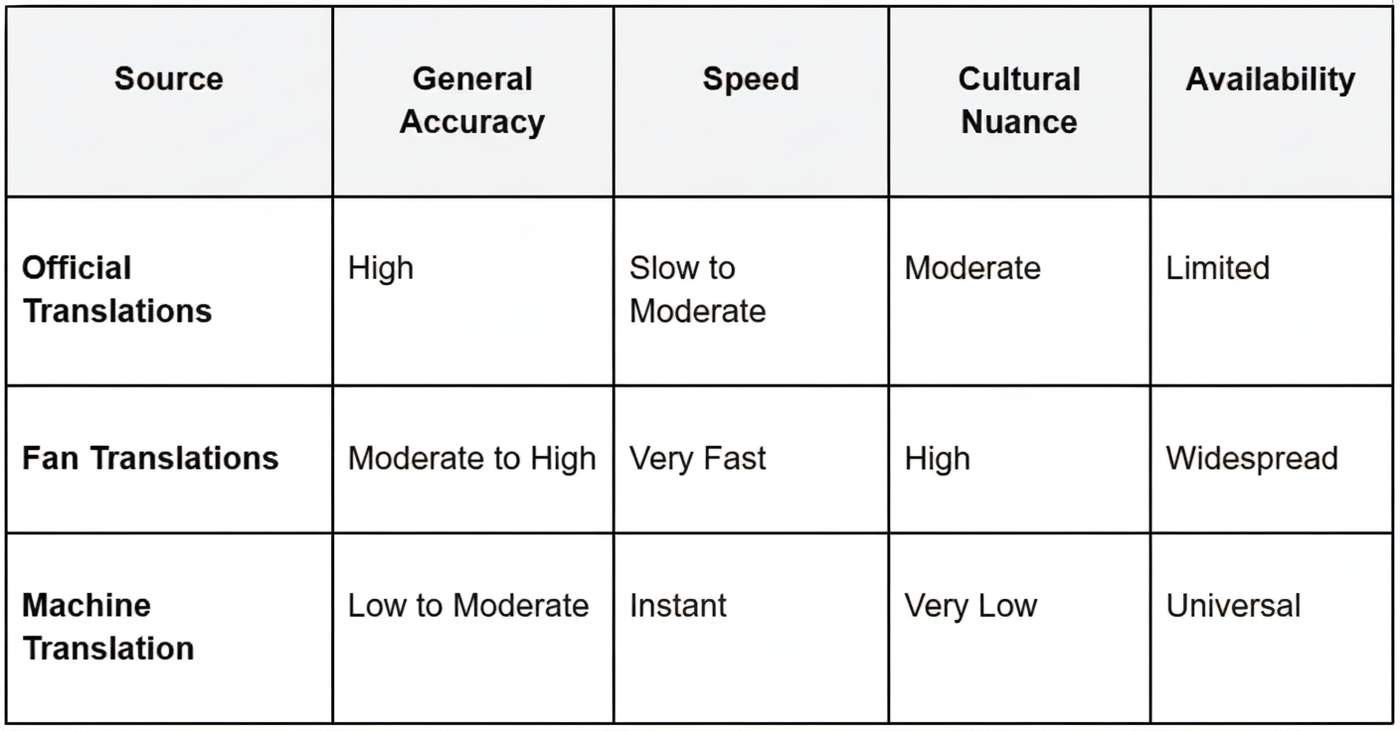
Fan translators are generally very committed and even obsessive about accuracy. Many are bilingual and have a sensitive feel for Korean culture, which is important for rehab work that machine tools can’t do well; they routinely insert “Translator’s Notes” to explain cultural references or slang, or wordplay that lacks an exact equivalent in English.
The reliability of fan translations can be hit or miss. Key issues include:
Uneven Proficiency: Translator skill can vary widely, with a corresponding variation in quality.
Potential for Bias: The translator’s own attitudes toward a group, or toward the situation the text describes, may inadvertently affect word choice.
No Official Editing: Unlike official translations, fan translations aren’t typically gone over by a team of editors, so they’re more prone to mistakes.
Time Pressure: Because people want instant translations, it can sometimes result in a slapdash job nuances are lost.
However, the fact is that a large proportion of fan translators are very dedicated to what they do. They know a bad translation can be detrimental to an artist, and they put their heart into it. These sites form part of an ecosystem of SoSoActive digital communities where active and genuine communication is valued over passive, sterile consumption.
The Challenges Behind the Screen
Becoming a K-pop fan translator is no easy feat. It is largely an unpaid job that brings with it intense pressure and a set of challenges.
Time Investment: Translators may work from a few minutes to more than 10 hours per day, depending on how much work they receive. One translator, @balloon_wanted, estimated to Forbes that they spend “about 5 hours back and forth to check news for updates.”
Burnout and Stress: K-pop news doesn’t sleep, and when working in the industry, you might experience high amounts of stress and burnout.
Copyright: Many accounts can be suspended due to the DMCA takedown and copied content, like the popular account @OH_mes.
Translation Accuracy of K-Pop Content
The Future of K-Pop Translations
Where are K-pop translations going in the future? Machine translation tools like Google Translate are getting better and better, but they still have to grapple with cultural and linguistic subtleties that are so crucial to grasping K-pop content. As much as real-time translation tools may enrich live events, they cannot replace the nuanced understanding of a human translator.
At the moment, a hybrid approach appears to be the most likely. AI can expedite the process, but fan translators are bound to remain important for conveying context and nuance that machines just can’t capture. “Their passion and commitment mean that international fans can remain in the loop.
The Verdict on Fan Translations
Fan-translated K-pop is an essential element of the worldwide web of K-pop. They offer millions of people a gateway into K-pop, and they cut through language barriers with speed and dedication. It's worth being conscious of a possibility for error or bias, even as the work they do is truly remarkable. These are not just fans translating words: This is the world bridging cultures and making sure that, no matter where people are from, they can join in on K-pop’s well-deserved joy. So the next time you see a fan-translated interview, remember how much work goes into it.

The best SEO plugins for WordPress in 2025 include Yoast SEO, Rank Math, All in One SEO, SEOPress, and The SEO Framework — all designed to help your site rank higher, improve readability, and boost organic traffic.
When you are running a WordPress site, Top SEO agencies recommend using the appropriate SEO plugins may make a massive difference. From WordPress free SEO plugins to premium tools, these plugins handle on-page optimization, XML sitemaps, schema markup, redirects, and more.
Whether you’re a beginner or a professional running large websites or an e-commerce store, this guide will help you choose the right SEO plugins for WordPress, saving time and ensuring better search engine visibility. These tools are also complementary to the services of SEO agency Dubai and other reputable SEO agencies or businesses.
1. Yoast SEO
Why You Need It
Yoast SEO is the most reliable WordPress optimization tool. It also streamlines the SEO process because it takes you through the steps of key word placement, description of the metas and analysis of readability. The plug-in will help to make sure your content is in line with the standards of SEO without compromising the natural flow. It also creates XML sitemaps automatically and manages canonical URLs, which diminishes the problem of duplicate content.
Best For
Bloggers, editors, and site owners in need of a systematic, easy-to-use SEO helper.
Key Features
On-page keyword and readability analysis.
Canonical tags and Automatic XML sitemaps.
More optimized CTR through social preview snippets
Quick Tip
Prior to publishing, check the green light indicators of Yoast on the readability, key-word density, and internal links recommendations to make sure the posts are completely optimized to perform well in searches.
2. Rank Math
Why You Need It?
Rank Math is one of the most comprehensive SEO plugins for WordPress. It is an amalgamation of power and simplicity as it offers such features as schema markup, redirection, and keyword tracking and analytics. This is made in a modular design and can be turned on only to the extent it is needed to make the site more performant. Rank Math is compatible with Google Search Console and provides real-time data on keyword positioning and the health of the SEO.
Best For
SEO professionals, bloggers, and SEO agencies managing multiple websites or clients.
Key Features
Schema and structured data support
Google Search Console integration
404 monitoring and redirection management
Quick Tip
Run Rank Math’s setup wizard to connect Google Analytics, activate only essential modules, and fine-tune automation settings for better control and faster optimization.
3. All in One SEO (AIOSEO)
Why You Need It?
Step-by-step optimization instructions will assist you in optimizing content, making it better on metadata, and increasing exposure on Google. The e-commerce websites developed using WordPress Website Development are also the best fit with this kind of plugin, having the specific WooCommerce SEO and local SEO features.
Best For
Small businesses, corporate websites, and e-commerce stores.
Key Features
TruSEO on-page optimization
WooCommerce search engine optimization and intelligent sitemaps.
Features of local SEO and site audit.
Quick Tip
Conduct a TruSEO audit on a monthly basis so that missing tags, broken links, and duplicated meta content can be spotted. Combine it with analytics tools to have a comprehensive overview of the SEO.
Why You Need It?
SEOPress is an easy to use but professional-level application. It has a clean and ad-free interface, with advanced features, such as schema support, redirection management, and white-label options in agencies. It is privacy conscious, lightweight, and works with more complicated optimization requirements without making your site sluggish.
Best For
Agencies and professionals working in digital Marketing in Dubai who handle multiple WordPress branding projects can benefit greatly from SEOPress.
Key Features
XML/HTML schema and sitemaps.
White-label agency functionality.
Redirection management and analytics.
Quick Tip
Its bulk meta editor of the SEOPress allows changing page titles and descriptions simultaneously, an effective tool when managing large content database websites.
5. The SEO Framework
Why You Need It?
The SEO Framework is a simple and yet smart system that will automate the SEO process such as the generation of meta tags, the addition of schema, and the management of canonical URLs. It is completely advertisement free and thus it is optimized without distraction. It is a fast, automated system that is designed to be used by users who want the efficiency and set-it-and-forget-it style without looking to compromise on results.
Best For
Others who are developers and users interested in fast, automated SEO management that does not involve unnecessary complexity.
Key Features
Automatic meta and schema generation
Canonical URL management
Optional extensions for breadcrumbs and AMP
Quick Tip
Activate only essential extensions to maintain fast site loading. Pair the SEO Framework with a caching plugin for better performance and Core Web Vitals improvement.
6. Schema Pro
Why You Need It?
Schema Pro is a pure structured data plugin that assists your content in being displayed as rich snippets by the search engines. It provides an opportunity to support articles, products, events, frequently asked questions, etc., to increase visibility and click-through rates. Good schema mark-ups can greatly enhance the search process, whereby Google can get to know your content.
Best in Publishers, product websites, and businesses that need to improve their SERP positions and rich results.
Key Features
Simple JSON-LD schema-based integration of numerous types of content.
Schema assignments are done automatically using content categories.
Both can work with such large-scale SEO tools as Yoast and Rank Math.
Hackerspace. Once you have an implementation, check your structured data with the Rich Results Test to help you to be sure that you are accurate and fully eligible.
7. Redirection
Why Do You Need It?
Redirection will assist in handling 301/302 redirects and tracking 404 errors, which is important in the event of site migrations, site reorganization, or URL changes. Redirects correctly place the link, save link equity, and enhance the user experience, which are critical in the performance of the SEO.
Best Used On
WordPress websites that either receive regular updates in their content or have a changing URL.
Key Features
Uncomplicated redirection of 301/302.
Record keeping and monitoring of 404 errors.
Conditional redirects with regard to login, refer, or cookies.
Quick Tip
404 logs should be checked on a regular basis, and redirects should be done as soon as possible in order to keep the SEO in a healthy state and not to lose traffic.
8. Broken Link Checker
The Reason You Need It?
Broken Link Checker crawls your site in search of broken in- coming and out-going links, missing pictures, and encroaches. Dead links are unpleasant to both the SEO and the user experience; thus, it is essential to identify and fix them as soon as possible to ensure the site retains its authority and ranking.
Best Use
Large blogs, affiliate sites, and websites that have lots of outbound links should be content-rich.
Key Features
Missing images can be automatically identified, and broken links are also detected.
Direct access to edit links in the dashboard of the plug-in.
Alerts on identified problems through email.
Speedy Hack
Scans should be conducted at times when there is low traffic, and broken links should be corrected as soon as possible in order to maintain the SEO and improve the usability.
9. WP Rocket
Its Reason
WP Rocket is an expensive caching and performance tool that enhances the speed of the site, which is a crucial ranking requirement in SEO. It deals with page caching, lazy loading, minification, and database optimization, which means that the websites can load faster and provide a better user experience.
Best
WordPress sites in general and especially those that are mostly content intensive and e-commerce websites, whose performance affects the search and conversion rates.
Key Features
Page caching and preloading
CSS, JavaScript, and HTML Minification.
On-demand images and video loading.
Protip
Use a lightweight theme and a CDN to use together with WP Rocket so that core web vitals are as high as possible and overall site performance is as high as possible.
10. Asset Cleanup
Why You Need It?
Asset Cleanup: This will help you disable unnecessary scripts and styles selectively on selected pages to limit bloat as well as improve the speed of your site. The optimization of assets has direct effects on the page load times and the Core Web Vitals, both of which are significant for SEO ranking.
Best Applicable
Developers and websites that build heavy page builders, such as Elementor or Divi.
Key Features
Offload invalid CSS and JavaScript on a per-page basis.
Minimization and merging of assets.
Graph monitors Graph monitors before and after the cleanup page load impact.
TIPs
You can always make tests on a staging site before going live to ensure you do not break the functionality of pages all in the name of performance optimization.
11. Squirrly SEO
Squirrly SEO is an AI-powered tool that assists with optimization of the content and keywords, and SEO strategy. It offers live advice as you write posts, which means that they are search engine optimized at the beginning.
When & Who to Use I
deal if you are a beginner, small business owner, or an individual blogger wishing to have a clever content SEO assistant.
Key Features
Keywords suggestions made by AI.
Writing with real-time SEO analysis.
SEO analysis and developments.
Quick Tip: Squirrly SEO and other optimization tools, such as Rank Math and Yoast, can be used to enhance content optimization and performance.
12. Slim SEO
Why You Need It
Slim SEO is a lightweight, no-complex settings SEO plug-in that provides the major essentials of SEO, including meta titles, descriptions, sitemaps, and schema. Its bare-boned design means that it does not drag your site down, yet it is good enough to handle the bare minimum.
Best For
Small business websites, brochure websites, amateurs that want a simple and low-maintenance SEO solution.
Key Features
Automatic generation of meta and title.
XML sitemap creation
Schema integration
Quick Tip
Slim SEO is to be used with small, non-dynamic sites, where advanced SEO tools are not required and where a simple optimization is still needed.
13. WP Meta SEO
The purpose You need it?
It is to simplify bulk SEO control, wherein you can edit alt text of photos, meta description, and titles, all through a centralized dashboard. It works best with the large websites or agencies dealing with several pages; they save time and maintain consistency when it comes to optimization.
Best use
Sites with numerous pages or with images that require bulk adjustments in SEO on the site.
Key Features
Massive editing of meta titles and descriptions.
Alt text optimization Image SEO.
Sitemap management
Quick Hack
WP Meta SEO can be used with other WordPress-based search engine optimization tools, such as Rank Math or SEOPress, to manage both technical and content SEO.
14. Screaming Frog SEO Spider
Why You Need It
Screaming Frog SEO Spider is a desktop site crawling application that checks websites for SEO problems, such as duplicate content, broken links, missing H1 tags, and redirect chains. It offers detailed reports to repair and detect technical SEO issues.
Best Use
Technical SEOs, developers, and agencies that do in-depth site audits.
Key Features
Spider web addresses SEO problems.
Export reports for analysis
Determine the presence of duplicated information and broken links.
Hint: To fix the reports, prioritize them and implement them in combination with WordPress plugins such as Redirection or Broken Link Checker.
15. WooCommerce SEO
Why You Need It?
WooCommerce search engine optimization tools or modules optimize online shops through the management of product metadata, sitemaps, and structured data. They enhance searches and Google Shopping and make the products easily visible so that they can be found by potential customers.
Best Use
E-commerce websites created based on WordPress Website Development require product optimisation.
Key Features
Price, availability, and review product schema.
Noindex cart and check out pages.
XML sitemaps for products
Little-known secret
WooCommerce SEO and Rank Math or AIOSEO are two complementary tools that can be used to develop a comprehensive strategy to optimize the performance of a store in terms of products and the entire site.
Ending Note
Choosing the right SEO plugins for WordPress is essential to boost visibility, improve site performance, and streamline content optimization. You can use Yoast SEO to get step-by-step on-page optimization, Rank Math to get more advanced, or The SEO Framework to get lean automation, and each tool will meet every necessary SEO requirement. US needs schema, redirection, and caching to make it complete optimized site. In the case of business and e-commerce projects, it can be recommended to assess the services of a professional SEO agency in Dubai or a competent SEO agency to make sure that your WordPress Website Development projects are optimized fully in 2025 and even later, which will provide a competitive advantage to your site in search engines.

From Software to Financial Hubs: The Quiet Revolution in B2B SaaS
Not long ago, business software lived in silos. Accounting ran in one system, payments through another, loans from banks, and insurance from brokers. The setup was slow, error-prone, and expensive — a constant juggling act for growing companies.
Then SaaS platforms noticed something important. They already sat at the crossroads of business activity — invoices, approvals, shipments, and orders flowed through them daily. Each of these touchpoints was a natural moment for a financial action.
With the rise of modern fintech software development services, it became possible to connect those dots. Instead of sending users to banks or third-party portals, forward-thinking platforms started embedding financial tools directly into their workflows. That quiet innovation — embedded finance — is now rewriting how B2B ecosystems operate.
Why “Non-Financial” Platforms Are Becoming Financial Players
Here’s what’s fascinating: the leaders of this shift aren’t traditional banks. They’re logistics systems, ERP suites, retail SaaS tools, and supplier networks, platforms that already run the real work of business.
These systems handle the very moments that trigger financial needs. When a retailer restocks, when a supplier ships, or when a contractor completes a milestone, a financial action usually follows. Embedding payments, credit, or insurance at those moments eliminates friction and gives businesses what they need most - speed and control.
For SaaS providers, it’s more than a convenience upgrade. Embedded finance unlocks new revenue streams, improves retention, and helps platforms evolve from single-use tools into all-in-one business hubs. A logistics app that lets drivers get paid instantly or insures freight in one tap quickly becomes indispensable.
The End of “Offline Finance”

Older generations of business owners remember the grind — paper checks, slow bank approvals, insurance forms that never seemed to end. Even early “digital” versions weren’t much better. You could email an invoice, sure, but reconciling it still required spreadsheets and manual transfers.
That era is fading fast. Modern API-driven systems can trigger payments automatically once a job is done or a delivery is confirmed. Embedded credit can appear in real time, based on actual performance data instead of last year’s books.
Finance, at last, is catching up with the pace of business.
Where Traditional Institutions Fall Behind
Legacy banks and insurers weren’t designed for real-time decision-making. Their infrastructure depends on batch processing, manual reviews, and delayed approvals. Meanwhile, digital-first businesses move minute to minute.
That gap has become a business opportunity. SaaS platforms now fill it by offering instant, contextual, and automated financial experiences — ones that feel native to the workflow.
Users trust these tools because they work where business happens. Instead of treating finance as an external burden, platforms integrate it into daily operations — and, in doing so, redefine customer expectations.
One-Click Payments and the Age of Invisible Transactions
Among all embedded tools, payments lead the charge. And for good reason: they’re the heartbeat of commerce.
When payments are built into workflows, businesses no longer wait days to get paid or shuffle through multiple dashboards. Funds move automatically, records sync instantly, and reconciliation becomes effortless.
For companies, this means better cash flow and fewer human errors. For SaaS providers, it’s recurring revenue through transaction fees and volume-based pricing. Marketplaces and supplier platforms, in particular, thrive when their payments are frictionless - trust and loyalty follow naturally.
It’s not just about moving money anymore. It’s about removing the barriers between doing the work and getting paid for it.
Insurance, Reinvented for a Digital World
Insurance rarely grabs headlines, but it’s quietly becoming one of the most valuable embedded services. Industries like logistics, retail, and construction face constant exposure to loss and risk. Yet traditional insurance involves forms, brokers, and delays — exactly the kind of friction modern platforms aim to eliminate.
Now, coverage is built right into the workflow:
When a freight order is booked, cargo insurance can be added instantly.
When an invoice goes out, protection can be offered automatically.
When a supplier restocks, embedded coverage for inventory can activate in seconds.
It’s faster, clearer, and often more affordable. And once users rely on a platform for both their operations and their risk management, switching away becomes unthinkable. For providers, embedded insurance adds stickiness and high-margin revenue streams — a rare combination.
AI, Orchestration, and What’s Next for Embedded Finance

The next evolution of embedded finance will be driven by intelligence and flexibility. Expect AI-powered underwriting to become standard, using live data from SaaS platforms to assess creditworthiness or insurance risk with uncanny precision.
At the same time, industries are moving toward vertical operating systems, specialized platforms built around the needs of a single sector like construction, logistics, or healthcare. Each vertical creates room for tailored financial products: instant driver payouts for logistics, subcontractor insurance for construction, or embedded equipment financing for manufacturing.
Behind the curtain, orchestration layers will keep everything connected. They’ll allow platforms to work with multiple Banking-as-a-Service (BaaS) or payments providers, minimizing regulatory risk and improving resilience.
Regulators are catching on, too. As embedded ecosystems expand, the focus will shift toward transparency, compliance, and data protection, all without slowing innovation.
The Human Shift: Finance Where You Work
Technology aside, the biggest change may be cultural. Businesses now expect financial services to live inside the software they already use. Asking, “Can I get paid now?” or “Can I insure this order here?” feels completely natural.
In a few short years, SaaS platforms without embedded finance will seem incomplete — the way offline tools felt when the cloud arrived. Finance is no longer an external process. It’s simply part of how modern work happens.
Expert Insight: 10Pearls and the New Age of Fintech
Building this new generation of financial ecosystems takes more than APIs - it takes deep domain experience. That’s where companies like 10Pearls come in.
As a global fintech software development company, 10Pearls has helped enterprises and startups design secure, scalable, and compliant fintech solutions - from digital lending systems to AI-driven payment orchestration. Their teams blend product strategy with technical depth, enabling clients to embed financial capabilities that scale sustainably and meet evolving regulations.
With experience across multiple industries, including finance, logistics, retail, and healthcare, 10Pearls has become a go-to fintech software development company for organizations seeking to transform their platforms into complete digital ecosystems.
Conclusion: Financially-Aware Software Will Lead the Next Decade
Embedded finance isn’t just a product trend; it’s the foundation of how modern B2B software creates value. By merging operational workflows with real-time payments, credit, and insurance, platforms are becoming trusted financial partners in their own right.
The most successful players won’t just bolt finance onto their tools; they’ll weave it into the experience so tightly that it feels invisible. And that’s exactly what will define the next generation of business software.

Modern shoppers may appear unpredictable, but their love for discounts follows clear psychological and economic patterns. Whether they are browsing for new sneakers or comparing prices on kitchen appliances, consumers repeatedly demonstrate that they are willing to spend time—and sometimes change their purchase decisions entirely—for the right deal. This behavior has fueled the rise of global coupon and promotion platforms, reshaped ecommerce strategies, and created new playbooks for entrepreneurs who hope to build digital businesses that resonate with today’s value-conscious shopper.
Understanding why customers actively look for deals is not just useful for marketers. It’s essential for founders building ecommerce brands, SaaS companies, retail platforms, subscription services, or any business that must win attention and retain users in a crowded digital landscape. And platforms like HotDeals, as well as the broader ecosystem represented by HotDeals.com, offer a strong lens through which to observe these behaviors.
1. Deal-Seeking Is Rooted in Behavioral Economics, Not Cheapness
For decades, retailers assumed that shoppers hunted for discounts simply to save money. But consumer psychology shows a deeper dynamic: deals trigger reward mechanisms similar to achieving a small win.
Behavioral economists describe this as the transaction utility effect: the thrill of getting a good deal can sometimes outweigh the importance of the product itself. In other words, shoppers don’t just buy the object—they buy the feeling of having “beaten the system.”
Founders should pay attention to this because it explains why:
People will scroll through coupons even when they already intend to buy,
Users trust platforms that help them avoid bad deals,
Shoppers stay loyal not just to brands, but to trusted discount sources like HotDeals.
Understanding this emotional payoff helps businesses design more engaging user journeys.
2. Discounts Increase Perceived Value, Not Just Lower Prices
A product with a 20% markdown is not only cheaper—it is perceived as more valuable relative to similar items. For a startup founder, this has two major implications:
Discounts can accelerate conversion
Discount structures can influence which product tiers customers select
Platforms such as HotDeals study which categories generate the strongest response—electronics, outdoor gear, beauty, or subscription services—and founders can learn from patterns that appear on HotDeals.com. Categories that attract consistent coupon engagement often signal high elasticity: consumers in those spaces are particularly responsive to perceived value improvements.
3. Consumers Seek “Verification” as Much as Savings
The modern internet is full of expired codes, misleading price claims, and fake “limited deals.” This environment has created a new psychological need: trust.
Consumers don’t just want discounts—they want confirmation that a discount is real.
This is where platforms like HotDeals differentiate themselves. Their value comes not only from listing promotions, but from:
Validating codes,
Tracking price histories,
Removing expired offers,
Curating categories so users don’t waste time searching.
For founders, the lesson is clear:
Reduce friction. Increase certainty. Build trust.
Discounts alone do not drive loyalty—reliable systems do.
4. Deal Platforms Reveal Which Incentives Actually Work
Studying what consumers click on, redeem, or revisit can teach founders about broader market behavior. When aggregated, data from platforms such as HotDeals.com shows unmistakable patterns:
Short-term deals trigger fast decision-making
Limited-inventory promotions create urgency
Loyalty-based codes strengthen repeat behavior
Seasonal or event-based discounts shift category demand
These insights help entrepreneurs plan smarter promotions. For example:
A startup launching a new subscription product can pair an introductory discount with a time-based reminder structure—mirroring the psychological triggers visible on major coupon platforms.
5. The Bigger Picture: Discounts as Part of a Larger Consumer Identity Shift
A generation ago, discounts were associated with frugality. Today, deal-seeking is almost a lifestyle. Gen Z and younger millennials openly identify as “smart shoppers.” They share promo code finds on social platforms, compare flash-sale timings, and use tools like HotDeals to validate savings before checking out.
This cultural shift matters for founders because:
Price transparency is expected
The stigma around budgeting is gone
Consumers prefer brands that respect financial realities
Shoppers reward companies that help them optimize spending
Deal-seeking is no longer about financial distress—it reflects consumer intelligence, independence, and digital empowerment.
Final Thoughts: What Founders Can Learn from HotDeals and Deal-Driven Behavior
Discount platforms are no longer small add-ons to the retail ecosystem. They represent a window into the real motivations driving modern consumer decision-making.
Founders who study these patterns can build stronger products by aligning with behaviors consumers already display:
Make savings transparent
Reward loyalty
Reduce friction at checkout
Communicate value clearly
Innovate around trust and verification
Platforms like HotDeals and the broader ecosystem supported by HotDeals.com showcase how powerful these principles can be when executed well. For entrepreneurs, understanding the hidden economics behind discount culture may be one of the most practical competitive advantages in 2025 and beyond.
Comment